Cyber Defenders - GoldenSpray Writeup
Category: Threat Hunting
Checkout the lab here: https://cyberdefenders.org/blueteam-ctf-challenges/goldenspray/
Description
As a cybersecurity analyst at SecureTech Industries, you’ve been alerted to unusual login attempts and unauthorized access within the company’s network. Initial indicators suggest a potential brute-force attack on user accounts. Your mission is to analyze the provided log data to trace the attack’s progression, determine the scope of the breach, and the attacker’s TTPs.
The lab provides a Splunk instance containing logs for the entire SECURETECH domain. I opened the Search & Reporting app, checked that the time selector covered September 2024, and then counted events by host to see what I had to work with.
1
2
index=goldenspray
| stats count by host source
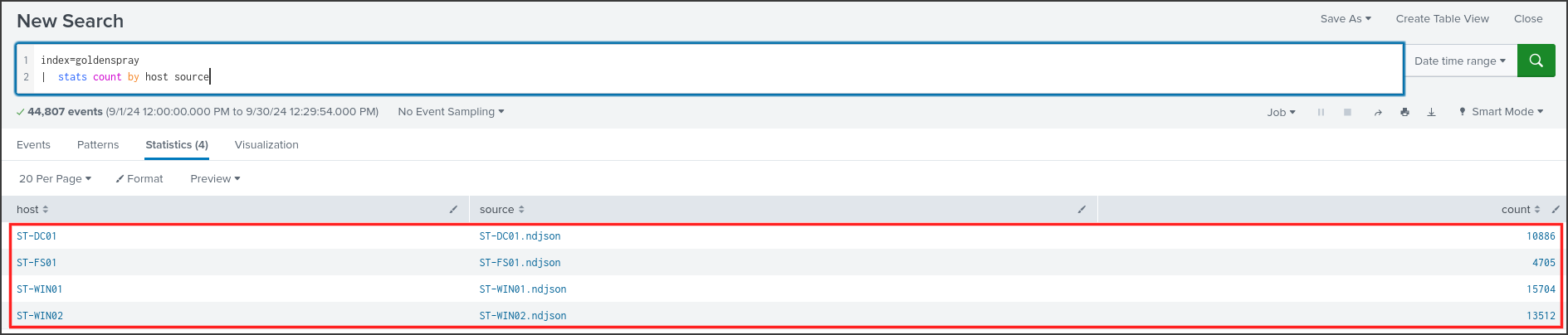
There are 44,807 events originating from four machines: ST-DC01 is the domain controller, which manages all accounts and passwords for the domain. ST-FS01 is the file server, while ST-WIN01 and ST-WIN02 are two employee workstations. Each machine’s logs are exported into an ndjson file, where each line is a JSON event sent by Winlogbeat, so the fields are in the format winlog.event_id and winlog.event_data.Field_Name.
The logs here consist of two main sources. The first is the Windows Security log, where Windows records all logins. The second is Sysmon, a free Microsoft tool that logs detailed process, file, network, and registry activity. The Event IDs I will use most in this writeup are:
- 4625 and 4624: Failed and successful logins, belonging to the Security log.
- 4768 and 4769: The domain controller issuing Kerberos tickets, also in the Security log.
- Sysmon 1, 3, 11: Process creation, network connection, and file creation.
- Sysmon 10: Process accessed (one process opening the memory of another).
All times in this writeup are in UTC on 2024-09-09.
Q1: What is the attacker’s IP address?
The description mentions a brute-force attack, so the natural starting point is failed logins, Event ID 4625. I grouped them by source IP and the targeted host. The dc function in the stats command counts distinct values, which in this case is the number of different usernames each IP attempted.
1
2
index=goldenspray winlog.event_id=4625
| stats count dc(winlog.event_data.TargetUserName) as users by winlog.event_data.IpAddress host
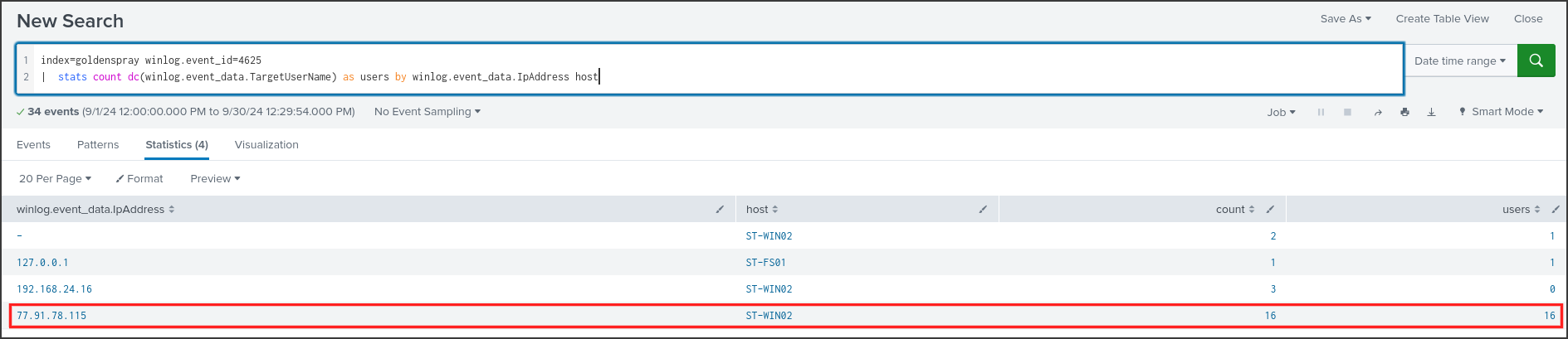
The first three rows are internal or localhost IPs with one or two failures, resembling normal mistyped passwords. The last row is completely different: 77.91.78.115, a public IP from the Internet, has 16 failures against ST-WIN02 and tried exactly 16 different usernames. Each account was only tried once. This is indicative of password spraying: the attacker tries a few common passwords across many accounts, rather than trying many passwords on a single account, to avoid hitting account lockout thresholds.
To see this more clearly, I listed each failure from this IP chronologically, along with the error codes.
1
2
3
index=goldenspray winlog.event_id=4625 winlog.event_data.IpAddress="77.91.78.115"
| table @timestamp winlog.event_data.TargetUserName winlog.event_data.LogonType winlog.event_data.Status winlog.event_data.SubStatus
| sort @timestamp
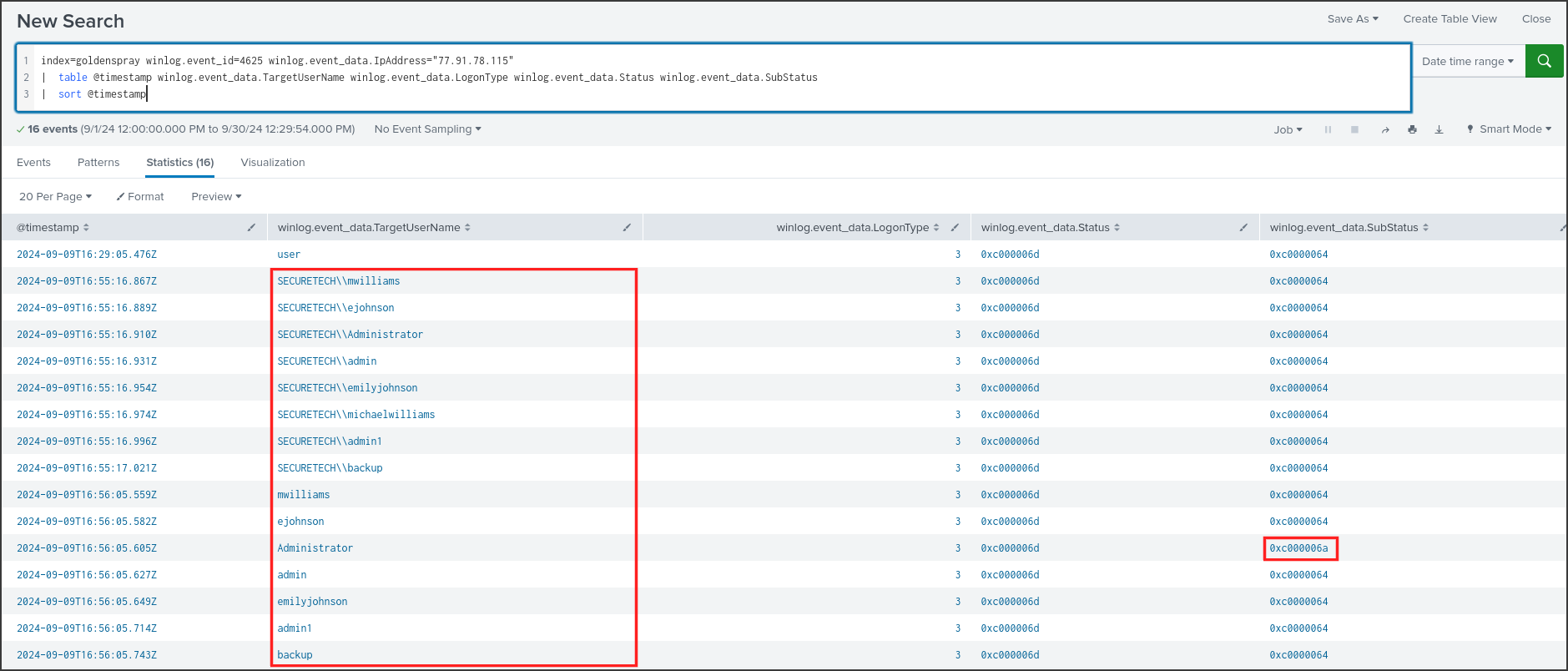
At 16:29:05, there was an attempt with the account user belonging to the domain FAKE, meaning an account that definitely does not exist. Scanning tools often do this to see if the machine has remote login services exposed and how it responds. Almost half an hour later, the real spraying began, split into two phases:
- 16:55:16 to 16:55:17: 8 accounts within one second, formatted as SECURETECH\mwilliams with two backslashes. The tool stuffed the domain name into the username field, so Windows looked for a user with that exact name and found nothing.
- 16:56:05: The same list but without the domain part.
LogonType 3 means network login, for example via SMB or the pre-authentication step before opening RDP. The SubStatus column reveals the true reason: 0xC0000064 means the account does not exist, while 0xC000006A means the account is valid but the password was incorrect. Only Administrator in the second phase returned 0xC000006A. The list of attempted names included mwilliams, ejohnson, emilyjohnson, michaelwilliams, admin, admin1, and backup, which looks like a combination of employee names and default accounts. Note: in the second phase, there was no error row for michaelwilliams; this detail will be relevant in Q3.
Answer: 77.91.78.115
Q2: What country is the attack originating from?
Windows logs do not contain geolocation information, so this question requires external lookup. I opened a new Firefox tab and checked the IP on ipinfo.io, a service that provides geographic location and ISP details for an IP address.
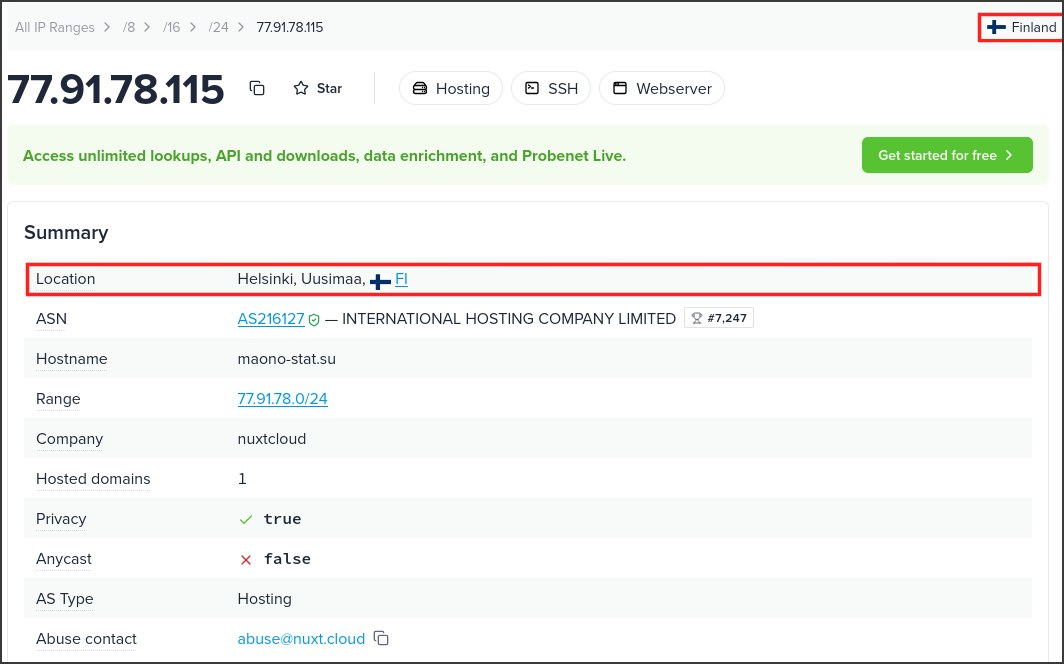
The IP is located in Helsinki, Uusimaa, Finland, belongs to AS216127 INTERNATIONAL HOSTING COMPANY LIMITED, and is labeled as Hosting. This is the IP of a hosting provider, not a residential network, meaning the actual attacker could be anywhere and merely rented a VPS in Finland for the attack. The question simply asks for the origin of the traffic, and I double-checked with ip-api.com, which yielded the same result.
Answer: Finland
Q3: What’s the compromised account username used for initial access?
Spraying is only meaningful if there is a successful attempt. I searched for all successful logins, Event ID 4624, containing the attacker’s IP.
1
2
3
index=goldenspray "77.91.78.115" winlog.event_id=4624
| table @timestamp host winlog.event_data.TargetDomainName winlog.event_data.TargetUserName winlog.event_data.LogonType winlog.event_data.IpAddress winlog.event_data.TargetLogonId
| sort @timestamp
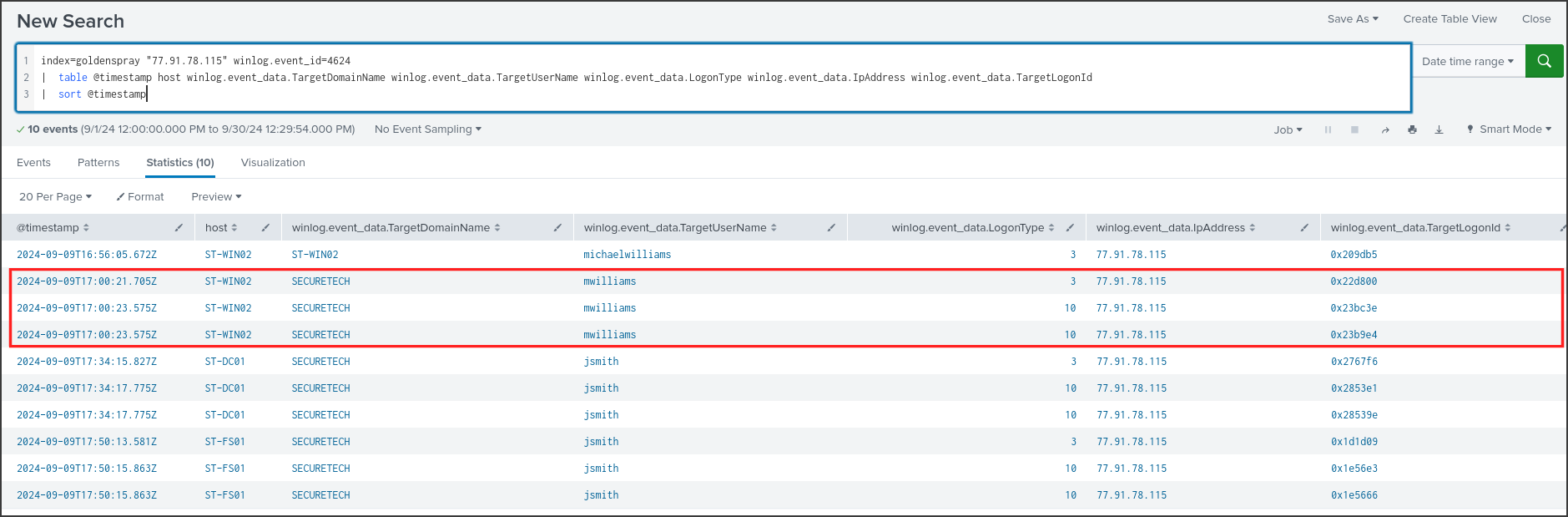
There are 10 successful logins, and they tell the story of the entire attack. The first row at 16:56:05 is michaelwilliams with the domain ST-WIN02, meaning it’s a local account that only exists on that machine. This explains why michaelwilliams did not have an error row in the second spray phase: the guessed password was correct.
Four minutes later, at 17:00:21, the attacker logged in using the domain account SECURETECH\mwilliams on the very first try, with no preceding failures. It is highly likely this user shared the same password for both their local and domain accounts, and the attacker simply reused the password they just guessed. Two seconds later, there are two LogonType 10 entries, which means RemoteInteractive, indicating a full RDP session with GUI access. All subsequent activity on ST-WIN02 ran under this domain account, making it the account used for initial access. The jsmith rows further down represent the second compromised account, which I will analyze in Q7.
Answer: SECURETECH\mwilliams
Q4: What’s the name of the malicious file utilized by the attacker for persistence on ST-WIN02?
Knowing that the attacker accessed ST-WIN02 via RDP as mwilliams, I listed every process this account spawned on the machine, using Sysmon Event ID 1. The legitimate user also had a morning session, so I added a where command to only keep events after 16:59. In the where clause, field names with special characters like @ must be enclosed in single quotes. The ISO-formatted timestamp has a fixed length, so string comparison correctly preserves chronological order.
1
2
3
4
index=goldenspray host=ST-WIN02 winlog.event_id=1 winlog.event_data.User="*mwilliams*"
| where '@timestamp'>"2024-09-09T16:59"
| table @timestamp winlog.event_data.ProcessId winlog.event_data.Image winlog.event_data.CommandLine
| sort @timestamp
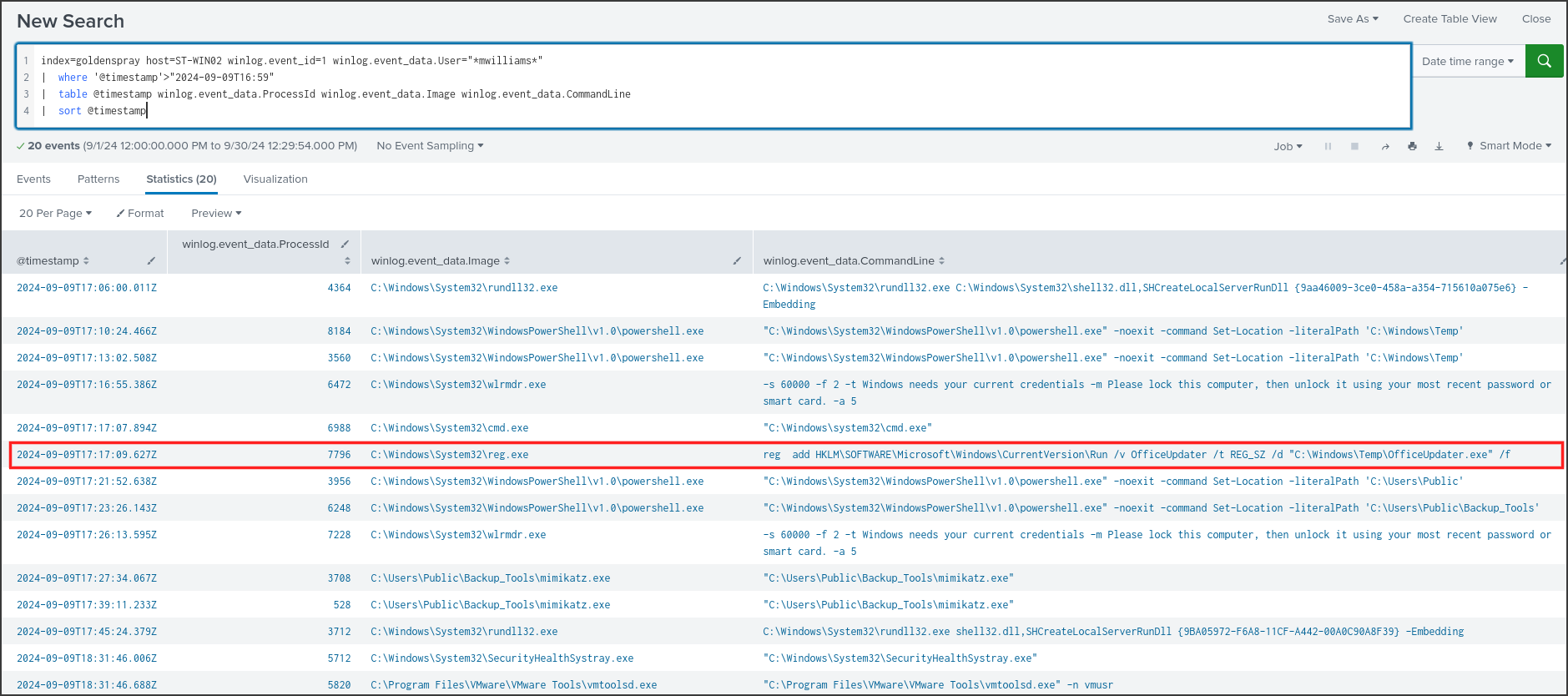
This table is essentially a log of the attacker’s actions. The powershell.exe entries with the parameters -noexit -command Set-Location -literalPath are artifacts of holding Shift, right-clicking a folder in Explorer, and selecting “Open PowerShell window here.” This indicates manual interaction over RDP. At 17:17:09, the following command was executed:
1
reg add HKLM\SOFTWARE\Microsoft\Windows\CurrentVersion\Run /v OfficeUpdater /t REG_SZ /d "C:\Windows\Temp\OfficeUpdater.exe" /f
The Run registry key contains a list of programs Windows automatically executes when a user logs in. Writing a value here is the most common persistence mechanism, which MITRE ATT&CK refers to as T1547.001 Registry Run Keys. Because it is under HKLM, the program will run for any user who logs into the machine. The name OfficeUpdater was chosen to blend in as an Office update process, but Office never runs from C:\Windows\Temp.
I wanted to know where this file came from, so I searched for file creation events, Sysmon Event ID 11, containing the names OfficeUpdater or Backup_Tools.
1
2
3
index=goldenspray host=ST-WIN02 winlog.event_id=11 (winlog.event_data.TargetFilename="*Backup_Tools*" OR winlog.event_data.TargetFilename="*OfficeUpdater*")
| table @timestamp winlog.event_data.ProcessId winlog.event_data.Image winlog.event_data.TargetFilename
| sort @timestamp
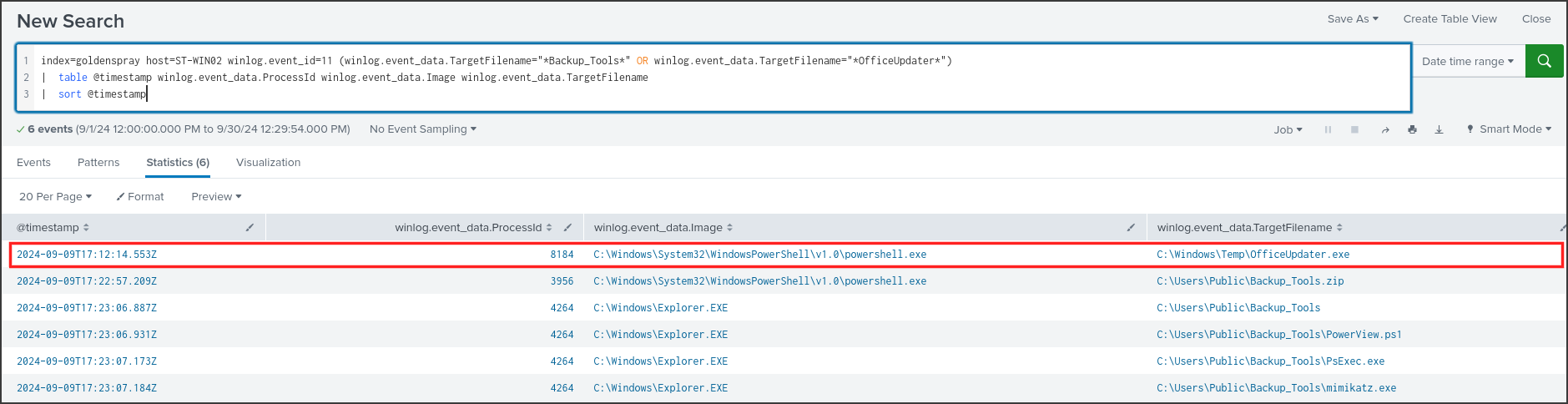
The file C:\Windows\Temp\OfficeUpdater.exe was written at 17:12:14 by powershell.exe PID 8184, which is the same PowerShell window opened in C:\Windows\Temp at 17:10:24. When PowerShell writes an exe file, it typically means it is downloading the file. I checked the network connections, Sysmon Event ID 3, for PID 8184 and another PowerShell process that we will see in Q5.
1
2
3
index=goldenspray host=ST-WIN02 (winlog.event_id=3 OR winlog.event_id=22) (winlog.event_data.ProcessId=8184 OR winlog.event_data.ProcessId=3956)
| table @timestamp winlog.event_id winlog.event_data.ProcessId winlog.event_data.QueryName winlog.event_data.DestinationIp winlog.event_data.DestinationPort
| sort @timestamp

Both PowerShell processes connected to 77.91.78.115 port 80, the exact same IP that conducted the spray in Q1. The attacker set up a standard HTTP web server on that VPS and pulled their tools down, a technique known as T1105 Ingress Tool Transfer. There were no Event ID 22 logs, as the machine connected directly via IP and did not need a DNS query.
Answer: OfficeUpdater.exe
Q5: What is the complete path used by the attacker to store their tools?
The Event ID 11 results from the previous question already contained the necessary information; I just needed to read the remaining five lines.
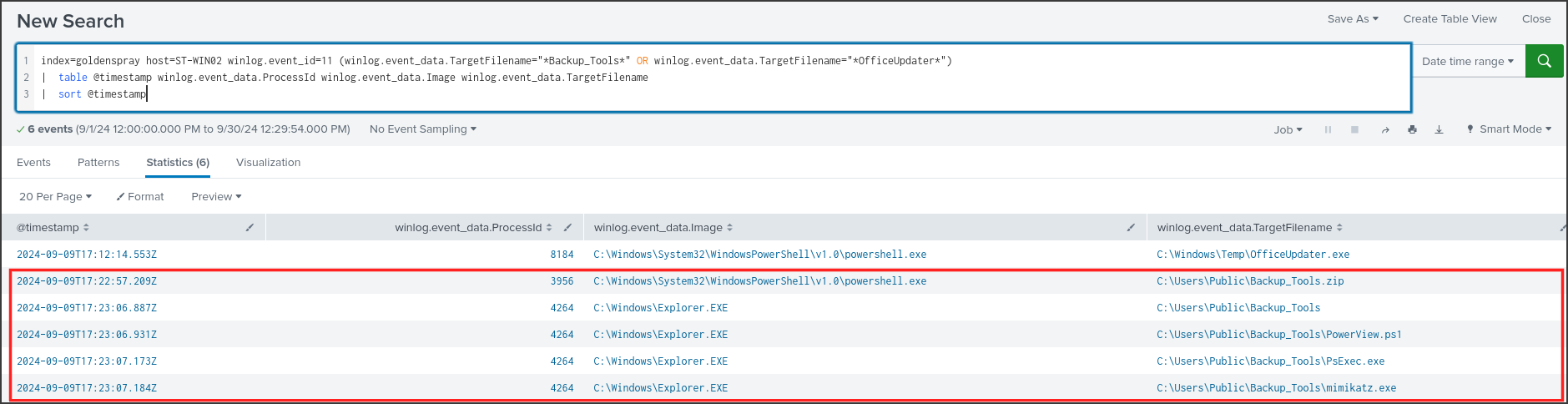
At 17:22:57, powershell.exe PID 3956 wrote out C:\Users\Public\Backup_Tools.zip, and a second later, it connected to 77.91.78.115:80, as seen in the previous image. Starting at 17:23:06, Explorer.EXE created the directory C:\Users\Public\Backup_Tools and three files inside it:
- PowerView.ps1: A PowerShell script used to enumerate Active Directory, such as listing users, groups, computers, and permissions.
- PsExec.exe: A Sysinternals tool for executing commands on remote systems.
- mimikatz.exe: A tool for extracting passwords and hashes from Windows memory.
The process that created the files was Explorer, not PowerShell, meaning the attacker extracted them by right-clicking and selecting “Extract All” in the GUI. C:\Users\Public is a directory that is writable by all users and rarely monitored, making it an ideal staging ground for tools. The name Backup_Tools was yet another disguise.
*Answer: C:\Users\Public\Backup_Tools*
Q6: What’s the process ID of the tool responsible for dumping credentials on ST-WIN02?
Going back to mwilliams’ process list in Q4, the lower section shows mimikatz being executed twice.
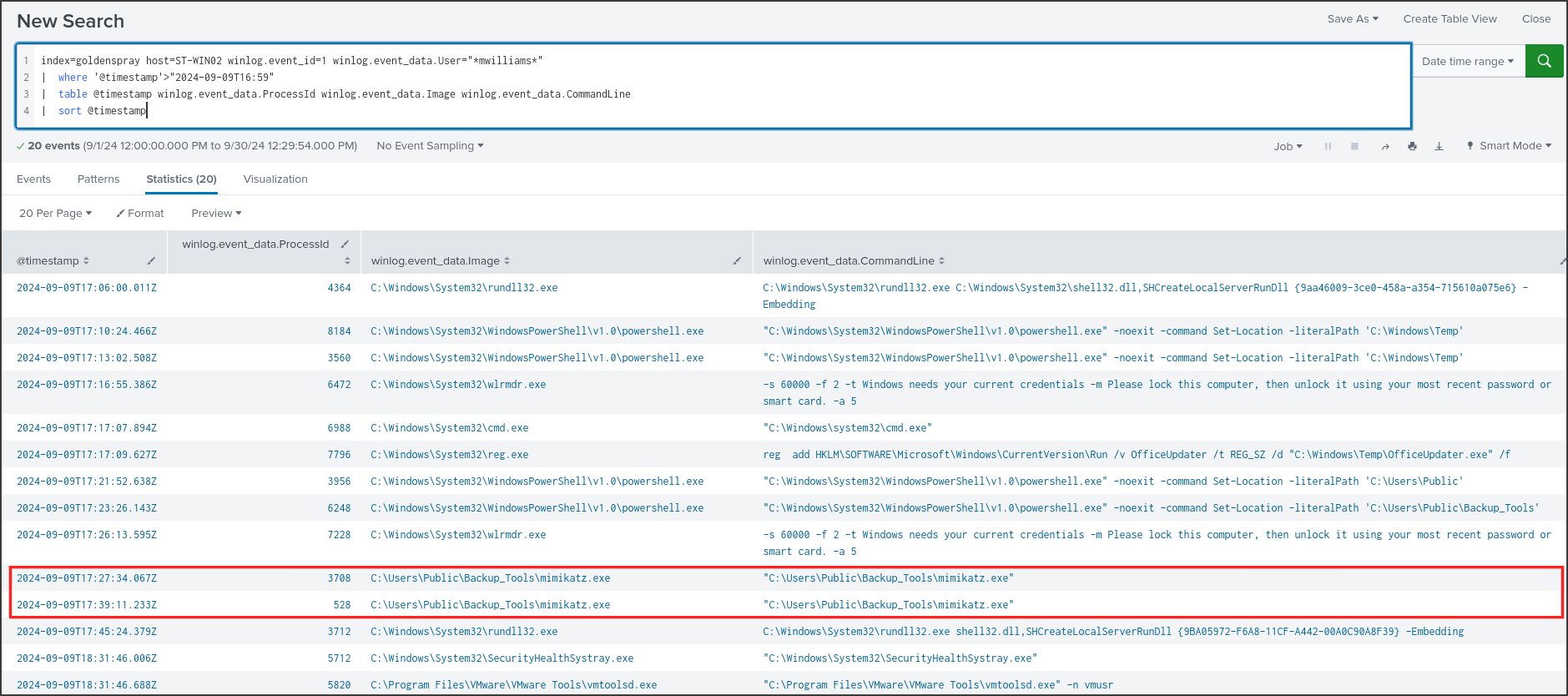
mimikatz.exe was run at 17:27:34 under PID 3708 and again at 17:39:11 under PID 528. Since there are two PIDs, I needed to determine which one actually extracted the credentials.
Windows keeps the logon credentials of active sessions in the memory of the lsass.exe process, which stands for Local Security Authority Subsystem Service. The mimikatz command sekurlsa::logonpasswords opens this process and reads its memory. Sysmon logs cross-process access via Event ID 10, so I searched for Event ID 10 where the target was lsass.exe and the source was mimikatz.
1
2
3
index=goldenspray host=ST-WIN02 winlog.event_id=10 winlog.event_data.TargetImage="*lsass.exe" winlog.event_data.SourceImage="*mimikatz*"
| table @timestamp winlog.event_data.SourceProcessId winlog.event_data.SourceImage winlog.event_data.TargetImage winlog.event_data.GrantedAccess
| sort @timestamp

There is only one event: at 17:27:59, PID 3708 opened C:\Windows\system32\lsass.exe with a GrantedAccess of 0x1010. This number is the sum of two permissions: 0x1000 is PROCESS_QUERY_LIMITED_INFORMATION, allowing queries for basic process information, and 0x10 is PROCESS_VM_READ, allowing memory reads. This is exactly the permission set mimikatz requests when dumping lsass, and it is a known signature that many detection rules use to flag mimikatz. The PID 528 execution did not access lsass, so the attacker likely used it for another command or just to review previous output. MITRE classifies this technique as T1003.001 LSASS Memory.
Answer: 3708
Q7: What’s the second account username the attacker compromised and used for lateral movement?
The answer already appeared in the successful logins table in Q3, in the bottom half.
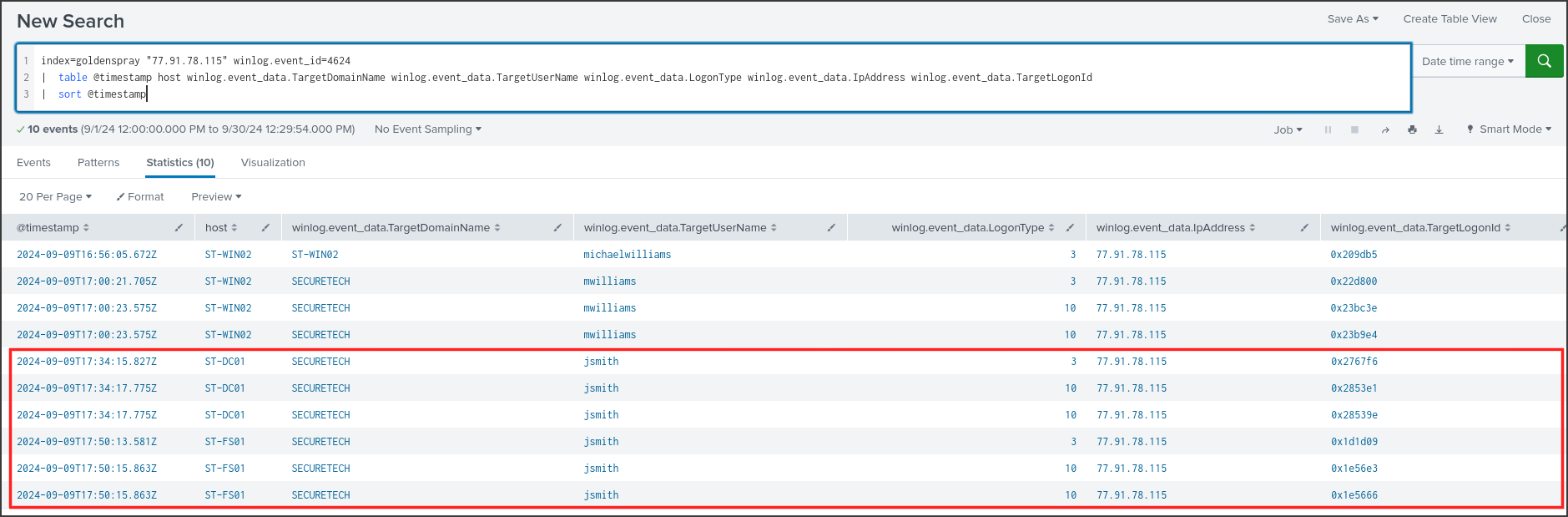
Originating from the same IP, 77.91.78.115, the account SECURETECH\jsmith logged into ST-DC01 at 17:34:15, followed by an RDP session at 17:34:17. At 17:50:13, it subsequently logged into ST-FS01 in the exact same manner. The attacker did not need to spray to obtain this password, so the next logical question is where they got it. Mimikatz was executed at 17:27, exactly seven minutes before the DC login, so I checked if jsmith had previously logged into ST-WIN02.
1
2
index=goldenspray host=ST-WIN02 winlog.event_id=4624 winlog.event_data.TargetUserName=jsmith
| stats count min(@timestamp) as first max(@timestamp) as last by winlog.event_data.LogonType winlog.event_data.IpAddress

jsmith had 6 RDP sessions on ST-WIN02 from the internal IP 192.168.24.16, between 15:16 and 16:47, right before the attacker gained access. When a user authenticates interactively via RDP, Windows stores their credentials in lsass, which can persist even after the session ends. Therefore, when mimikatz PID 3708 dumped lsass at 17:27:59, jsmith’s hash or plaintext password was already sitting there. An account permitted to RDP directly into the domain controller is clearly highly privileged, and the attacker immediately used it for lateral movement, T1021.001 Remote Desktop Protocol.
Answer: SECURETECH\jsmith
Q8: Can you provide the scheduled task created by the attacker for persistence on the domain controller?
Task Scheduler logs Event ID 106 whenever a new task is registered, the Security log records Event ID 4698 if auditing is enabled, and schtasks.exe commands are caught by Sysmon Event ID 1. I grouped all three together on ST-DC01 after the initial compromise timestamp.
1
2
3
4
index=goldenspray host=ST-DC01 (winlog.event_id=4698 OR winlog.event_id=106 OR (winlog.event_id=1 winlog.event_data.Image="*schtasks.exe"))
| where '@timestamp'>"2024-09-09T16:59"
| table @timestamp winlog.event_id winlog.event_data.TaskName winlog.event_data.SubjectUserName winlog.event_data.UserContext winlog.event_data.CommandLine
| sort @timestamp
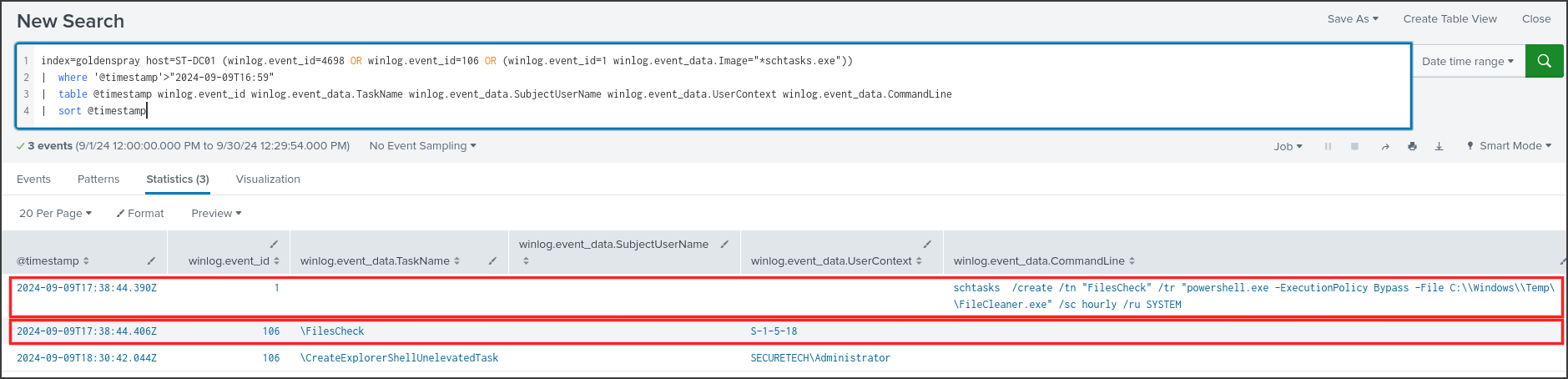
At 17:38:44, from jsmith’s RDP session, the attacker ran:
1
schtasks /create /tn "FilesCheck" /tr "powershell.exe -ExecutionPolicy Bypass -File C:\\Windows\\Temp\\FileCleaner.exe" /sc hourly /ru SYSTEM
This command created a task named FilesCheck to run hourly under the SYSTEM context, the highest privilege level on Windows. The subsequent Event 106 confirmed that the task \FilesCheck was registered, with the UserContext S-1-5-18, which is the SID for the SYSTEM account. The final entry, CreateExplorerShellUnelevatedTask, is a benign task automatically generated by Windows when an Administrator logs in. This technique is classified as T1053.005 Scheduled Task.
What is FileCleaner.exe? Sysmon Event ID 29 records whenever an executable file is dropped onto disk, along with its hash. I extracted the SHA256 hash from the Hashes field using the rex command, which uses regular expressions to extract substrings into new fields.
1
2
3
4
index=goldenspray ((winlog.event_id=29 winlog.event_data.Image="*powershell.exe") OR (winlog.event_id=1 winlog.event_data.Image="*mimikatz*"))
| rex field=winlog.event_data.Hashes "SHA256=(?<sha256>[A-F0-9]{64})"
| table @timestamp host winlog.event_id winlog.event_data.TargetFilename winlog.event_data.Image sha256
| sort @timestamp
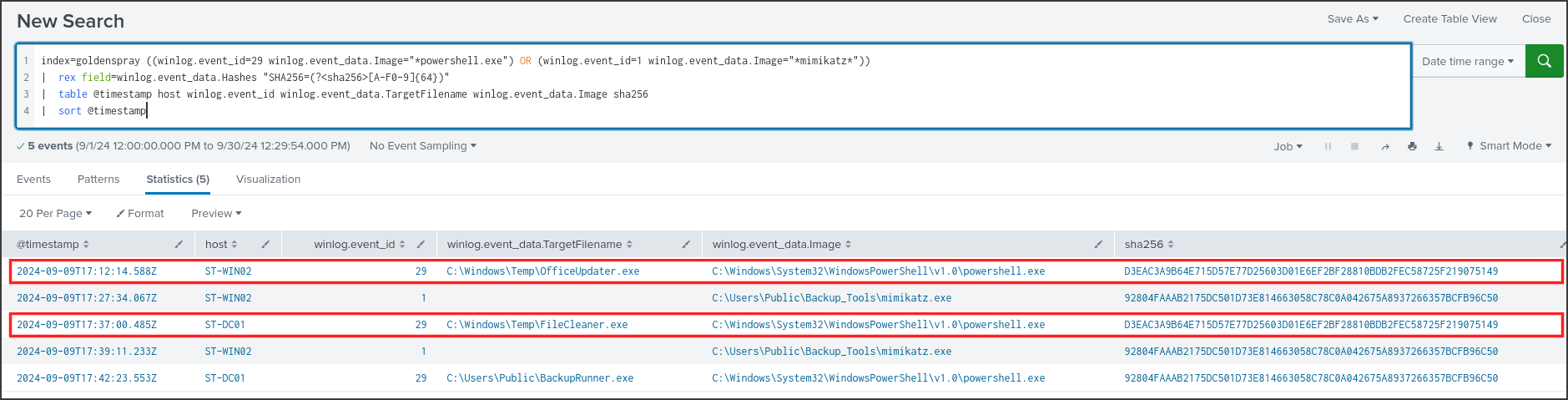
C:\Windows\Temp\FileCleaner.exe on the DC was written by PowerShell at 17:37:00 and had the SHA256 hash D3EAC3A9B64E715D57E77D25603D01E6EF2BF28810BDB2FEC58725F219075149, perfectly matching OfficeUpdater.exe on ST-WIN02. It was the same payload, just renamed to blend in with each machine. Note: the -File parameter in PowerShell is intended for .ps1 scripts, so this scheduled task would likely fail when attempting to execute an exe file. Nevertheless, the intent to establish persistence on the DC is clear.
In that same table, there was an even more concerning finding.
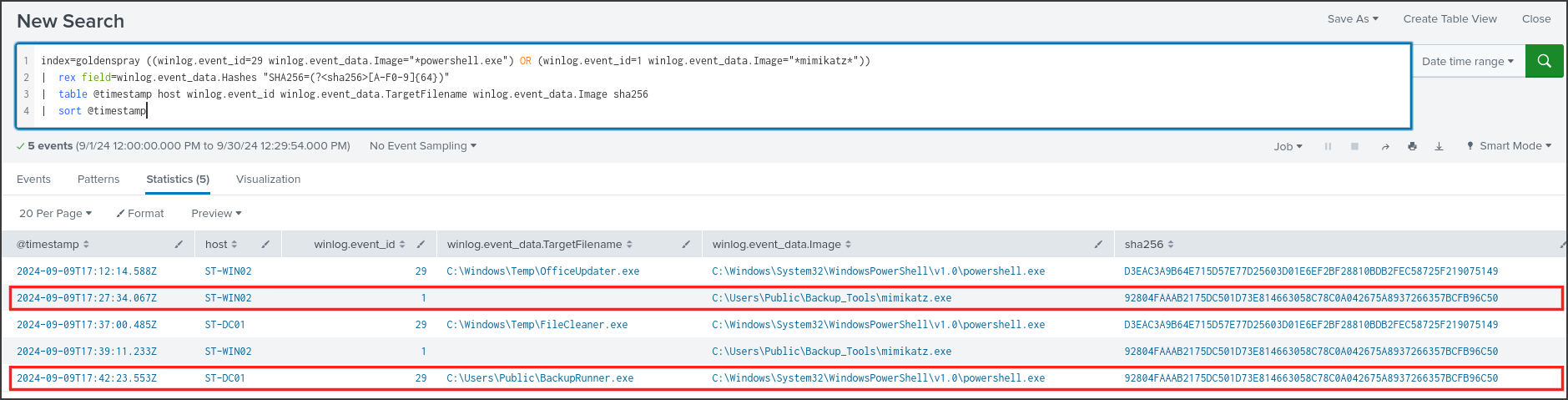
At 17:42:23, PowerShell on the DC dropped C:\Users\Public\BackupRunner.exe with the SHA256 hash 92804FAAAB2175DC501D73E814663058C78C0A042675A8937266357BCFB96C50, which matched the hash of mimikatz.exe on ST-WIN02. The attacker had brought mimikatz over to the domain controller and renamed it. I then checked everything related to this file on the DC.
1
2
3
index=goldenspray host=ST-DC01 "BackupRunner"
| table @timestamp winlog.event_id winlog.event_data.ProcessId winlog.event_data.SourceImage winlog.event_data.TargetImage winlog.event_data.GrantedAccess winlog.event_data.CommandLine winlog.event_data.User
| sort @timestamp
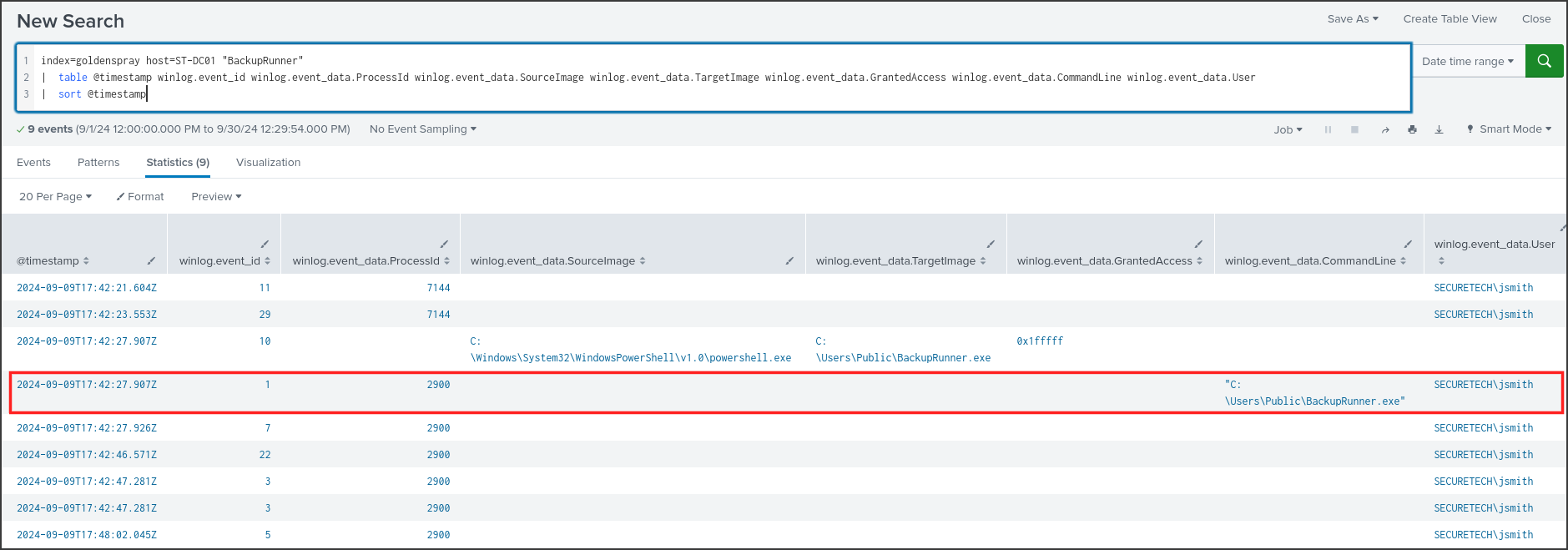
BackupRunner.exe executed at 17:42:27 as PID 2900 under the SECURETECH\jsmith account, and the process terminated at 17:48:02 according to Event ID 5. During this timeframe, it made one DNS query and two network connections, which I investigated further.
1
2
3
4
index=goldenspray host=ST-DC01 ((winlog.event_data.ProcessId=2900 (winlog.event_id=3 OR winlog.event_id=22)) OR (winlog.event_id=10 winlog.event_data.SourceProcessId=2900) OR winlog.event_id=4662)
| where '@timestamp'>"2024-09-09T17:40" AND '@timestamp'<"2024-09-09T17:50"
| table @timestamp winlog.event_id winlog.event_data.QueryName winlog.event_data.DestinationIp winlog.event_data.DestinationPort winlog.event_data.TargetImage winlog.event_data.GrantedAccess winlog.event_data.Properties
| sort @timestamp
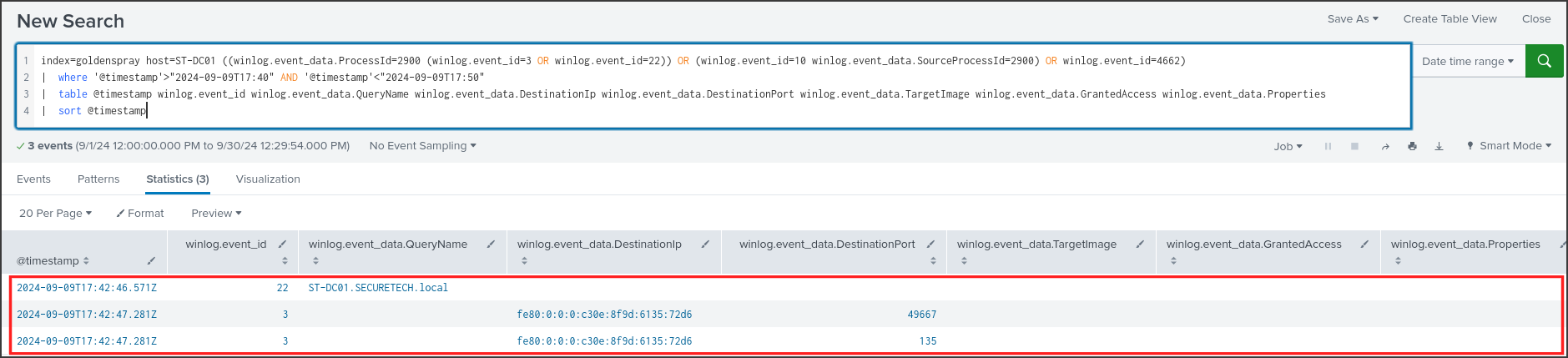
Mimikatz queried DNS for ST-DC01.SECURETECH.local, then connected to the machine itself on port 135 and port 49667. Port 135 is the RPC Endpoint Mapper, which clients use to query which port an RPC service is listening on, while 49667 is the dynamic port returned. Domain controllers use an RPC protocol called DRSUAPI to synchronize data with each other, including password hashes. The mimikatz command lsadump::dcsync impersonates another domain controller and leverages this very protocol to request the hash of any account, typically krbtgt. Armed with the krbtgt hash, the attacker can self-sign Kerberos tickets for any user, known as a Golden Ticket, which is where the “Golden” in the lab’s name originates.
I must clarify: Event ID 4662, which logs Active Directory replication actions, was missing from the logs because Directory Service Access auditing was not enabled. Additionally, mimikatz did not have any command-line parameters because the attacker typed commands directly into its interactive prompt. Therefore, DCSync is a highly probable conclusion based on network behavior rather than direct evidence. There were no Event ID 10 logs from PID 2900 targeting lsass, meaning it did not dump the DC’s lsass but instead used the replication vector.
Answer: FilesCheck
Q9: What type of encryption is used for Kerberos tickets in the environment?
Kerberos is the default authentication protocol in Active Directory. Users request a TGT from the domain controller upon login, logged as Event ID 4768, and then exchange the TGT for service tickets when accessing resources, logged as Event ID 4769. Both events contain the TicketEncryptionType field, which indicates the encryption algorithm used for the ticket, so I aggregated based on that field.
1
2
index=goldenspray (winlog.event_id=4768 OR winlog.event_id=4769)
| stats count by winlog.event_id winlog.event_data.TicketEncryptionType

Every genuinely issued ticket, 10 TGTs and 24 service tickets, used encryption type 0x17. According to Microsoft’s documentation on Event 4768, 0x17 represents RC4-HMAC, whereas AES256 would be 0x12. There were an additional 1245 rows with 0xffffffff, which I reviewed to ensure they were unrelated to the attack.
1
2
index=goldenspray winlog.event_id=4768 winlog.event_data.TicketEncryptionType=0xffffffff
| stats count by winlog.event_data.Status winlog.event_data.IpAddress winlog.event_data.TargetUserName
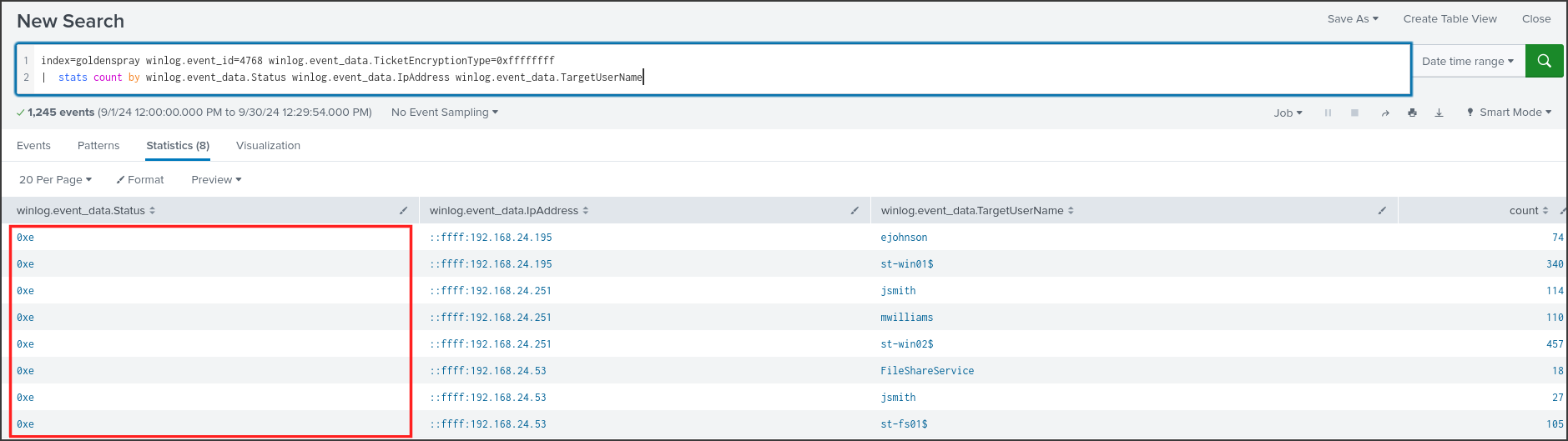
All of these had a Status of 0xe, corresponding to KDC_ERR_ETYPE_NOTSUPP: the client requested an encryption type that the DC did not support, meaning no tickets were issued, and the 0xffffffff value was simply a placeholder. These attempts originated from three internal IPs for standard user and machine accounts, and conveniently revealed the host IPs: 192.168.24.195 is ST-WIN01, 192.168.24.251 is ST-WIN02, and 192.168.24.53 is ST-FS01. The domain was running Kerberos with RC4, an outdated algorithm. With RC4, the ticket’s key is simply the NT hash of the password, meaning any hash extracted by mimikatz could be used directly to request or forge tickets, and service tickets are far easier to crack via Kerberoasting compared to AES.
Answer: RC4-HMAC
Q10: Can you provide the full path of the output file in preparation for data exfiltration?
jsmith’s final destination was the ST-FS01 file server, where the most valuable data usually resides. I reviewed the processes jsmith spawned on this machine.
1
2
3
4
index=goldenspray host=ST-FS01 winlog.event_id=1 winlog.event_data.User="*jsmith*"
| where '@timestamp'>"2024-09-09T17:30"
| table @timestamp winlog.event_data.ProcessId winlog.event_data.Image winlog.event_data.CommandLine
| sort @timestamp
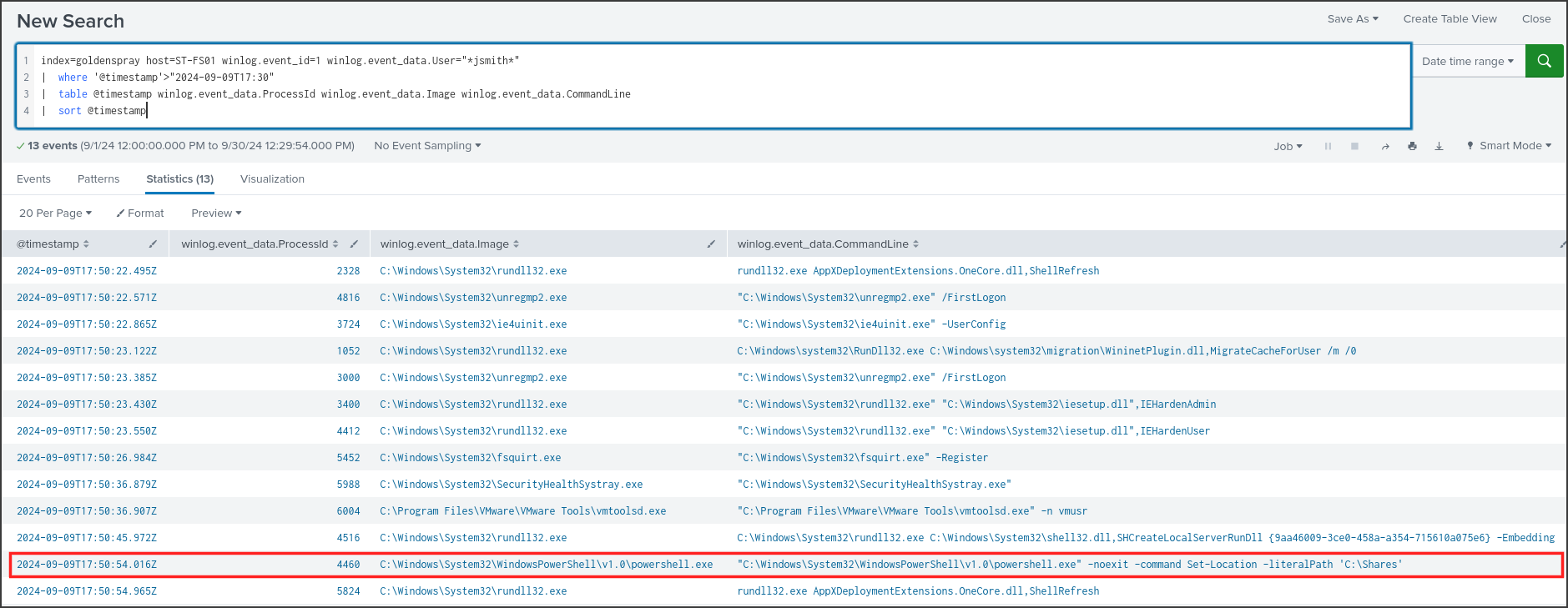
Most of these were standard Windows initialization processes triggered when a user logs in for the first time, such as unregmp2.exe /FirstLogon or ie4uinit.exe. The standout entry was at 17:50:54: PowerShell PID 4460 was launched directly in C:\Shares, the file server’s shared directory. Cmdlets like Compress-Archive execute internally within PowerShell and do not spawn new processes, but the resulting files are still captured by Sysmon Event ID 11. I searched for files created by PID 4460.
1
2
3
index=goldenspray host=ST-FS01 winlog.event_id=11 winlog.event_data.ProcessId=4460
| table @timestamp winlog.event_data.ProcessId winlog.event_data.Image winlog.event_data.TargetFilename
| sort @timestamp
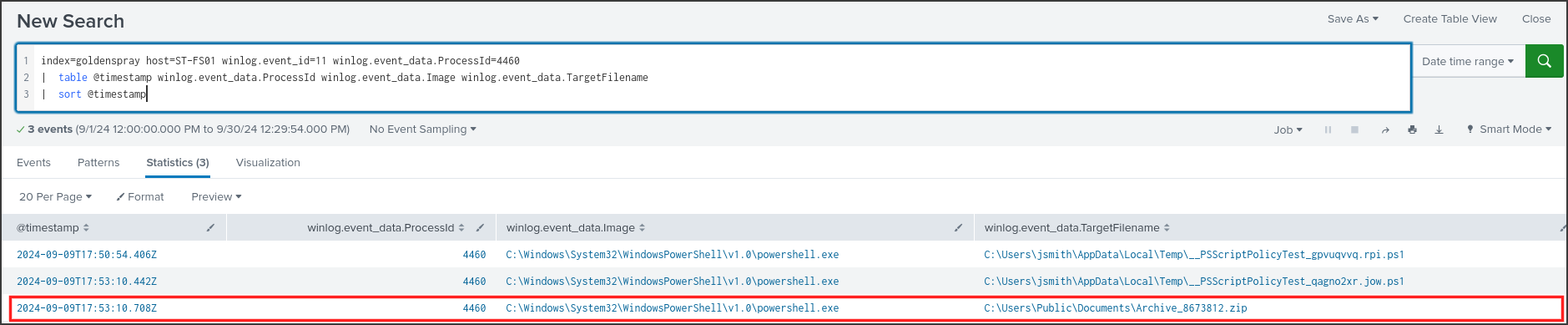
The two __PSScriptPolicyTest files are temporary files PowerShell generates to check execution policies. The actual file of interest was C:\Users\Public\Documents\Archive_8673812.zip, created at 17:53:10, three minutes after PowerShell launched in C:\Shares. Compressing data into a single file and staging it in the Public directory is preparation for exfiltration, which MITRE classifies as T1560 Archive Collected Data and T1074.001 Local Data Staging. The logs showed no subsequent network connections from ST-FS01 back to 77.91.78.115, so I could not confirm if the file was actually exfiltrated. The RDP session could still have transferred the file via the clipboard or mapped drives without generating a separate network connection log in Sysmon.
Answer: C:\Users\Public\Documents\Archive_8673812.zip
Conclusion
By threat hunting in Splunk across Windows Security, Sysmon, and Task Scheduler logs from four machines in the SECURETECH domain, I reconstructed a compromise spanning approximately an hour and a half on 2024-09-09. The attacker, operating from 77.91.78.115, a VPS in Finland, password sprayed ST-WIN02 via an Internet-exposed login service. They successfully guessed the local account michaelwilliams, then reused the password for the domain account SECURETECH\mwilliams and gained RDP access. On ST-WIN02, they downloaded a payload disguised as OfficeUpdater.exe, added it to the Run key, staged the PowerView, PsExec, and mimikatz toolset in C:\Users\Public\Backup_Tools**, and ran mimikatz against lsass to dump the credentials of **jsmith, a highly privileged account that had recently used RDP on that machine.
Leveraging jsmith, the attacker pivoted via RDP to the domain controller ST-DC01, dropped the identical payload as FileCleaner.exe, and established a FilesCheck scheduled task executing hourly under SYSTEM. They then ran mimikatz, renamed to BackupRunner.exe, which initiated RPC replication calls against the DC itself. This behavior strongly aligns with a DCSync attack to dump the krbtgt hash and forge a Golden Ticket, especially since the domain was still issuing Kerberos tickets with RC4-HMAC. Finally, they RDP’d into the file server ST-FS01 and compressed the contents of C:\Shares into C:\Users\Public\Documents\Archive_8673812.zip, staging it for exfiltration.
Summary
| Item | Details |
|---|---|
| Incident Type | Intrusion via password spraying, credential theft, lateral movement to DC and file server, data staging |
| Severity | Critical: Domain controller compromised, high probability of krbtgt hash exposure |
| Timeframe | 2024-09-09 16:29:05 UTC to 17:53:10 UTC |
| Threat Origin | 77.91.78.115, AS216127 International Hosting Company Limited, Helsinki, Finland |
| Compromised Hosts | ST-WIN02 192.168.24.251, ST-DC01, ST-FS01 192.168.24.53 |
| Compromised Accounts | ST-WIN02\michaelwilliams, SECURETECH\mwilliams, SECURETECH\jsmith, potentially entire domain if DCSync occurred |
| Unaffected Hosts | ST-WIN01 192.168.24.195 |
Timeline
| Timestamp | Host | Event | Log Source |
|---|---|---|---|
| 16:29:05 | ST-WIN02 | Trial login with FAKE\user from 77.91.78.115, probing services | Security 4625 |
| 16:55:16 | ST-WIN02 | Spray phase 1, 8 SECURETECH\user accounts, none existed | Security 4625 |
| 16:56:05 | ST-WIN02 | Spray phase 2, 8 accounts without domain; local michaelwilliams success | Security 4625, 4624 |
| 17:00:21 | ST-WIN02 | SECURETECH\mwilliams network login, RDP at 17:00:23 | Security 4624 type 3, 10 |
| 17:10:24 | ST-WIN02 | PowerShell PID 8184 spawned at C:\Windows\Temp | Sysmon 1 |
| 17:12:14 | ST-WIN02 | Downloaded C:\Windows\Temp\OfficeUpdater.exe from 77.91.78.115:80 | Sysmon 11, 29, 3 |
| 17:17:09 | ST-WIN02 | reg add Run key OfficeUpdater pointing to OfficeUpdater.exe | Sysmon 1, 13 |
| 17:22:57 | ST-WIN02 | PowerShell PID 3956 downloaded C:\Users\Public\Backup_Tools.zip from 77.91.78.115:80 | Sysmon 11, 3 |
| 17:23:06 | ST-WIN02 | Extracted PowerView.ps1, PsExec.exe, mimikatz.exe to Backup_Tools | Sysmon 11 |
| 17:27:34 | ST-WIN02 | mimikatz.exe PID 3708 executed | Sysmon 1 |
| 17:27:59 | ST-WIN02 | PID 3708 accessed lsass.exe with 0x1010 permissions, dumped jsmith’s credentials | Sysmon 10 |
| 17:34:15 | ST-DC01 | SECURETECH\jsmith logged in from 77.91.78.115, RDP at 17:34:17 | Security 4624 type 3, 10 |
| 17:37:00 | ST-DC01 | PowerShell dropped C:\Windows\Temp\FileCleaner.exe, matching OfficeUpdater.exe hash | Sysmon 11, 29 |
| 17:38:44 | ST-DC01 | schtasks created FilesCheck task, hourly, as SYSTEM | Sysmon 1, TaskScheduler 106 |
| 17:39:11 | ST-WIN02 | mimikatz.exe executed second time, PID 528 | Sysmon 1 |
| 17:42:23 | ST-DC01 | PowerShell dropped C:\Users\Public\BackupRunner.exe, matching mimikatz.exe hash | Sysmon 11, 29 |
| 17:42:27 | ST-DC01 | BackupRunner.exe PID 2900 executed as jsmith | Sysmon 1 |
| 17:42:47 | ST-DC01 | PID 2900 initiated RPC to DC ports 135 and 49667, suspected DCSync | Sysmon 22, 3 |
| 17:48:02 | ST-DC01 | PID 2900 terminated | Sysmon 5 |
| 17:50:13 | ST-FS01 | SECURETECH\jsmith logged in from 77.91.78.115, RDP at 17:50:15 | Security 4624 type 3, 10 |
| 17:50:54 | ST-FS01 | PowerShell PID 4460 spawned in C:\Shares | Sysmon 1 |
| 17:53:10 | ST-FS01 | Created C:\Users\Public\Documents\Archive_8673812.zip | Sysmon 11 |
Indicators of Compromise
| Type | Value | Notes |
|---|---|---|
| IPv4 | 77.91.78.115 | Source of spray, RDP, and port 80 HTTP server distributing tools; AS216127 |
| Hostname | maono-stat.su | Reverse DNS of 77.91.78.115 via ipinfo.io |
| SHA256 | D3EAC3A9B64E715D57E77D25603D01E6EF2BF28810BDB2FEC58725F219075149 | Persistence payload: OfficeUpdater.exe on ST-WIN02, FileCleaner.exe on ST-DC01 |
| SHA256 | 92804FAAAB2175DC501D73E814663058C78C0A042675A8937266357BCFB96C50 | mimikatz.exe on ST-WIN02, BackupRunner.exe on ST-DC01 |
| File | C:\Windows\Temp\OfficeUpdater.exe | ST-WIN02 |
| File | C:\Windows\Temp\FileCleaner.exe | ST-DC01 |
| File | C:\Users\Public\BackupRunner.exe | ST-DC01, renamed mimikatz |
| Directory | C:\Users\Public\Backup_Tools\ | ST-WIN02, contained PowerView.ps1, PsExec.exe, mimikatz.exe |
| File | C:\Users\Public\Backup_Tools.zip | ST-WIN02 |
| File | C:\Users\Public\Documents\Archive_8673812.zip | ST-FS01, staged exfiltration data |
| Registry | HKLM\SOFTWARE\Microsoft\Windows\CurrentVersion\Run\OfficeUpdater | ST-WIN02 |
| Scheduled Task | \FilesCheck | ST-DC01, executed hourly as SYSTEM |
| Account | ST-WIN02\michaelwilliams, SECURETECH\mwilliams, SECURETECH\jsmith | Compromised credentials |
MITRE ATT&CK Mapping
| Tactic | Technique | Evidence |
|---|---|---|
| Credential Access | T1110.003 Password Spraying | 16 accounts, once each, from 77.91.78.115 |
| Initial Access, Persistence | T1078.003 Local Accounts, T1078.002 Domain Accounts | michaelwilliams, mwilliams, jsmith logged in successfully |
| Lateral Movement | T1021.001 Remote Desktop Protocol | LogonType 10 to ST-WIN02, ST-DC01, ST-FS01 |
| Execution | T1059.001 PowerShell | PowerShell downloaded tools and archived data |
| Command and Control | T1105 Ingress Tool Transfer | Downloaded OfficeUpdater.exe and Backup_Tools.zip via HTTP |
| Persistence | T1547.001 Registry Run Keys | OfficeUpdater Run key |
| Persistence, Privilege Escalation | T1053.005 Scheduled Task | FilesCheck ran as SYSTEM |
| Defense Evasion | T1036.005 Match Legitimate Name or Location | OfficeUpdater, FileCleaner, BackupRunner, Backup_Tools |
| Credential Access | T1003.001 LSASS Memory | mimikatz PID 3708 opened lsass with 0x1010 |
| Credential Access | T1003.006 DCSync, highly probable | BackupRunner.exe initiated RPC to DC ports 135 and 49667 |
| Collection | T1560 Archive Collected Data, T1074.001 Local Data Staging | Archive_8673812.zip staged in C:\Users\Public\Documents |
Assessment and Recommendations
The confirmed scope includes three machines and three accounts. Because the attacker executed mimikatz on the domain controller using a highly privileged account and exhibited behavior consistent with DCSync, the entire domain should be considered compromised until proven otherwise. The available logs do not confirm if the zip file left the network, requiring further investigation of firewall, proxy, and perimeter RDP logs.
Immediate Containment:
- Block 77.91.78.115 and the entire 77.91.78.0/24 subnet at the perimeter firewall, and disable RDP and SMB access from the Internet to ST-WIN02.
- Disable and reset the passwords for michaelwilliams, mwilliams, and jsmith; forcefully terminate all active sessions for these accounts.
- Network-isolate ST-WIN02, ST-DC01, and ST-FS01 to acquire memory and disk forensic evidence.
Eradication:
- Remove the OfficeUpdater Run key, the FilesCheck scheduled task, and the files OfficeUpdater.exe, FileCleaner.exe, BackupRunner.exe, Backup_Tools, Backup_Tools.zip, and Archive_8673812.zip after forensic acquisition.
- Reset the krbtgt account password twice, separated by at least the maximum ticket lifetime, to invalidate any potentially forged Golden Tickets.
- Perform a domain-wide threat hunt using the two SHA256 hashes above and Sysmon Event ID 10 targeting lsass.exe with GrantedAccess 0x1010.
Prevention:
- Implement account lockout policies and configure alerts for an IP failing to authenticate against multiple distinct accounts within a short timeframe.
- Do not expose RDP directly to the Internet; mandate VPN and MFA. Restrict RDP access to the DC to administrative accounts originating from dedicated jump servers.
- Disable RC4 for Kerberos and enforce AES; add highly privileged accounts to the Protected Users group.
- Enable Credential Guard or LSA Protection to prevent lsass memory dumping; enable Directory Service Access auditing to capture Event 4662 during DCSync attempts.
- Do not share passwords between local and domain accounts; manage local administrator passwords using Windows LAPS.