Cyber Defenders - ShadowRoast Writeup
Category: Threat Hunting
Checkout the lab here: https://cyberdefenders.org/blueteam-ctf-challenges/shadowroast/
Description
As a cybersecurity analyst at TechSecure Corp, you have been alerted to unusual activities within the company’s Active Directory environment. Initial reports suggest unauthorized access and possible privilege escalation attempts.
Your task is to analyze the provided logs to uncover the attack’s extent and identify the malicious actions taken by the attacker. Your investigation will be crucial in mitigating the threat and securing the network.
The lab provides a Splunk instance with the index shadowroast. I opened the Search & Reporting app, set the time picker to All time since the lab logs are old, and then counted the events by source file to identify which machines the logs came from.
index=shadowroast
| stats count by source host.name
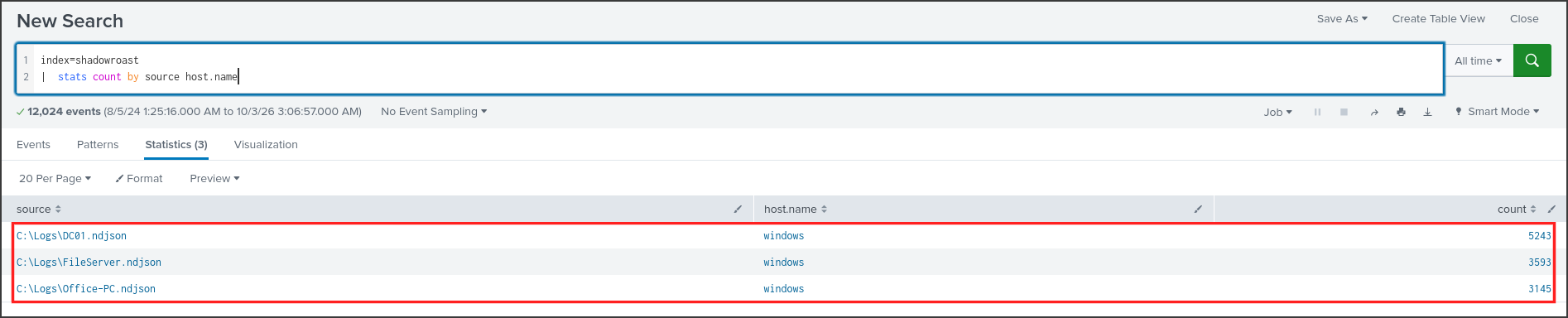
There are 12,024 events from three files: DC01 (the domain controller), FileServer, and Office-PC (an employee workstation). The host.name field broadly indicates “windows”, so I will differentiate the machines using the source field. The logs were forwarded by Winlogbeat in JSON format, meaning the fields take the form winlog.event_id and winlog.event_data.[Field_Name]. In addition to Security logs, all three machines have Sysmon installed. Sysmon is a free Microsoft tool that records process creation at Event 1, file creation at Event 11, and registry value modifications at Event 13. I will utilize these three Event IDs heavily throughout this writeup.
Q1: What’s the malicious file name utilized by the attacker for initial access?
A malicious file used for initial access is typically downloaded and executed by the user, so it might reside in personal directories such as Downloads, Desktop, or AppData. I searched for all Sysmon Event 1 processes with paths starting with C:\Users and grouped them by machine and file name. In SPL, backslashes must be escaped with a double backslash.
index=shadowroast winlog.event_id=1 winlog.event_data.Image="C:\\Users\\*"
| stats count by source winlog.event_data.Image
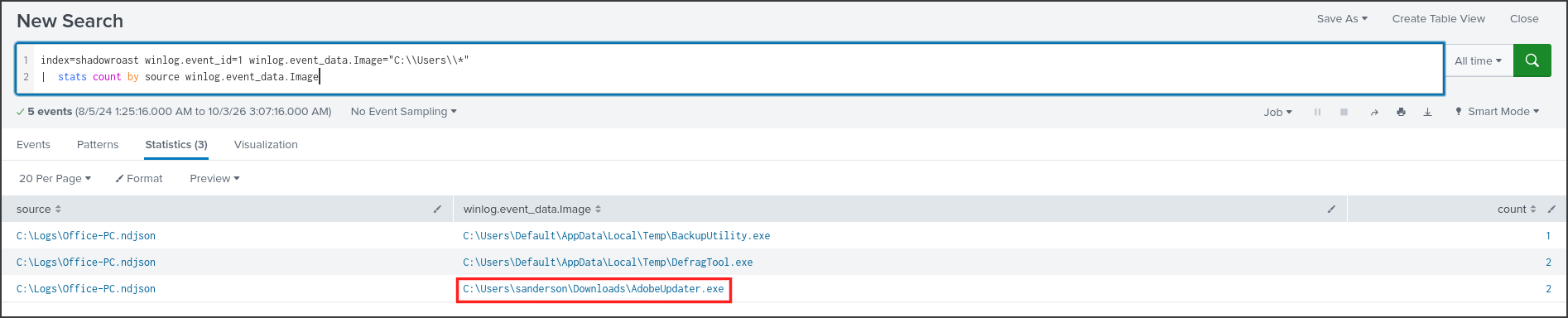
There were only three files, all located on Office-PC. Two of them, BackupUtility.exe and DefragTool.exe, were found in an unusual Temp directory, while AdobeUpdater.exe was situated in C:\Users\sanderson\Downloads. Adobe does not update its software via a downloaded file in the Downloads folder, making this the prime suspect. To be certain, I examined the parent processes of these files and sorted them by time.
index=shadowroast source="*Office-PC*" winlog.event_id=1 (winlog.event_data.Image="C:\\Users\\*" OR winlog.event_data.ParentImage="C:\\Users\\*")
| table @timestamp winlog.event_data.User winlog.event_data.ParentImage winlog.event_data.Image winlog.event_data.CommandLine
| sort @timestamp
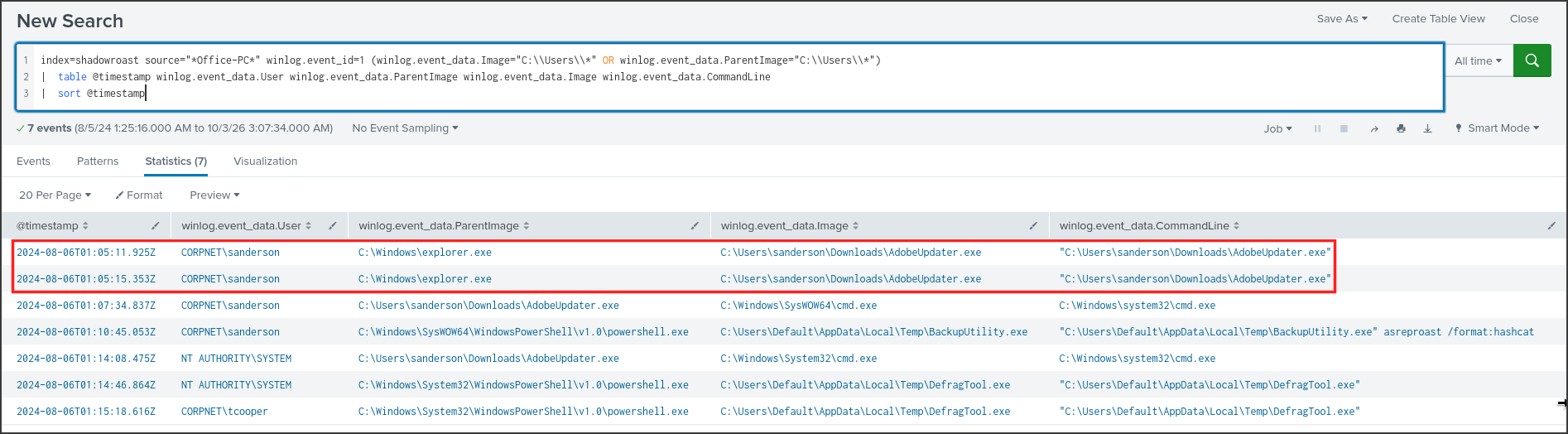
At 2024-08-06 01:05:11, the user CORPNET\sanderson executed AdobeUpdater.exe, and its parent process was explorer.exe. This indicates that the user manually double-clicked the file, characteristic of a malicious attachment or a downloaded file they were tricked into opening. Two minutes later, AdobeUpdater.exe spawned cmd.exe, and all subsequent activities in the table originated from it. This is the attacker’s entry point. The answer also matches the 12-character mask plus a 3-character extension.
Answer: AdobeUpdater.exe
Q2: What’s the registry run key name created by the attacker for maintaining persistence?
Run keys are registry keys that Windows reads every time a user logs in: any value inside them is treated as a command to be automatically executed. Writing a value here is the most common persistence mechanism. Sysmon records this activity via Event 13, so I looked for writes to the CurrentVersion\Run path.
index=shadowroast winlog.event_id=13 winlog.event_data.TargetObject="*CurrentVersion\\Run*"
| table @timestamp winlog.event_data.Image winlog.event_data.TargetObject winlog.event_data.Details

There was only one result, at 01:05:58, less than a minute after AdobeUpdater.exe ran. The very same process created the value wyW5PZyF under HKU\S-1-5-21-…-1105\SOFTWARE\Microsoft\Windows\CurrentVersion\Run, which is the specific Run key for the sanderson account. The name consists of 8 random characters and does not resemble any legitimate software.
The content of the value is also worth analyzing. It launched a hidden PowerShell instance, read a Base64 string from another registry value named OQqd5sjJ under HKCU\Software\EdI86bhr, decoded it, and executed it using iex. The actual payload was not stored on disk but hidden within the registry; the Run key merely ensured that every time sanderson logged in, the payload would be loaded into memory. This command structure resembles the registry persistence mechanism used by Metasploit, although the logs don’t explicitly name the tool, making this an educated guess.
Answer: wyW5PZyF
Q3: What’s the full path of the directory used by the attacker for storing his dropped tools?
In Q1, I noticed BackupUtility.exe and DefragTool.exe in the same Temp directory. To see what else that directory contained and who wrote to it, I searched for Sysmon Event 11 (file creation events) in that specific path.
index=shadowroast winlog.event_id=11 winlog.event_data.TargetFilename="C:\\Users\\Default\\AppData\\Local\\Temp\\*"
| table @timestamp source winlog.event_data.Image winlog.event_data.TargetFilename
| sort @timestamp
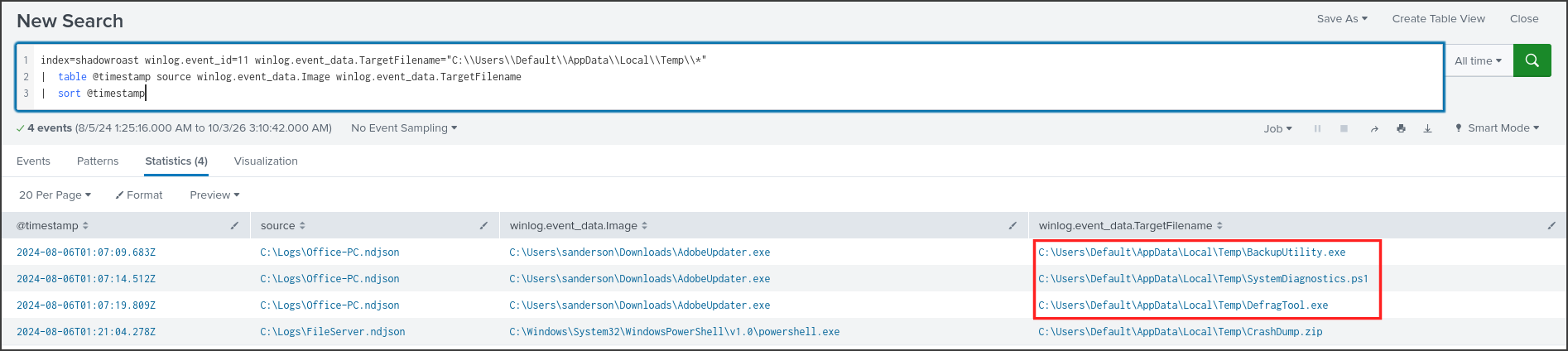
Between 01:07:09 and 01:07:19, AdobeUpdater.exe wrote three files to C:\Users\Default\AppData\Local\Temp**: **BackupUtility.exe, SystemDiagnostics.ps1, and DefragTool.exe. The Default directory is a template profile used by Windows when creating profiles for new users; it is rarely accessed by anyone, making it a stealthy location for the attacker’s toolkit. The filenames were also disguised as legitimate system utilities. The last row shows a file named CrashDump.zip on FileServer, which was also dropped in this exact path—I will revisit this in Q8.
*Answer: C:\Users\Default\AppData\Local\Temp*
Q4: What tool was used by the attacker for privilege escalation and credential harvesting?
Going back to the process table in Q1, I examined the row corresponding to BackupUtility.exe.
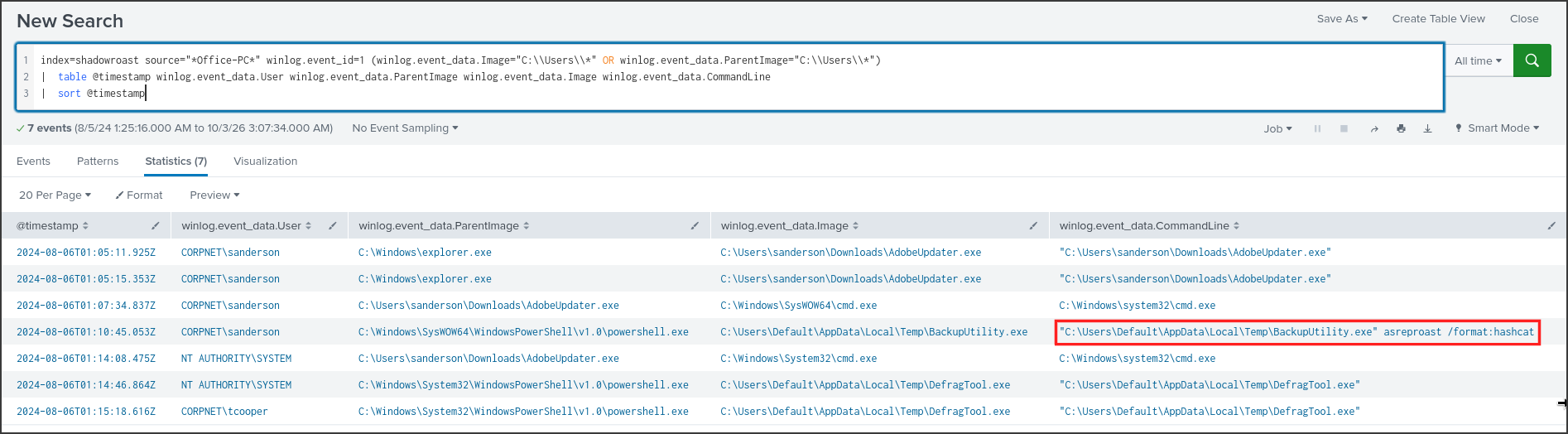
At 01:10:45, sanderson executed BackupUtility.exe asreproast /format:hashcat via PowerShell. The filename sounds like a backup utility, but the parameters reflect the syntax of Rubeus, a Kerberos attacking tool written in C#. Renaming the file doesn’t alter its internal contents, so I checked the version information that Sysmon extracted directly from the executable.
index=shadowroast winlog.event_id=1 winlog.event_data.Image="C:\\Users\\Default\\*"
| table @timestamp source winlog.event_data.Image winlog.event_data.OriginalFileName winlog.event_data.Description winlog.event_data.Product winlog.event_data.User
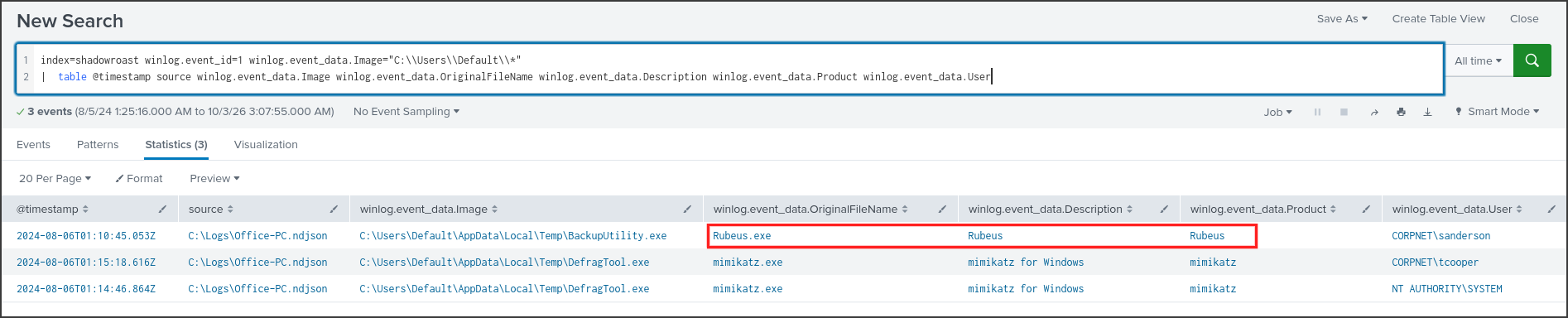
The OriginalFileName field is hardcoded into the file during compilation and remains unchanged even if the file is renamed on disk. For BackupUtility.exe, the OriginalFileName, Description, and Product were all Rubeus. This table also revealed that DefragTool.exe was actually mimikatz.exe, which I will save for Q6. The answer has 6 characters, perfectly matching Rubeus.
Answer: Rubeus
Q5: Was the attacker’s credential harvesting successful? If so, can you provide the compromised domain account username?
First, it is important to understand how AS-REP Roasting works. When a user logs into a domain, the machine sends a request for a TGT ticket to the domain controller. Normally, this request must include a timestamp encrypted with the user’s password—known as pre-authentication—to prove the requester knows the password. If an account has this requirement disabled, anyone can request a ticket for it, and a portion of the response will be encrypted using the account’s password. The attacker can then take this encrypted portion offline and crack it using tools like hashcat, matching the /format:hashcat parameter seen in Q4. The domain controller logs every TGT issuance as Event 4768, which includes a PreAuthType field; a value of 0 indicates no pre-authentication was used.
index=shadowroast source="*DC01*" winlog.event_id=4768 @timestamp>"2024-08-06T01:05" @timestamp<"2024-08-06T01:14"
| where NOT like($winlog.event_data.TargetUserName$, "%$")
| table @timestamp winlog.event_data.TargetUserName winlog.event_data.IpAddress winlog.event_data.PreAuthType winlog.event_data.TicketEncryptionType winlog.event_data.Status
| sort @timestamp
The where clause filters out machine accounts, which have names ending in $.
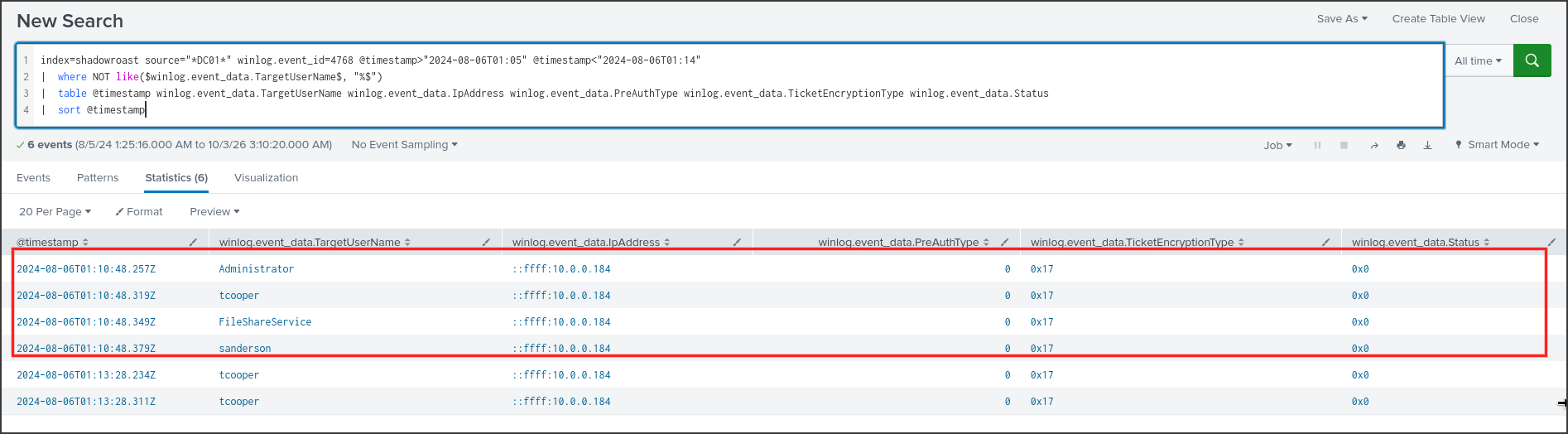
At 01:10:48, three seconds after Rubeus was executed, DC01 issued TGTs for four accounts: Administrator, tcooper, FileShareService, and sanderson, all requested from 10.0.0.184. All had a PreAuthType of 0 and a Status of 0x0, indicating successful issuance. The requests were merely milliseconds apart, consistent with an automated Rubeus sweep. The encryption type 0x17 stands for RC4-HMAC, which is the easiest to crack. However, obtaining a ticket doesn’t necessarily mean the password was successfully cracked. To determine which account was genuinely compromised, I looked for subsequent logins using these accounts. I tested tcooper first.
index=shadowroast "tcooper" winlog.event_id IN (4624,4648,4672,4768,4769,4776)
| table @timestamp source winlog.event_id winlog.event_data.TargetUserName winlog.event_data.LogonType winlog.event_data.IpAddress winlog.event_data.LogonProcessName winlog.event_data.SubjectUserName
| sort @timestamp
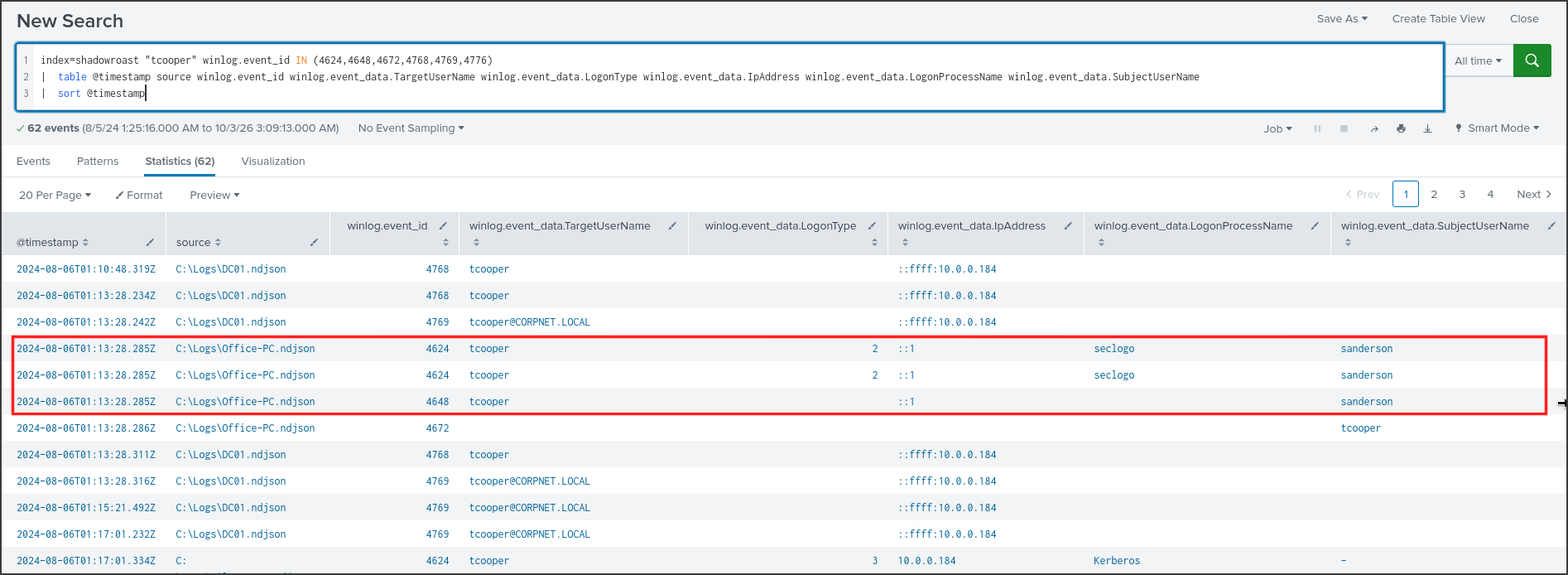
At 01:13:28, on Office-PC, there was an Event 4648 and two Event 4624s for tcooper, with SubjectUserName listed as sanderson and LogonProcessName as seclogo. Event 4648 indicates a user logging in with explicit credentials of another user. seclogo refers to the Secondary Logon service, which is utilized by the runas command. In other words, the attacker, sitting in sanderson’s session, correctly typed tcooper’s password just three minutes after acquiring the AS-REP ticket. Immediately following this, there was an Event 4672, meaning tcooper’s session was assigned special privileges, denoting administrative access. The subsequent logs show tcooper proceeding to log into FileServer, which I will cover in Q7. I found no evidence of the other three accounts being successfully logged into.
Answer: tcooper
Q6: What’s the tool used by the attacker for registering a rogue Domain Controller to manipulate Active Directory data?
The technique of registering a rogue domain controller is known as DCShadow. An attacker transforms a regular machine into a domain controller from the perspective of Active Directory, pushes malicious changes via the synchronization mechanism between domain controllers, and then unregisters it. Because the modifications are routed through the synchronization channel rather than standard APIs, many traditional object modification logs will not trigger. This technique is a module integrated into mimikatz. In Q4, I already identified that DefragTool.exe was indeed mimikatz.
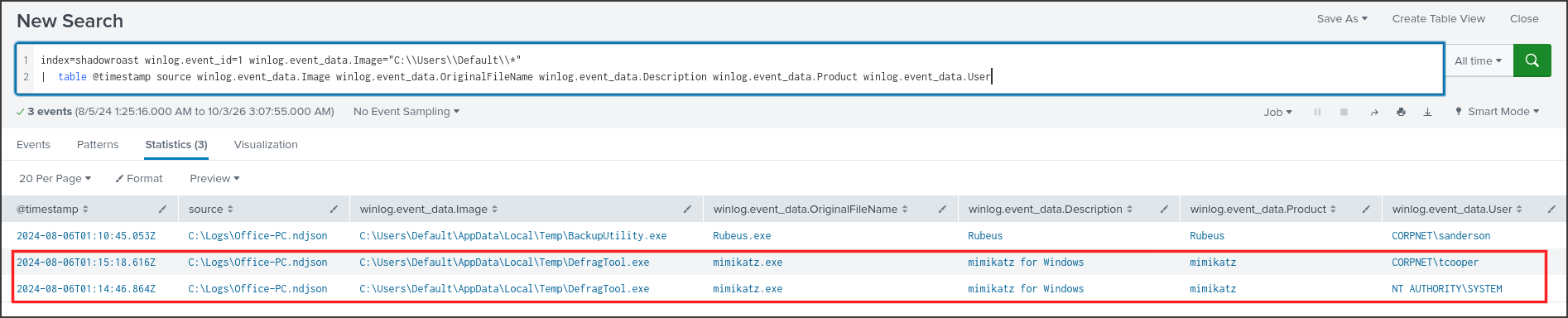
Mimikatz was executed twice: at 01:14:46 under NT AUTHORITY\SYSTEM and at 01:15:18 under CORPNET\tcooper. This dual-execution perfectly aligns with the DCShadow methodology: one mimikatz window runs as SYSTEM to impersonate the rogue domain controller, while a second window runs under a domain admin account to authorize and push the changes. The command line only displays the filename because mimikatz was used interactively, so the specific commands weren’t logged. To find evidence on the domain controller’s side, I searched for Event 4929 on DC01. This event is logged when an Active Directory replication source is removed.
index=shadowroast source="*DC01*" winlog.event_id=4929
| table @timestamp winlog.event_id winlog.event_data.SourceAddr winlog.event_data.DestinationDRA winlog.event_data.NamingContext

At 01:15:21, just three seconds after mimikatz ran under tcooper, DC01 logged that the replication source Office-PC.CORPNET.local for the naming context DC=CORPNET,DC=local was removed. Office-PC is a workstation and has no legitimate reason to act as a replication source for DC01. This is the telltale signature of DCShadow left behind when the rogue domain controller finishes pushing its changes and unregisters itself. The 8-character mask perfectly matches mimikatz.
Answer: mimikatz
Q7: What’s the first command used by the attacker for enabling RDP on remote machines for lateral movement?
Windows enables or disables Remote Desktop based on the fDenyTSConnections registry value: 1 denies RDP connections, while 0 allows them. An attacker wishing to enable RDP on another machine will almost certainly manipulate this value, so I searched for it within the command line arguments of Sysmon Event 1 across all machines.
index=shadowroast winlog.event_id=1 "fDenyTSConnections"
| table @timestamp source winlog.event_data.User winlog.event_data.ParentImage winlog.event_data.CommandLine
| sort @timestamp

There were two instances of the same command, both executed under tcooper: the first on FileServer at 01:17:14, and the second on DC01 at 01:18:18. The command uses reg add to set fDenyTSConnections to 0 within the Terminal Server key, utilizing the /f flag to forcefully overwrite without prompting. The parent process was wsmprovhost.exe. This is the process Windows spawns to execute commands from a remote PowerShell Remoting session via WinRM. Thus, the command was not typed locally on FileServer but pushed remotely. I then reviewed all processes on FileServer around that timeframe.
index=shadowroast source="*FileServer*" winlog.channel="Microsoft-Windows-Sysmon/Operational" @timestamp>"2024-08-06T01:16" @timestamp<"2024-08-06T01:23" (winlog.event_id=1 OR (winlog.event_id=11 winlog.event_data.Image="*powershell.exe"))
| table @timestamp winlog.event_id winlog.event_data.User winlog.event_data.ParentImage winlog.event_data.CommandLine winlog.event_data.TargetFilename
| sort @timestamp
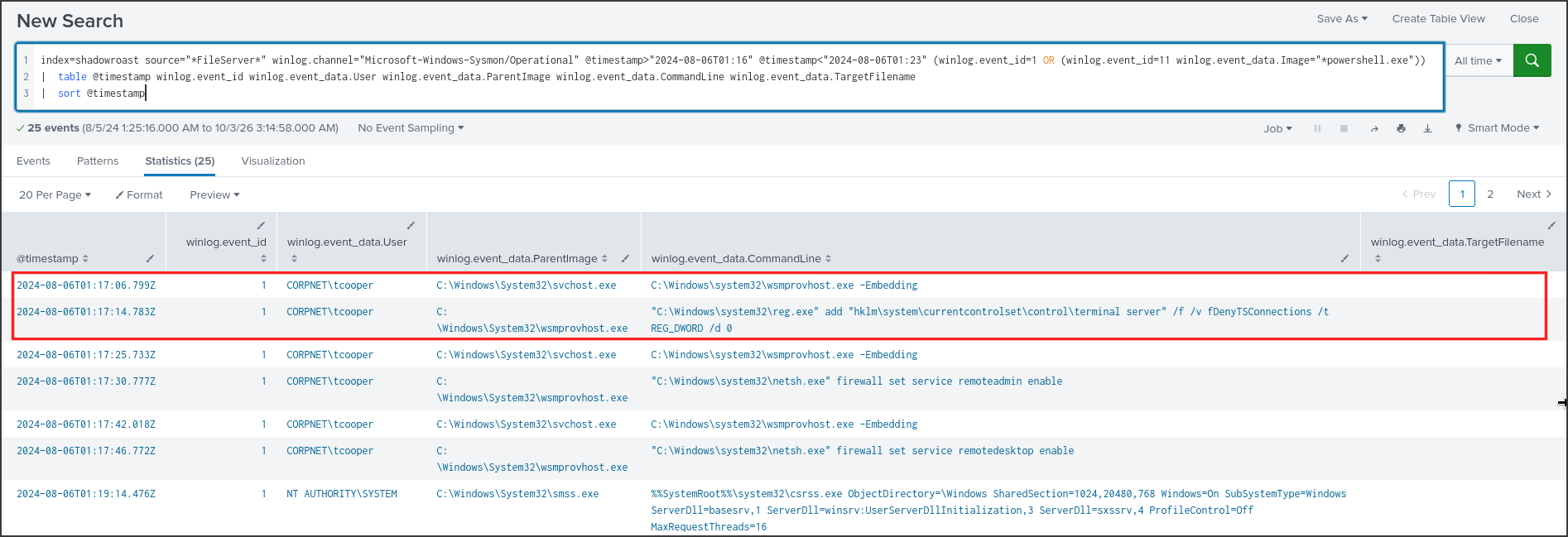
At 01:17:06, svchost launched wsmprovhost.exe -Embedding under tcooper, and eight seconds later, it spawned the reg add command. As seen in the Q5 screenshot, tcooper also performed a network logon to FileServer from 10.0.0.184 at 01:17:01. Afterward, the attacker continued via WinRM to modify the firewall using netsh firewall set service remoteadmin enable and remotedesktop enable. At 01:19:14, a new logon session was initialized with csrss.exe, followed by tcooper’s explorer.exe launching, confirming that the attacker had successfully accessed FileServer via Remote Desktop. The answer is the very first command executed on FileServer, which fits the mask starting with reg add.
Answer: reg add “hklm\system\currentcontrolset\control\terminal server” /f /v fDenyTSConnections /t REG_DWORD /d 0
Q8: What’s the file name created by the attacker after compressing confidential files?
Once access to a file server is achieved, the logical next step is to aggregate data for exfiltration. Data is typically compressed into an archive before being sent out, so I searched for Sysmon Event 11 pertaining to common archive extensions.
index=shadowroast winlog.event_id=11 (winlog.event_data.TargetFilename="*.zip" OR winlog.event_data.TargetFilename="*.7z" OR winlog.event_data.TargetFilename="*.rar")
| table @timestamp source winlog.event_data.Image winlog.event_data.TargetFilename
| sort @timestamp

There was only a single matching file: at 01:21:04, powershell.exe on FileServer created CrashDump.zip in the exact same tool staging directory identified in Q3. The filename was chosen to blend in as a legitimate crash dump file to evade detection. To determine what data was compressed, I reviewed subsequent processes on FileServer after the attacker established their RDP session.
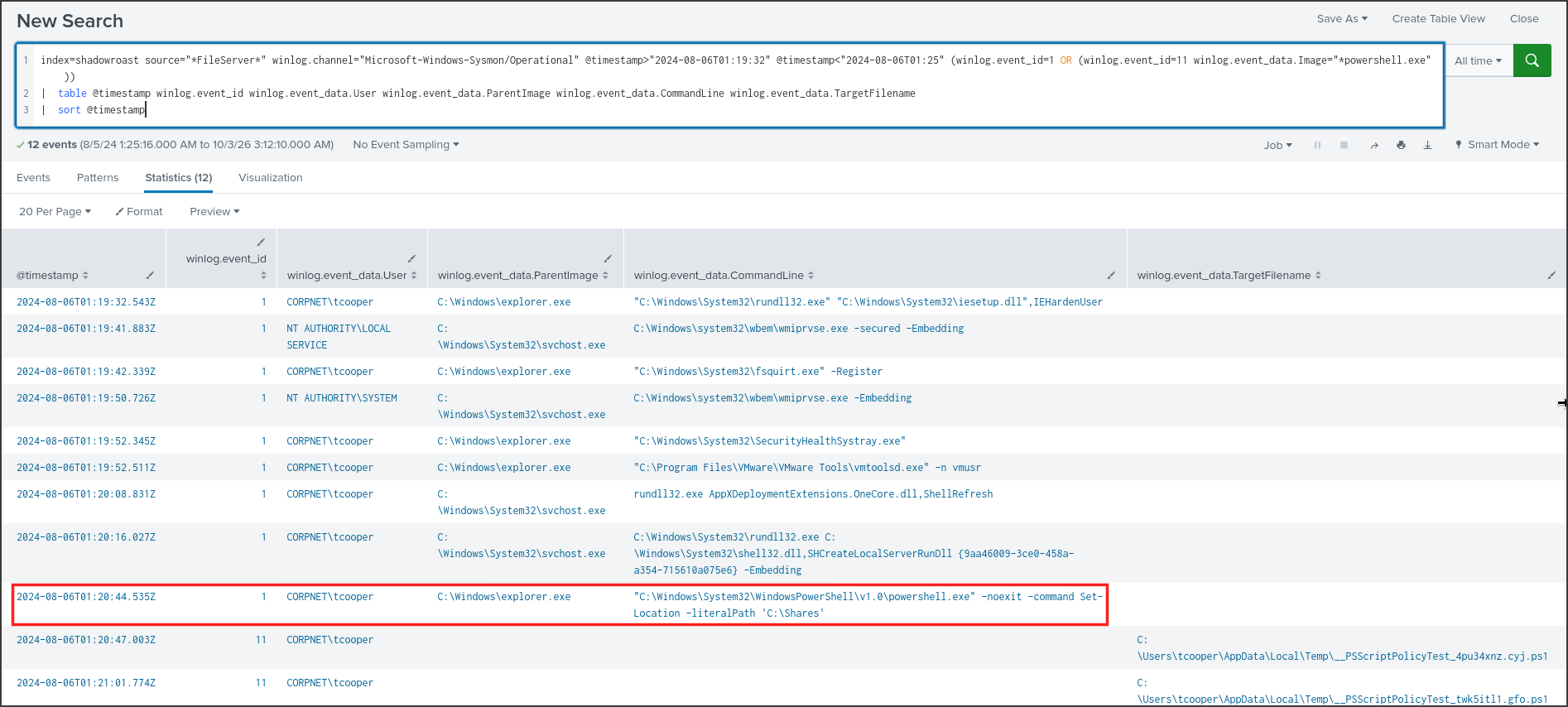
At 01:20:44, tcooper’s explorer.exe launched powershell.exe -noexit -command Set-Location -literalPath ‘C:\Shares’. This is the command generated by Windows when a user selects “Open PowerShell window here” within a directory. This implies the attacker was browsing the C:\Shares network share during their RDP session and opened PowerShell directly in that location. Twenty seconds later, CrashDump.zip was generated. The PowerShell logs on FileServer didn’t capture the specific contents of the compression command, so I cannot confirm precisely which files were archived, but the sequence of events strongly suggests the data within C:\Shares was the target.
Answer: CrashDump.zip
Conclusion
By threat hunting within Splunk using the Security and Sysmon logs of three machines—Office-PC, FileServer, and DC01—I successfully reconstructed an Active Directory attack that unfolded over approximately 16 minutes on the morning of 2024-08-06. At 01:05:11, the user sanderson executed AdobeUpdater.exe from the Downloads folder on
Office-PC. Less than a minute later, it established persistence by creating the Run key wyW5PZyF to load a registry-hidden payload upon login, and dropped Rubeus, a PowerShell script, and mimikatz into *C:\Users\Default\AppData\Local\Temp* using masqueraded names likeBackupUtility.exeandDefragTool.exe.At 01:10:45, Rubeus performed AS-REP Roasting and obtained tickets for four accounts lacking pre-authentication requirements. The password for tcooper, an administrative account, was successfully cracked and utilized via
runasat 01:13:28. Leveraging SYSTEM andtcooperprivileges, the attacker executed a mimikatz DCShadow attack, registeringOffice-PCas a rogue domain controller to manipulate Active Directory data; DC01 subsequently logged the removal of this replication source at 01:15:21.Starting at 01:17,
tcooperutilized PowerShell Remoting to enable RDP via reg add … fDenyTSConnections /d 0 and modified the firewall on bothFileServerandDC01. The attacker then initiated an RDP session intoFileServer, launched PowerShell within C:\Shares, and at 01:21:04, created CrashDump.zip in the staging directory, highly likely as a precursor to data exfiltration.
Summary
| Item | Details |
|---|---|
| Incident Type | Initial access via malicious executable, AS-REP Roasting, Active Directory manipulation via DCShadow, lateral movement and data aggregation |
| Severity | Critical: Admin account tcooper compromised, Active Directory data modified using a rogue domain controller, RDP enabled on DC01 |
| Timeline | 2024-08-06 01:05:11 UTC to 01:21:04 UTC |
| Attack Source | Office-PC, IP 10.0.0.184, after user sanderson executed AdobeUpdater.exe; logs do not reveal an external C2 address |
| Affected Systems | Office-PC 10.0.0.184, FileServer, DC01 in the CORPNET.local domain |
| Compromised Accounts | CORPNET\tcooper password cracked; CORPNET\sanderson session hijacked |
| No Known Impact | Administrator, FileShareService had AS-REP tickets requested but no logins observed |
Timeline
All times are UTC on 2024-08-06, extracted directly from the logs presented in the previous questions.
| Time | Host | Event | Log Source |
|---|---|---|---|
| 01:05:11 | Office-PC | sanderson opened AdobeUpdater.exe from Downloads, parent is explorer.exe | Sysmon 1 |
| 01:05:58 | Office-PC | Created Run key wyW5PZyF to run hidden PowerShell reading payload from HKCU\Software\EdI86bhr | Sysmon 13 |
| 01:07:09 to 01:07:19 | Office-PC | Dropped BackupUtility.exe, SystemDiagnostics.ps1, DefragTool.exe into C:\Users\Default\AppData\Local\Temp | Sysmon 11 |
| 01:10:45 | Office-PC | Rubeus ran asreproast /format:hashcat | Sysmon 1 |
| 01:10:48 | DC01 | Issued non-preauth TGTs for Administrator, tcooper, FileShareService, sanderson from 10.0.0.184 | Security 4768 |
| 01:13:28 | Office-PC | sanderson used tcooper credentials via runas, assigning tcooper special privileges | Security 4648, 4624, 4672 |
| 01:14:46 | Office-PC | mimikatz executed under SYSTEM | Sysmon 1 |
| 01:15:18 | Office-PC | mimikatz executed under tcooper | Sysmon 1 |
| 01:15:21 | DC01 | Removed replication source Office-PC.CORPNET.local, indicative of DCShadow | Security 4929 |
| 01:17:01 | FileServer | tcooper logged in via network from 10.0.0.184 | Security 4624 type 3 |
| 01:17:14 | FileServer | reg add fDenyTSConnections = 0 via wsmprovhost.exe | Sysmon 1 |
| 01:17:30, 01:17:46 | FileServer | netsh enabled remoteadmin and remotedesktop | Sysmon 1 |
| 01:18:18 | DC01 | reg add fDenyTSConnections = 0 via wsmprovhost.exe | Sysmon 1 |
| 01:19:14 | FileServer | New RDP session for tcooper | Sysmon 1 |
| 01:20:44 | FileServer | tcooper opened PowerShell at C:\Shares | Sysmon 1 |
| 01:21:04 | FileServer | PowerShell created CrashDump.zip | Sysmon 11 |
Indicators of Compromise
| Type | Value | Notes |
|---|---|---|
| File | C:\Users\sanderson\Downloads\AdobeUpdater.exe | Office-PC, initial intrusion file |
| File | C:\Users\Default\AppData\Local\Temp\BackupUtility.exe | Renamed Rubeus |
| File | C:\Users\Default\AppData\Local\Temp\DefragTool.exe | Renamed mimikatz |
| File | C:\Users\Default\AppData\Local\Temp\SystemDiagnostics.ps1 | Script dropped simultaneously, contents unknown |
| File | C:\Users\Default\AppData\Local\Temp\CrashDump.zip | FileServer, compressed data |
| Directory | C:\Users\Default\AppData\Local\Temp\ | Tool staging directory on Office-PC and FileServer |
| Registry | HKU…-1105\SOFTWARE\Microsoft\Windows\CurrentVersion\Run\wyW5PZyF | Run key for sanderson |
| Registry | HKCU\Software\EdI86bhr, value OQqd5sjJ | Base64 payload loaded by Run key |
| Registry | HKLM\System\CurrentControlSet\Control\Terminal Server\fDenyTSConnections = 0 | FileServer, DC01 |
| IPv4 | 10.0.0.184 | Office-PC, source of AS-REP Roasting and WinRM |
| Account | CORPNET\tcooper | Password cracked, used for DCShadow, WinRM, RDP |
| Account | CORPNET\sanderson | User opened malicious file, session hijacked |
MITRE ATT&CK Mapping
| Tactic | Technique | Evidence |
|---|---|---|
| Execution | T1204.002 Malicious File | sanderson opened AdobeUpdater.exe from explorer.exe |
| Persistence | T1547.001 Registry Run Keys | Run key wyW5PZyF |
| Defense Evasion | T1112 Modify Registry, T1027 Obfuscated Files | Base64 payload hidden in HKCU\Software\EdI86bhr |
| Defense Evasion | T1036.005 Masquerading | Rubeus and mimikatz renamed to BackupUtility.exe, DefragTool.exe |
| Credential Access | T1558.004 AS-REP Roasting | Rubeus asreproast, Event 4768 PreAuthType 0 |
| Credential Access | T1110.002 Password Cracking (highly likely) | /format:hashcat, followed by correct usage of tcooper password |
| Privilege Escalation | T1078.002 Domain Accounts | runas with tcooper, Event 4672 |
| Defense Evasion | T1207 Rogue Domain Controller | mimikatz SYSTEM and tcooper, Event 4929 source Office-PC |
| Lateral Movement | T1021.006 Windows Remote Management | wsmprovhost.exe spawned reg.exe and netsh.exe |
| Defense Evasion | T1562.004 Disable or Modify System Firewall | netsh firewall set service remotedesktop enable |
| Lateral Movement | T1021.001 Remote Desktop Protocol | tcooper’s RDP session on FileServer |
| Collection | T1560 Archive Collected Data | CrashDump.zip after browsing C:\Shares |
Assessment and Recommendations
The confirmed scope involves three machines: Office-PC, FileServer, DC01, and two accounts: sanderson, tcooper. Since DCShadow allows modifying any attribute in Active Directory without leaving conventional object modification logs, the entire domain must be considered compromised. The available logs do not reveal where AdobeUpdater.exe originated from, the C2 server address, which attributes DCShadow modified, what SystemDiagnostics.ps1 does, or whether CrashDump.zip was successfully exfiltrated. We need to collect proxy, firewall, and EDR logs from Office-PC, along with Active Directory synchronization metadata, to answer these questions.
Immediate Containment:
- Isolate Office-PC and FileServer from the network; block 10.0.0.184 from accessing DC01.
- Disable and reset passwords for
tcooperandsanderson; log out all active RDP and WinRM sessions for both accounts. - Revert
fDenyTSConnectionsto 1 on FileServer and DC01, and disable the remoteadmin and remotedesktop firewall rules.
Eradication:
- Remove the
wyW5PZyFRun key and theHKCU\Software\EdI86bhrkey. Delete all tools inC:\Users\Default\AppData\Local\Tempafter gathering forensic evidence. - Compare synchronization metadata of sensitive objects like Domain Admins, AdminSDHolder, SIDHistory, and primaryGroupID around 01:15 using
repadmin /showobjmetato identify modifications made by DCShadow. - Reset the
krbtgtpassword twice and reset passwords for all privileged and service accounts; resetAdministratorandFileShareServicepasswords since their AS-REP tickets were also harvested.
Prevention:
- Re-enable Kerberos pre-authentication for all accounts and trigger alerts for Event 4768 with PreAuthType 0.
- Disable RC4 for Kerberos, and enforce complex passwords for privileged and service accounts.
- Monitor for Event 4929, 4742 (SPN changes like GC/), and the creation of nTDSDSA objects from non-domain controller machines.
- Block execution from the Downloads and
C:\Users\Defaultfolders using AppLocker or WDAC. Enable PowerShell Script Block Logging, and restrict WinRM and RDP access solely to management jump boxes.