Cyber Defenders - Kerberoasted Writeup
Category: Threat Hunting
Checkout the lab here: https://cyberdefenders.org/blueteam-ctf-challenges/kerberoasted/
Description
As a diligent cyber threat hunter, your investigation begins with a hypothesis: ‘Recent trends suggest an upsurge in Kerberoasting attacks within the industry. Could your organization be a potential target for this attack technique?’ This hypothesis lays the foundation for your comprehensive investigation, starting with an in-depth analysis of the domain controller logs to detect and mitigate any potential threats to the security landscape.
Note: Your Domain Controller is configured to audit Kerberos Service Ticket Operations, which is necessary to investigate kerberoasting attacks. Additionally, Sysmon is installed for enhanced monitoring.
The lab provided a Splunk instance containing logs of the domain controller DC01 in the CYBERCACTUS.LOCAL domain. I opened the Search & Reporting app, set the time picker to All time because the lab logs are old, and counted events by log channel and Event ID to see what I have.
1
2
index=kerberoasted
| stats count by winlog.channel winlog.event_id
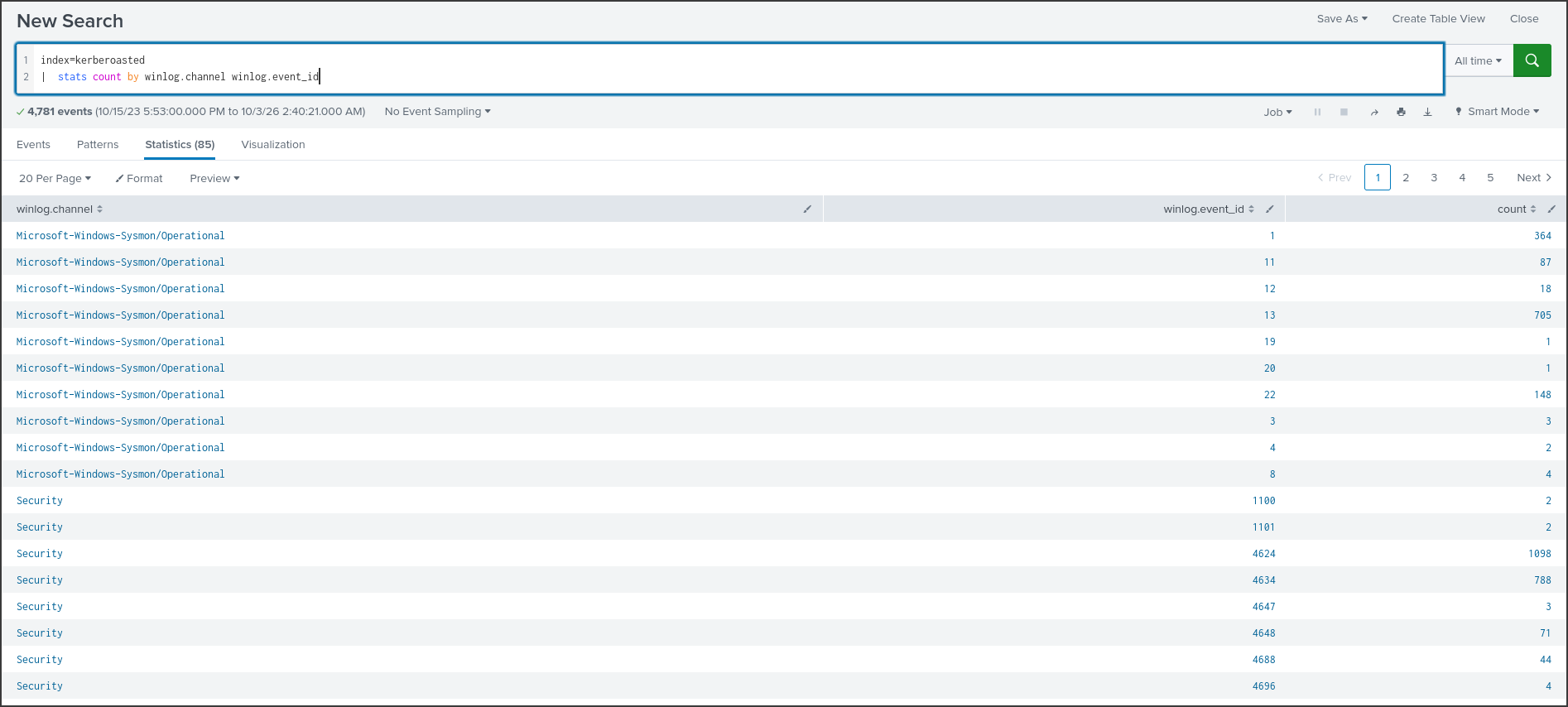
There are 4,781 events, all coming from one machine, DC01. The logs were sent by Winlogbeat in JSON format, so the fields are in the format winlog.event_id and winlog.event_data.Field_Name. The two main sources are Windows Security log and Sysmon. Sysmon is a free Microsoft tool that records detailed processes, files, registry, and WMI activity. The Event IDs that will be used in the exercise:
- 4769: Domain controller issued a Kerberos service ticket, belongs to the Security log.
- 4624: Successful logon, along with logon type and source IP.
- 7045: A new service was installed, belongs to the System log.
- Sysmon 1, 13, 19, 20, 21: Process creation, registry value written, and three events regarding WMI subscriptions.
Before answering the questions, we need to understand what Kerberoasting is. In Active Directory, each service like SQL Server or file share runs under a service account and is assigned a name called SPN (Service Principal Name). Any user in the domain can request a service ticket for that SPN from the domain controller. Most tickets are encrypted using the service account’s password. The attacker requests a ticket, takes it back to their machine, and attempts to crack the password offline without needing to touch the network further. If the service account has a weak password, they immediately get it.
Q1: To mitigate Kerberoasting attacks effectively, we need to strengthen the encryption Kerberos protocol uses. What encryption type is currently in use within the network?
Every time the domain controller issues a service ticket, it logs Event 4769, where the TicketEncryptionType field indicates the algorithm used to encrypt the ticket. I grouped these events by encryption type, service name, and the account requesting the ticket.
1
2
index=kerberoasted winlog.event_id=4769
| stats count by winlog.event_data.TicketEncryptionType winlog.event_data.ServiceName winlog.event_data.TargetUserName
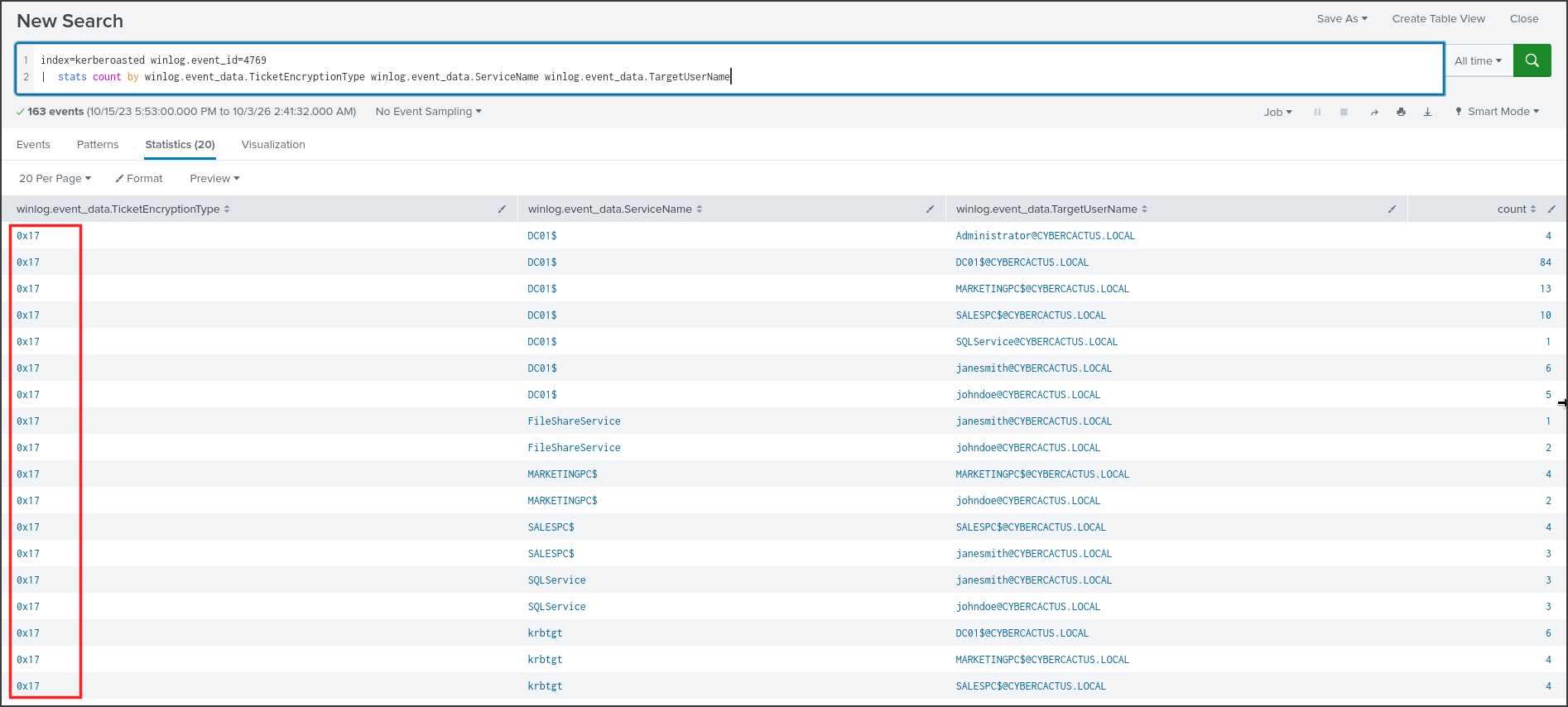
All 163 tickets have the encryption type 0x17. According to Microsoft’s documentation, 0x17 is RC4-HMAC, while AES uses 0x11 and 0x12. RC4-HMAC directly uses the NT hash of the password as the key and has no salt, making offline password cracking on RC4 tickets much faster compared to AES. This is exactly what a Kerberoasting attacker wants, and it’s the reason the question suggests upgrading the algorithm.
The table also reveals two application services: SQLService and FileShareService. Names ending with a $ are machine accounts, and krbtgt is the domain’s own ticket-granting account. Two regular users, johndoe and janesmith, both requested tickets for both services, so for Q2, I need to look closer at the timing.
Answer: RC4-HMAC
Q2: What is the username of the account that sequentially requested Ticket Granting Service (TGS) for two distinct application services within a short timeframe?
Since both johndoe and janesmith requested tickets for the two services, I filtered specifically for the two application services and sorted by time, adding the source IP to see where each request came from.
1
2
3
index=kerberoasted winlog.event_id=4769 winlog.event_data.ServiceName IN ("SQLService","FileShareService")
| table @timestamp winlog.event_data.TargetUserName winlog.event_data.ServiceName winlog.event_data.IpAddress winlog.event_data.TicketEncryptionType
| sort @timestamp
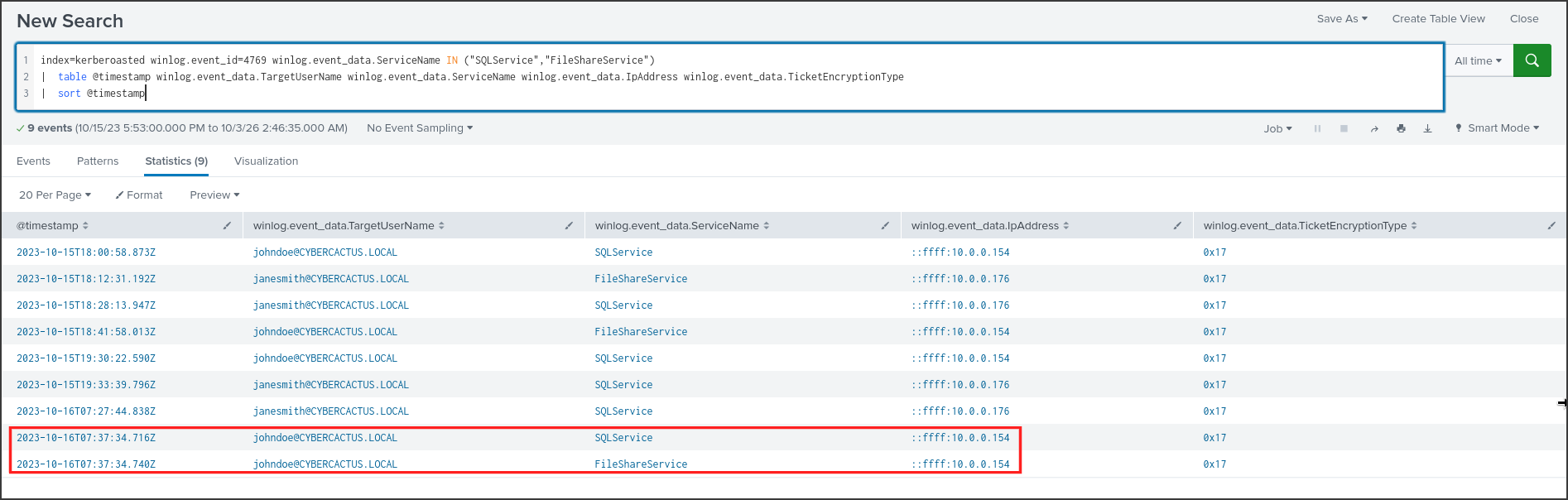
The requests on October 15 are spaced tens of minutes apart, like a human normally opening an application. The last two rows are different: johndoe requested a ticket for SQLService at 07:37:34.716 and for FileShareService at 07:37:34.740 on 2023-10-16, separated by only 24 milliseconds, both from 10.0.0.154. A human doesn’t open two applications that fast. This is a sign of an automated Kerberoasting tool: it enumerates all accounts with an SPN and then requests a ticket for each one consecutively. The answer also has exactly 7 characters.
Note: janesmith always comes from 10.0.0.176, while all requests from johndoe come from 10.0.0.154. Keep this IP in mind, as it will come back in Q4.
Answer: johndoe
Q3: We must delve deeper into the logs to pinpoint any compromised service accounts for a comprehensive investigation into potential successful kerberoasting attack attempts. Can you provide the account name of the compromised service account?
Requesting a ticket is just the first step. If the attacker successfully cracks the password, the next step is to use that service account to log in. So, I looked for successful logon events, Event 4624, for SQLService, one of the two accounts that had their tickets requested.
1
2
3
index=kerberoasted winlog.event_id=4624 winlog.event_data.TargetUserName=SQLService
| table @timestamp winlog.event_data.TargetUserName winlog.event_data.LogonType winlog.event_data.IpAddress winlog.event_data.WorkstationName
| sort @timestamp
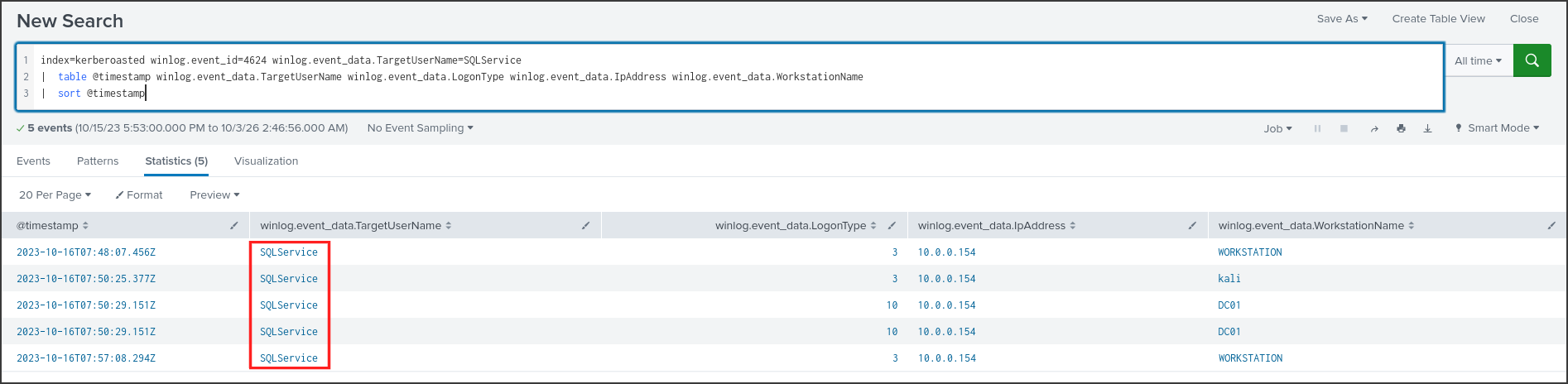
Only about 10 minutes after the ticket requests in Q2, SQLService began logging into DC01: at 07:48:07, 07:50:25, 07:50:29, and 07:57:08. LogonType indicates how the login was performed. Type 3 is a network logon, such as accessing SMB, while type 10 is an interactive logon via Remote Desktop. A service account running SQL has no reason to interactively log into the domain controller, so its password was almost certainly cracked. I didn’t see any logons for FileShareService, meaning its password might have been strong enough to resist cracking.
Answer: SQLService
Q4: To track the attacker’s entry point, we need to identify the machine initially compromised by the attacker. What is the machine’s IP address?
Staying with the previous results, I now look at the source IP and WorkstationName columns.
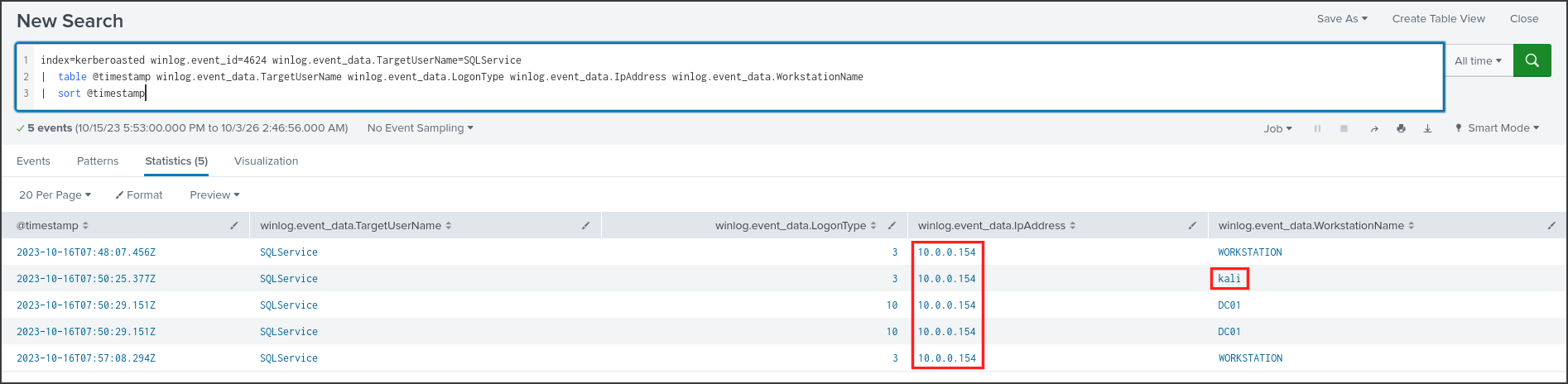
All five logons came from 10.0.0.154, which is the exact same IP that requested the tickets using the johndoe account in Q2. In the logon at 07:50:25, the WorkstationName field recorded kali. Kali Linux is an operating system specifically used for penetration testing and comes pre-installed with tools like Impacket. Thus, the sequence of events is quite clear: machine 10.0.0.154 was compromised, the attacker used johndoe’s credentials to perform Kerberoasting, cracked the password for SQLService, and then used it to access DC01.
Answer: 10.0.0.154
Q5: To understand the attacker’s actions following the login with the compromised service account, can you specify the service name installed on the Domain Controller (DC)?
The first network logon for SQLService was at 07:48:07. A common method to execute commands remotely via SMB is to install a temporary service on the target machine, and Windows logs this as Event 7045 in the System log. I listed these events.
1
2
index=kerberoasted winlog.event_id=7045
| table @timestamp winlog.event_data.ServiceName winlog.event_data.ImagePath winlog.event_data.AccountName
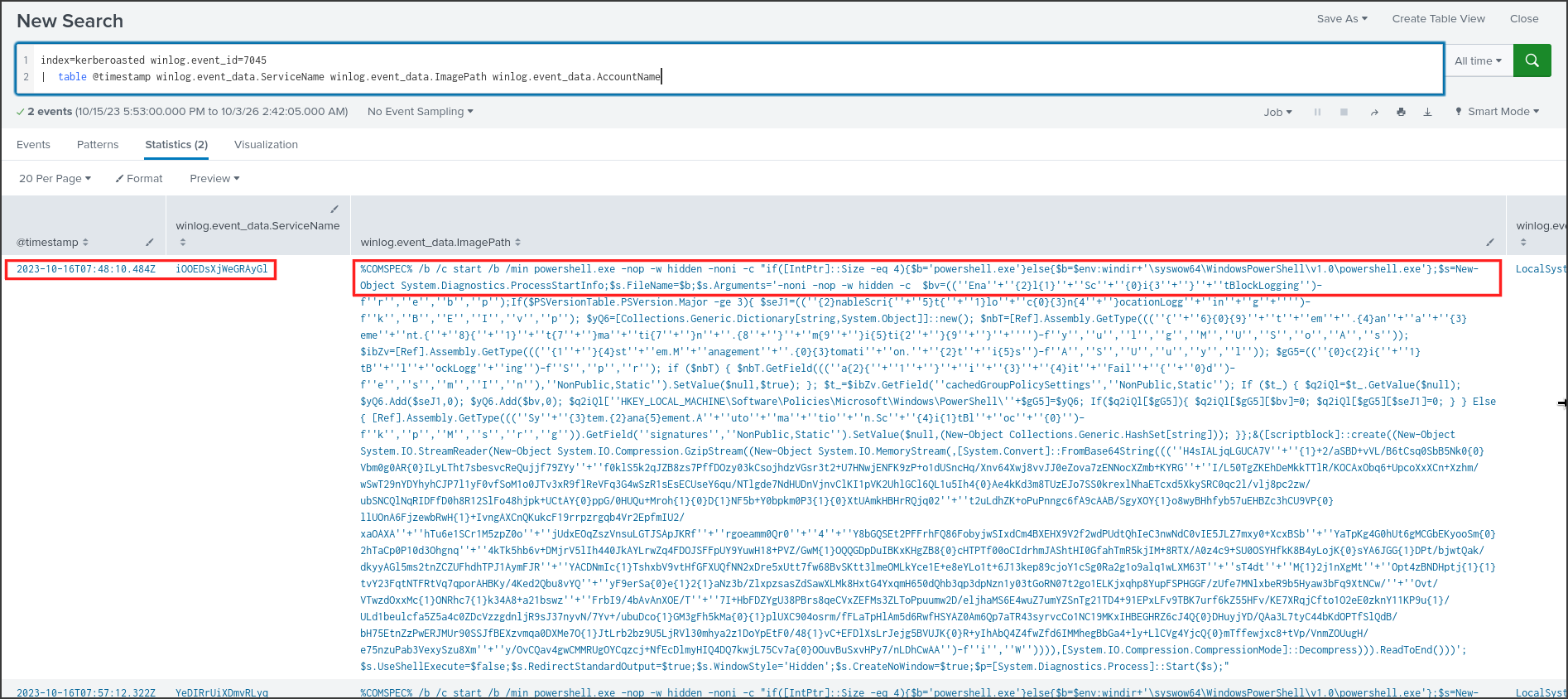
Just 3 seconds after SQLService logged in, at 07:48:10, a service named iOOEDsXjWeGRAyGl was installed, running under the LocalSystem account. The name is 16 random characters and does not resemble any legitimate service. Its executable path is not an exe file but an entire PowerShell command:
- %COMSPEC% /b /c start /b /min powershell.exe -nop -w hidden -noni: Opens a hidden PowerShell window without loading a profile and running non-interactively.
- if([IntPtr]::Size -eq 4): Checks whether PowerShell is running in 32-bit or 64-bit to ensure the 32-bit version in SysWOW64 is always called.
- The middle part pieces together strings like ‘Ena’+’bleScri’… to disable PowerShell’s ScriptBlockLogging, which stops the mechanism from logging the contents of executed scripts.
- FromBase64String and GzipStream: Decompresses an embedded payload and executes it directly in memory.
The random service name combined with this command structure looks very much like the psexec_psh module from Metasploit, though that’s just my assessment based on the command format, as the logs don’t explicitly name the tool. At 07:57:12, there was a second service, YeDIRrUiXDmvRLyq, with the same format, installed right after the fourth network logon of SQLService. The answer mask starts with the letter ‘i’ and is 16 characters long, which perfectly matches the first service.
Answer: iOOEDsXjWeGRAyGl
Q6: To grasp the extent of the attacker’s intentions, What’s the complete registry key path where the attacker modified the value to enable Remote Desktop Protocol (RDP)?
Windows turns Remote Desktop on or off based on the fDenyTSConnections registry value. A value of 1 means RDP connections are denied, while a value of 0 means they are allowed. Sysmon logs every time a registry value is set with Event 13, so I searched for this value name.
1
2
index=kerberoasted winlog.event_id=13 "fDenyTSConnections"
| table @timestamp winlog.event_data.Image winlog.event_data.TargetObject winlog.event_data.Details

At 07:48:38, less than half a minute after the service in Q5 ran, reg.exe in SysWOW64 set HKLM\System\CurrentControlSet\Control\Terminal Server\fDenyTSConnections to DWORD 0, enabling RDP on DC01. I wanted to know who executed this command, so I looked for Sysmon Event 1 for reg.exe.
1
2
index=kerberoasted winlog.event_id=1 winlog.event_data.Image="*reg.exe"
| table @timestamp winlog.event_data.User winlog.event_data.CommandLine winlog.event_data.ParentImage

The full command is reg add “hklm\system\currentcontrolset\control\terminal server” /f /v fDenyTSConnections /t REG_DWORD /d 0, running under NT AUTHORITY\SYSTEM with the parent process being C:\Windows\SysWOW64\cmd.exe. The SYSTEM privileges and the 32-bit cmd.exe perfectly match the service in Q5, which ran as LocalSystem and intentionally spawned a 32-bit PowerShell. The other two rows are routine softwareinventorylogging queries from Windows and are unrelated.
Answer: HKLM\System\CurrentControlSet\Control\Terminal Server\fDenyTSConnections
Q7: To create a comprehensive timeline of the attack, what is the UTC timestamp of the first recorded Remote Desktop Protocol (RDP) login event?
RDP was just enabled, so the next logical step for the attacker was to log in via the graphical interface. In Q3, I saw that SQLService had LogonType 10, but to be sure it was the very first RDP login across the entire log, I searched for all Event 4624 with LogonType 10 for any account.
1
2
3
index=kerberoasted winlog.event_id=4624 winlog.event_data.LogonType=10
| table @timestamp winlog.event_data.TargetUserName winlog.event_data.LogonType winlog.event_data.IpAddress
| sort @timestamp
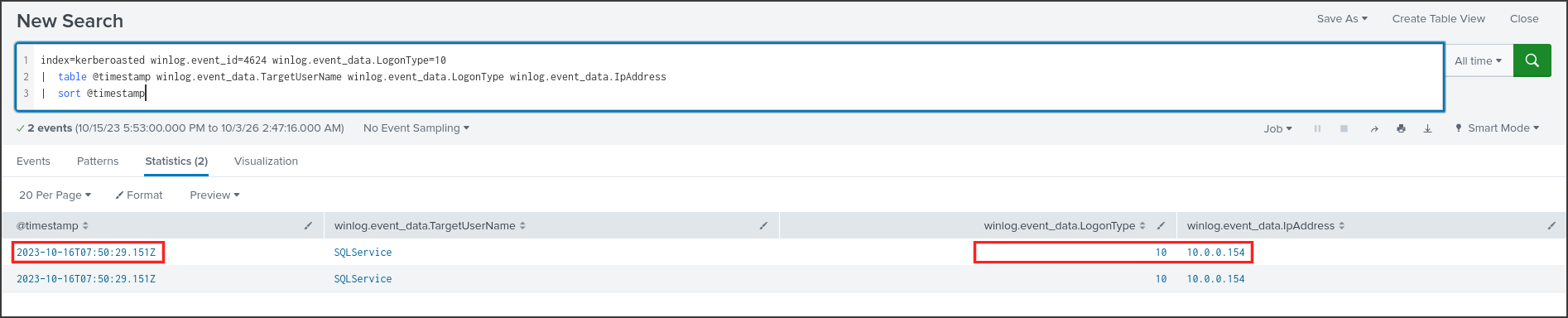
The entire log only contains two RDP events, both occurring at 2023-10-16 07:50:29 UTC, and both are for SQLService from 10.0.0.154. Both events have the exact same timestamp down to the millisecond, so I consider this to be a single logon instance. It happened less than two minutes after RDP was enabled in Q6. The answer format only requires the timestamp down to the minute.
Answer: 2023-10-16 07:50
Q8: To unravel the persistence mechanism employed by the attacker, what is the name of the WMI event consumer responsible for maintaining persistence?
WMI is a built-in management infrastructure in Windows. A WMI event subscription consists of three parts: a filter that describes the event to wait for, a consumer that dictates what to do when the event occurs, and a binding that links the two together. Subscriptions are stored in the WMI repository and persist across reboots, making this a fairly stealthy persistence mechanism. Sysmon records these three components with Event IDs 19, 20, and 21.
1
2
index=kerberoasted winlog.event_id IN (19,20,21)
| table @timestamp winlog.event_id winlog.event_data.Operation winlog.event_data.Name winlog.event_data.Query winlog.event_data.Destination winlog.event_data.Consumer winlog.event_data.Filter
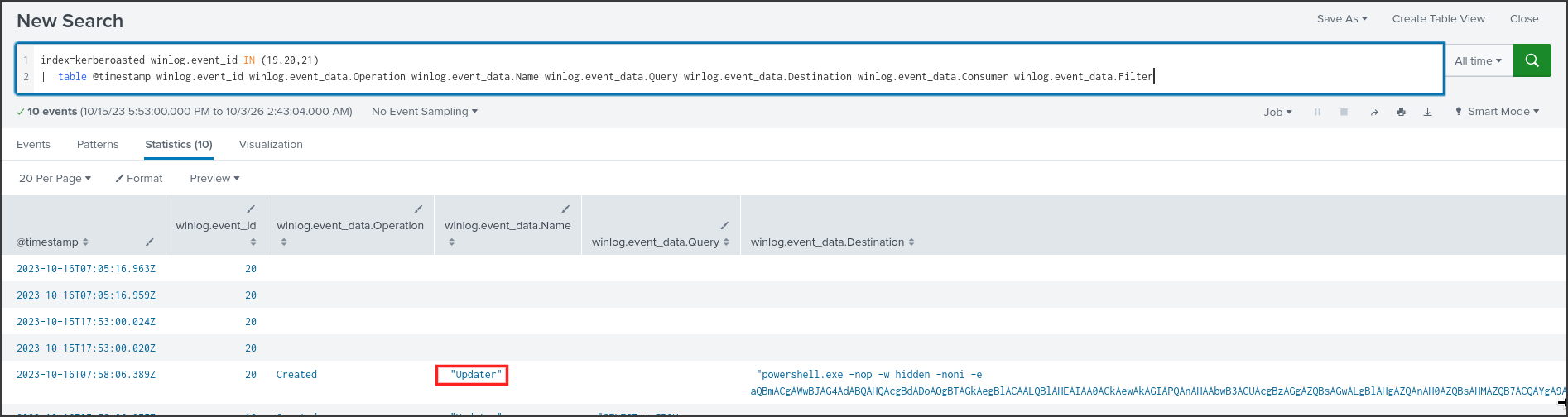
The first four Event 20 entries lack a name and operation, and they occurred before any attacker activity, so I ignored them. The notable entry is a Created operation at 07:58:06 with the name Updater, an intentionally innocuous-sounding name. Its Destination is powershell.exe -nop -w hidden -noni -e followed by a long Base64 string. The -e parameter means the command is Base64 encoded as UTF-16LE. I decoded the first part of the string and got if([IntPtr]::Size -eq 4){$b=’powershell.exe’}else{$b=$env:windir+’\syswow64\WindowsPowerShell\v1.0…, matching the launcher format of the service in Q5. This means every time the filter triggers, this consumer will execute the attacker’s payload again.
Answer: Updater
Q9: Which class does the WMI event subscription filter target in the WMI Event Subscription you’ve identified?
The consumer is only half of the story; we have to look at the filter to know when it gets triggered. I filtered specifically for Event 19.
1
2
index=kerberoasted winlog.event_id=19
| table @timestamp winlog.event_data.Operation winlog.event_data.Name winlog.event_data.EventNamespace winlog.event_data.Query

The filter is also named Updater, located in the root/cimv2 namespace, and has the following WQL query:
1
SELECT * FROM __InstanceCreationEvent WITHIN 60 WHERE TargetInstance ISA 'Win32_NTLogEvent' AND Targetinstance.EventCode = '4625' And Targetinstance.Message Like '%johndoe%'
Breaking it down: __InstanceCreationEvent WITHIN 60 means that every 60 seconds, WMI checks to see if any new objects were created. Win32_NTLogEvent is the WMI class representing individual entries in the Windows Event Log. The remaining condition looks for event 4625 (failed logon) that contains the string johndoe. This is a very clever backdoor: simply by attempting to log into DC01 with the johndoe account and a wrong password, Windows logs an event 4625, the filter catches it, and the Updater consumer executes the payload with SYSTEM privileges. The attacker can return at any time without needing the correct password.
Answer: Win32_NTLogEvent
Conclusion
By hunting through the Splunk logs via the Windows Security log, System log, and Sysmon of the domain controller DC01, I was able to reconstruct a Kerberoasting attack that unfolded over about 20 minutes on the morning of 2023-10-16. From machine 10.0.0.154, where one logon recorded the hostname kali, the attacker used the johndoe account to request service tickets for SQLService and FileShareService, just 24 milliseconds apart at 07:37:34. The domain was still issuing tickets using RC4-HMAC, making offline password cracking trivial, and the password for SQLService was successfully compromised.
At 07:48:07, SQLService logged into DC01 over the network, and three seconds later, a randomly named service iOOEDsXjWeGRAyGl was installed to run hidden PowerShell with SYSTEM privileges. From there, the attacker set fDenyTSConnections to 0 to enable RDP at 07:48:38, then logged into DC01 via RDP using SQLService at 07:50:29. At 07:57, they installed a second service, YeDIRrUiXDmvRLyq, and at 07:58:06, created a WMI subscription named Updater with a filter on the Win32_NTLogEvent class. This mechanism re-executes the payload whenever there is a failed logon attempt for johndoe. This backdoor allows them to regain SYSTEM-level access to the domain controller at any time.
Summary
| Item | Details |
|---|---|
| Incident Type | Kerberoasting leading to service account compromise, remote code execution, and backdoor installation on the domain controller |
| Severity | Critical: Attacker executed code with SYSTEM privileges on DC01 and established persistence via WMI |
| Timeline | 2023-10-16 07:37:34 UTC to 07:58:06 UTC |
| Attack Source | 10.0.0.154, internal machine, hostname recorded in logs as kali |
| Affected Systems | DC01, the domain controller of CYBERCACTUS.LOCAL |
| Compromised Accounts | CYBERCACTUS\SQLService password cracked, CYBERCACTUS\johndoe used from the attacking machine |
| No Known Impact | FileShareService had a ticket requested but no logins observed; janesmith from 10.0.0.176 exhibited normal behavior |
Timeline
All times are UTC on 2023-10-16, extracted directly from the logs presented in the previous questions.
| Time | Host | Event | Log Source |
|---|---|---|---|
| 07:37:34.716 | DC01 | johndoe from 10.0.0.154 requested ticket for SQLService, RC4-HMAC | Security 4769 |
| 07:37:34.740 | DC01 | johndoe from 10.0.0.154 requested ticket for FileShareService, RC4-HMAC | Security 4769 |
| 07:48:07 | DC01 | SQLService logged on via network from 10.0.0.154 | Security 4624 type 3 |
| 07:48:10 | DC01 | Installed service iOOEDsXjWeGRAyGl, hidden PowerShell, LocalSystem | System 7045 |
| 07:48:38 | DC01 | reg add set fDenyTSConnections = 0, enabled RDP, under SYSTEM | Sysmon 1, 13 |
| 07:50:25 | DC01 | SQLService network logon, WorkstationName kali | Security 4624 type 3 |
| 07:50:29 | DC01 | SQLService RDP logon from 10.0.0.154 | Security 4624 type 10 |
| 07:57:08 | DC01 | SQLService network logon from 10.0.0.154 | Security 4624 type 3 |
| 07:57:12 | DC01 | Installed service YeDIRrUiXDmvRLyq, same command format | System 7045 |
| 07:58:06 | DC01 | Created WMI filter and consumer Updater | Sysmon 19, 20 |
Indicators of Compromise
| Type | Value | Notes |
|---|---|---|
| IPv4 | 10.0.0.154 | Attacking machine on the internal network, hostname kali |
| Account | CYBERCACTUS\SQLService | Password cracked, used for network and RDP logins to DC01 |
| Account | CYBERCACTUS\johndoe | Used to request Kerberoasting tickets, also the trigger keyword for the WMI filter |
| Service | iOOEDsXjWeGRAyGl | DC01, hidden PowerShell executing a compressed Base64 payload |
| Service | YeDIRrUiXDmvRLyq | DC01, same command format |
| Registry | HKLM\System\CurrentControlSet\Control\Terminal Server\fDenyTSConnections = 0 | DC01, RDP was enabled |
| WMI Filter | Updater, root/cimv2 | Win32_NTLogEvent, EventCode 4625, Message contains johndoe |
| WMI Consumer | Updater | powershell.exe -nop -w hidden -noni -e with Base64 payload |
MITRE ATT&CK Mapping
| Tactic | Technique | Evidence |
|---|---|---|
| Discovery | T1087.002 Domain Account, highly likely | Tool enumerated accounts with SPNs before making consecutive ticket requests |
| Credential Access | T1558.003 Kerberoasting | johndoe requested RC4 tickets for SQLService and FileShareService 24 ms apart |
| Initial Access, Persistence | T1078.002 Domain Accounts | SQLService logged into DC01 with cracked password |
| Execution | T1569.002 Service Execution | Services iOOEDsXjWeGRAyGl and YeDIRrUiXDmvRLyq |
| Execution | T1059.001 PowerShell | Hidden PowerShell launcher with Base64 and Gzip payload |
| Defense Evasion | T1562.001 Disable or Modify Tools | Command to disable ScriptBlockLogging |
| Defense Evasion | T1112 Modify Registry | fDenyTSConnections set to 0 |
| Lateral Movement | T1021.001 Remote Desktop Protocol | SQLService LogonType 10 from 10.0.0.154 |
| Persistence | T1546.003 WMI Event Subscription | Filter and consumer Updater |
Assessment and Recommendations
The confirmed scope includes the domain controller DC01 and two accounts: SQLService and johndoe. Because the attacker executed code with SYSTEM privileges on the domain controller, the entire domain must be considered compromised until proven otherwise. The logs are only from DC01, so it is still unknown how machine 10.0.0.154 was compromised, how johndoe’s credentials were breached, or what the PowerShell payload actually did after executing. Further collection of logs and memory from 10.0.0.154, as well as network traffic between it and DC01, is required.
Immediate Containment:
- Isolate machine 10.0.0.154 and block its connections to DC01.
- Disable and change the passwords for SQLService and johndoe; log out any open RDP sessions on DC01.
- Set fDenyTSConnections back to 1 or block RDP access to DC01 at the firewall, restricting it only to a dedicated management jump host.
Eradication:
- Delete the Updater WMI filter, consumer, and binding in root/subscription and root/cimv2; delete the services iOOEDsXjWeGRAyGl and YeDIRrUiXDmvRLyq after gathering evidence.
- Rotate the krbtgt password twice and reset all privileged account passwords, as SYSTEM access on the DC is sufficient to dump the entire domain’s hashes.
- Hunt across the entire domain for Sysmon 19, 20, 21 and Event 7045 where ImagePath contains
powershell -nop -w hidden.
Prevention:
- Disable RC4 for Kerberos and strictly enforce AES; set msDS-SupportedEncryptionTypes for service accounts to AES.
- Use long passwords (25+ characters) for service accounts, or preferably switch to group Managed Service Accounts (gMSA) so Windows rotates the passwords automatically.
- Alert when an account requests tickets for multiple SPNs within a short timeframe, or when a service account logs in interactively.
- Deny service accounts the right to log onto the domain controller; enable PowerShell Script Block Logging and alert when it is disabled.