Cyber Defenders - REvil - GOLD SOUTHFIELD Writeup
Category: Threat Hunting
Checkout the lab here: https://cyberdefenders.org/blueteam-ctf-challenges/revil-gold-southfield/
Description
You are a Threat Hunter working for a cybersecurity consulting firm. One of your clients has been recently affected by a ransomware attack that caused the encryption of multiple of their employees’ machines. The affected users have reported encountering a ransom note on their desktop and a changed desktop background. You are tasked with using Splunk SIEM containing Sysmon event logs of one of the encrypted machines to extract as much information as possible.
A SIEM is a system that aggregates logs from all machines in a company into a central location for analysts to search, eliminating the need to log into each machine individually. Splunk is a popular SIEM. The logs in this lab are generated by Sysmon. Sysmon is a free Microsoft tool that records Windows machine activity in much greater detail than the default logs. Each type of activity is assigned a code called an Event ID. For this lab, I only need to remember the following codes:
- Event ID 1: A process is created, including the full command line, parent process, and file hash.
- Event ID 11: A file is created, including the path and the process that created it.
- Event ID 13: A registry value is set.
- Event ID 3 and Event ID 22: A network connection and a DNS query, respectively.
I opened the lab’s Splunk, navigated to the Search & Reporting app, set the time picker on the right side of the search bar to All time, and ran the simplest search query:
1
index=revil
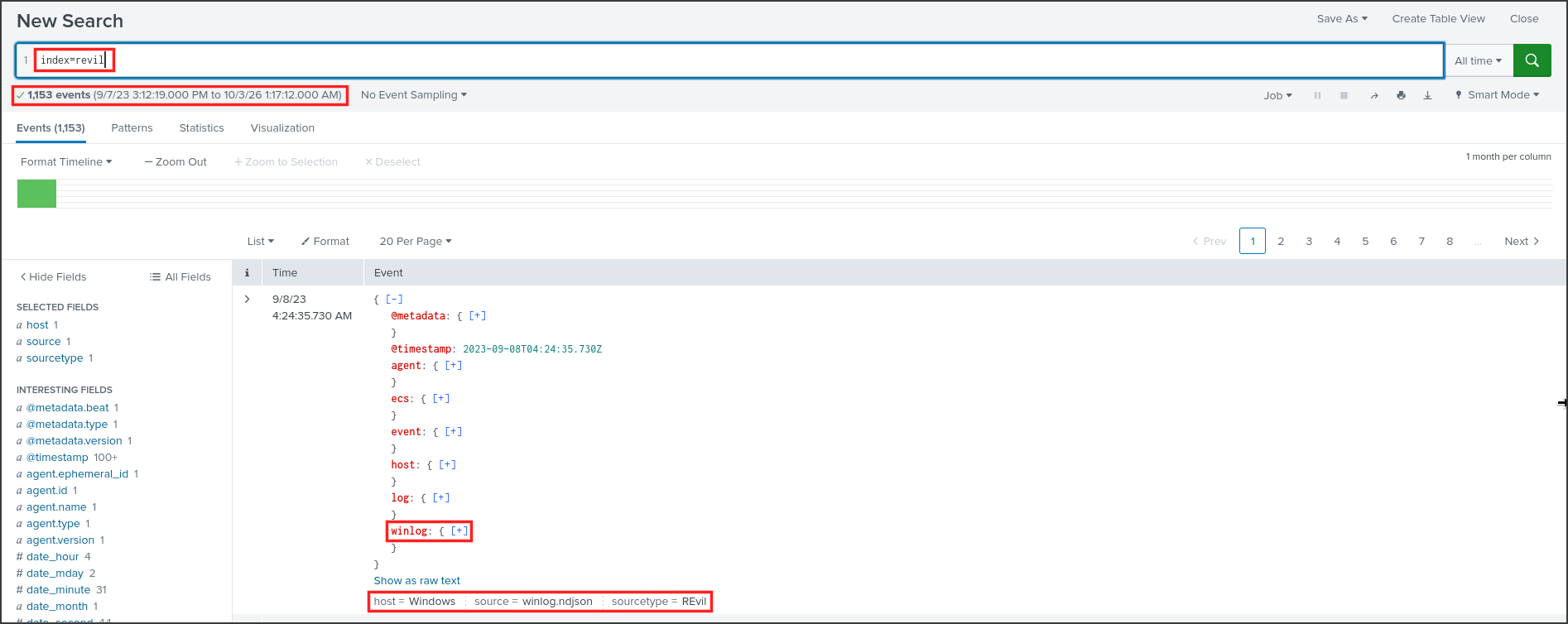
Splunk returned 1,153 events, all from a machine with host = Windows and source winlog.ndjson. Each event is a JSON document. The crucial part resides within the winlog key, and Splunk turns each key into a field searchable via dot notation, such as winlog.event_id or winlog.event_data.Image. The Image field contains the program’s path. Clicking the [+] next to winlog expands it to view the details inside.
Before hunting, I wanted to know what types of events were present. In Splunk, commands are chained together using the pipe | symbol: the left side finds events, and the right side processes the results. The stats count by X command groups events by the value of X and then counts each group.
1
2
index=revil
| stats count by winlog.event_id
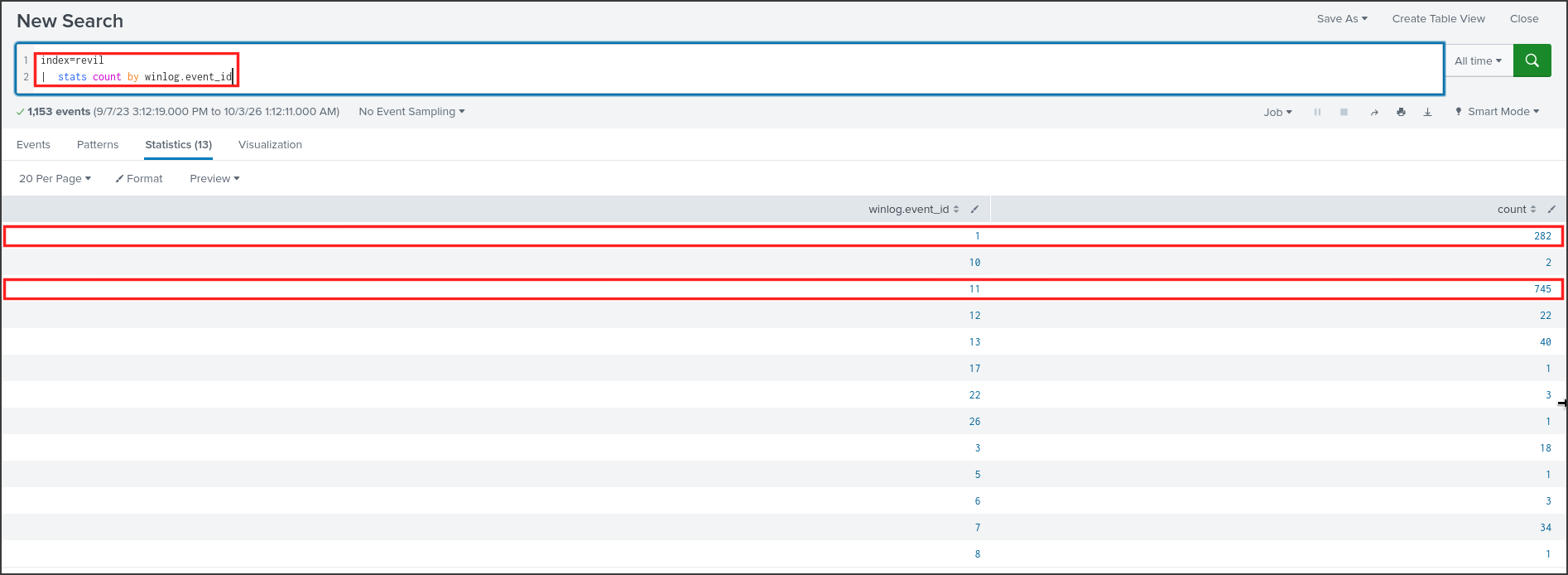
The majority of the data consisted of 745 file creation events with ID 11 and 282 process creation events with ID 1. Ransomware creates numerous files, such as ransom notes or encrypted files, and often spawns additional subprocesses, so these two Event IDs should answer almost all the questions.
Q1: To begin your investigation, can you identify the filename of the note that the ransomware left behind?
The user reported seeing the ransom note on the Desktop. A ransom note is almost always a text file dropped into numerous directories, so I searched for all .txt files created on the machine with Event ID 11. The asterisk * is a wildcard, so *.txt matches any name ending in .txt. The value is enclosed in quotes because it contains special characters.
1
2
index=revil winlog.event_id=11 winlog.event_data.TargetFilename="*.txt"
| stats count by winlog.event_data.TargetFilename
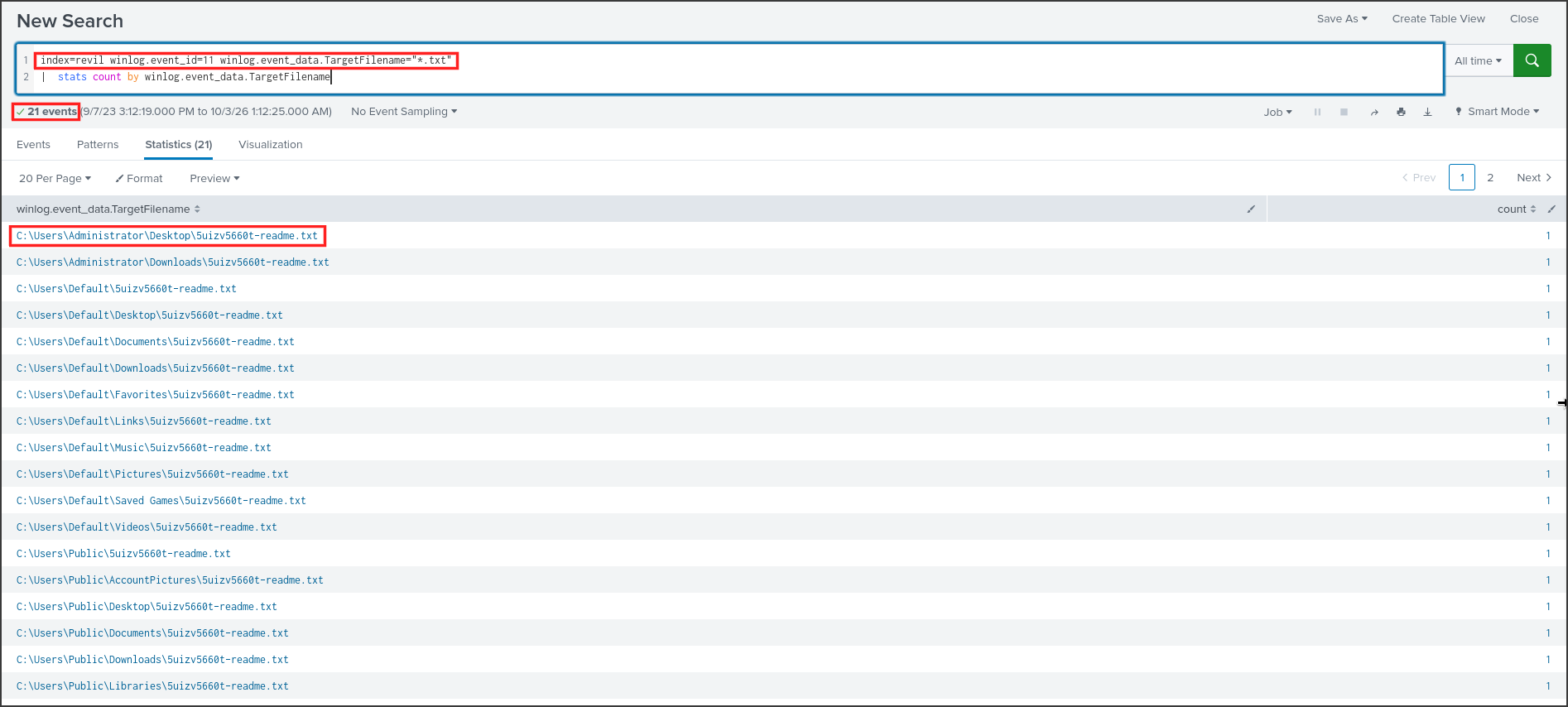
Only 21 events matched, and they were all the same filename located in various directories: Desktop, Downloads, Documents, Music, and Pictures across the Administrator, Default, and Public profiles. The first line is C:\Users\Administrator\Desktop\5uizv5660t-readme.txt, exactly where the user saw it. A random string followed by -readme.txt is a familiar naming convention for REvil, a ransomware family also known as Sodinokibi. The random part is the extension the ransomware appends to encrypted files, and it is uniquely generated for each infection. This detail will be relevant again in Q6.
Answer: 5uizv5660t-readme.txt
Q2: After identifying the ransom note, the next step is to pinpoint the source. What’s the process ID of the ransomware that’s likely involved
Each Sysmon file creation event also records the process that created the file: the program’s path in the Image field and the process ID in the ProcessId field, commonly referred to as PID. I kept the previous filter, specified the exact ransom note name, and then grouped by those two fields.
1
2
index=revil winlog.event_id=11 winlog.event_data.TargetFilename="*5uizv5660t-readme.txt"
| stats count by winlog.event_data.ProcessId winlog.event_data.Image

There was only one row: all 21 files were written by PID 5348, a program named facebook assistant.exe located in the Administrator’s Downloads directory. Normal applications do not write readme files to every profile on the disk, so this is the ransomware. Note: Windows reuses PIDs after a process terminates, so in a real investigation, I always examine the PID alongside the Image path or ProcessGuid; I never rely on the PID alone.
Answer: 5348
Q3: Having determined the ransomware’s process ID, the next logical step is to locate its origin. Where can we find the ransomware’s executable file?
The path was already present in the previous result, but I wanted to see everything this file did in chronological order. The easiest way is to search by the filename, use table to select the necessary columns, and sort to bring the oldest events to the top.
1
2
3
index=revil "facebook assistant"
| table @timestamp winlog.event_id winlog.event_data.Image winlog.event_data.TargetFilename winlog.event_data.ParentImage
| sort @timestamp
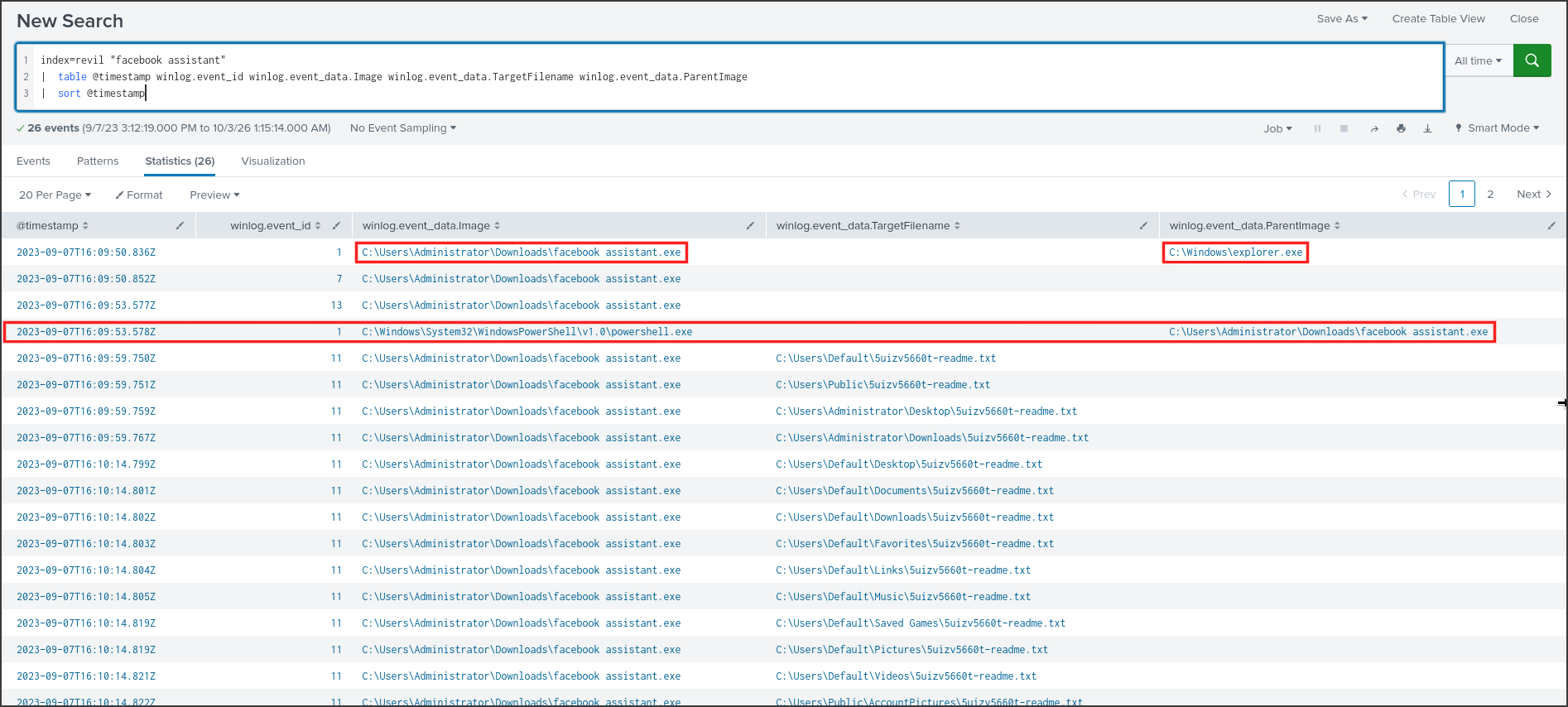
Reading from top to bottom, this is the timeline in seconds, in UTC time on 2023-09-07:
- 16:09:50: Event ID 1, C:\Users\Administrator\Downloads\facebook assistant.exe is launched. The parent process is C:\Windows\explorer.exe, which is the Windows Desktop interface, indicating someone double-clicked the file. The filename was chosen to look like a harmless Facebook tool.
- 16:09:53: Another Event ID 1, this time the executed program is powershell.exe, and its parent is the ransomware. I analyzed this part in Q4.
- 16:09:59 to 16:10:14: Event ID 11 rows, the ransom note is being dropped.
The executable file was located in the Administrator’s Downloads directory, strongly suggesting it was downloaded from the Internet via a browser or an email attachment, and then manually executed by the user.
Answer: C:\Users\Administrator\Downloads\facebook assistant.exe
Q4: Now that you’ve pinpointed the ransomware’s executable location, let’s dig deeper. It’s a common tactic for ransomware to disrupt system recovery methods. Can you identify the command that was used for this purpose?
Windows maintains volume snapshots called Volume Shadow Copies, used to restore previous versions of files. If they remain intact, the victim can recover their data without paying, so almost all ransomware families delete them first. MITRE ATT&CK refers to this technique as T1490 Inhibit System Recovery. To see what the ransomware executed, I searched for processes whose parent process was PID 5348.
1
2
index=revil winlog.event_id=1 winlog.event_data.ParentProcessId=5348
| table @timestamp winlog.event_data.ProcessId winlog.event_data.Image winlog.event_data.CommandLine

There was only one child process, powershell.exe with PID 1860, executed with powershell -e followed by a very long string. -e is shorthand for -EncodedCommand: PowerShell accepts a script encoded in Base64, meaning the data is rewritten using only letters, numbers, plus signs, and slashes. Attackers use this method to obscure the command from human readers and simple detection rules. PowerShell also requires the text to be in UTF-16LE format, where each character occupies two bytes and the second byte of a Latin character is always 0. Because of this, the Base64 string contains many As.
To decode it, I copied the Base64 string into CyberChef, a browser-based tool specialized in data transformation and decoding. I added the From Base64 operation, followed by Decode text with UTF-16LE (1200) encoding.
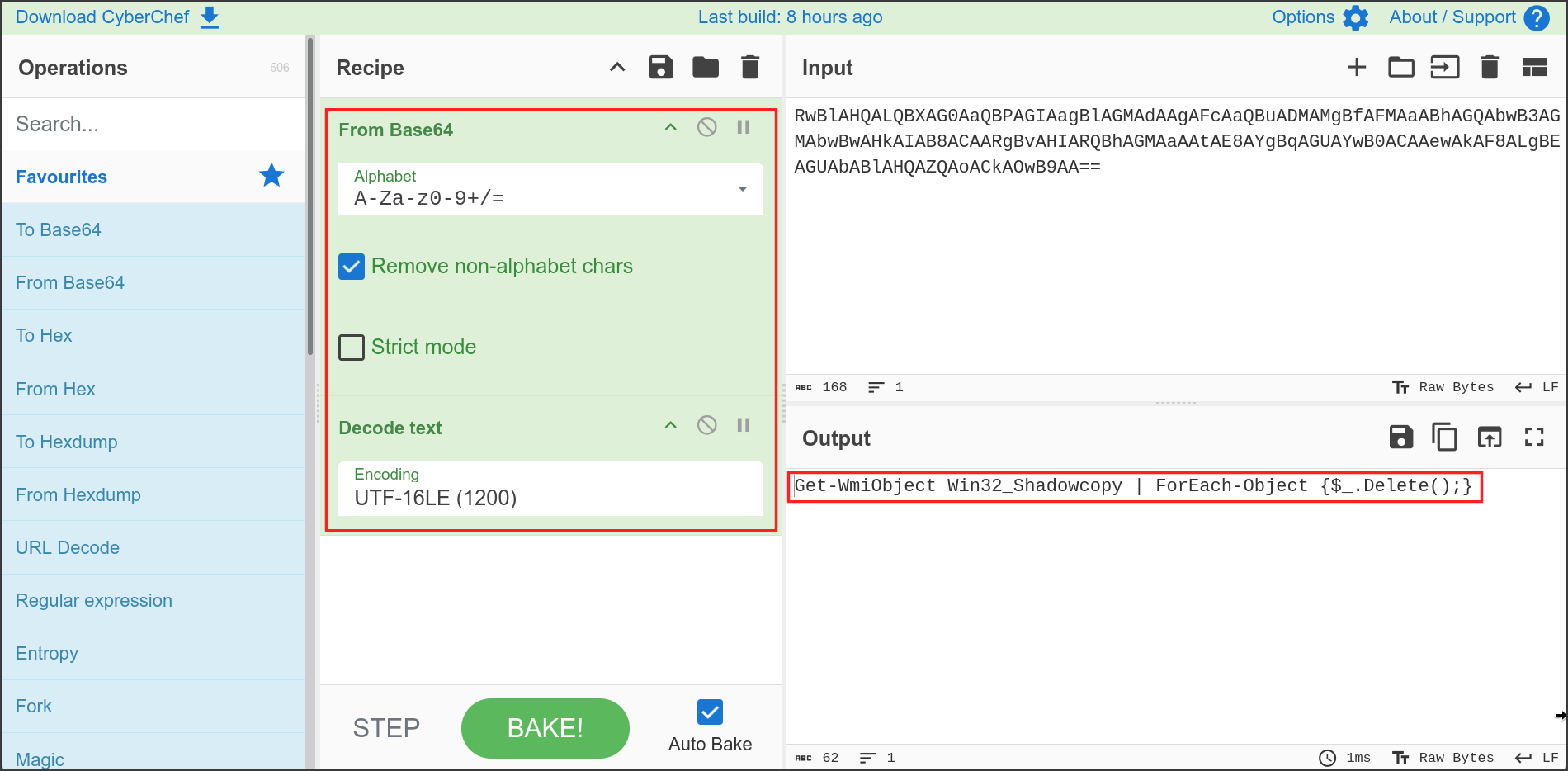
The result was a one-line script. Get-WmiObject Win32Shadowcopy** retrieves a list of all shadow copies via WMI, the Windows management interface. The pipe | passes each shadow copy to **ForEach-Object**, and **$.Delete() deletes the current shadow copy being processed. In short, this command finds all backups on the machine and deletes them all. It ran at 16:09:53, six seconds before the first ransom note, so the backups were destroyed before the encryption even started.
Answer: Get-WmiObject Win32_Shadowcopy | ForEach-Object {$_.Delete();}
Q5: As we trace the ransomware’s steps, a deeper verification is needed. Can you provide the sha256 hash of the ransomware’s executable to cross-check with known malicious signatures?
A hash is a value calculated from a file’s contents. With SHA256, the result is a 64-character string, and changing just a single byte of the file completely alters the string. Therefore, a hash is the best way to check if this file has been analyzed by someone else on threat intelligence platforms. Sysmon’s Event ID 1 stores the hashes of all launched programs in the Hashes field, formatted as SHA1=…,MD5=…,SHA256=…,IMPHASH=…. This field is long and gets truncated on the screen, so I used rex to extract the SHA256 value into a separate column. rex applies a regular expression to a field: here, it looks for the string SHA256= followed by exactly 64 hexadecimal characters, and then saves those characters into a new field named sha256.
1
2
3
index=revil winlog.event_id=1 winlog.event_data.Image="*facebook assistant.exe"
| rex field=winlog.event_data.Hashes "SHA256=(?<sha256>[A-F0-9]{64})"
| table winlog.event_data.Image sha256

The ransomware’s SHA256 hash is B8D7FB4488C0556385498271AB9FFFDF0EB38BB2A330265D9852E3A6288092AA. The same event also contained the MD5 hash 4D84641B65D8BB6C3EF03BF59434242D, which will appear again in the next question.
Answer: b8d7fb4488c0556385498271ab9fffdf0eb38bb2a330265d9852e3a6288092aa
Q6: One crucial piece remains: identifying the attacker’s communication channel. Can you leverage threat intelligence and known Indicators of Compromise (IoCs) to pinpoint the ransomware author’s onion domain?
The Sysmon logs did not show any network connections originating from the ransomware. I checked Event IDs 3 and 22 for PID 5348 and found nothing useful, and the content of the ransom note was not available in the logs. Therefore, the answer must come from threat intelligence, specifically from public sandboxes, where researchers execute malware and publish its behavior. I searched for the SHA256 hash from Q5 and found a report on the Recorded Future Triage sandbox: https://tria.ge/200624-pdt44nqn6x.
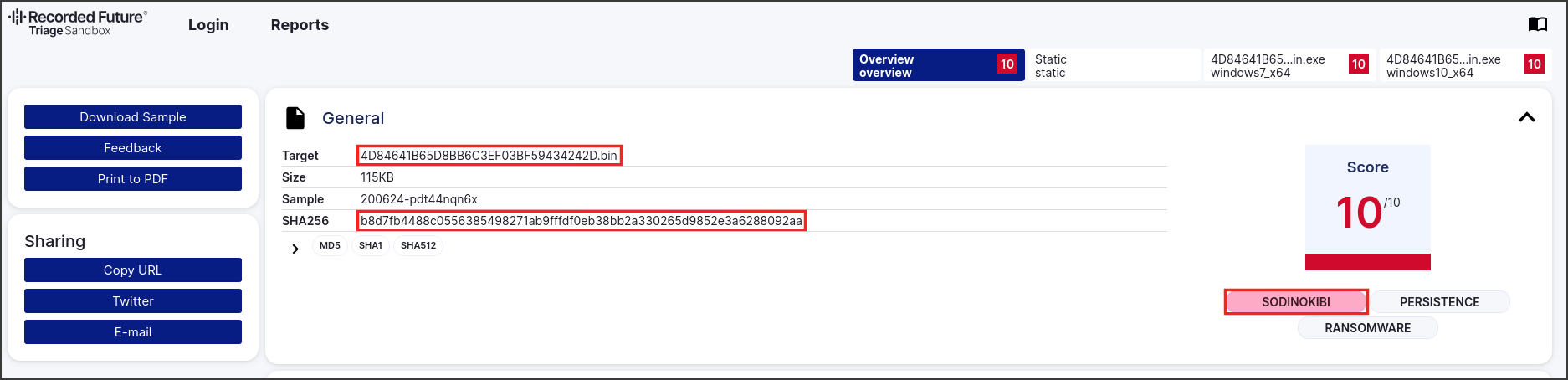
The SHA256 matched, and the uploaded file was even named with the MD5 hash 4D84641B65D8BB6C3EF03BF59434242D, matching the exact MD5 recorded by Sysmon. This is undoubtedly the exact same file. Triage scored it 10/10 and tagged it as SODINOKIBI, another name for REvil. Further down, Triage extracted the ransomware’s configuration and the ransom note’s content. I used Firefox’s Ctrl+F to search for .onion on the page.
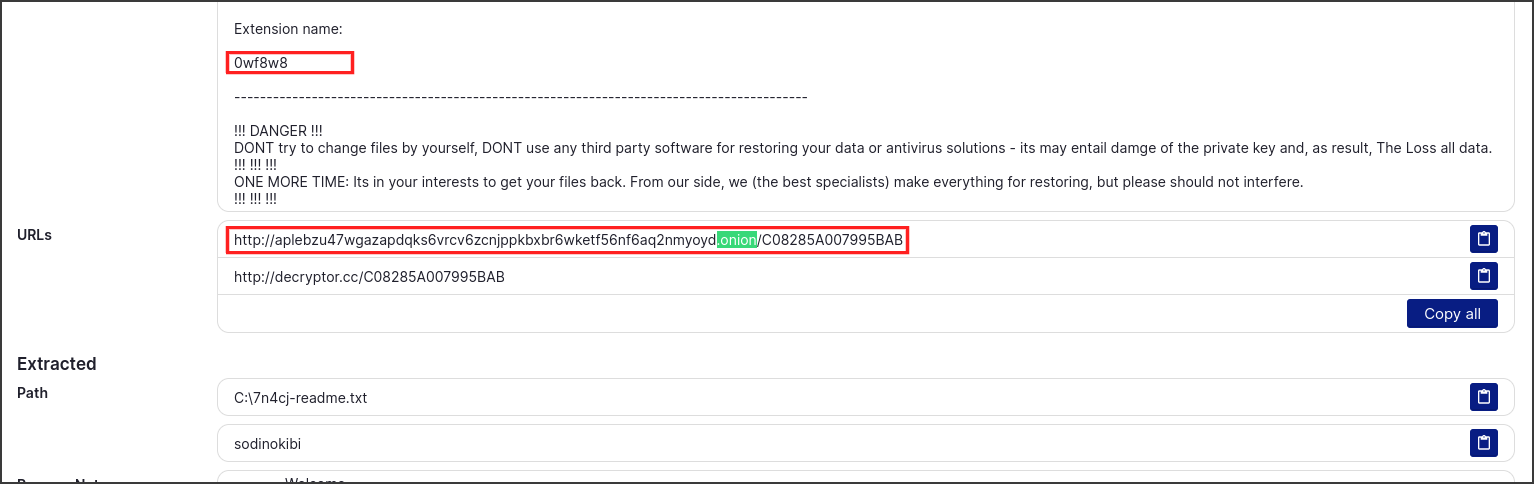
The ransom note instructed the victim to visit http://aplebzu47wgazapdqks6vrcv6zcnjppkbxbr6wketf56nf6aq2nmyoyd.onion/C08285A007995BAB. A .onion address can only be accessed via the Tor network, which hides the server’s real location, making it the preferred choice for ransomware groups for their payment portals and communication with victims. The part after the slash is the victim’s ID, but the question only requires the domain part.
The file extension in this sandbox run was 0wf8w8, another run in the same report produced 7n4cj, while the client’s machine got 5uizv5660t. It is the same file, but each execution generates a different extension, exactly as observed in Q1. The ransom note name varies per machine, while the hash and the onion domain remain constant, making them the appropriate IoCs to share with other teams.
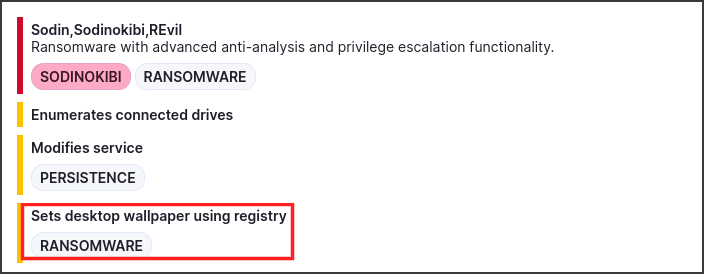
The same report listed the behavior Sets desktop wallpaper using registry, aligning with the user’s report that their desktop background was changed. The Sysmon configuration on this machine did not record that registry write, as searching for Event ID 13 with “Wallpaper” yielded no results. This is an instance where threat intelligence fills in the gaps left by internal logs.
Answer: aplebzu47wgazapdqks6vrcv6zcnjppkbxbr6wketf56nf6aq2nmyoyd.onion
Conclusion
By hunting through the Sysmon logs of an encrypted machine on Splunk, using just a few SPL queries for Event IDs 1 and 11, then decoding a command with CyberChef and cross-referencing the hash on the Triage sandbox, I successfully reconstructed the entire infection chain. At 16:09:50 UTC on 2023-09-07, the user double-clicked facebook assistant.exe in the Administrator’s Downloads directory. Its parent process was explorer.exe, and the REvil/Sodinokibi ransomware began running with PID 5348.
Three seconds later, the ransomware spawned powershell.exe -e with a Base64-encoded UTF-16LE command, which decoded to
Get-WmiObject Win32_Shadowcopy | ForEach-Object {$_.Delete();}, deleting all Volume Shadow Copies so the victim could not restore their files. From 16:09:59 to 16:10:14, it dropped the ransom note 5uizv5660t-readme.txt into 21 directories across the Administrator, Default, and Public profiles. According to the sandbox report, it also changed the desktop wallpaper via the registry.The file’s SHA256 hash was b8d7fb4488c0556385498271ab9fffdf0eb38bb2a330265d9852e3a6288092aa, matching a public Triage report tagged as Sodinokibi. The configuration extracted from that report pointed victims to the Tor payment portal aplebzu47wgazapdqks6vrcv6zcnjppkbxbr6wketf56nf6aq2nmyoyd.onion. This hash and onion domain are the key indicators to hunt for across the client’s other machines, along with any PowerShell process executing encoded commands spawned from the Downloads directory.