SOC HTB - Section 1: Incident Handling Process
Introduction
Incident Handling Definition & Scope
Common Terms:
- Event: is an action occurring in a system of network
- A user sending an email
- A mouse click
- A firewall allowing a connection request.
- Incident: is an event with a clear intent to cause harm that is performed against a computer system.
- A system crash
- Unauthorized data intrusion
- Natrural disasters, power failures
Incident Handling: is a clearly defined set of procedures for managing and responding to security incidents in a computer or network environments.
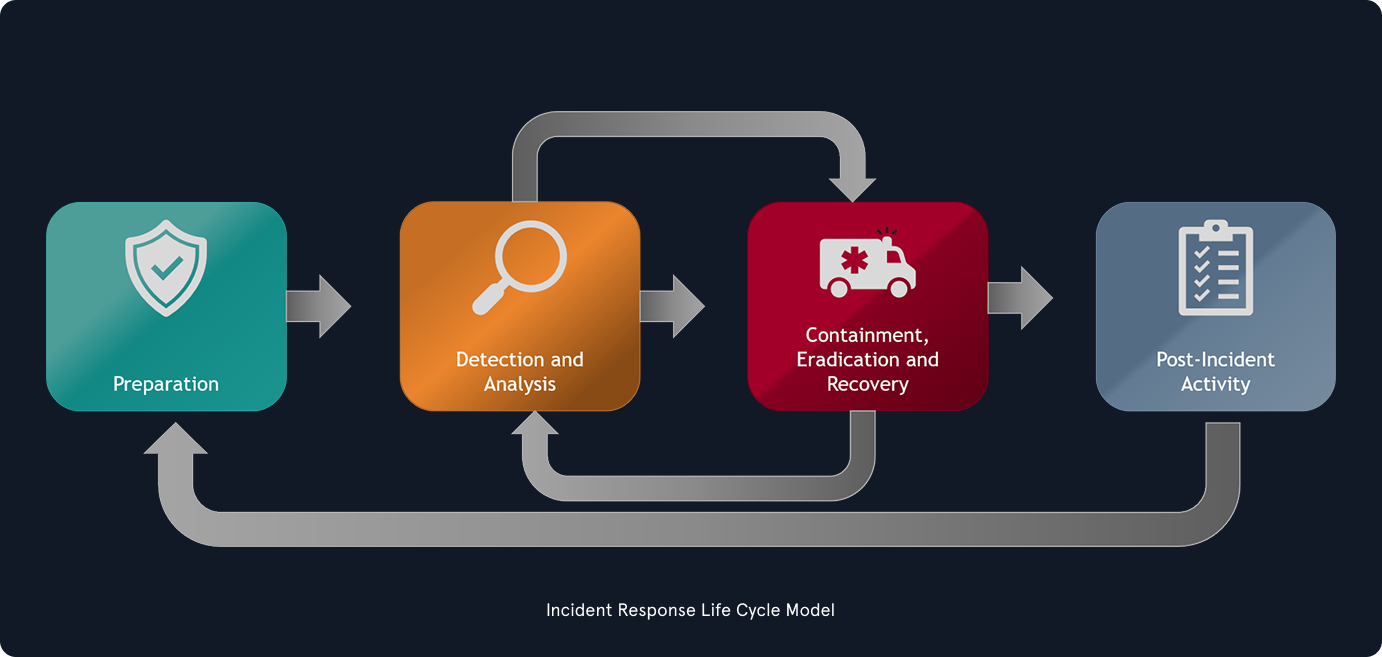
Incident Handling’s Value & Generic Notes
Different incidents will have different impacts on the organization. More severe incidents require immediate attention and dedicated resources, while lower-rated incidents may still need an initial investigation to confirm whether they are, in fact, IT security incidents.
incident response team ← incident manager (SOC manager, CISO/CIO, third-party “trusted” vendor)
One of the most widely used resources on incident handling is NIST’s Computer Security Incident Handling Guide.
Different Types of Real-World Incidents
Leaked Credential
- Password Leak
- Private Key Leak
Default / Weak Credentials
- Default/Factory Password
Outdated Software / Unpatched Systems
- Did not apply new patch
- Unpatch Windows systems
Rogue Employee / Insider Threat
- Bad intent employee → leak sensitive information
Phishing / Social Engineering
- Trick users into performing harmful action without their knowledge
Supply-Chain Attack
- injected a malicious backdoor into new updates
Example of Incident Reports
https://cloud.google.com/security/mandiant
https://unit42.paloaltonetworks.com/
https://www.proofpoint.com/us
https://thedfirreport.com/
These are incident-specific reports that focus on one particular event or outbreak
Incident Scenario
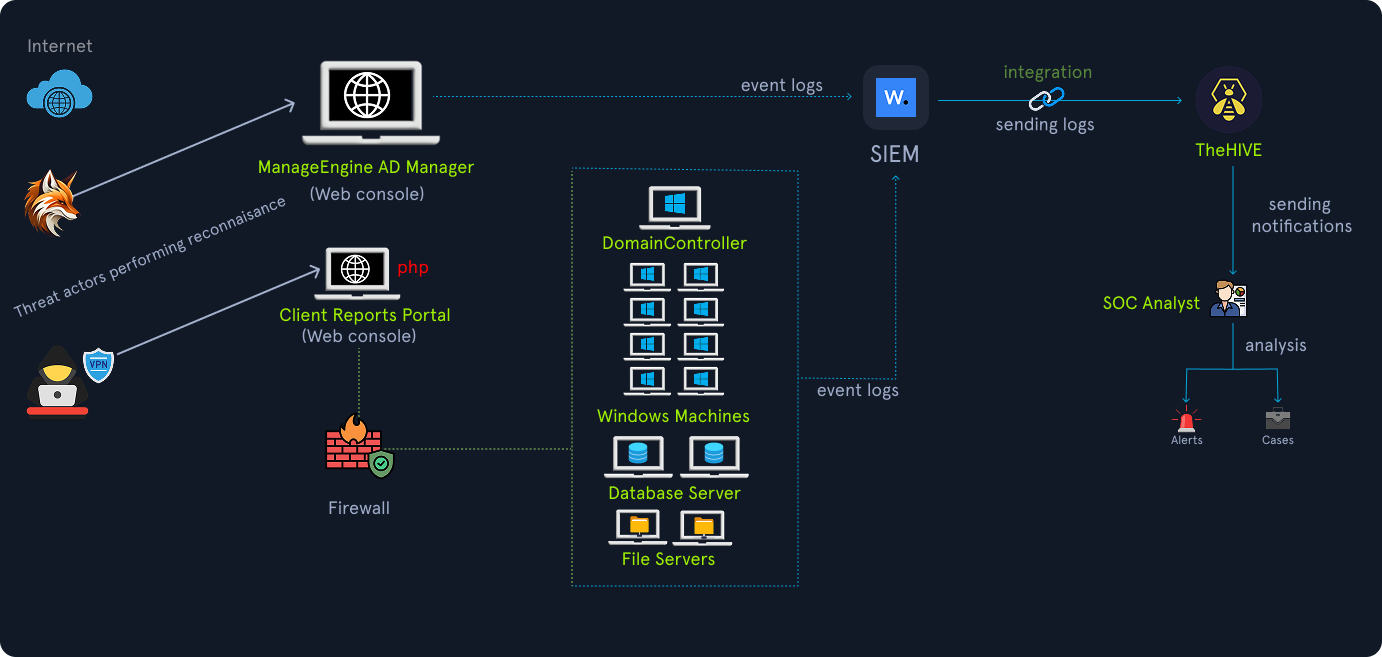
The victim in this Scenario is “Insight Nexus”, a global market research firm that handles sensitive competitive data for high-profile clients in the IT sector
Cyber Kill Chain
Before we start talking about handling incidents, we need to understand the attack lifecycle (a.k.a. the cyber kill chain)

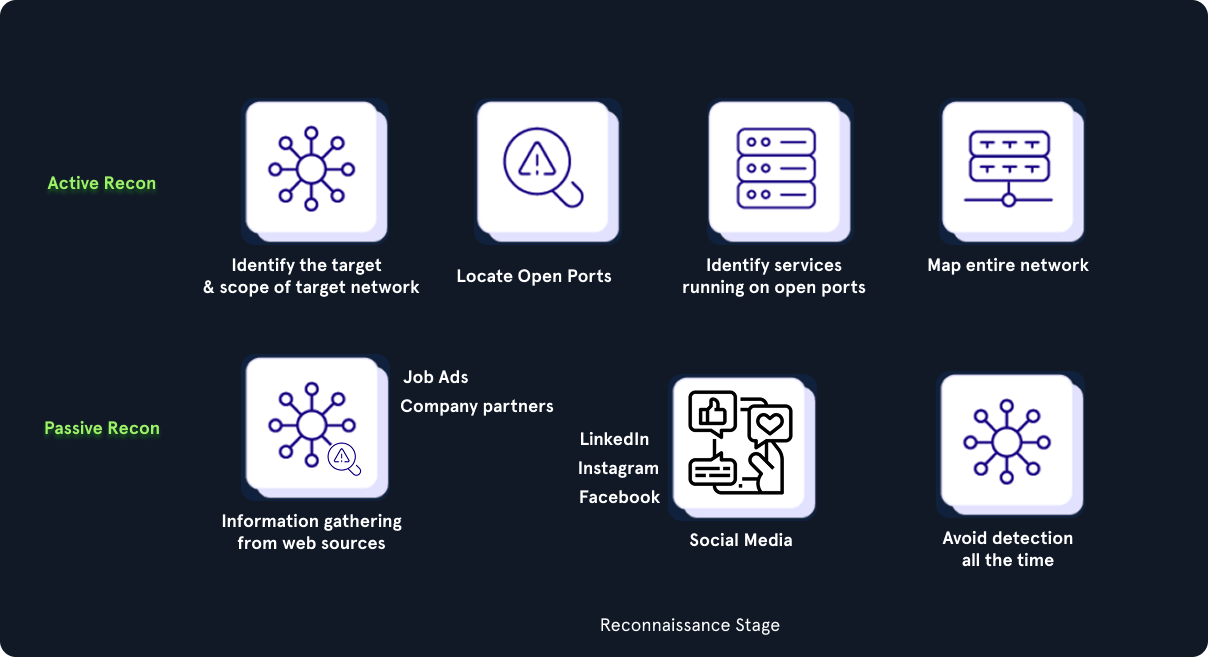
#1 Reconnaissance stage
- The initial stage where an attacker chooses their target
- perform information gathering → as much useful data as possible
- perform passive information gathering from web sources like social media or documentation on the target organization’s web pages
- Job ads and company partners often reveal information about the technology utilized in the target organization
#2 Weaponize stage
- Developing malware and embedding it into some types of payload
- This malware is crafted to be extremely lightweight and undetectable by antivirus and detection tools
#3 Delivery stage
- Payload is delivered to the victim(s)
- Might be phishing email or social engineering call
- It can also be physical interaction via USB tokens and similar storage tools that are purposely left around
- It is extremely rare to deliver a payload that requires the victim to do more than double-click an executable file or a script
#4 Exploitation stage
- when an exploit or a delivered payload is triggered
#5 Installation stage
- the initial stager is executed and is running on the compromised machine
- Droppers: A small piece of code designed onto the target system and execute it
- Backdoors: A backdoor is a type of malware designed to provide the attacker with ongoing access to the compromised system
- Rootkits: A rootkit is a type of malware designed to hide its presence on a compromised system → evade detection by antivirus software and other security tools
#6 Command and Control stage
- The attacker establishes a remote access capability to the compromised machine
#7 Action stage
- Perform their objectives (exfiltrate confidential data, obtain the highest level of acces)
→ Adversaries don’t operate linearly, Our objective is to stop an attacker from progressing further up the kill chain, ideally in one of the earliest stages.
MITRE ATT&CK Framework
The MITRE ATT&CK Enterprise Matrix is a knowledge base that documents adversary behavior observed in the wild against enterprise IT environments.
It is presented as a matrix
- Columns represent adversary goals (
tactics) - Cells are
techniquesattackers use to achieve those goals
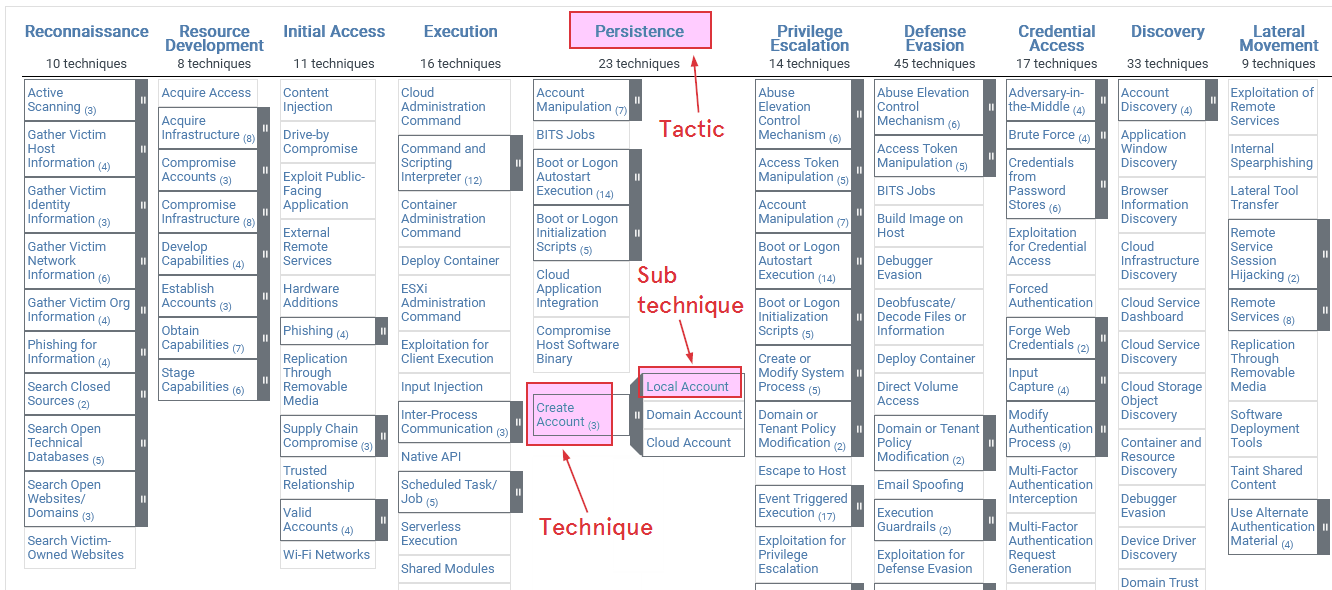
A tactic is the goal they want to accomplish at that stage, example:
Initial AccessPersistencePrivilege Escalation
A technique is a specific method adversaries use to achieve a tactic, Techniques have IDs like T1105 (Ingress Tool Transfer) or T1021 (Remote Services), example:
T1105 Ingress Tool Transfer: Refers to the tools used by attackers to download a tool, such aswget,curl, etc., commonly OS built-in commands/tools.T1021 Remote Services: Refers to adversaries using protocols such as SSH, RDP, and SMB for lateral movement.
Sub-techniques are children of techniques that capture a particular implementation or target. Sub-technique IDs extend the parent technique (the .001 & .002):
T1003.001 - OS Credentials: LSASS Memory: Refers to adversaries dumping credentials directly from the LSASS process memory when achieving the necessary privileges.T1021.002 - Remote Services: SMB/Windows Admin Shares: Refers to adversaries interacting with shares using valid credentials.
Pyramid of Pain
The Pyramid of Pain illustrates how much effort it takes for an adversary to change their tactics
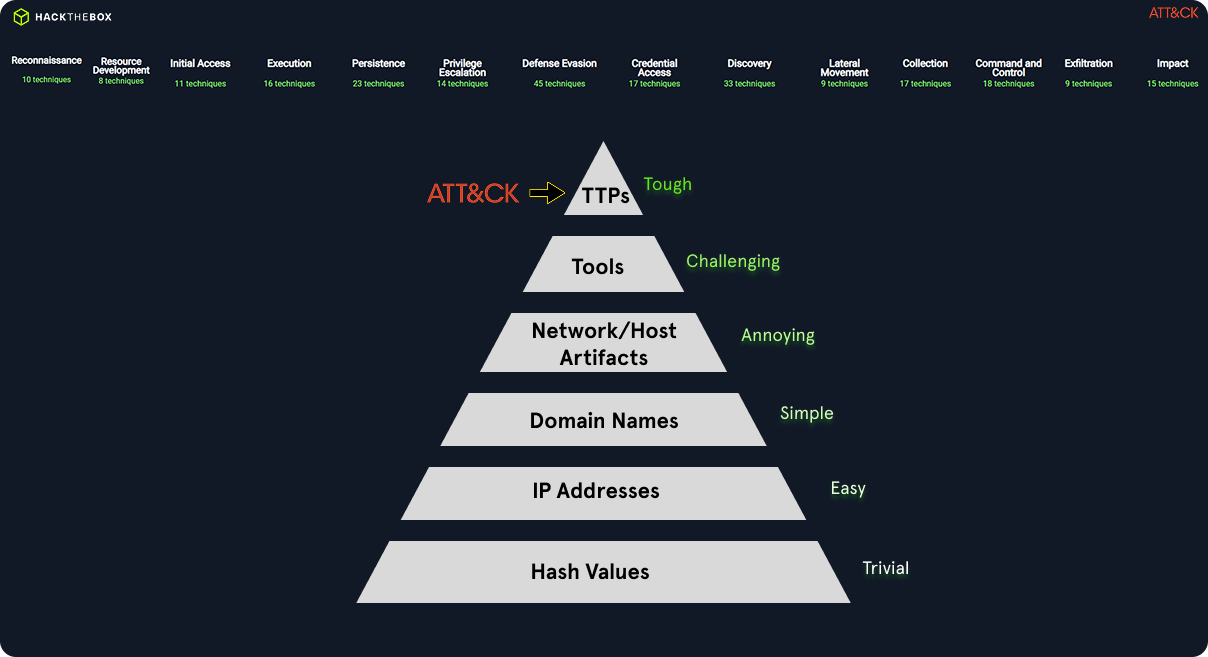
- For example,
blocking a malicious IPin a MITRE ATT&CK “Command and Control” (T1071) scenario will onlyslightly slow downthe adversary since they can quickly switch to a new C2 server. - Moving upward, network and host artifacts (like registry keys, mutex names, or filenames) correspond to specific techniques in ATT&CK (e.g., T1547.001 – Registry Run Keys/Startup Folder). These take
more effortto change and are more resilient indicators for defenders. - At the top of the pyramid are Tools, Tactics, Techniques, and Procedures (TTPs) — these align directly with the core of MITRE ATT&CK
→ Hash/IP detections = easy to evade.
→ Behavioral TTP detections (MITRE-based) = hard to evade, higher attacker cost, and stronger defense maturity.
MITRE ATT&CK integration in TheHive
TheHive is a case management platform designed for cybersecurity teams to efficiently handle incidents by processing alerts.
→ TheHive offers the capability to import all MITRE ATT&CK Framework Tactics, Techniques, and Procedures (TTPs) into its alert management system.
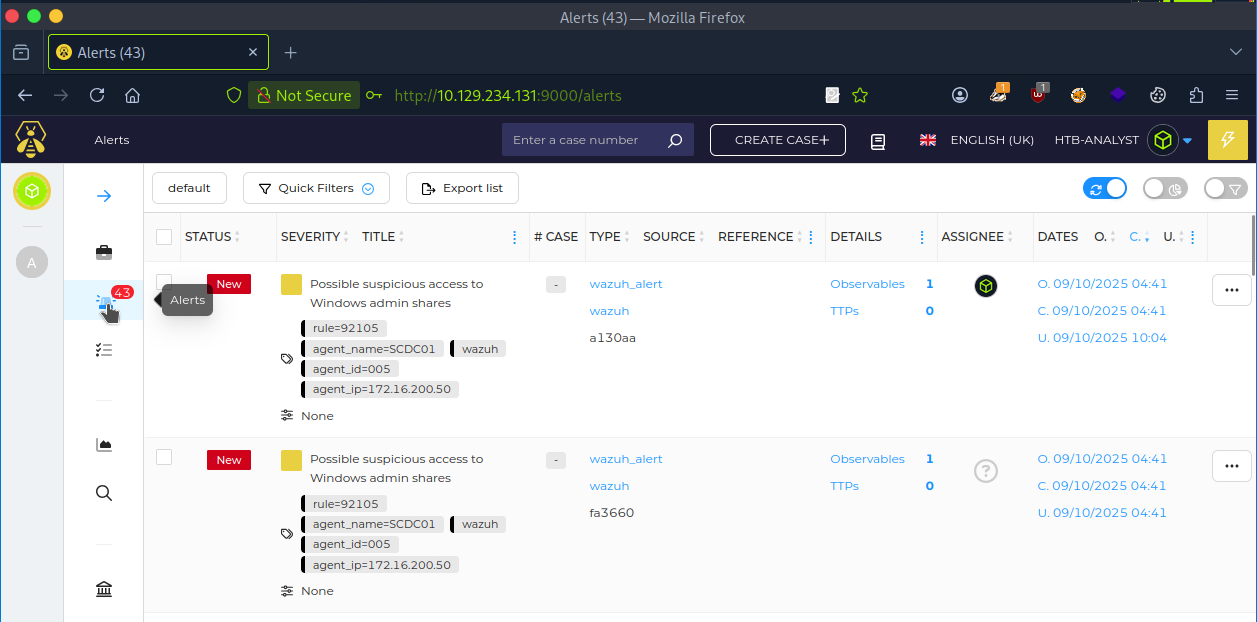
To access TheHive platform, navigate to http://TARGET_IP:9000
The Incident Handling Process
Incident Handling Process Overview
Just like the Cyber Kill Chain, there are different stages when responding to an incident, defined as the Incident Handling Process
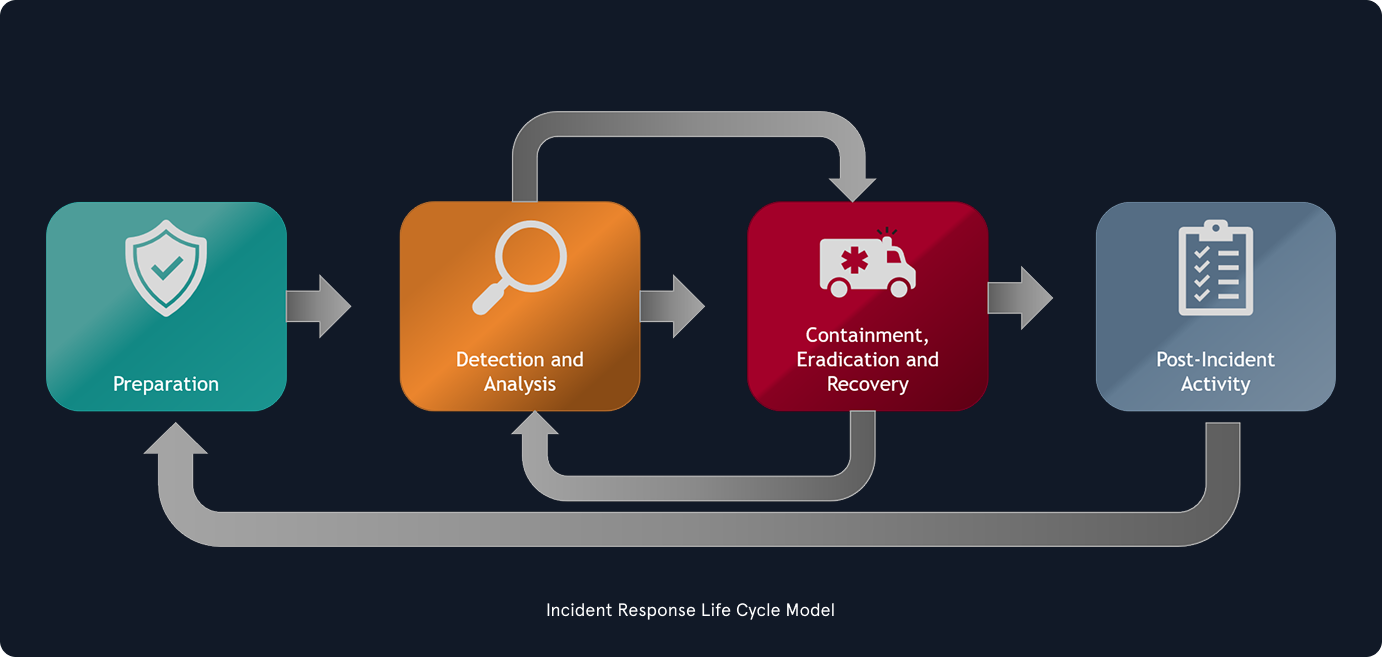
It is vital to ensure that we don’t skip steps in the process and that we complete a step before moving on to the next one.
Incident handling could be divine into to main activities:
- Investigating
Discoverthe initial ‘patient zero’ victim and create an ongoing (if still active) incident timeline.- Determine which
toolsand malware the adversary used. Documentthe compromised systems and what the adversary has done.
- Recovering
- creating and implementing a
recovery plan. - When an incident is fully handled, a report is issued that details the cause and cost of the incident, also, “lessons learned” activities are performed to prevent incidents of a similar type from occurring again.
- creating and implementing a
Preparation Stage
Preparation Prerequisites
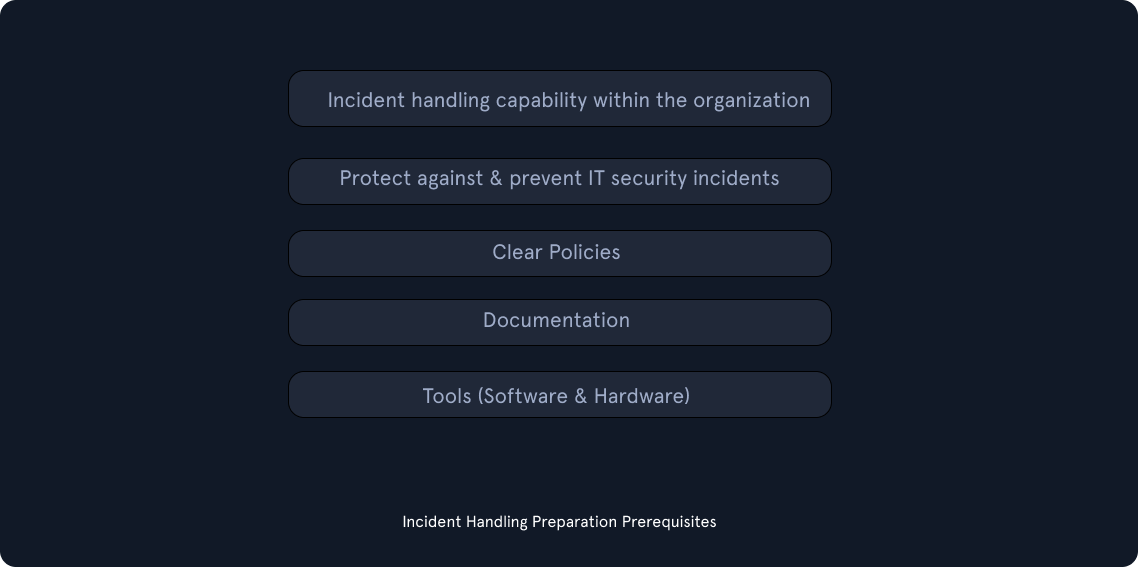
Clear Policies & Documentation
- Contact
information and rolesof the incident handling team members. - Contact information for the legal and compliance department, management team, IT support, communications and media relations department, law enforcement, internet service providers, facility management, and external incident response team.
- Incident response
policy,plan, andprocedures. - Incident information sharing policy and procedures.
- Baselines of systems and networks, out of a golden image and a clean state environment.
Network diagrams.- Organization-wide asset management
database. User accounts with excessive privilegesthat can be used on-demand by the team when necessary (also for business-critical systems, which are handled with the skills needed to administer that specific system). These user accounts are normally enabled when an incident is confirmed during the initial investigation and then disabled once it is over. A mandatory password reset is also performed when disabling the users.- Ability to acquire
hardware, software, or an external resourcewithout a complete procurement process (urgent purchase of up to a certain amount). The last thing you need during an incident is to wait for weeks for the approval of a $500 tool. - Forensic/Investigative
cheat sheets.
→ While having documentation in place is vital, it is also important to document the incident as we investigate.
Tools (Software & Hardware)
- An
additional laptop or a forensic workstationfor each incident handling team member to preserve disk images and log files, perform data analysis, and investigate without any restrictions (we know malware will be tested here, so tools such as antivirus should be disabled). These devices should be handled appropriately and not in a way that introduces risks to the organization. Digital forensic imageacquisition and analysis tools.Memory captureand analysis tools.Live responsecapture and analysis tools.Log analysistools.Networkcapture and analysis tools.- Network cables and switches.
Write blockers.Hard drivesfor forensic imaging.Powercables.Screwdrivers,tweezers, and other relevant tools to repair or disassemble hardware devices if needed.Indicator of Compromise (IOC)creator and the ability to search for IOCs across the organization.Chain of custodyforms.Encryptionsoftware.Ticket trackingsystem.Secure facilityfor storage and investigation.- Incident handling system
independentof your organization’s infrastructure.
→ Many of the tools mentioned above will be part of what is known as a jump bag
DMARC
https://dmarcly.com/blog/how-to-implement-dmarc-dkim-spf-to-stop-email-spoofing-phishing-the-definitive-guide#what-is-spf
DMARC is an email protection mechanism designed to stop phishing attacks from spoofing your organization’s domain. It automatically rejects emails pretending to come from your company before they reach the recipient.
Endpoint Hardening (& EDR)
Endpoint devices (workstations and laptops) are the most common entry points for attackers. Key actions include:
- Take away
super-user rightsfrom regular employees so they can’t accidentally install malicious software. It also meansdisabling powerful built-in tools(likePowerShelloroutdated network features) that hackers love to abuse. - Instead of letting any program run on the computer, you create a strict
whitelist. If that is too difficult, you at leastblock programs from runningin folders where people normally save files (like the “Downloads” folder). That way, if a user accidentally downloads a virus, the computer simply refuses to open it. pay attention to https://lolbas-project.github.io/ files while implementing whitelisting. Do not overlook them; they are really used in the wild as initial access to bypass whitelisting. - Turn on the computer’s built-in
firewallto block shady internet traffic. Then, installadvanced security software(EDR like AMSI) that doesn’t just look for known viruses, but actively reads and stops sneaky, hidden code before it has a chance to execute.
Network Protection
Privilege Identity Management / MFA / Passwords
Vulnerability Scanning
User Awareness Training
Active Directory Security Assessment
Purple Team Exercises
Detection & Analysis Stage
Initial Investigation
Date/Timewhen the incident was reported. Additionally,who detectedthe incident and/orwho reportedit?How was the incident detected?What was the incident? Phishing? System unavailability? etc.- Assemble a
list of impacted systems(if relevant). - Document
who has accessed the impacted systemsandwhat actions have been taken. Make a note of whether this is an ongoing incident or if the suspicious activity has been stopped. Physical location,operating systems,IP addressesandhostnames,system owner,system's purpose,current state of the system.- List of IP addresses, if malware is involved, time and date of detection,
type of malware, systems impacted, export of malicious files with forensic information on them (such as hashes, copies of the files, etc.).
→ With the initially gathered information, we can start building an incident timeline. This timeline will keep us organized throughout the event and provide an overall picture of what happened.
Note: during the investigative process later on, we will not necessarily uncover evidence in this chronological order.
The timeline should contain the information described in the following columns:
| Date | Time of the event | Host name | Event description | Data source |
|---|---|---|---|---|
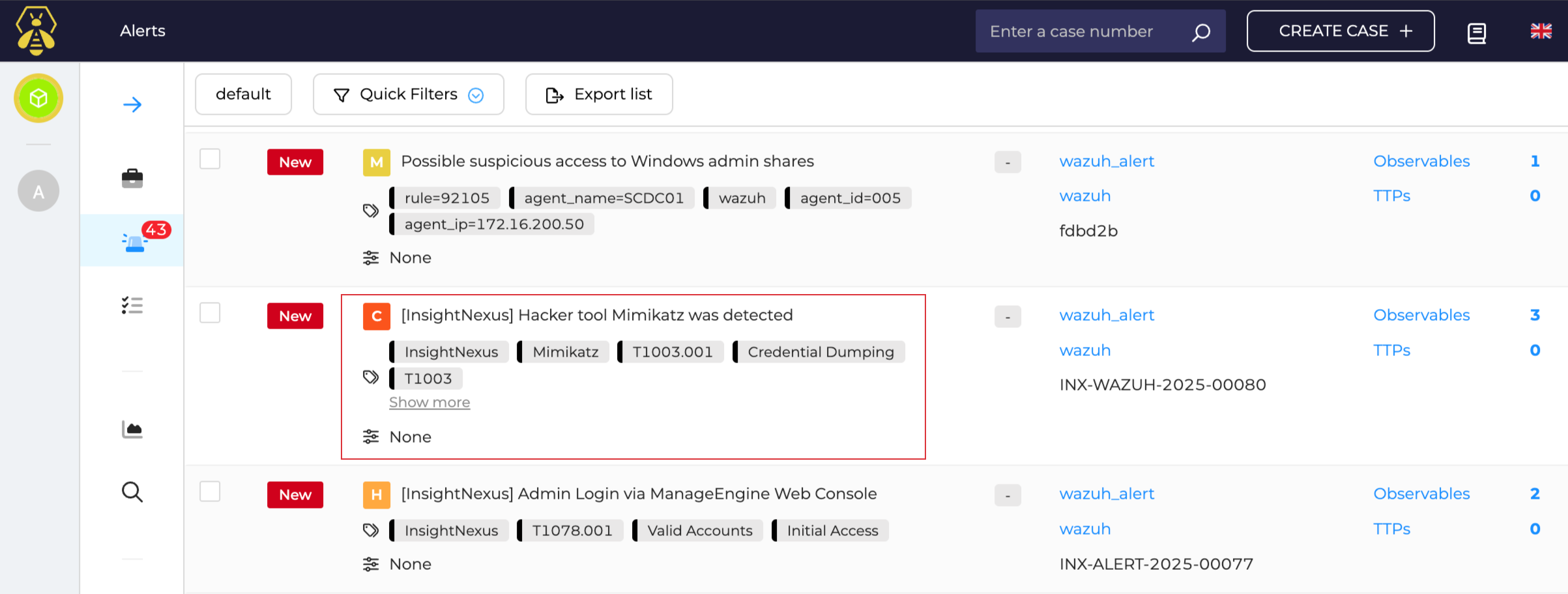
| 09/09/2021 | 13:31 CET | SQLServer01 | Hacker tool ‘Mimikatz’ was detected | Antivirus Software |
We can also view an alert related to this event log in the TheHive Case Management Platform.
Incident Severity & Extent Questions
When handling a security incident, we should also try to answer the following questions to get an idea of the incident’s severity and extent
- What is the
exploitation impact? - What are the
exploitation requirements? - Can any
business-criticalsystems beaffectedby the incident? - Are there any
suggested remediation steps? How many systemshave been impacted?- Is the exploit being
used in the wild? - Does the exploit have any
worm-like capabilities?
Incident Confidentiality & Communication
- All of the information gathered should be kept on a need-to-know basis unless applicable laws or a management decision instruct us otherwise.
- When an investigation is launched, we will set some expectations and goals.
- Type of incident that occurred
- Sources of evidence that we have available
- Rough estimate of how much time the team needs for the investigation
- Whether we will be able to uncover the adversary or not
The Investigation
The investigation starts based on the initially gathered (and limited) information that contains what we know about the incident so far.
With this initial data, we will begin a 3-step cyclic process that will iterate over and over again as the investigation evolves.
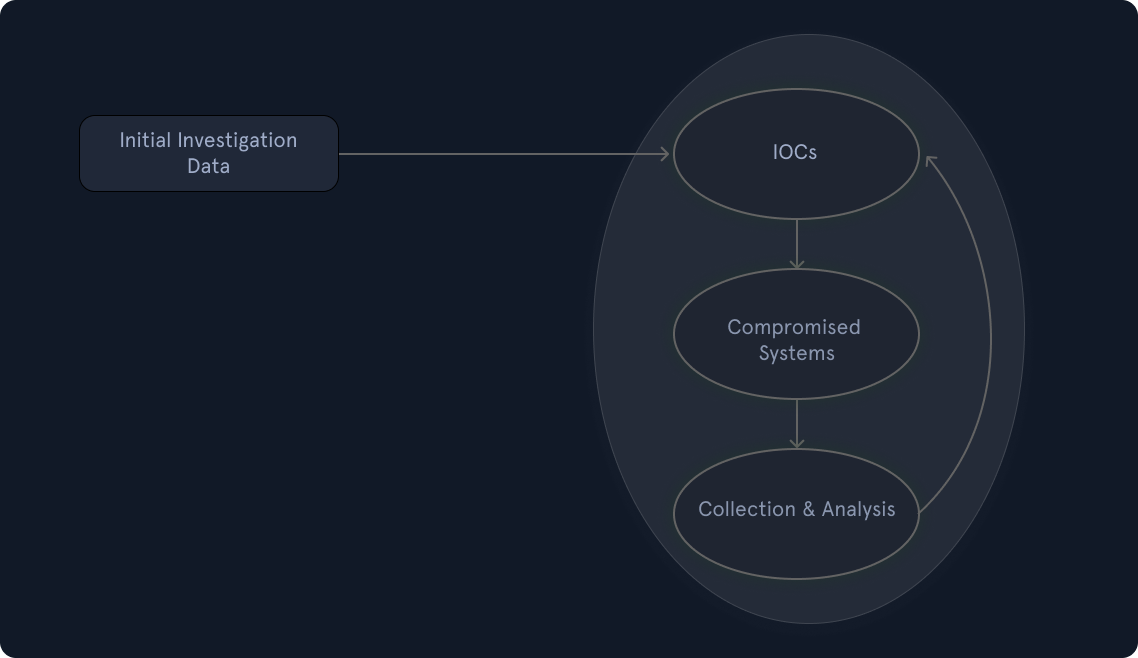
Initial Investigation Data
To prevent premature conclusions and an incomplete understanding of the incident, an investigation must continuously pursue diverse leads throughout the entire process rather than fixating on a single discovery.
Creation & Usage Of IOCs
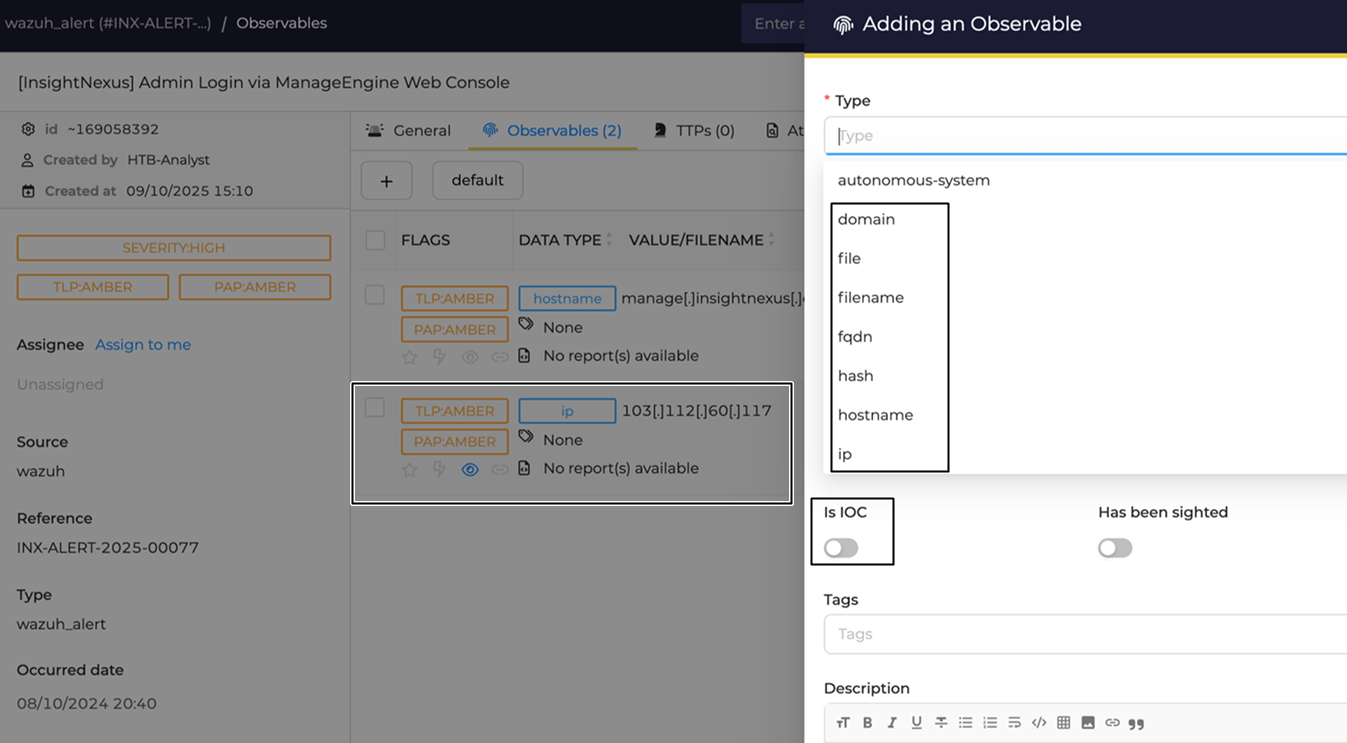
Indicators of Compromise (IOCs) are technical artifacts (such as IP addresses, file hashes, and file names) used to identify and document cyber attacks. To ensure that the recording, sharing, and analysis of these IOCs remain consistent and standardized, the cybersecurity community relies on specific tools and languages like OpenIOC, YARA, and STIX (which primarily uses the JSON format).
- Artifacts: Digital traces or evidence left behind by a compromise → called IOCs.
- OpenIOC / YARA: Specific languages and standards developed to document, share, and analyze IOCs.
- STIX (Structured Threat Information eXpression): An open-source, standardized language used to represent and exchange cyber threat information.
- CTI (Cyber Threat Intelligence): Analyzed information about potential or current cyber attacks.
- Mandiant’s IOC Editor: A free software tool used to create and edit IOCs.
→ In TheHive, we can add IOCs in the observables section of an alert.
When deploying tools to search for and collect IOCs (such as WMI or PowerShell in Windows environments), investigators must be extremely careful not to expose and cache the credentials of highly privileged accounts on the systems under investigation.
To ensure security, investigators should only use connection protocols or logon types that do not cache credentials, such as WinRM or Logon type 3 (Network Logon). Understanding exactly how each tool operates is crucial. A prime example is PsExec: it will cache credentials if they are provided explicitly, but it remains safe if run using the currently logged-on user’s session without re-entering credentials.
Identification Of New Leads & Impacted Systems
Searching for IOCs across a network often yields numerous hits, but not all of them represent the actual incident (some may be false positives caused by overly generic IOCs).
→ Investigators must filter out these false alarms and strictly prioritize the most promising hits for forensic analysis to uncover new investigative leads.
Data Collection and Analysis from the New Leads and Impacted Systems
Once compromised systems are identified, investigators must carefully collect and preserve data.
Live response is often preferred over shutting the system down to prevent the loss of valuable volatile data stored in RAM.
During collection, interaction with the system must be kept to an absolute minimum to avoid tampering with evidence. The collected data undergoes rigorous and time-consuming analysis (such as disk, memory, or malware forensics) to uncover new leads for the timeline.
Crucially, a strict chain of custody must be maintained to ensure the evidence is court-admissible.
Use of AI in Threat Detection
Artificial Intelligence, particularly Generative AI and Large Language Models (LLMs), is revolutionizing Incident Response. Instead of relying on time-consuming manual analysis, AI automates the clustering of alerts, prioritizes threats, reconstructs complete attack narratives (mapped to the MITRE ATT&CK framework), and assists with automated response actions and post-incident learning.
Containment, Eradication, and Recovery Stage
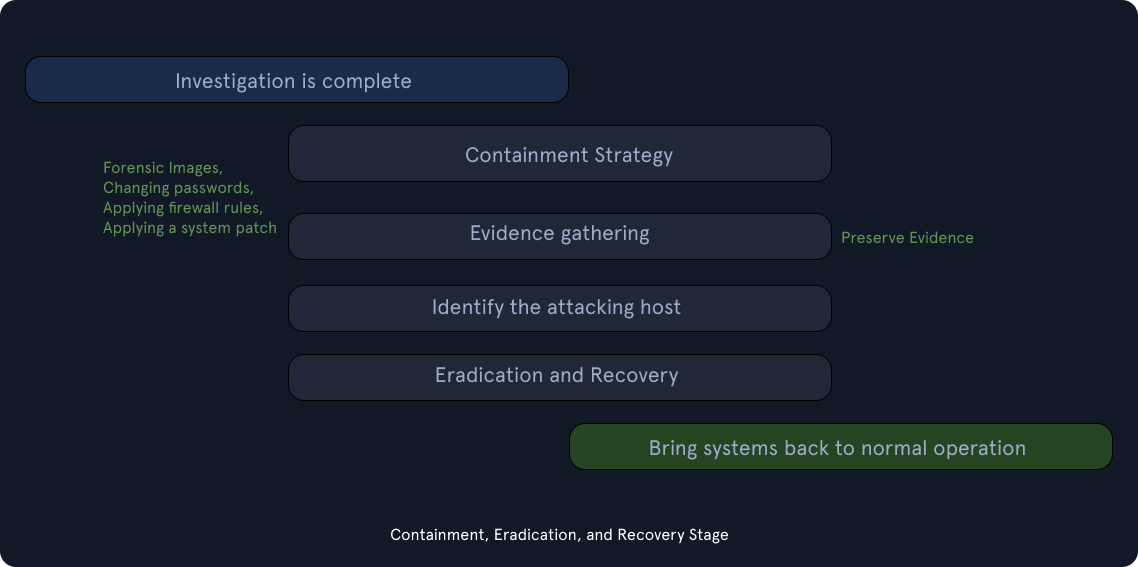
Containment
It is time to enter the containment stage to prevent the incident from causing more damage.
We divide the actions into short-term containment and long-term containment:
- Short-term containment: Focuses on
*temporary, low-impact actions*(such as network isolation using VLAN or DNS sinkholing) to*immediately stop the bleeding*, buy time for a remediation strategy, and preserve the system’s state for forensic evidence collection. - Long-term containment: Involves making persistent changes and security implementations (like resetting passwords, applying patches, and updating firewall rules). However, applying these fixes does not mean the incident is resolved, as eradication and recovery phases must still follow.
Eradication (Eliminate)
- Completely
eliminate the attacker, the root cause, and all remnantsof the incident from the network. Remove malware, wipe and rebuild compromised machines, andrestore systems from known-good backups.Apply broader security patchesandexecute system-wide hardening(not just on the infected machines) to prevent reinfection.
Recovery
- The business must confirm that
systems are functioning correctlyand contain intact data before bringing them back into production. - Restored systems are subjected to
aggressive logging to watch for suspicious activities(like unusual logons, unexpected processes, or registry changes), as attackers often try to hit the same targets again. - Because recovery can take months, it is typically
split into phases, starting with immediate “quick wins” to patch obvious holes, followed by permanent, structural changes to improve long-term security.
Post-Incident Activity Stage
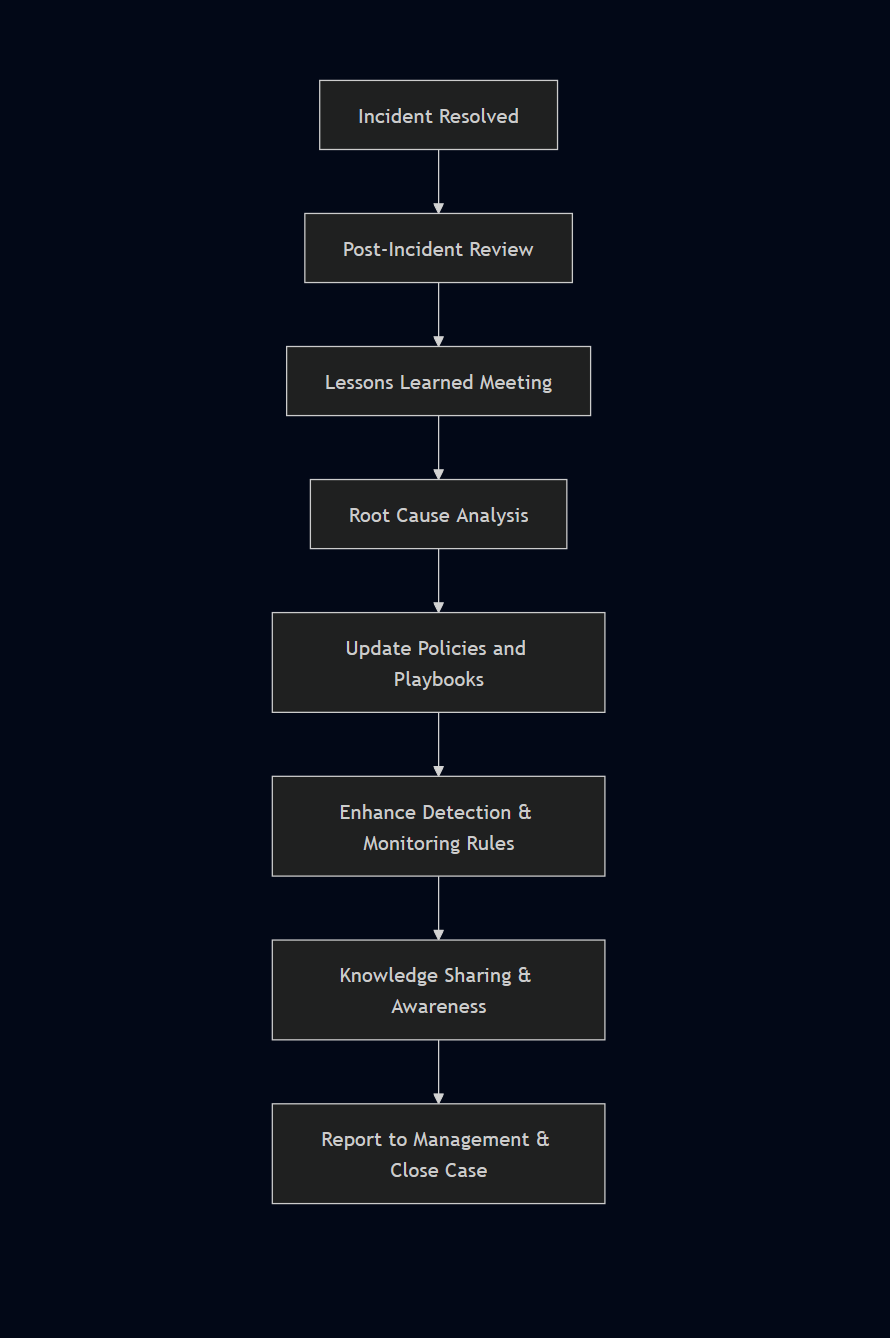
The goal of this final step is to figure out what went right, what went wrong, and how to improve for next time. A few days after the incident is over, everyone involved gets together for a meeting. They look back at exactly how the attack happened and discuss whether their response actually worked. By learning from these experiences, the team can update their plans and be better prepared to stop future attacks.
Reporting
- What happened and when?
- How did the team perform in dealing with the incident in regard to plans, playbooks, policies, and procedures?
- Did the business provide the necessary information and respond promptly to aid in handling the incident efficiently? What can be improved?
- What actions have been implemented to contain and eradicate the incident?
- What preventive measures should be put in place to prevent similar incidents in the future?
- What tools and resources are needed to detect and analyze similar incidents in the future?
→ This stage is a great place to train new team members by showing them how the incident was handled by more experienced colleagues
Incident Analysis and Response
Analysis of Insight Nexus Breach
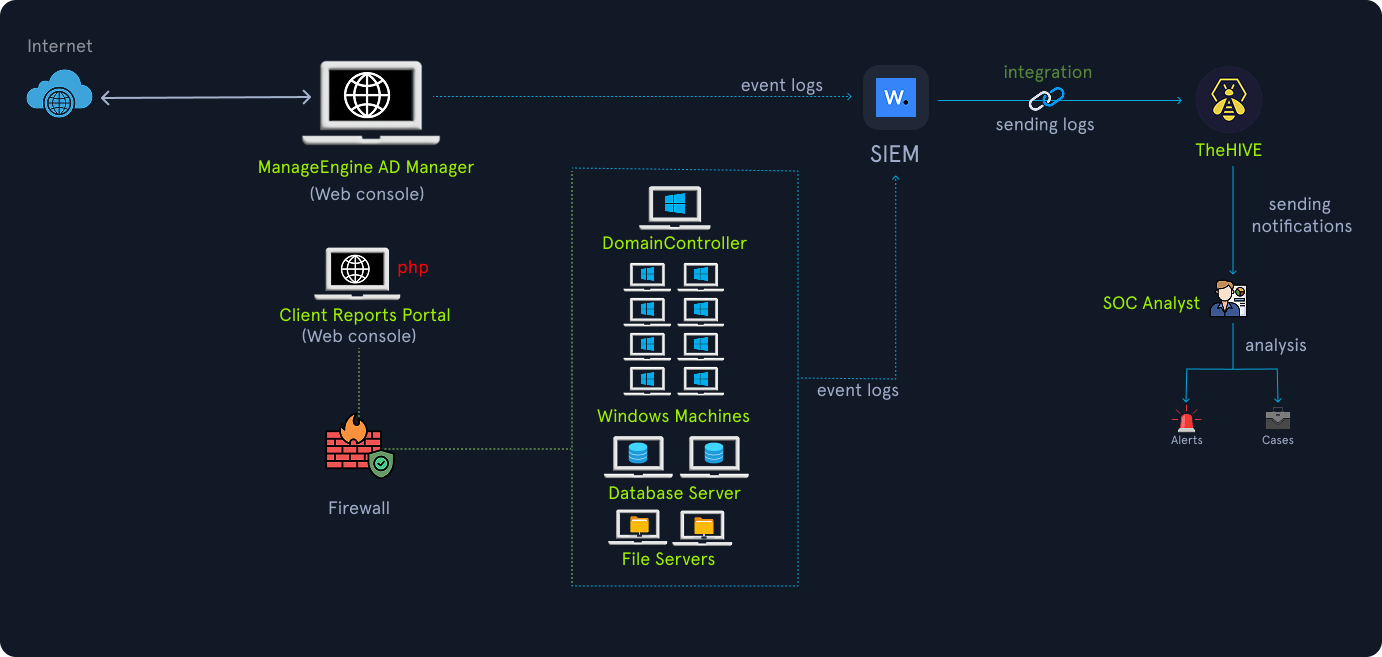
The Victim: Insight Nexus - A market research firm holding highly sensitive competitive data for major IT and finance clients.
The Threat Actors & Attack Paths
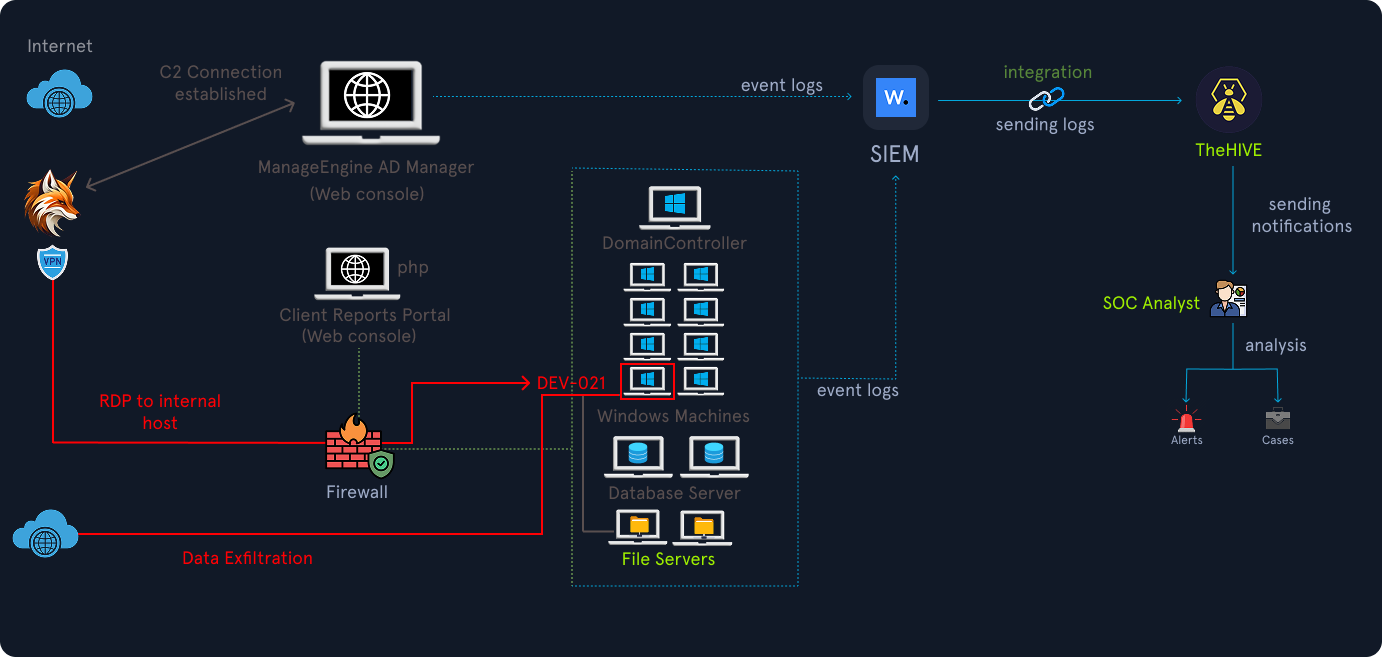
- Crimson Fox (Advanced/Targeted): This primary group breached the network via an internet-facing ManageEngine server because IT staff left the default
admin/admincredentials active. They escalated privileges to Domain Administrator, pivoted through a misconfigured public RDP desktop (DEV-021), and used a Group Policy Object (GPO) to deploy spyware (java-update.msi) across the domain to exfiltrate sensitive client data.
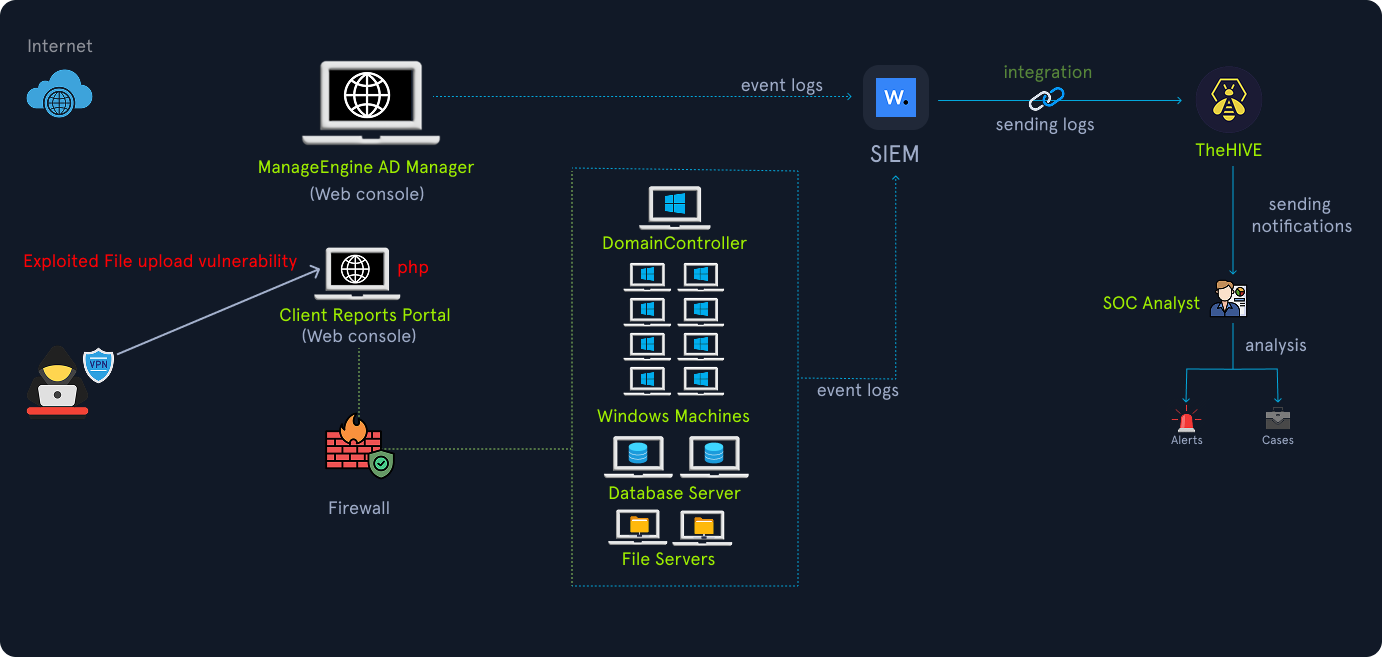
- Silent Jackal (Low-skill/Opportunistic): This secondary group exploited an unpatched file upload vulnerability on a separate PHP reporting portal. Their only action was dropping a signature marker file (
checkme.txt), which inadvertently alerted defenders to the broader network compromise.
Detection and Response
- A SOC analyst investigated the
checkme.txtalert and successfully correlated it with unusual outbound ManageEngine traffic and foreign login events. - The Incident Response team rapidly contained the threat by isolating compromised hosts, blocking the attacker’s Command and Control (C2) IPs at the firewall, disabling the exposed ManageEngine admin account, and forcing a global rotation of high-privilege credentials.
Key Lessons Learned
- Failing to change default credentials on public-facing applications remains a catastrophic security oversight.
- Multiple threat actors with entirely different motives can inhabit the same environment simultaneously; defenders must not stop investigating just because they found the most “noisy” intruder.
- Effective and rapid alert correlation is vital for quick containment and minimizing data loss.