Cyber Defenders - BlackEnergy Writeup
Category: Endpoint Forensics
Checkout the lab here: https://cyberdefenders.org/blueteam-ctf-challenges/blackenergy/
Description
A multinational corporation has suffered a cyber attack, resulting in the theft of sensitive data. The attack employed a previously unseen variant of the BlackEnergy v2 malware. The company’s security team has obtained a memory dump from the infected machine and is seeking your expertise as a SOC analyst to analyze the dump in order to understand the scope and impact of the attack.
Q1: Which volatility profile would be best for this machine?
To answer this question, I used the windows.info plugin to scan the memory dump file.
1
vol -f CYBERDEF-567078-20230213-171333.raw windows.info
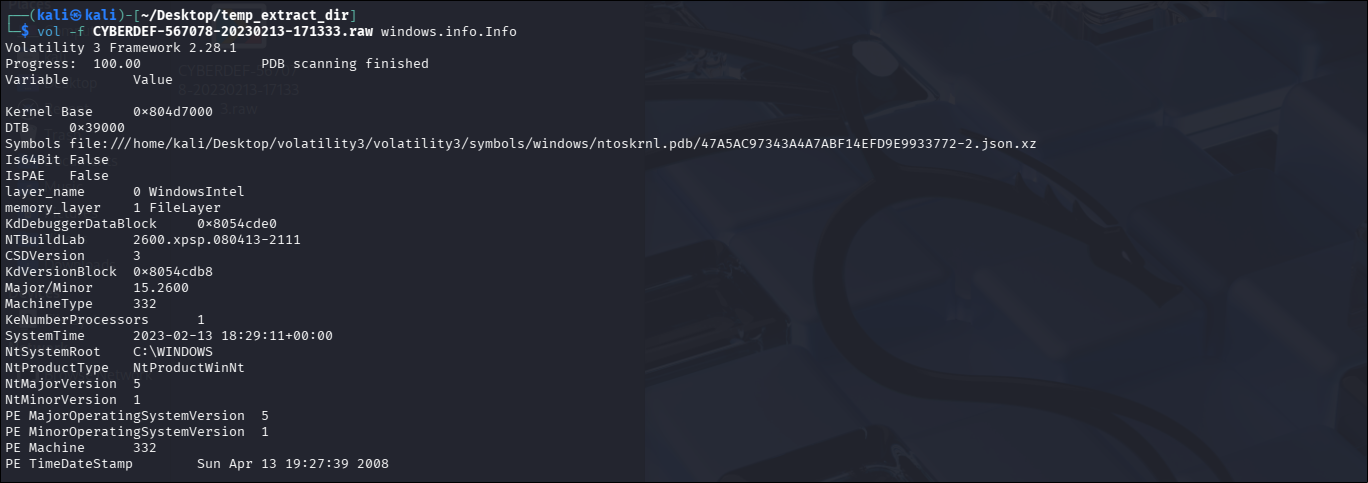
NtMajorVersion 5andNtMinorVersion 1correspond to the version code for Windows XP (WinXP).- The line
CSDVersion 3indicates that the operating system is running Service Pack 3 (SP3). Is64Bit Falseconfirms this is a 32-bit (x86) system.
→ WinXPSP3x86
After submitting incorrect answers about 10 times, I realized that I wasn’t using Volatility 2 to scan. Most of the solutions use imageinfo from Volatility 2, which predicts WinXPSP2x86 as the profile. From my research, these two Service Packs are quite similar, making them very easy to confuse. Eh 😕.
Answer: WinXPSP2x86
Q2: How many processes were running when the image was acquired?
I used the pslist plugin to enumerate the list of processes. To determine whether a process is still active or has terminated, I looked at the ExitTime column:
- If
ExitTimedisplaysN/A, it means the process is still running. - If
ExitTimehas a specific timestamp, it means the process was terminated before the memory was dumped (though its data structure remnants still exist in RAM).
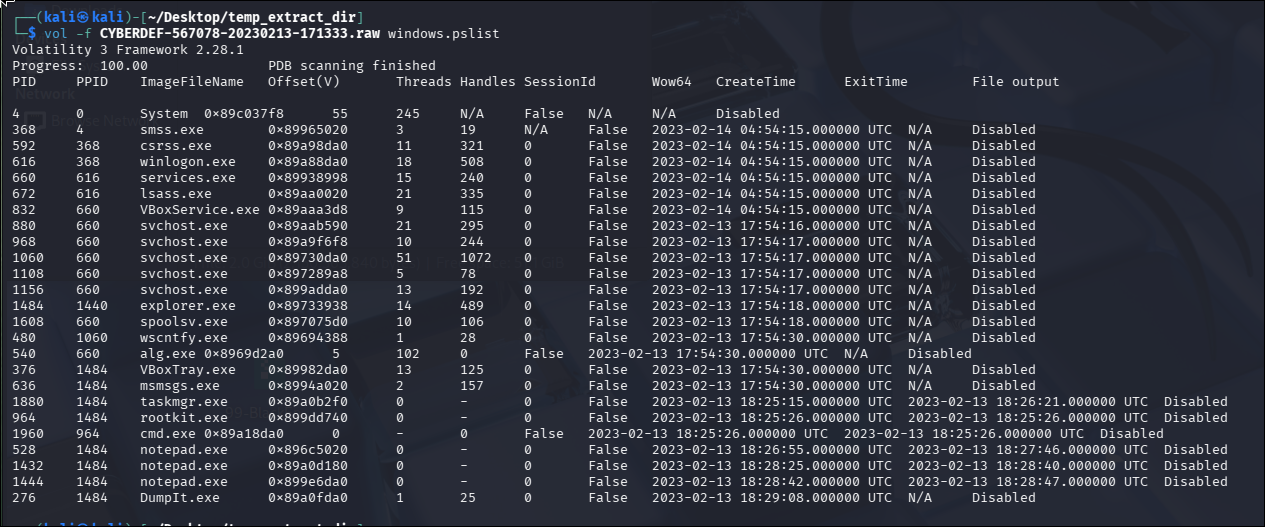
There are 25 processes, but the question only asks for the active ones. I found 19 active processes, as 6 processes had already been terminated.
Answer: 19
Q3: What is the process ID of cmd.exe?
Looking at the process list, I could immediately identify the PID of cmd.exe:
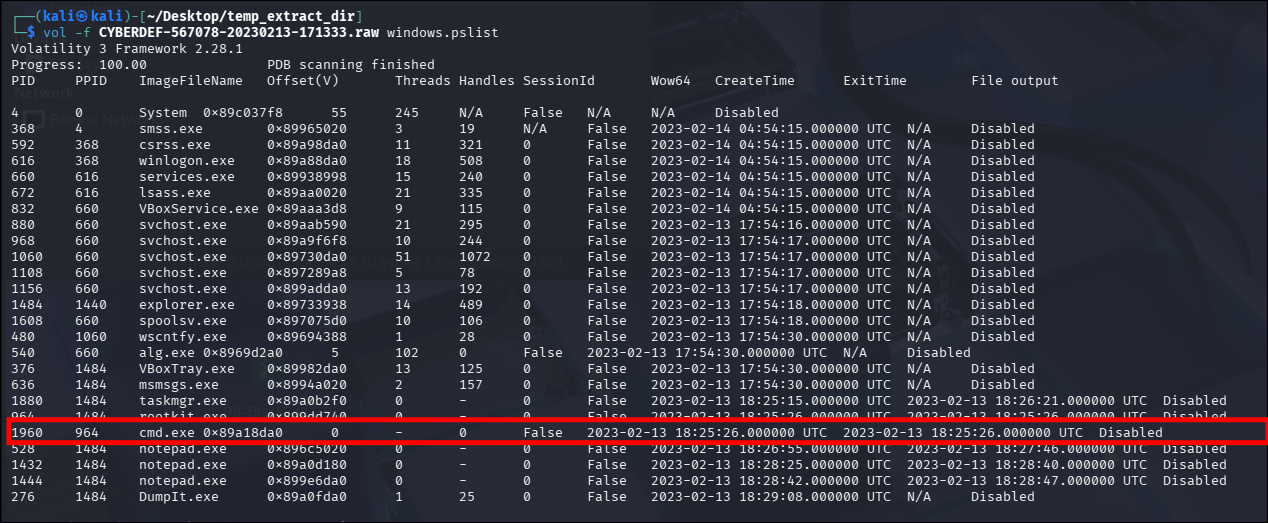
Answer: 1960
Q4: What is the name of the most suspicious process?
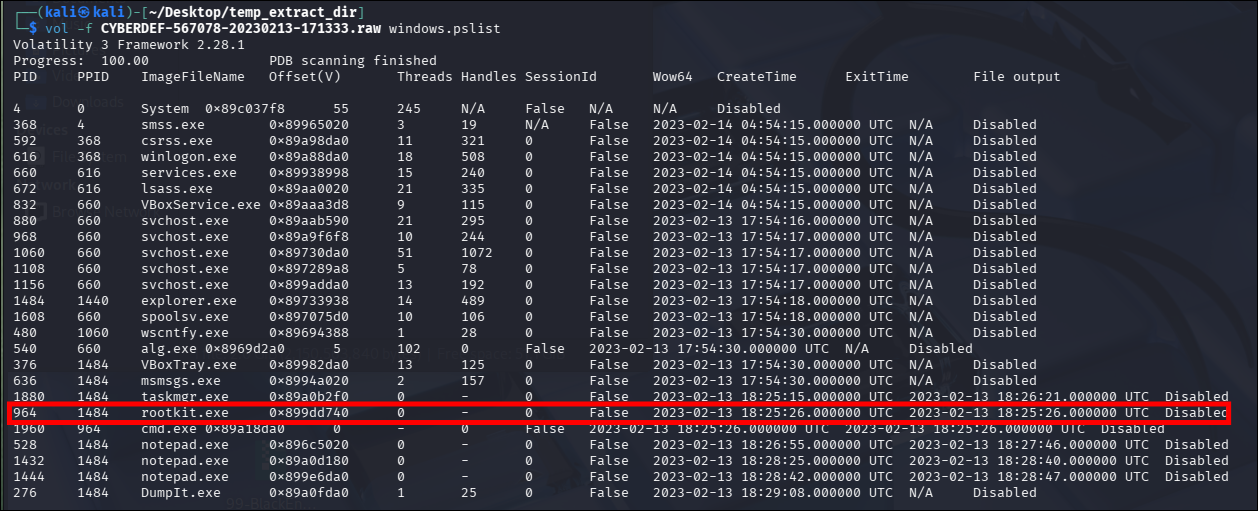
What could be more suspicious than a process named rootkit? 🙂
Answer: rootkit.exe
Q5: Which process shows the highest likelihood of code injection?
Using the malfind plugin (which lists process memory ranges that potentially contain injected code), I identified an executable named svchost.exe.

Answer: svchost.exe
Q6: There is an odd file referenced in the recent process. Provide the full path of that file.
In the context of digital forensics, an “odd file” usually refers to a file that stands out as unusual or suspicious in some way. This could be due to its name, location, size, content, or other characteristics that do not seem to fit with the normal patterns of files on the system.
However, if I manually searched through all files, it would take forever. In Windows, a handle is an abstract identifier or reference that a program uses to access or interact with system resources. If malware (such as svchost.exe PID 880) is dropping a rootkit file onto the system, it must open a handle pointing to that rootkit file.
I ran the following command to filter the handles for PID 880:
1
$ vol -f CYBERDEF-567078-20230213-171333.raw windows.handles | grep "880"
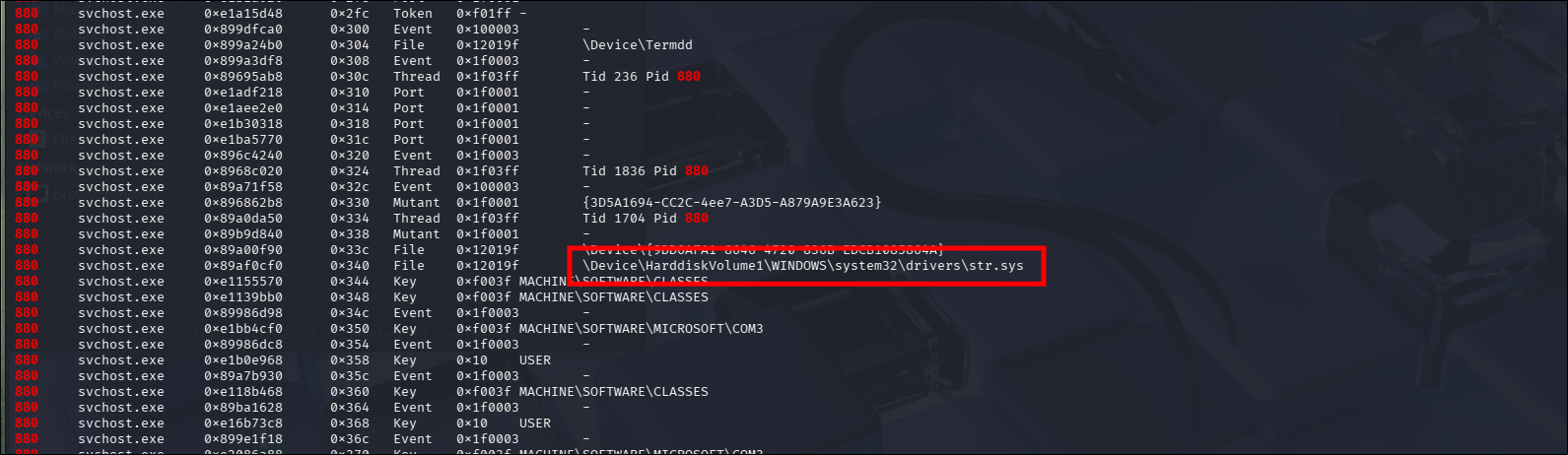
Answer: C:\WINDOWS\system32\drivers\str.sys
Q7: What is the name of the injected DLL file loaded from the recent process?
DLL injection is a technique that involves inserting a DLL into the memory space of a running process, commonly used to execute malicious code within a legitimate process. By injecting a malicious DLL into the memory space of a running process, the malware can gain access to the process’s resources and privileges, enabling it to steal data, escalate privileges, or perform other malicious actions.
There are several different DLL injection methods, including:
- Load-time injection: This method involves modifying a process’s Import Address Table (IAT) to load a malicious DLL upon startup.
- Run-time injection: This method involves using a thread within the target process to load the malicious DLL.
- Reflective injection: This method uses a specially crafted DLL that injects itself into a process without relying on traditional Windows API calls.
Unlinked DLLs refer to DLLs that are loaded into the memory space of a process but are not listed in the IAT or the process’s module list (these DLLs are hidden from both the operating system and the process itself). They are frequently abused by attackers to conceal malicious activities.
In Volatility, there is a plugin named ldrmodules used to detect unlinked DLLs by comparing the list of modules loaded in a process’s memory space against the process’s internal module list.
1
$ vol -f CYBERDEF-567078-20230213-171333.raw windows.ldrmodules --pid 880 | grep "False"

When software operates and needs to load DLL files, the Windows operating system records those DLL names into three internal management lists. The ldrmodules command checks these three lists:
- InLoad: Confirms that the system executed the command to load the DLL.
- InInit: Confirms that the DLL has completed running its initial setup code.
- InMem: Confirms that the DLL has been officially allocated memory space.
→ The malware used custom shellcode/instructions to write its DLL directly into computer memory to run stealthily. This process completely bypasses standard Windows loading mechanisms. Because Windows is unaware of this action, the DLL is not recorded in any of the three lists (The result displays: False, False, False).
The question asked for the “DLL file loaded from the recent process”, so:
Answer: msxml3r.dll
Q8: What is the base address of the injected DLL?

The malware loaded a real file from disk into memory, then used techniques to unlink its name from the three Windows internal management lists to remain stealthy. The N/A here indicates that this memory region is no longer linked to any physical file on disk.
The question asked for the “base address of the injected DLL”, so:
Answer: 0x98000
Conclusion
Through memory forensics analysis of the BlackEnergy v2 malware dump using Volatility, I investigated the scope and techniques employed in the cyber attack. I identified the system profile as WinXPSP2x86 and enumerated 19 active processes, spotting
cmd.exe(PID 1960) and a blatantly suspicious process namedrootkit.exe. Further analysis with themalfindplugin revealed code injection withinsvchost.exe(PID 880).By inspecting open handles, I traced a suspicious file reference to
C:\WINDOWS\system32\drivers\str.sys. Additionally, using theldrmodulesplugin, I uncovered an unlinked DLL namedmsxml3r.dllloaded at base address0x98000, demonstrating how the malware bypassed standard Windows loading mechanisms to conceal its activities.