Cyber Defenders - IcedID 2 Writeup
Category: Endpoint Forensics
Checkout the lab here: https://cyberdefenders.org/blueteam-ctf-challenges/icedid-2-gold-cabin/
Description
You are a forensic analyst investigating a critical ransomware attack at a major financial institution. Your job is to analyze the memory image from the affected endpoint. Trace the attack from its origin, identify lateral movements, uncover persistence methods, and analyze any control commands.
You are a forensic analyst responding to a ransomware incident at a prominent financial institution. A workstation was compromised, and an in-memory artifact was captured for analysis. Your mission is to dissect this memory image to trace the ransomware’s point of entry, determine how it executed, and understand its progression through the system.
IcedID 2, also known as BokBot, is a modular banking trojan that first appeared in 2017. Initially designed for banking fraud, it has evolved into a versatile malware loader, capable of delivering various payloads (like ransomware) and performing extensive data theft and reconnaissance within compromised networks.
Q1: Understanding the entry point of the malware is crucial for analyzing the attack vector. Can you specify the filename of the .iso file that was used to deliver the malicious payload?
To begin, the lab provided a filescan.txt file. Therefore, without much effort, I opened it and used Ctrl+F to search for the .iso extension. Fortunately, there was only one .iso file present in the entire directory scan at that time.

Answer: docs_invoice_173.iso
Q2: The initial delivery of the malware is crucial for understanding the attack vector. What is the link used to view the malicious malware?
I mounted the memory dump to the M:\ drive:
1
memprocfs.exe -device memory.dmp -mount M: -forensic 1
I navigated to the mounted directory and examined the file M:\forensic\web\web.txt.
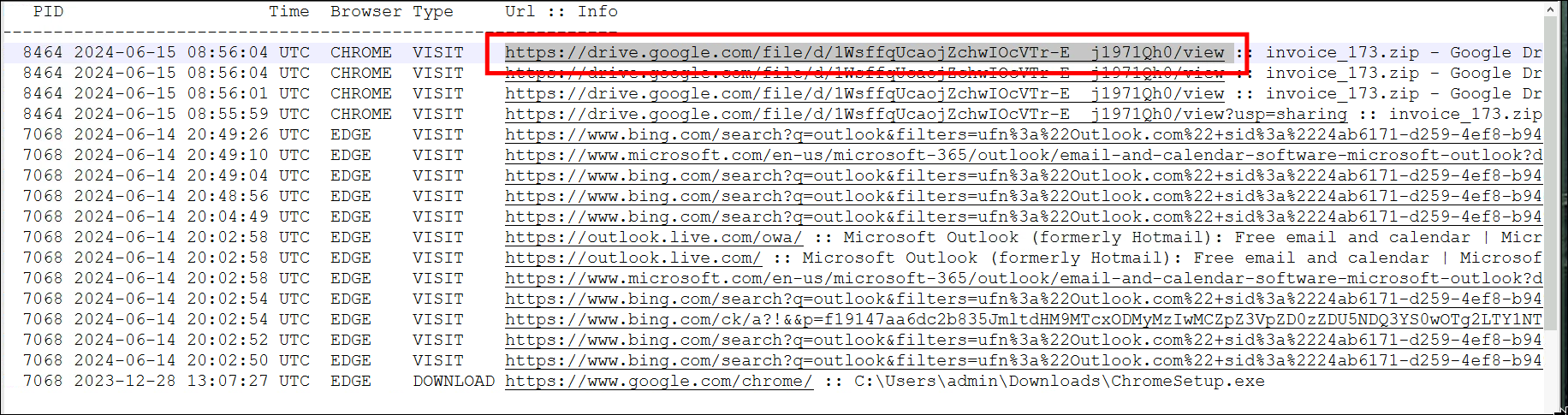
This invoice_173.zip file must have .iso file inside it.
Answer: https://drive.google.com/file/d/1WsffqUcaojZchwIOcVTr-E__j1971Qh0/view
Q3: Identifying the storage location of a rogue process is critical for assessing its origin and purpose within a compromised system. What is the directory path where this process is located on the workstation?
This is on the house! Since I’ve already found the directory path in filescan.txt!
Answer: C:\Users\admin\Downloads
Q4: To track the timeline of the attack, it is essential to know when the malware was dropped on the system. What is the download date and time of the malicious file on the affected device?
NTFS maintains a journal of data changes. If the computer suddenly loses power or crashes while writing a file, NTFS uses this journal to automatically repair the file upon reboot, significantly reducing data corruption.
When the memory dump was created, this journal file was also dumped. To view the timeline optimally, I imported the M:\forensic\csv\timeline_ntfs.csv file into Timeline Explorer, and searched for the keyword invoice_173.zip.

Sorting by the timeline, I obtained the exact time this file was created (CRE) on the system.
Answer: 2024-06-15 08:56
Q5: Determining the root of the malicious activity is essential for comprehending the extent of the intrusion. What is the malicious command that triggered this malicious behavior?
After the .iso file was mounted, some complex activities occurred on the system.
Fundamentally, on Windows, a .dll file contains a collection of code that other programs can call and use. The important point is that I cannot run a DLL file directly; it is not a standalone executable (like an .exe or an ELF binary).
Because a DLL file cannot run on its own, Windows provides a built-in tool named rundll32.exe. Its sole purpose is to dive into a DLL file, extract a specific function, and execute it.
The syntax is:
1
rundll32.exe <file_name.dll>,<func_name> <parameter_1> <parameter_2>
The rundll32 tool does not care about the file extension. Therefore, I could have a malicious DLL file, rename it to cat.txt or pop_music.mp3 (However, I cannot use rundll32.exe to call just any random function. The called function must adhere to a specific signature format mandated by Microsoft).
→ rundll32.exe cat.txt,ActiveFunc Payload1 Payload2.
I decided to use Volatility 3 for a quicker analysis.
Knowing the time the zip file was downloaded from Q4, I used the pslist plugin and observed that two rundll32.exe processes were executed shortly after, with PIDs 2368 and 3312.
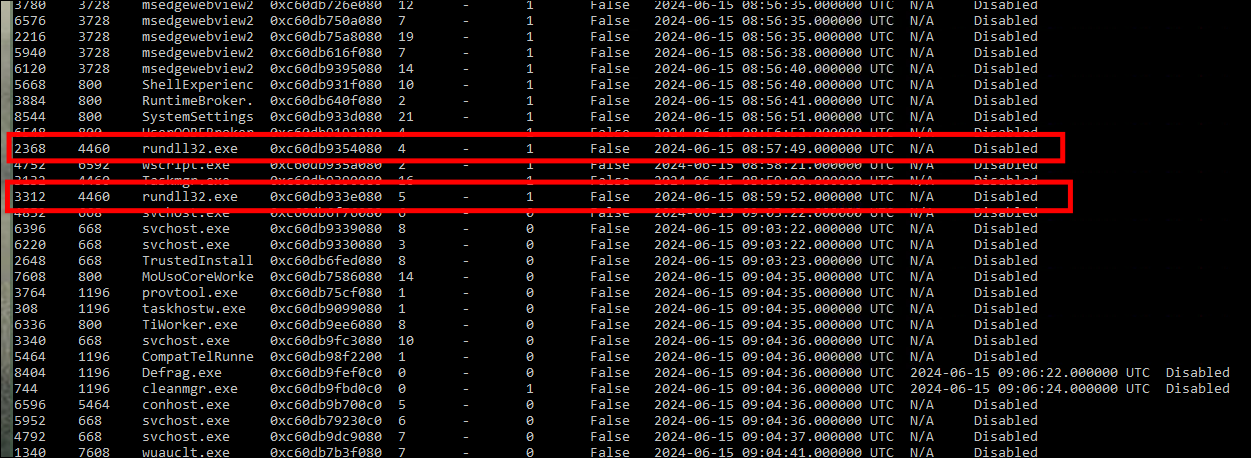
→ rundll32.exe
Using the cmdline plugin:

I opened the text output, used Ctrl+F, and searched by PID. I found the malicious command:
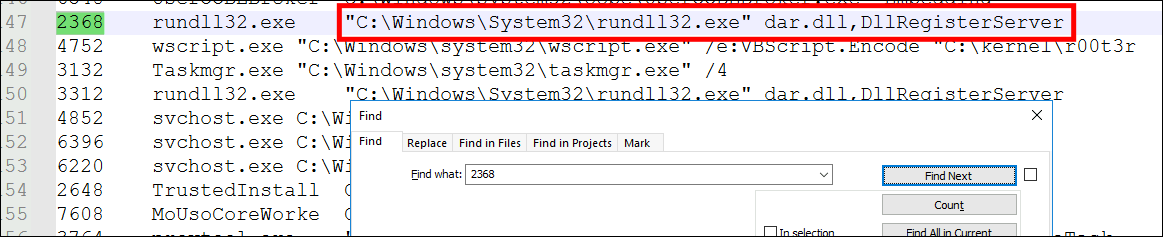
→ dar.dll,DllRegisterServer
Answer: rundll32.exe dar.dll,DllRegisterServer
Q6: Identifying file indicators is crucial for a comprehensive forensic analysis. What is the SHA256 hash of the DLL associated with the last execution of the malware?
Using MemProcFS, I navigated to M:\pid\3312\files\modules and hashed the dar.dll file, as it is the actual malware payload (rundll32.exe is just a legitimate proxy).

Answer: d90b4ee7e8adf2d7aa5fcff2c017c1fa4e99143fdcd9cd3d1bd7827ae59d9a05
Conclusion
Through memory forensics analysis of the provided dump using Volatility and MemProcFS, I successfully reconstructed the IcedID (BokBot) infection chain. The attack began with a malicious payload delivered via an ISO file contained within a downloaded ZIP archive (
invoice_173.zip). Using NTFS timeline analysis, I pinpointed the exact download time and origin of the malicious ISO.The attacker leveraged a legitimate Windows utility,
rundll32.exe, to execute the hidden malicious DLL (dar.dll) from the mounted ISO. This technique (Defense Evasion) bypassed standard executable scanning since the malicious code resided within a dynamically loaded library. I successfully identified the exact command line execution string and extracted the SHA256 hash of the maliciousdar.dllpayload for further threat intelligence mapping.