Cyber Defenders - Insider Writeup
Category: Endpoint Forensics
Checkout the lab here: https://cyberdefenders.org/blueteam-ctf-challenges/insider/
Description
After Karen started working for ‘TAAUSAI,’ she began doing illegal activities inside the company. ‘TAAUSAI’ hired you as a soc analyst to kick off an investigation on this case.
You acquired a disk image and found that Karen uses Linux OS on her machine. Analyze the disk image of Karen’s computer and answer the provided questions.
So AD1-tools is the tool that I’m going to use (just because I’m working on Kali Linux and not because I HATE Windows), you can find it here.
Once you download lab file, use this command to extract it:
1
sudo ad1extract -i FirstHack.ad1 -d ./result
And then give permission to the folder you just extracted.
1
2
sudo chown -R kali:kali result
sudo chmod -R 755 result
Q1: Which Linux distribution is being used on this machine?
A good starting point is the /var/log/ directory, which often contains logs related to system activities and installation details.
1
sudo cat result/Horcrux.E01:Partition\ 5\ \[14304MB\]:NONAME\ \[ext4\]/\[root\]/var/log/syslog

Now I know that the operating system is Kali Linux.
Answer: kali
Q2: What is the MD5 hash of the Apache access.log file?
First, I need to locate the access.log file:
1
2
3
4
$ find "$PWD" | grep "access.log"
/home/kali/Desktop/temp_extract_dir/c46-FirstHack/result/Horcrux.E01:Partition 5 [14304MB]:NONAME [ext4]/[root]/var/log/nginx/access.log
/home/kali/Desktop/temp_extract_dir/c46-FirstHack/result/Horcrux.E01:Partition 5 [14304MB]:NONAME [ext4]/[root]/var/log/apache2/other_vhosts_access.log
/home/kali/Desktop/temp_extract_dir/c46-FirstHack/result/Horcrux.E01:Partition 5 [14304MB]:NONAME [ext4]/[root]/var/log/apache2/access.log
Then, I generate its MD5 hash:
1
2
sudo md5sum result/Horcrux.E01:Partition\ 5\ \[14304MB\]:NONAME\ \[ext4\]/\[root\]/var/log/apache2/access.log
d41d8cd98f00b204e9800998ecf8427e  result/Horcrux.E01:Partition 5 [14304MB]:NONAME [ext4]/[root]/var/log/apache2/access.log

Answer: d41d8cd98f00b204e9800998ecf8427e
Q3: It is suspected that a credential dumping tool was downloaded. What is the name of the downloaded file?
Credential dumping is a technique used by attackers to extract login credentials, such as usernames and passwords, from a compromised system.
These credentials are often stored in memory, security databases, or cached locations by the operating system. Attackers leverage this method to escalate privileges, move laterally within a network, or gain unauthorized access to sensitive resources.
Credential dumping is a significant security threat as it allows attackers to impersonate legitimate users, bypass authentication mechanisms, and further infiltrate systems without detection.
Because the credential dumping tool was downloaded by the attacker, the zip file must still be in the Downloads directory.
1
find "$PWD" | grep Downloads

Answer: mimikatz_trunk.zip
Q4: To determine the absolute path of the super-secret file, we need to investigate user activity logs stored on the system.
One of the most valuable artifacts for such analysis in Linux systems is the .bash_history file.
1
2
find "$PWD" | grep .bash_history
/home/kali/Desktop/temp_extract_dir/c46-FirstHack/result/Horcrux.E01:Partition 5 [14304MB]:NONAME [ext4]/[root]/root/.bash_histor
Now, let’s read the file to see its contents:
1
cat result/Horcrux.E01:Partition\ 5\ \[14304MB\]:NONAME\ \[ext4\]/\[root\]/root/.bash_history
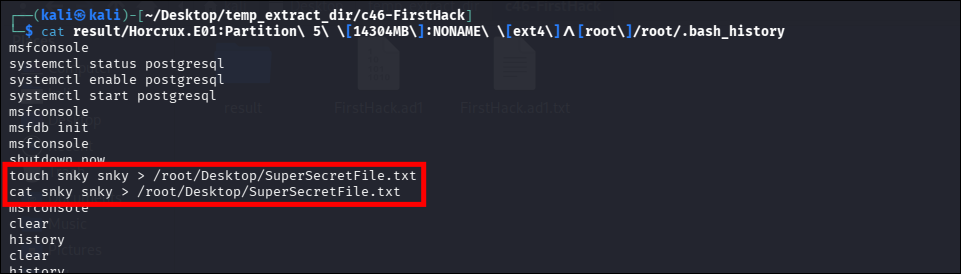
Answer: /root/Desktop/SuperSecretFile.txt
Q5: What program used the file didyouthinkwedmakeiteasy.jpg during its execution?
Still in the same content from Q4:
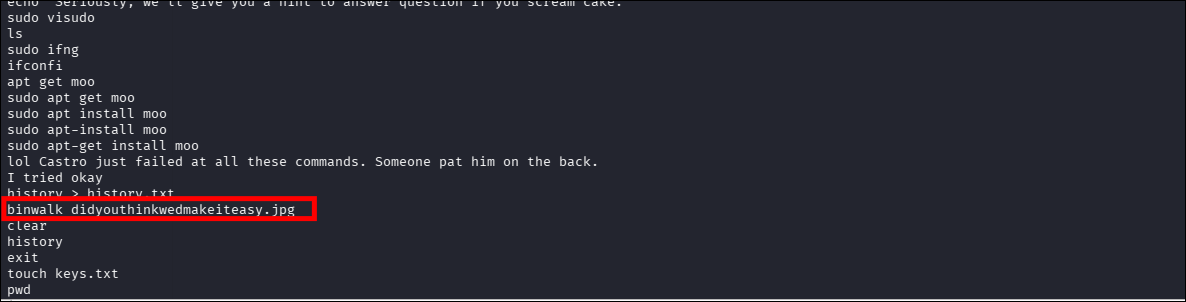
This command indicates that the program binwalk was used to analyze the file didyouthinkwedmakeiteasy.jpg.
Answer: binwalk
Q6: What is the third goal from the checklist Karen created?
To uncover the third goal from the checklist Karen created, I analyzed the directory structure and files found in the investigation. By navigating to the /root/Desktop/ directory, I discovered a file named Checklist.
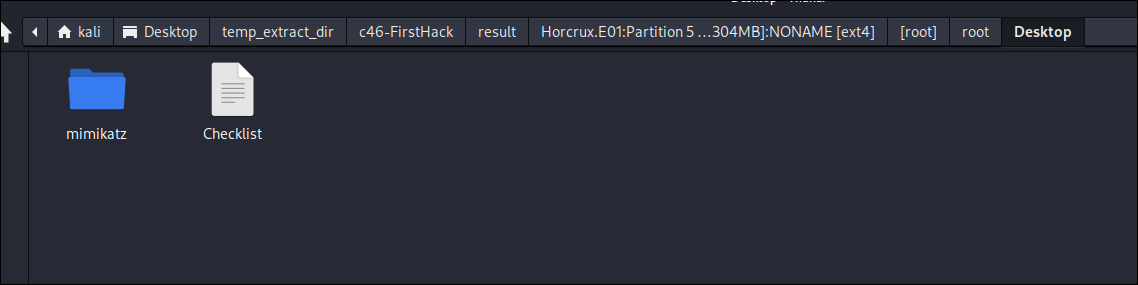
The contents of this file reveal a series of goals or tasks outlined by the user, providing insight into their intentions and actions.
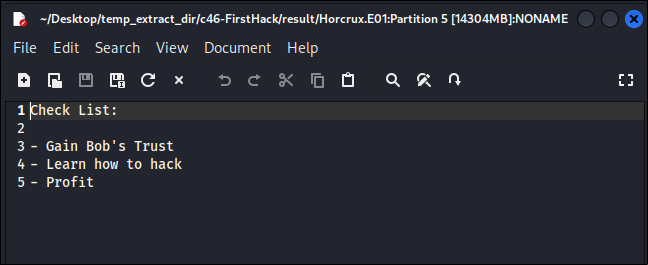
Answer: Profit
Q7: How many times was Apache run?
To determine how many times Apache was run, I examined the contents of the Apache log directory.
1
sudo ls -lah result/Horcrux.E01:Partition\ 5\ \[14304MB\]:NONAME\ \[ext4\]/\[root\]/var/log/apache2

This directory typically contains log files that track access requests, errors, and other server activities. The primary files of interest include:
- access.log: This file records all HTTP requests made to the server, including details such as IP addresses, requested resources, HTTP methods, and timestamps. It is a key source for analyzing web traffic and identifying suspicious activities or unauthorized access attempts.
- error.log: This file logs errors encountered by the server, such as configuration issues, failed requests, and server crashes. It helps in diagnosing problems with the server configuration or identifying attempts to exploit vulnerabilities.
- other_vhosts_access.log: This file logs HTTP requests specific to virtual hosts configured on the server. Virtual hosts allow a single Apache instance to host multiple websites, each with its own configuration and logging requirements.
In this case, an inspection of the logs reveals that all three files—access.log, error.log, and other_vhosts_access.log—have a size of 0 KB. This indicates that no data has been recorded in these logs, which strongly suggests that Apache was never run or accessed during the monitored period.
Answer: 0
Q8: This machine was used to launch an attack on another. Which file contains the evidence for this?
To determine whether this machine was used to launch an attack against another system, I examined the evidence provided in the investigation.
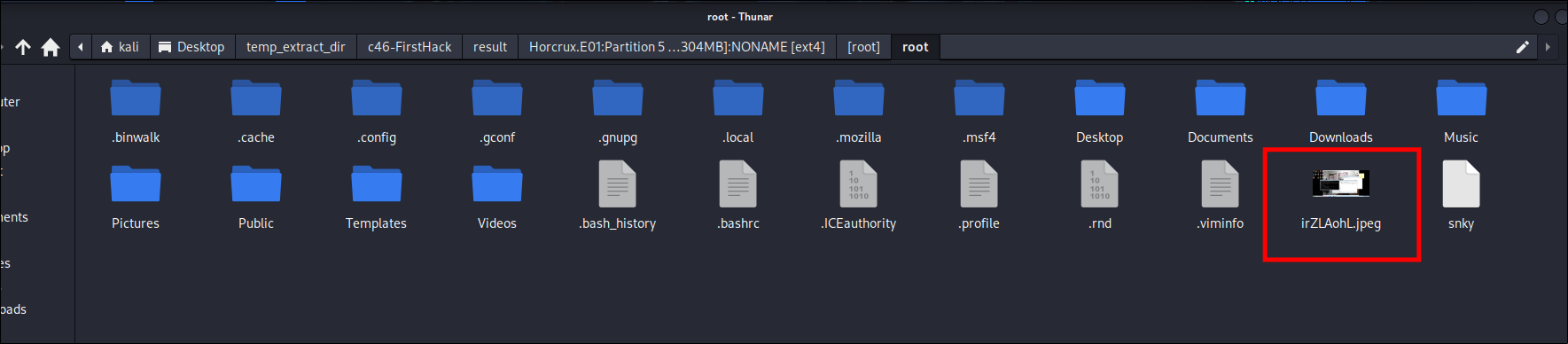
By navigating through the directory structure, I discovered a file named irZLAohL.jpeg stored in the /root/ directory.
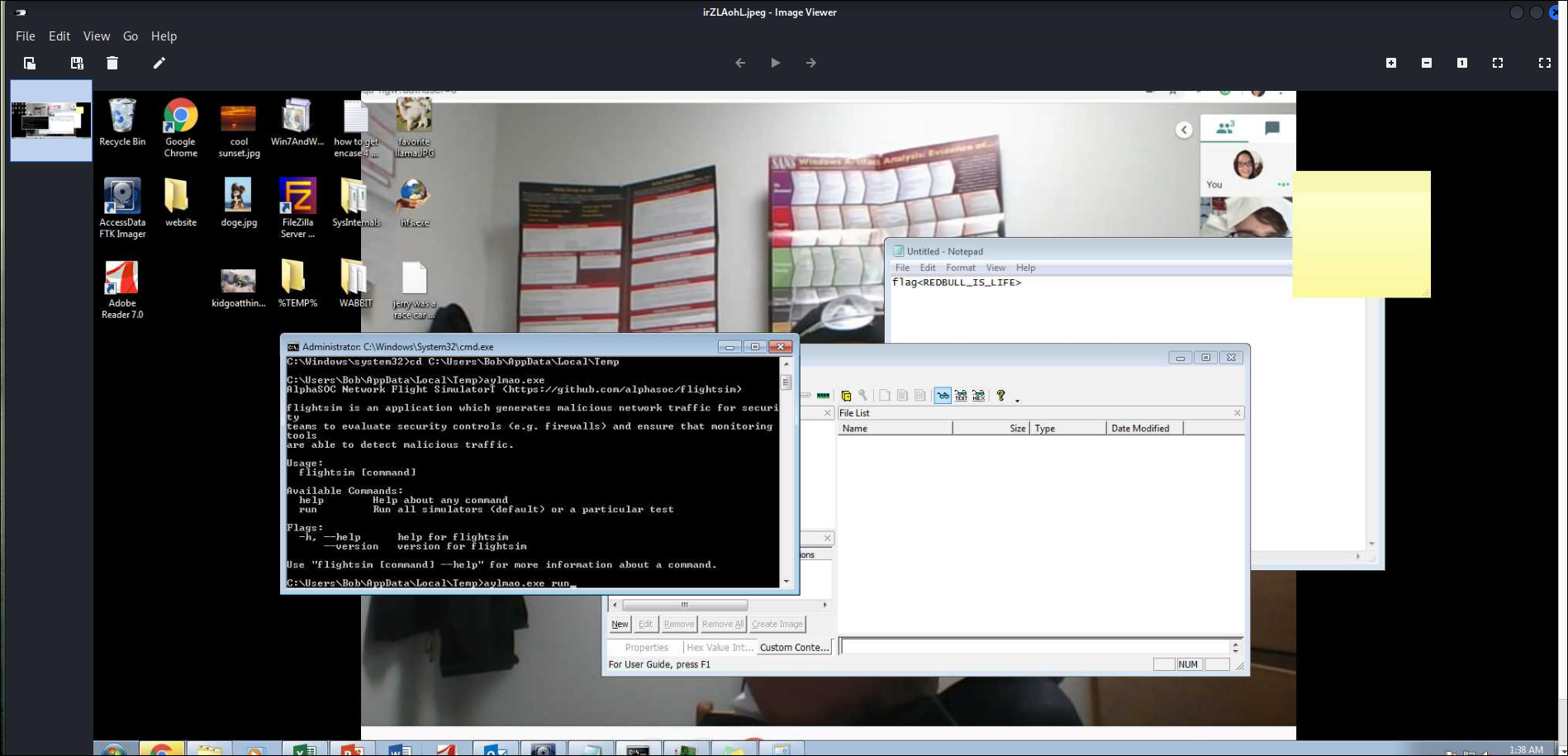
Double clicking it, I could see that:
- The attacker is inside
C:\Users\Bob\AppData\Local\Temp. - He executes a file named
sylmao.exe run. - What is displayed below is “AlphaSOC Network Flight Simulator”.
→ The tool’s name was changed from flightsim.exe to sylmao.exe to evade antivirus detection (or just to mock). But inherently, it is still a tool for generating malicious network traffic.
Answer: irZLAohL.jpeg
Q9: It is believed that Karen was taunting a fellow computer expert through a bash script within the Documents directory. Who was the expert that Karen was taunting?
To determine who Karen was taunting through a bash script, I analyzed the contents of the Documents/myfirsthack directory, which contains a file named firstscript_fixed.
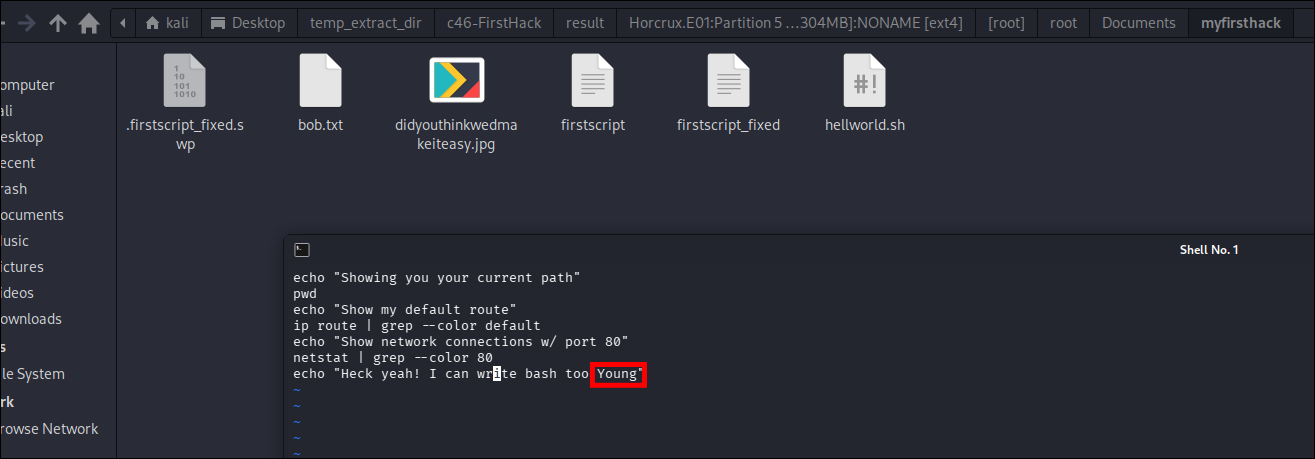
This file is a shell script written in Bash, a common scripting language used for automating tasks and interacting with system commands.
Answer: Young
Q10: A user executed the su command to gain root access multiple times at 11:26. Who was the user?
To determine who switched to the root user (su’d) at 11:26 multiple times, I analyzed the contents of the auth.log file located in the /var/log/ directory.
1
cat result/Horcrux.E01:Partition\ 5\ \[14304MB\]:NONAME\ \[ext4\]/\[root\]/var/log/auth.log | grep "11:26"
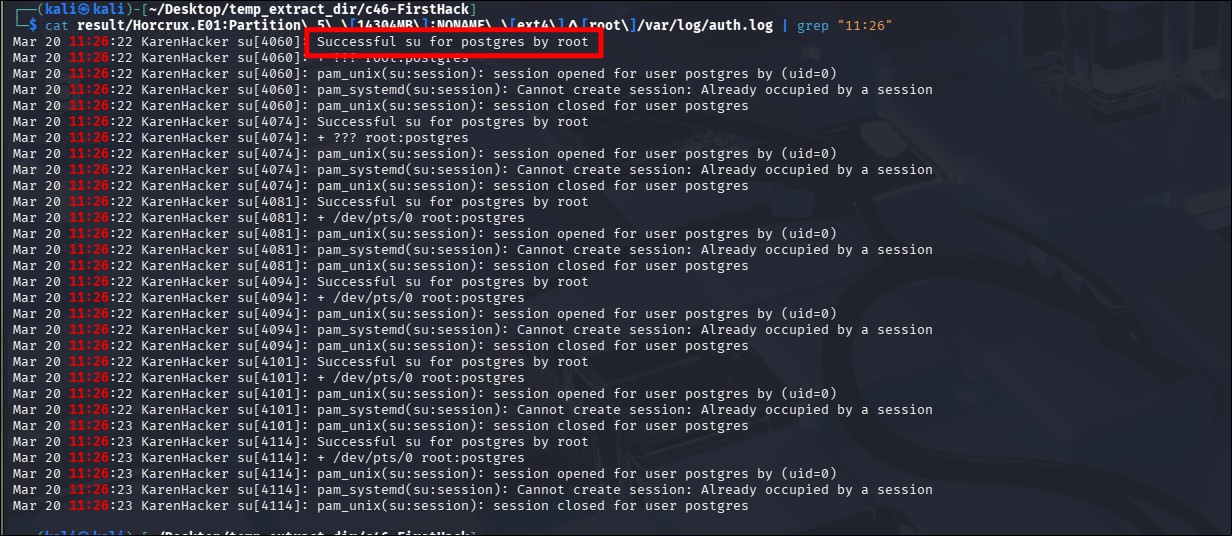
The root account successfully switched to the postgres account. (postgres is the default administrator account for the PostgreSQL database management system).
Answer: postgres
Q11: Based on the bash history, what is the current working directory?
Returning to .bash_history, and focusing on the cd command:
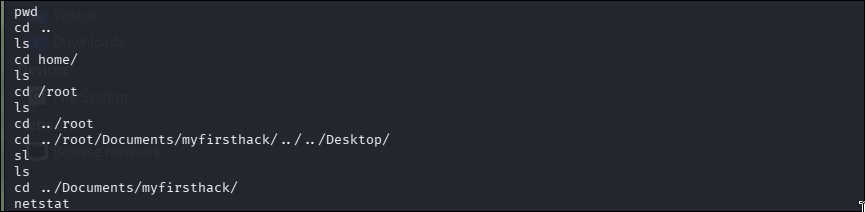
Answer: /root/Documents/myfirsthack/
Conclusion
Through forensic analysis of the provided Kali Linux disk image using AD1-tools, I successfully traced Karen’s unauthorized activities on the “TAAUSAI” endpoint. The investigation revealed the download of a credential dumping tool (
mimikatz_trunk.zip) and the creation of a malicious checklist aiming for “Profit”.Furthermore, I discovered evidence of the machine being used as a staging ground to attack another system, specifically via the execution of a renamed network traffic simulation tool (
sylmao.exeoriginallyflightsim.exe) captured in an image file (irZLAohL.jpeg). The analysis of.bash_historyandauth.logfiles also exposed lateral movement attempts and privilege escalations, such as therootuser switching to thepostgresdatabase account. This writeup highlights the importance of analyzing bash history, authentication logs, and user directories during Linux forensic investigations.