Cyber Defenders - RedLine Writeup
Category: Endpoint Forensics
Checkout the lab here: https://cyberdefenders.org/blueteam-ctf-challenges/redline/
Description
As a member of the Security Blue team, your assignment is to analyze a memory dump using Redline and Volatility tools. Your goal is to trace the steps taken by the attacker on the compromised machine and determine how they managed to bypass the Network Intrusion Detection System (NIDS). Your investigation will identify the specific malware family employed in the attack and its characteristics. Additionally, your task is to identify and mitigate any traces or footprints left by the attacker.
This is the next lab I practiced on the platform. Through my research, I learned that RedLine is a prominent name in the Information Stealer (Infostealer) malware family. Infostealer malware is typically a type of Remote Access Trojan (RAT). Attackers usually infect a victim’s device using social engineering attacks, delivering the stealer via malicious attachments, websites, or ads.
Once the stealer is downloaded to the victim’s device, it harvests sensitive information and sends that data back to the attacker.
Typical data collection methods include using:
- Grabbers: intercept and copy data in victim computer.
- Keylogging: recording the keys that people strike on their keyboards.
The RedLine infostealer variant offers a customizable file-grabber, enabling attackers to collect credentials from web browsers, cryptocurrency wallets, and applications, including:
- Chromium browsers
- Gecko-based browser, like Mozilla Firefox
- FTP clients
- Instant messaging applications
- VPN applications
Q1: What is the name of the suspicious process?
When analyzing malicious processes on a machine, there are several appoarch tactics I can use:
- Wrong/Suspicious Executable Path
- Some system processes like
svchost.exe,lsass.exe, andtaskhostw.exemust run from theC:\Windows\System32\directory. It is suspicious if a process runs from an unusual location or a directory that does not require Admin privileges to write files.
- Some system processes like
- Mismatched PPID
- Inconsistent parent-child process relationships can be an indicator. For example,
svchost.exeshould never haveexplorer.exe,cmd.exe, or any arbitrary process as its parent process.
- Inconsistent parent-child process relationships can be an indicator. For example,
- Typosquatting
- Be cautious of slightly altered process names such as
svch0st.exe(replacing ‘o’ with ‘0’),lsasss.exe(extra ‘s’),scvhost.exe(wrong character order), orlsaas.exe(swapped characters).
- Be cautious of slightly altered process names such as
- Anomalous Creation Time
- Core system processes (
smss.exe,lsass.exe,services.exe) always launch around the same time when the machine boots up. - If a critical system process suddenly appears hours later or right around the time the system memory was dumped, it is a significant indicator of compromise.
- Core system processes (
I used the pstree plugin, which allows me to view not only the running processes but also their execution timestamps and parent-child hierarchy.
1
$ vol -f MemoryDump.mem windows.pstree
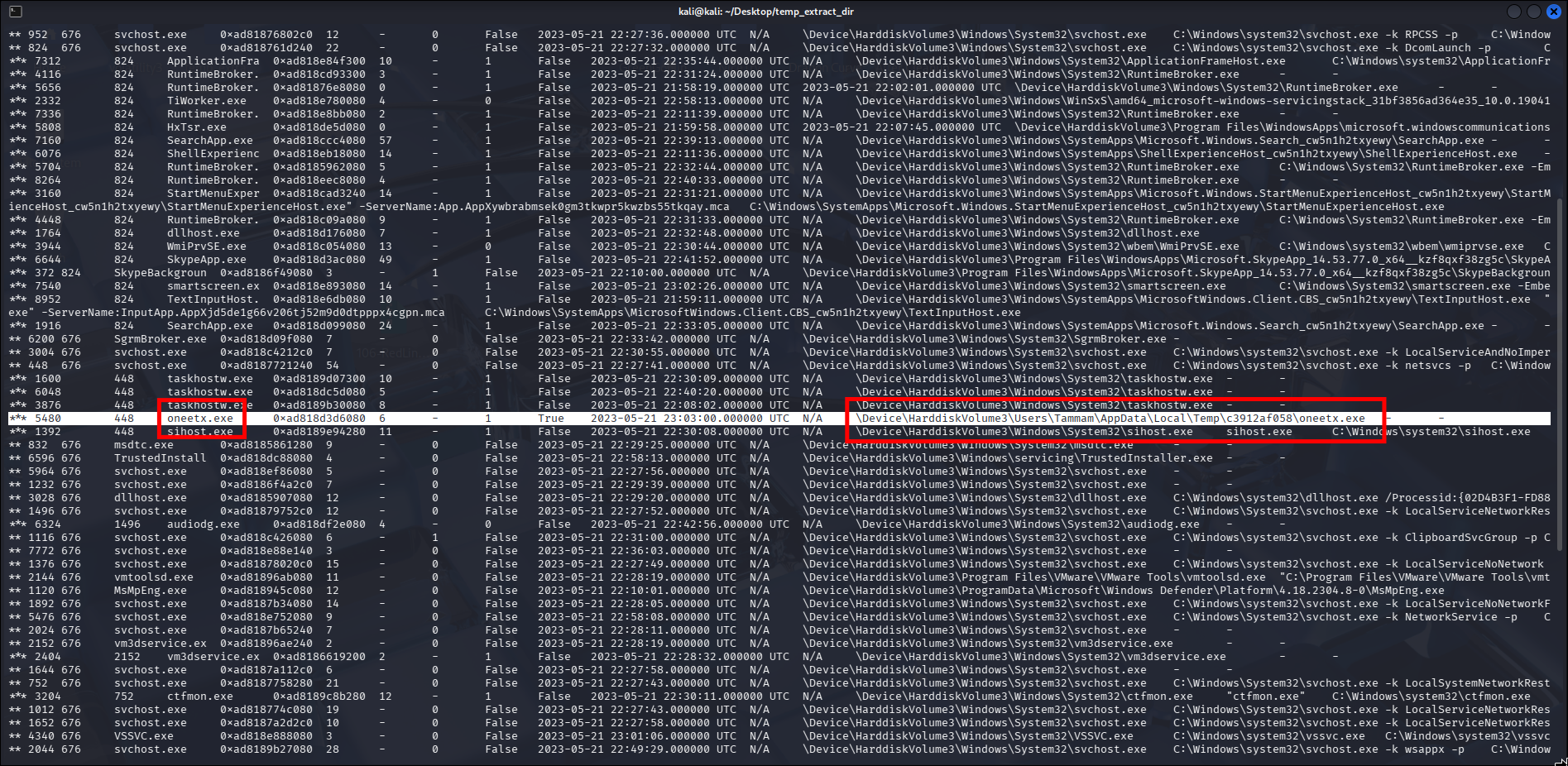
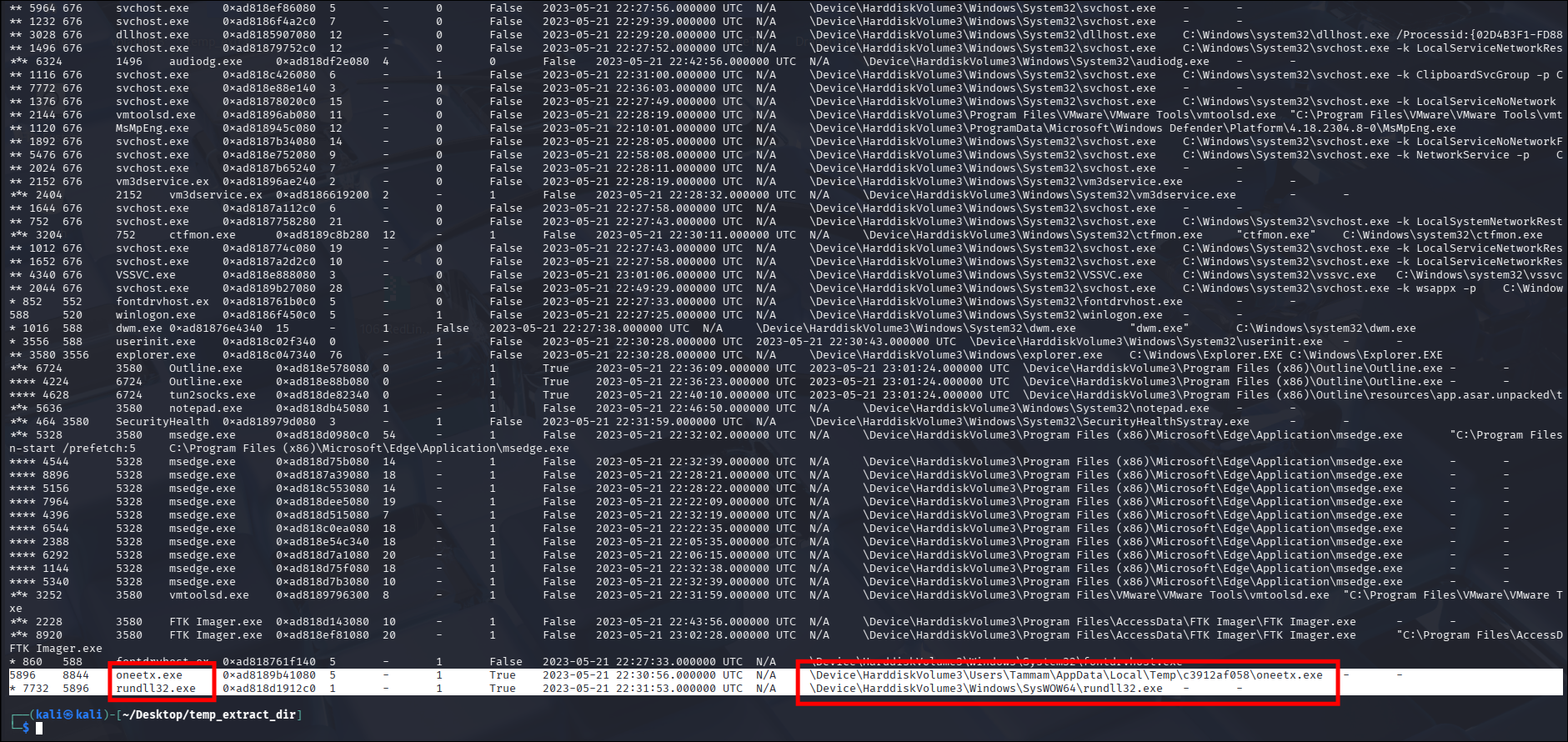
Among all running processes, one suspicious process stood out: oneetx.exe.
- It is an executable (
.exe) running from the user’sAppData\Local\Temp\directory (Tammam). - The
oneetx.exeprocess (PID 5896) spawned a child process namedrundll32.exe(PID 7732).
→ More importantly, oneetx.exe (PID 5896) has a PPID of 8844, but when I checked the entire process list, no process with PID 8844 was actively running.

Answer: oneetx.exe
Q2: What is the child process name of the suspicious process?
As mentioned in Q1, the oneetx.exe process spawned a child process named rundll32.exe (PID 7732).

Answer: rundll32.exe
Q3: What is the memory protection applied to the suspicious process memory region?
To understand this question, I first need to note that the operating system divides RAM into smaller regions called “Pages”. To prevent applications from accidentally (or intentionally) overwriting each other’s data, Windows applies memory Protections to each region:
- R (Read): Allows reading data.
- W (Write): Allows changing/writing data (e.g., variables, temporary data).
- X (Execute): Allows the CPU to execute data in that memory region as code.
These permissions are combined to enforce strict access control. Common protection mechanisms include: PAGE_READONLY (only allows reading data from memory), PAGE_READWRITE (allows both reading and writing), and PAGE_EXECUTE_READWRITE (allows executing, reading, and writing data).
To analyze the memory protection mechanisms applied to the suspicious process oneetx.exe, I used the vadinfo plugin. This plugin provides detailed information about the memory regions associated with a process, including their size, attributes, and protection rights.
1
$ vol -f MemoryDump.mem windows.vadinfo --pid 5896
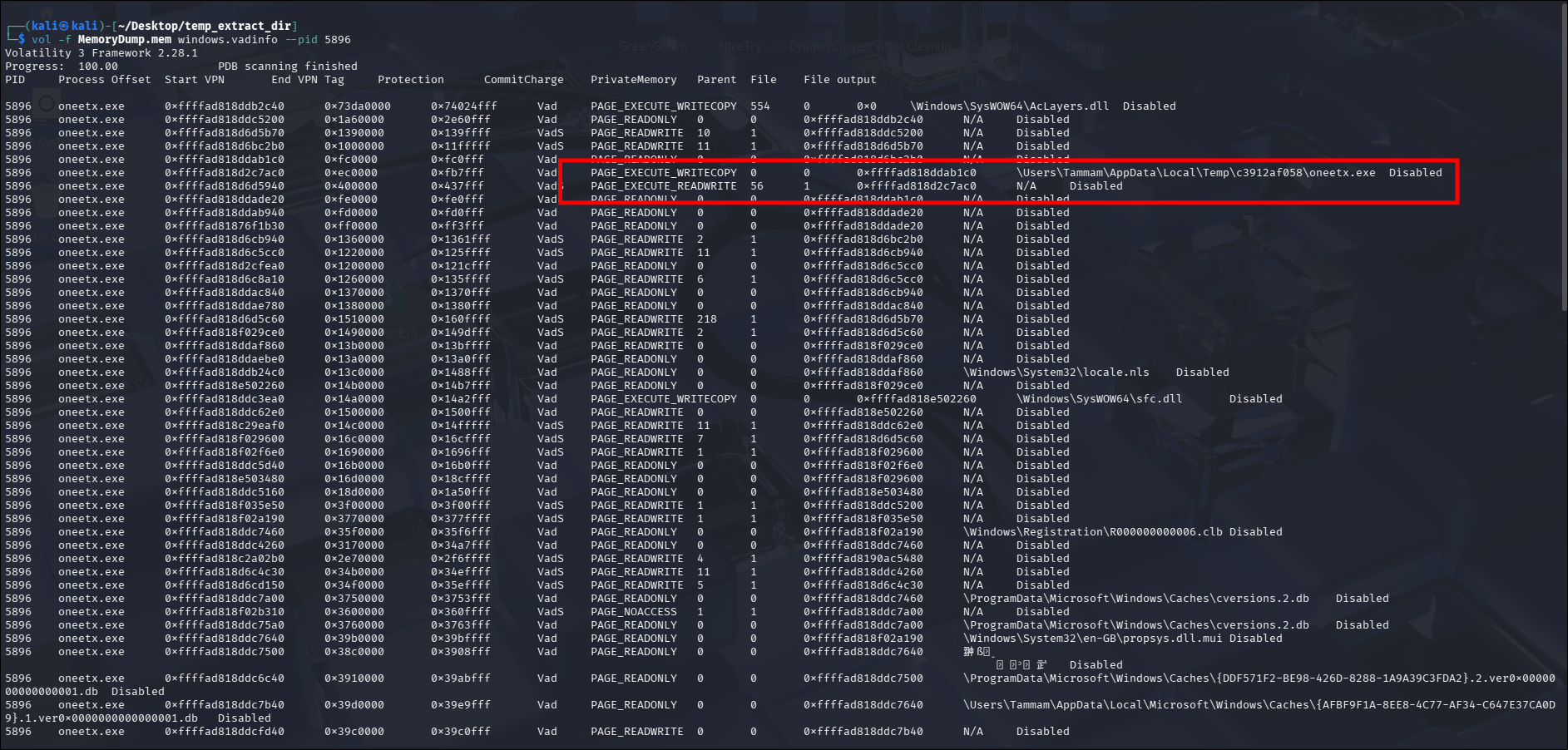
The output of this command lists all Virtual Address Descriptors (VADs) associated with the oneetx.exe process.
A legitimate, normal application generally adheres to the W^X principle: A memory region that is writable cannot be executable, and a region that is executable cannot be writable.
To bypass this or inject code, malware often allocates a memory region with all three permissions RWX (PAGE_EXECUTE_READWRITE):
- It needs Write (W) permission to copy the malicious code into RAM.
- It needs Execute (X) permission to activate and run that code.
→ It is extremely rare for a standard, legitimate application to request a PAGE_EXECUTE_READWRITE memory region.

Because of this tendency for malware to seek out RWX memory regions, Volatility includes a dedicated plugin designed to automatically hunt for memory regions flagged with PAGE_EXECUTE_READWRITE that are not backed by any file on disk. This plugin is malfind.
1
vol -f MemoryDump.mem windows.malfind --pid 5896
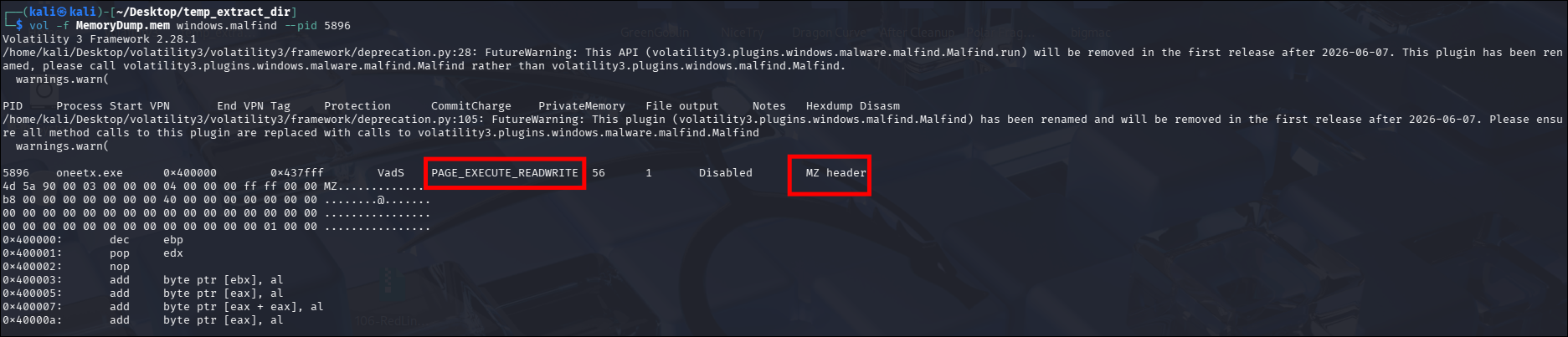
As shown in the vadinfo analysis, oneetx.exe acts as a Dropper that injected code into its own memory space. The memory region containing the payload shows N/A in the File column. This means the actual RedLine payload is executing entirely from RAM, without a corresponding .exe or .dll file dropped onto the physical disk.
Answer: PAGE_EXECUTE_READWRITE
Q4: What is the name of the process responsible for the VPN connection?
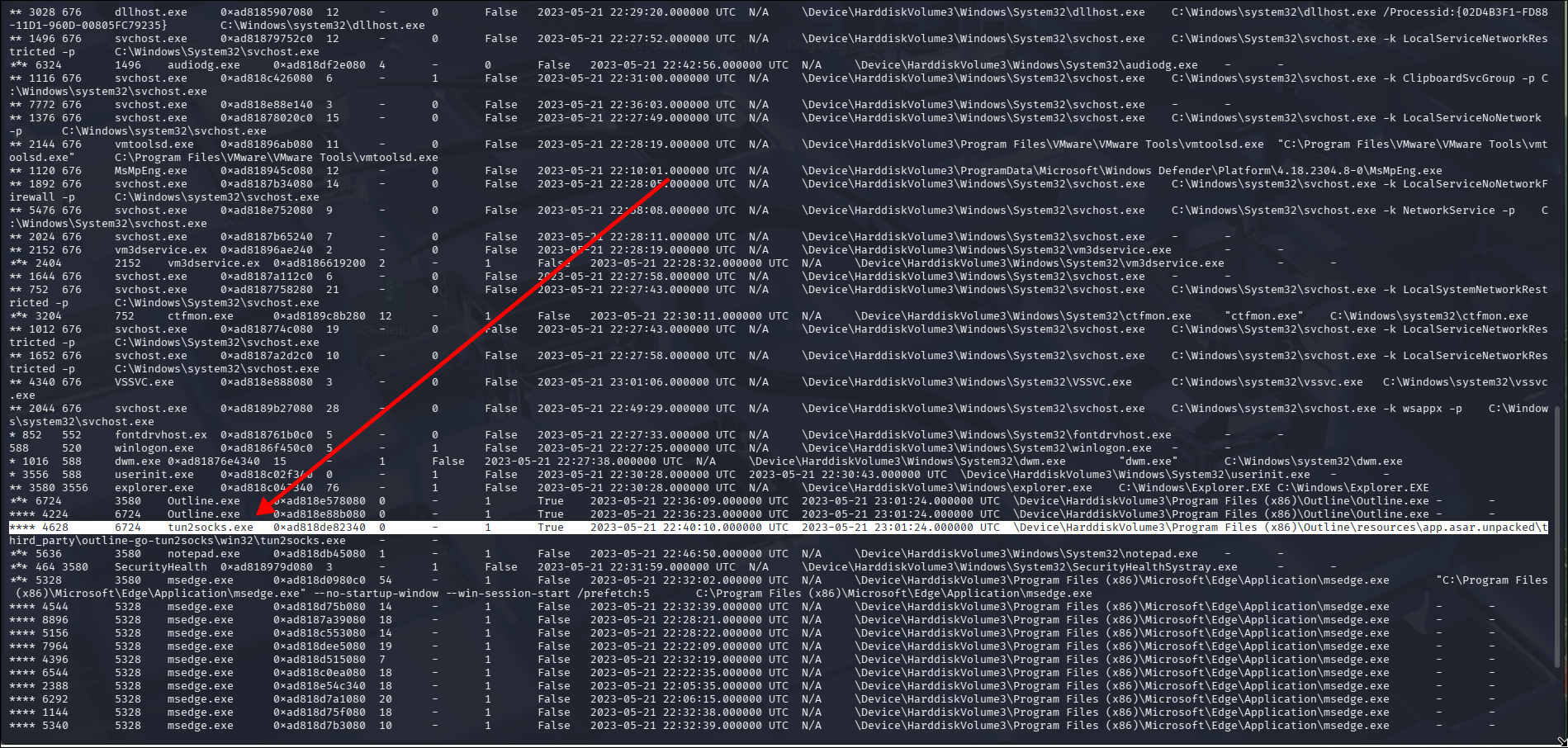
This question brought me back to the process list. After inspecting the running processes carefully, a process named tun2socks.exe caught my attention.
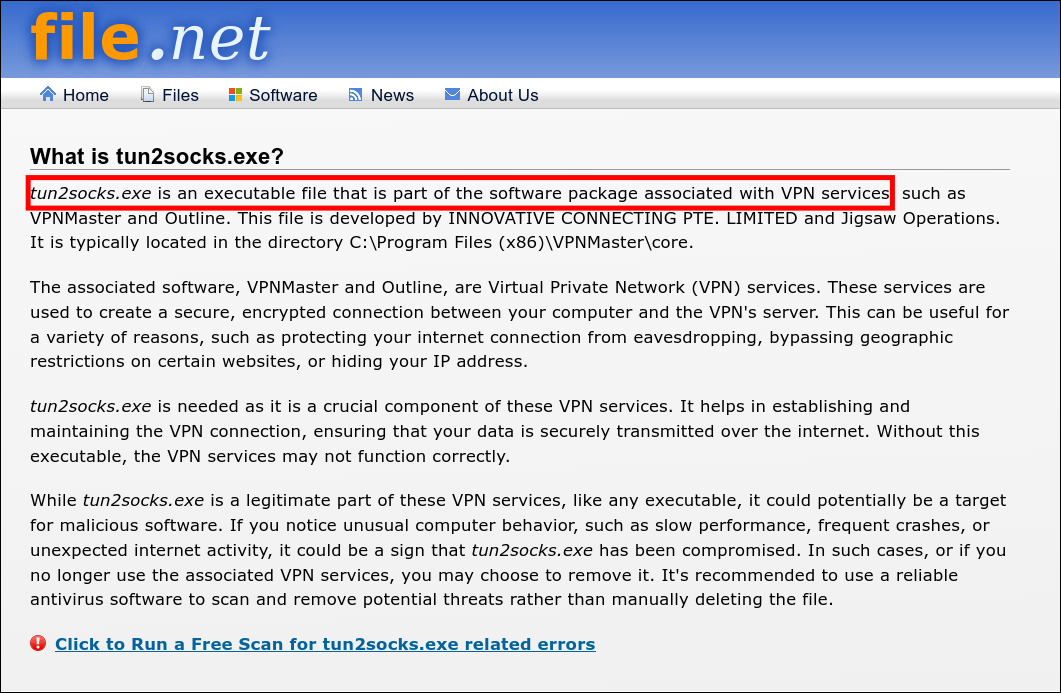
A quick online search confirmed my suspicion. This process is associated with VPN functionalities and is often used as a utility for translating SOCKS proxy traffic into IP packets.
However, looking deeper into the hierarchy, tun2socks.exe is merely a child process spawned by another process: outline.exe.

So the process responsible for the VPN connection is Outline.exe.
Answer: Outline.exe
Q5: What is the attacker’s IP address?
To gather more network information and display active connections—including open ports, remote IP addresses, and associated processes—I used the netscan plugin.
1
$ vol -f MemoryDump.mem windows.netscan | grep -E "5896|4628"

I used a filter to focus specifically on the suspicious PIDs identified earlier: 5896 (oneetx.exe) and 4628 (tun2socks.exe).
I immediately observed two active connections. For tun2socks.exe, there is a VPN tunnel connection to 38.121.43.65, which is the VPN server IP (a legitimate tunneling software abused to bypass network monitoring).
Therefore, the outbound connection initiated by oneetx.exe to 77.91.124.20 is the actual connection to the attacker’s C2 server.
Answer: 77.91.124.20
Q6: What is the full URL of the PHP file that the attacker visited?
The netscan plugin used previously only captures data at the Network/Transport Layers (Layer 3 & 4), providing just the IP and Port. However, the full URL belongs to the HTTP protocol at the Application Layer (Layer 7).
When the malicious process oneetx.exe connects to the C2 server, it creates a variable in its RAM containing the target URL query, then instructs Windows to package and send it to IP 77.91.124.20 on port 80.
Since port 80 is used (unencrypted HTTP), this URL string should exist in plain text within the memory dump. I used the strings utility combined with grep to search for strings referencing the C2 IP address.
1
strings MemoryDump.mem | grep "77.91.124.20" | grep "\.php"

Answer: http://77.91.124.20/store/games/index.php
Q7: What is the full path of the malicious executable?
For this question, I used the filescan plugin to scan for all FILE_OBJECT structures in memory (a special data structure that holds file names, full file paths, disk locations, and access states used by the CPU for I/O operations). → This means it searches through all files that have ever been opened or accessed by Windows, even if those files were subsequently deleted or their host processes terminated.
1
vol -f MemoryDump.mem windows.filescan | grep "oneetx.exe"

Answer: C:\Users\Tammam\AppData\Local\Temp\c3912af058\oneetx.exe
Conclusion
Through memory forensics analysis of the provided dump using Volatility, I reconstructed the infection lifecycle and operational footprint of the RedLine infostealer. The attack began with the execution of a malicious dropper named
oneetx.exe(PID 5896) from the user’s temporary directory. This dropper utilized memory injection to allocate an unbackedPAGE_EXECUTE_READWRITEmemory region, allowing the RedLine payload to execute stealthily directly from RAM without dropping additional payloads to disk.To evade network detection and hide its communication infrastructure, the attacker abused legitimate VPN software (
Outline.exeand its utilitytun2socks.exe). However, deeper network and memory string carving revealed direct unencrypted HTTP communication between the injected payload and the command-and-control (C2) server athttp://77.91.124.20/store/games/index.php. This investigation underscores the critical value of combining memory protection analysis (vadinfo/malfind) with string extraction when investigating fileless or memory-resident threats.